Soldered Laptop SSD? Your Recovery Options Explained
Our founder and lead technician, Joseph Montanti, handles cases personally.
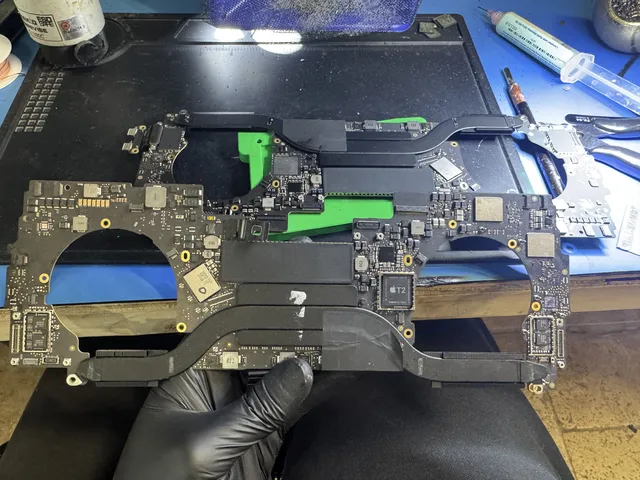
A soldered SSD means the storage chips are attached directly to the laptop's motherboard. There's no separate drive to slide into a USB enclosure. If the laptop dies, recovering the files can mean repairing the original board long enough to start the machine, unlock the storage and copy the data.
On this page
Is the storage soldered down on this particular laptop?
Look up the model number on the bottom case and open the manufacturer's service manual. A drawing of a separate SSD with a retaining screw and a socket identifies a removable module. “Onboard memory” in the specifications may describe RAM, the laptop's temporary working memory. Look specifically at the entry for storage. The advertised capacity and the absence of an access door don't tell you how the SSD is attached.
For example, the HP EliteBook 840 G6 has a removable M.2 SSD. HP's service guide shows the mounting screw and the module coming out of its connector. Microsoft lists the Surface Pro 11th Edition with Snapdragon among its removable-SSD models and publishes separate instructions by generation. A thin HP or Surface therefore needs a model lookup before someone starts quoting a motherboard repair. HP EliteBook 840 G6 service manual and Microsoft's compatible Surface list.
The MacBook Air with M1 is an example of the other layout. Apple's repair manual lists a logic-board assembly. There is no user-removable internal hard drive or M.2 module. If you still need local files, keep the original board. MacBook Air M1 repair manual.
If the laptop still reaches your files
Leave a wet laptop off. Unplug it and leave the charger disconnected, even if pressing Power did nothing.
If a dry laptop signs in and lets you open your project folder, copy the work you need onto separate storage before running diagnostics or arranging a repair. If the copy produces read errors, the laptop shuts down, or it gets abnormally hot, end the attempt.
On an Apple silicon Mac that can start in macOS Recovery, Share Disk lets you copy files to a second Mac even if the usual desktop won’t load.
- With the affected Mac shut down, connect the two Macs with a compatible data cable. Hold Power on the affected Mac until startup options appear.
- Choose Options, then Continue, and authenticate when prompted. In Recovery, open Utilities → Share Disk, select the volume and choose Start Sharing.
- On the other Mac open Network in Finder, select the shared Mac, choose Connect As and connect as Guest.
- Copy the needed files to that Mac or an attached drive. Open them from that destination to verify the transfer, then eject the shared volume.
Intel Macs use a different feature called Target Disk Mode. A compatible Intel Mac started with T held down can present its storage to the connected Mac as an external disk. Use a Thunderbolt cable if either Mac runs macOS 11 or later. A dead board won't appear as a USB stick when you connect the two laptops. Intel Mac Target Disk Mode.
Why the original board can matter even with a recovery key
On Apple silicon and T2 Macs, the internal storage is encrypted even if you never turned on FileVault. Hardware on the original Mac protects the keys. FileVault adds protection tied to your login credentials. A reader attached to the individual flash chips sees encrypted data without the original hardware path. Your password helps an operable board unlock the files. It can't make damaged storage chips return the missing bytes. Apple's volume encryption documentation.
Windows depends on the hardware and settings. If BitLocker was active, a working removable SSD transferred to another computer can still ask for the 48-digit recovery key. Match the key ID with the saved key in your personal Microsoft account, your organization's account, or a copy you saved elsewhere. The recovery price depends on whether the work involves reading a healthy removable module or getting a soldered-storage board to start. Microsoft's BitLocker recovery-key locations.
What failed around the SSD?
| Condition | What the recovery work depends on |
|---|---|
| Laptop has lost power but its onboard storage may be intact | Whether the original board can be brought up and the volume unlocked. |
| Liquid reached the power circuitry | Which circuits were affected and whether the original storage and security components still communicate. |
| Damage crosses the storage or security area | Whether the hardware that holds the data and the keys can still operate together. |
| The board runs but its SSD drops out or returns read errors | The SSD controller and storage need assessment in addition to the laptop. |
Moving the original board into a working chassis can help when the failed part is outside it, such as the display. The same move carries a board-level short into the new chassis. For a dead machine, a laptop recovery assessment needs the original assembly while those possibilities are still open. Skip heat guns, reflow and soldering around the storage. Leave the laptop unwiped. On Apple silicon, DFU Restore erases the Mac while Share Disk lets you read its files. Before trading the machine in or authorizing a board exchange, open your Time Machine, File History or cloud copy on another device and check for the exact folders you need.
Get help with data recovery
Bring your device to our Lincroft lab during opening hours, or mail it in.
How to mail your deviceThe $100 diagnostic is non-refundable once diagnostics start, and donor drives or replacement parts you approve are non-refundable once ordered, even if recovery fails.
Published by MDrepairs
MDrepairs is a data recovery and electronics repair lab in Lincroft, New Jersey. Our founder and lead technician Joseph Montanti films real cases for our YouTube channel, showing tools, repair steps and recovery outcomes.
Keep reading
- iMac Fusion Drive Failing? Recovery Is Trickier
- Apple Silicon Data Recovery: What M-Series Changed
- MacBook Dead? How to Recover Your Files