How Long Does Data Recovery Take? Realistic Timelines
In this article

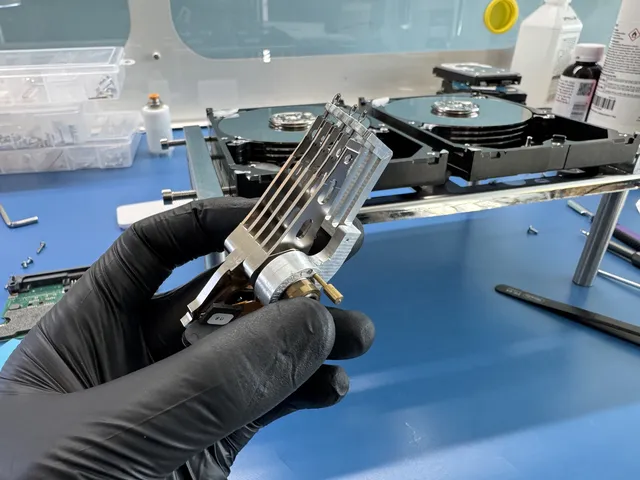
The standard wait is 4 to 6 weeks before we reach your device in line and start the diagnostic. How long recovery takes after that depends on what we find. Physical repairs needing head swaps or platter transplants run longer because donor parts must be sourced and imaging is slow by design.
- Deleted/formatted (logical) — we image the drive and scan the copy
- Clicking drive / head swap (physical) — if the heads have failed, we find a matching donor and image the drive carefully
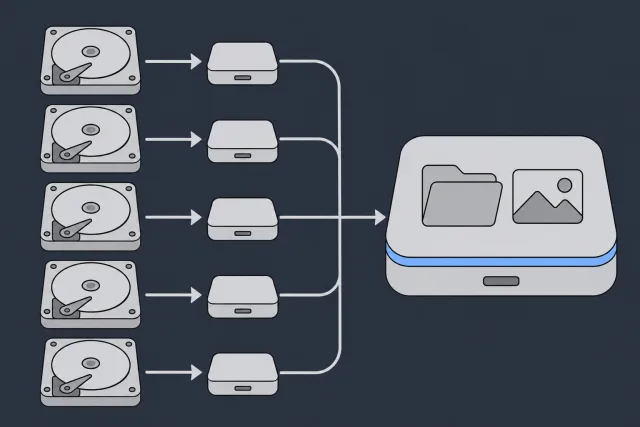
- RAID arrays — we image each drive and put the array back together
- Mail-in service adds transit time each way
Once your drive is on the bench, the type of failure matters. For simple logical recoveries, like deleted files or a formatted drive, we skip parts sourcing. Physical recoveries that require head swaps or platter transplants take longer because donor parts need to be sourced and the imaging process is slow by nature. Complex cases like multi-drive RAID arrays or drives with severely damaged platters need extra imaging work. Rush services shorten the diagnostic wait, but they cost more.
Below we'll break down exactly what happens during each phase of recovery, why certain jobs take longer, and how to avoid the most common delays. If you already know your situation is urgent, get a quote and ask how soon we can start the diagnostic.
Quick Answer: Timeline by Case Type
Here's what takes time once we have your drive on the bench.
| Scenario | What Affects Timing |
|---|---|
| Deleted files (HDD) | Device condition and imaging |
| Formatted drive | Device condition and imaging |
| Corrupted file system | Imaging and device condition |
| Clicking hard drive | Parts and careful imaging |
| Head crash / platter damage | Damage, parts and imaging |
| SSD (logical failure) | Device condition and imaging |
| SSD (firmware corruption) | Device condition and imaging |
| RAID array | Condition and imaging of each drive |
| Water / fire damaged drive | Damage, parts and imaging |
| Flash drive / SD card | Device condition and imaging |
The standard wait to start diagnosis is 4 to 6 weeks. How long recovery takes after that depends on what we find. Ask the lab how the current queue and your device's condition affect your case.
Need a Timeline for Your Drive?
Tell us what happened and we'll explain the wait before you ship anything. We can estimate the recovery time after the diagnostic.
Get a Quote
What Happens During Each Phase of Data Recovery
When people ask "how long does data recovery take," they usually picture someone plugging in a drive and copying files off. The reality is a multi-step process, and each step takes time for good reason. Rushing any of them risks your data.
Phase 1: Intake and Initial Assessment
When your drive arrives, we log it in our tracking system and document what you told us about the failure. This is where we note the symptoms: is the drive clicking? Did it get dropped? Was it in a fire? Did the drive stop working after a power surge? Did you accidentally format it? Every detail matters because it tells us what tools and approach we'll need.
We also look for obvious physical damage at this point, like dents, burn marks, or loose components.
Phase 2: Diagnosis
This is where the real work starts. For logical failures, we connect the drive to our recovery workstation and see whether the file system is intact, partially corrupted, or completely destroyed. We look at the partition table, the MFT (Master File Table) on NTFS drives, or the catalog file on Mac drives that use one.
For physical failures, diagnosis is more involved. We listen to the drive. Persistent hard clicking points to a physical problem. No spin at all could mean a seized motor or a dead PCB. An intermittent beep from an external drive usually means it isn't getting enough power. Those sounds tell us what to test next.
At the end of diagnosis, we contact you with what we found, what the recovery will involve, and what it'll cost. You decide whether data recovery is worth it. No recovery work happens until you approve the quote.
Phase 3: Parts Sourcing (Physical Cases Only)
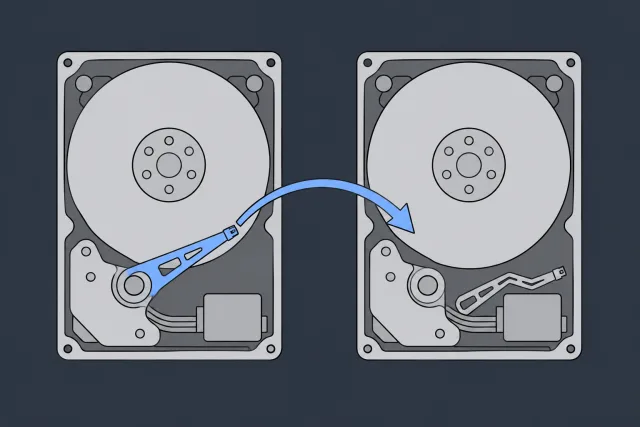
This is the step that surprises most people. If your hard drive needs a head swap, we can't just grab any heads off the shelf. The donor drive needs to match your drive's model number, firmware revision, and often the specific head map. If we need to order a donor, the wait depends on how easy it is to find a match.
 Illustration
Older drives and less common models take longer. A 2009 Samsung SpinPoint F1? That might take some hunting.
Phase 4: The Actual Recovery
For logical recoveries, we run recovery software on the drive image to scan for deleted files, rebuild corrupted file systems, or carve raw data.
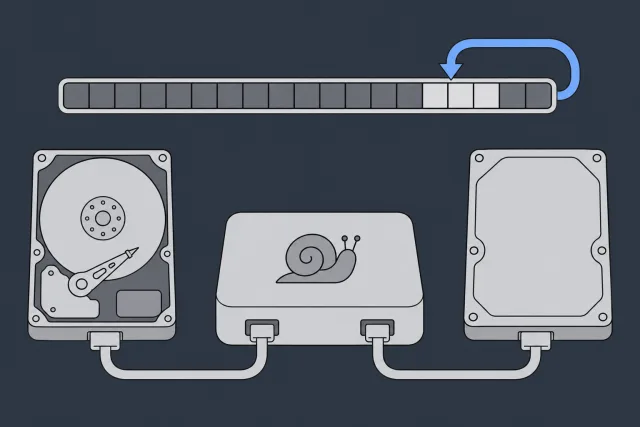
Physical recoveries are a different story. After swapping heads, we connect the drive to an imaging tool (we use PC-3000 and DeepSpar hardware) and start pulling data sector by sector. Here's what most people don't realize: we don't image the drive at full speed. We can't. A drive with new heads is fragile. Push it too fast and the donor heads can fail, and we'd need to start over with another donor.
The time it takes to image a hard drive depends on how steadily its heads can read. And if the drive has bad sectors or unstable heads, the imager has to slow down even further, skip problem areas, and come back to retry them later. That's just how it works. There's no shortcut that doesn't risk your data.
 Illustration
Phase 5: Verification
After imaging is complete, we mount the image and verify the recovered data. We check that files open correctly and that folder structures are intact. Photos need to render. Documents need to open. Database files need to be structurally sound.
Before you pay for recovery, you can look through your report to see which files we got back. Click through the file tree to see which files may be partly or fully damaged.
Phase 6: Data Return
Once you've reviewed the report, we copy your data to a new external drive or USB flash drive. Then we mail it to you, or you can pick it up. We keep a copy in an offline backup for two weeks, then delete it.
For mail-in customers, this phase adds transit time on top of the recovery itself. More on that below.
Why Some Recoveries Take Longer Than Others
Not all data recovery jobs are equal. Here's what actually causes delays, and none of these are things we can control.
Donor Parts Need to Match Exactly
We covered this briefly above, but it's worth repeating because the head swap has to wait until we find a match. A head swap isn't like replacing a car battery where any brand works. The donor heads must come from the same drive model with the same firmware revision. Some drives also need matching codes on the label. If the first donor doesn't work, we try another.
Imaging Speed Is Limited by the Drive's Condition
A drive with damaged heads can read steadily on good sectors and slow to a crawl on damaged areas. The imaging tool can skip a bad sector, retry it later, adjust the read parameters, or back off if the heads get unstable. All of this takes time.
The capacity of the drive matters far less than its physical condition.
Platter Damage Requires Extra Steps
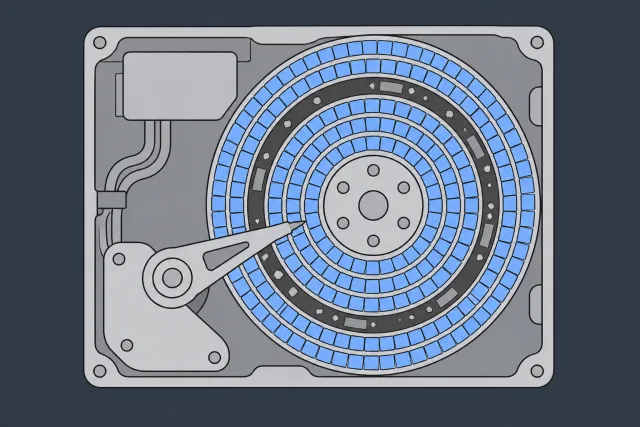
If the read/write heads crashed onto the platters (called a head crash), the magnetic surface gets scratched. Data in the scratched area is permanently gone, but data on the rest of the platters may still be readable. The problem is that the debris from the scratch contaminates the drive. Before we can even attempt imaging, we need to clean the platters, replace the heads, and hope the contamination didn't spread too far.
 Illustration
Sometimes we need to image the drive in multiple passes. We read forward and then in reverse, stopping before the heads reach the scratch.
Multi-Drive RAID Arrays Multiply Everything
A 5-drive RAID 5 array means five separate drives to diagnose, image, and verify. If two of those drives have damaged heads, we're doing two head swaps, two separate imaging processes, and then reconstructing the array from the images. The reconstruction itself adds time because we need to determine the RAID parameters (stripe size, drive order, rotation pattern) and rebuild the virtual volume.
 Illustration
A degraded array where multiple drives failed and someone tried to rebuild it? We also have to work out what that rebuild changed before we can put the array back together.
Logical vs Physical Recovery: How Timelines Compare
The type of failure is a big factor in how long your recovery will take once it starts. Understanding the difference saves you from unrealistic expectations.
Logical Recovery
Logical means the drive hardware is fine. The problem is with the data itself: accidentally deleted files, a formatted partition, a corrupted file system, malware encryption, or an OS that won't boot. The drive spins up, the heads read normally, and we can access the raw sectors without issue.
These are the fastest recoveries because we skip parts sourcing. We connect the drive, image it as a precaution (even healthy drives can fail during intensive scanning), and then run our recovery tools against the image.
Physical Recovery
Physical means something is mechanically or electronically wrong with the drive. The heads are damaged, the motor is seized, the PCB is fried, or the platters are scratched. These cases can require donor parts and slow, careful imaging.
The timeline breaks down roughly like this:
- Diagnosis: the wait depends on the service level you choose
- Parts sourcing: how long it takes to find a matching donor
- Physical work: we replace the damaged parts
- Imaging: drive condition and size determine how long the copy takes
- Verification: we make sure the recovered files open
The condition of your specific drive determines how long that work takes.
SSD Recovery: A Different Beast
SSD data recovery doesn't follow the same rules as hard drives. SSDs have no moving parts, so there's no head swap or platter transplant. But they have their own challenges. Many SSDs encrypt everything they write, and the key stays inside the drive. If the controller fails, reading the NAND chips alone often gives you only encrypted data. The controller has to work to unlock it.
For a firmware failure, the time goes into patching the controller's firmware so we can read the drive again.

Can You Rush Data Recovery?
Yes. We offer expedited or rush service. But let's be honest about what that means and what it doesn't mean.
If you need us sooner, we start the diagnostic within 5 to 7 days with Priority, within 1 to 2 days with Urgent, or the same day with Emergency. It does not set a recovery completion date.
For physical recoveries, rush still covers only the diagnostic queue. Once we've checked the drive, we can tell you what work it needs. But we can't make donor parts appear out of thin air. If we don't have a matching donor in stock, we still need to source one, and shipping takes however long it takes. We also can't force a fragile drive to image faster without risking your data.
Even with Emergency, we can't promise a same-day physical recovery. Anyone who promises that is either lying or cutting corners.
- Priority: +$250
- Urgent: +$500
- Emergency: +$1,000
Mail-In vs Local Drop-Off: How Shipping Affects Your Timeline
If you're local to our lab in Lincroft, New Jersey, you can drop off your drive and pick it up when it's done. We're open Monday to Friday, 10am to 6pm Eastern. If you mail in your drive, that adds transit time on both ends. We offer the same data recovery services either way.
Mail-In Timeline Breakdown
| Phase | What to Expect |
|---|---|
| Shipping to our lab | Transit to Lincroft before your drive enters the queue |
| Recovery work | The diagnostic wait, then the work your case needs |
| Return shipping | Transit back to you with your original drive |
Fill out the mail-in form, print the packing slip, and put it in the box with your drive. If you're on the contiguous US mainland or an island connected to it by bridge or causeway, return shipping is free whether we recover files or not. You can also generate a free prepaid UPS label on the mail-in form (contiguous US).
If you're in Alaska, Hawaii or Puerto Rico, or on an island you can reach only by ferry or plane, you arrange and pay for shipping both ways.
What Slows Data Recovery Down (and How to Avoid It)
Some of the longest recovery cases we see aren't because the drive was in bad shape. They're because something happened before the drive got to us that made everything harder. Here are the biggest culprits.
Wrong Diagnosis from Another Shop
A customer takes their drive to a local computer repair shop. The shop says "it's just the PCB" and replaces it. The drive still doesn't work because the actual problem was bad heads, and now the PCB swap has caused additional complications. By the time the drive reaches a real data recovery lab, we're dealing with the original problem plus whatever the repair shop did.
We don't say this to bash repair shops. They're great at what they do. But data recovery is a specialized field, and diagnosing a failing drive takes tools like the PC-3000. If you suspect physical drive failure, skip the repair shop and send your drive straight to us.
DIY Recovery Attempts Gone Wrong
We get it. The drive is clicking and you Googled "how to fix clicking hard drive." The freezer trick. Tapping it on the desk. Opening it up to "look inside." Every single one of these makes the situation worse.
- Freezer trick: Never run a drive with condensation on it.
- Tapping or dropping: Can cause additional platter scoring or unseat components.
- Opening the drive: Even dust you can't see can score the platters the next time the drive spins up.
- Running recovery software on a failing drive: Keeps the damaged heads reading and risks more platter damage with every pass. Run recovery software only on a copy.
The best thing you can do with a physically failing drive is turn it off immediately and send it to us. Every minute it runs risks more damage.
Rare or Unusual Drive Models
Some drives are harder to work on simply because they're uncommon. Proprietary NAS drives from certain manufacturers, enterprise SAS drives, older laptop drives from discontinued product lines. Scarce donor parts and custom tool settings can add time.
Encrypted drives (hardware encryption, BitLocker, FileVault) add another layer. If we can read the encrypted data, we need the recovery key or password to decrypt it. If you don't, the data may be unrecoverable regardless of our technical capabilities.
Large Capacity Drives
Simple math: a 10TB drive takes roughly 5 times longer to image than a 2TB drive, all else being equal. Even if a 20TB Seagate BarraCuda held its top read speed of 190 MB/s the whole way, one pass would take about 29 hours. Bad sectors slow it down further.
Worried About Your Drive?
If your drive keeps clicking, leave it off and tell us what happened.
Get a Quote
How MDrepairs' Recovery Process Works
We're a real lab. Not a broker, not a middleman, not a franchise that ships your drive to someone else. Your drive stays in our facility from the moment it arrives until the moment we ship your data back. Here's what to expect when you work with us.
1 Get a Quote
Fill out our online quote form or call us at (732) 933-7717. Tell us what happened, what kind of drive it is, and what data you need. We'll give you a price range from our price list. No commitment. We can estimate the recovery time after the diagnostic.
2 Ship Your Drive (or Drop It Off)
Fill out the mail-in form, print the packing slip, and put it in the box with your drive. Pack the drive securely. If you're local, you can drop it off at our Lincroft lab.
3 Diagnostic Evaluation
$100 diagnostic, credited toward a successful recovery. We examine your drive, determine what's wrong, and contact you with a quote and an estimate of how long the work will take.
We send your original drive back even if you decide not to proceed. Return shipping is free for the addresses covered by our mail-in label.
4 Recovery Work
Once you approve the quote, we get to work. Logical cases go straight to our recovery workstations. For physical cases, we replace damaged parts as needed and image the drive.
5 Verification and File Listing
When recovery is complete, we verify the data and share a file tree that shows which files may be partly or fully damaged. Before you pay for recovery, you can look through your report to see which files we got back.
6 Data Returned
We copy your recovered data to a new external drive or USB flash drive. We mail it to you, or you can pick it up. Your original drive is returned along with the recovered data. If we can't get any files back, there's no recovery fee.
The standard wait is 4 to 6 weeks before we reach your device in line and start the diagnostic. Recovery takes extra time after that, depending on what your drive needs.
Frequently Asked Questions
How long does it take to recover data from a hard drive?
At MDrepairs, the standard wait for diagnosis is 4 to 6 weeks. Recovery takes extra time depending on the case. Queue, parts, device condition, imaging and delivery affect the schedule.
Can data recovery be done in one day?
With Emergency, we start the diagnostic the same day. How long recovery takes after that depends on the case. Physical recovery timing varies by case because finding parts and imaging the drive both take time. Any company promising same-day physical recovery is cutting corners.
Why is my data recovery taking so long?
The most common reasons are: the lab is waiting for a matching donor drive to arrive, the imaging process is running slowly because the drive is in poor condition, or the drive has a very large capacity that requires extended imaging time. If you haven't heard from your lab in over a week, call them and ask for a status update. A good lab will be transparent about where your case stands.
Does the size of the hard drive affect recovery time?
Absolutely. Imaging speed is measured in megabytes per second, so a larger drive takes proportionally longer to image. Bad sectors slow the imager down because it has to skip them and come back to retry them. The actual file recovery and verification also take longer with more data.
Is rush data recovery worth the extra cost?
It depends on your situation. An earlier diagnosis can help if your business needs those files to keep operating. If you need us sooner, we start the diagnostic within 5 to 7 days with Priority, within 1 to 2 days with Urgent, or the same day with Emergency. It does not set a recovery completion date.
- Priority: +$250
- Urgent: +$500
- Emergency: +$1,000
How long does SSD data recovery take compared to hard drives?
The diagnostic wait is the same as for a hard drive. For a logical problem, we scan the drive image. SSDs don't need donor heads, but a controller or firmware failure adds work. Reading the chips alone often gives us only encrypted data. We need the controller working to unlock it.
What's the fastest way to get my data recovered?
Ask for Emergency service to start the diagnostic the day we receive the drive. If you're local, drop it off at our Lincroft lab to skip shipping time. For mail-in, the shipping instructions above explain which addresses qualify for the label. Don't waste time with DIY software or local repair shops first. Every failed attempt at recovery risks making the situation worse and extending the timeline once it reaches us.
Do I need to pay if data recovery takes too long or fails?
The $100 diagnostic is credited toward a successful recovery. You approve the estimate before recovery work starts. Taking longer doesn't change the recovery price you approved. If we can't get any files back, there's no recovery fee.
Ready to Get Your Data Back?
$100 diagnostic, credited toward a successful recovery. If we can't get any files back, there's no recovery fee. Real lab, real technicians, no middlemen.
Start Your RecoverySources
- Technical Note TN1150: HFS Plus Volume Format
- Identifying Hard Drive Sounds and Determining What They Mean
- Get It Right the First Time! Diagnosing Failed Hard Drives
- Head Stack Replacement: Questions and Answers
- Seagate Completes Acquisition of Samsung's Hard Disk Drive Business
- The Targeted Way to Get More Data: Techniques of Selective Imaging
- mdadm(8) — Linux manual page
- md(4) — Linux manual page
- Encrypted hard drives
- Samsung Solid State Drive White Paper
- BarraCuda 1-2TB Product Manual
- When Data Loss Occurs
- Find your BitLocker recovery key
- Protect data on your Mac with FileVault
- BarraCuda 3.5 HDD Data Sheet