
USB flash drive data recovery
We can help you get your files back from a broken USB stick. Even if the plug has snapped off or the stick no longer shows up on your computer, we can try reading the memory chip inside, where your photos, documents and recordings are stored. Set the stick aside for now. If it still reads normally and you deleted files by mistake, you may be able to recover them yourself with software.
You can bring your thumb drive to our counter in Lincroft, New Jersey, or mail it to us. We cover shipping both ways within the contiguous US.
Getting files back from broken thumb drives
Great service! MDrepairs successfully retrieved my data from a 15 year old thumb drive that failed. I had previously sent the drive to another company which wasn't successful, but MDrepairs got my data back by going to the "chip-level recovery from the NAND". Time of repair was less than two weeks. Highly recommended
We make and post these videos for 2M+ followers across YouTube, TikTok and Instagram combined.
- Since 2014One lab, in Lincroft, New Jersey
- 20,000+ ticketsacross all services since 2014
- 4.6 from 345Google reviews
- $100 diagnosticcredited toward a successful recovery
The people we help
Our customers include people from
-

-

-
 AT&T
-
 Marriott
-

-

-
 Tennessee Titans
-

-

-

-

-

-

-

What customers say about getting their files back
Handing over your only copy is a big decision. Here's how people who've trusted us with their files describe the experience.
I think this is the biggest miracle I've ever experienced in my life!! … MD Repairs is a godsend! Thorough, great communication and genuine care for their clients!!!
I went to several other locations to try and recover my data. These guys did it, and they were patient with my payment as well.
Could not be happier with their service. Super professional, kept in constant contact thru the process, and best of all, came thru with what they said they would do. The pics they recovered are literally priceless, from my deploymentd during GWOT. I never thought I'd seen em again. Can not recommend these guys enough. Thanks again.
Can I use USB flash drive recovery software, or do I need a lab?
If the stick still reads normally, software can help after an accidental deletion or a quick format. Try PhotoRec first. It's a free program that can find files that are still on the stick, as long as nothing new has been saved over them. USB sticks don't use TRIM, the command to clear deleted space, so files stay put until something replaces them.
Save anything PhotoRec finds to a different drive and cancel any Windows offer to repair or format the stick. If the computer freezes, the stick disappears during the scan or the recovered files come back damaged, stop there. Trying to read a failing stick again can make the damage worse.
If the plug has snapped off or no computer recognizes the stick, software has no way to reach your files. That's when it makes sense to bring it to us. We can try to read the memory directly, even on a one-piece stick where the memory and the chip that runs it are sealed together.
What to do with your USB stick right now
If the stick got wet or the plug is bent or broken, leave it unplugged. If yours looks undamaged, what to do next depends on whether your computer can still read it.
What you can do
- Keep new files off the stick
If you've deleted something, even a small save can write over part of the file you want back. Use another drive for anything new.
- If a dry, undamaged stick doesn't show up
Try another USB port, then another computer. Look for the stick in Disk Management on Windows or Disk Utility on a Mac. Windows may list it even if it hasn't given it a drive letter. If it's still missing, leave it unplugged.
- Copy files while they still open
If the stick is getting hot or taking longer to show up but still reads steadily, copy the files you can open to another drive. Once you've copied what you can, replace the stick.
What to avoid
- Letting Windows format or repair the stick
Cancel the prompt if Windows offers to format or repair the stick. A repair command such as CHKDSK can write over information you need to get your files back.
- Plugging it in over and over
If another port and another computer have given you the same result, leave the stick disconnected. Each new attempt puts the failing parts back to work.
- Holding a broken plug at an angle
Wiggling the plug to get it to connect can tear the connections on the board. Leave the case closed and keep the loose pieces for us without trying to tape, glue or solder them together.
- Testing a wet stick
Water can damage the metal connections inside. Plugging the stick in speeds up that damage, even if you only want to check whether it works.
What happened to your USB stick?
You don't need to know which part failed. Tell us what you noticed the last time you used the stick. Even the wording of a message on your screen can help us decide where to start.
Can you recover files from a broken USB stick?
Yes. A knock to a stick that's plugged into a laptop can tear the plug loose or crack the board while leaving the memory chip intact. Leave the pieces as they are so we can check where the break ends.
One customer's flash drive snapped in half with their mixtape on it. Joe soldered wires across four broken connections between the plug and the board. The reader still couldn't tell how much memory the stick held. Once Joe applied cooling spray, the reader showed the stick's size and he was able to make a copy and save the mixtape.
My bent flash drive keeps cutting out
A bent pin inside a rectangular USB-A plug can touch the port briefly and then lose contact. Unplug the stick and leave the pins as they are. We can check them under the microscope and straighten them, or try to read the memory without using the plug.
Windows says "You need to format the disk"
Cancel the format request. Windows can see the stick, but it may be unable to read the index that tells it where your files are. It may also list the stick as RAW. We can try to rebuild that index from a copy of what's on the stick.
Dead USB drive or a stick that disappears
A flash drive that shows 0 bytes can still hold your files. A chip inside tells the computer how much space the stick has. A fault in that chip or in its software, called firmware, can make a 64 GB stick show up as just 8 MB.
Windows may say "Unknown USB Device" or show code 43 when it doesn't recognize the stick. If you see either message, or the stick keeps appearing and disappearing, unplug it and tell us what you saw.
My USB stick stopped working after a power surge or fire
Leave it unplugged. A surge from a faulty USB port or hub can burn out the parts that run the stick while leaving its memory intact. If yours overheated or went through a fire, we can check whether the chip that holds your files still reads.
My old USB stick freezes or won't open files
Those can be signs that the memory is wearing out. The stick uses spare space to replace worn spots. As it wears, it may take longer to appear, drop out while you're using it or stop opening files you just saved. Once it runs out of spares, your computer may stop seeing it altogether.
If it freezes, stop trying to read it. By reading the memory directly, we can correct some errors the stick could no longer handle, though a file may still come back damaged.
What should I do with a water-damaged USB flash drive?
Keep it unplugged after a spill or a trip through the wash. Shake the water out of the plug, pat the stick dry and let it air dry. Skip the rice and the hair dryer. Send it in soon so we can clean the damaged connections and try to read the sealed memory chip.
My USB stick needs a password or keypad code
If the stick has its own lock, we need to get it working well enough for you to unlock it. An IronKey, for example, scrambles your files as it saves them. Reading its memory chip on its own would give us only the scrambled files.
If you used BitLocker To Go or VeraCrypt on your computer, we can copy the encrypted files even from a dead stick. You'll need your password or recovery key to open that copy. For BitLocker, check your Microsoft account for the 48-digit recovery key.
Why do files disappear as my USB stick fills up?
The stick may have less memory than its label says. On a fake stick, new files start overwriting older ones once the real memory fills up. If files vanish or stop opening as you add more, stop copying. We can read the chip to find what's left.
What can fail inside a USB stick?
The plug can break, parts on the board can burn out and the memory itself can wear out. A blown fuse and a cracked board can look the same when you plug the stick in, so we base the price on what it takes to reach your files.
| Part or recovery method | What you might notice | How we reach your files | What matters for recovery | Price |
|---|---|---|---|---|
| USB plug | A loose plug or one that has snapped off | Reattach or replace the plug and reconnect any torn copper paths with fine wires | How far the break extends into the board | $299 - $1,750+ |
| Control chip or another part on the board | "Unknown USB Device", 0 bytes or no response after a surge | Repair the failed part or reload the software that runs the control chip | Whether the control chip's own memory still works | $299 - $1,750+ |
| Separate memory chip (chip-off recovery) | A badly damaged board, a dead control chip or worn memory | Lift the chip off the board and copy what's stored on it | Whether the memory chip is still readable | $1,750+ |
| One-piece stick (monolithic USB flash drive) | A tiny stick, sometimes a giveaway, with the chips sealed together | Run fine wires from the hidden contacts to a reader | Whether the sealed part that holds the memory is intact | $1,750+ |
| File and folder index | A format request, a drive listed as RAW or files missing after deletion | Copy the memory and rebuild the file index using that copy | Whether anything new was saved over the missing files | $299 - $1,750+ |
How our flash drive recovery service works
When we can, we repair the stick just enough to make a copy through its own plug. If the board is too badly damaged for that, we try to read the memory itself and put your files back together.
Where a USB stick stores your files
Inside the case, the USB plug connects to a small circuit board. One chip on that board, called NAND, holds your files. Another chip, the controller, talks to your computer and decides where each piece of a file goes. It spreads the writing across the memory, keeps track of worn spots and corrects small errors when you open the file again.
Your USB stick recovery, step by step
-
Bring or mail your USB stick
You can ask us for a free quote while the stick is still at home. When you're ready for us to examine it, bring it to our Lincroft counter or send it by mail.
-
We check the stick and quote the work
During the $100 diagnostic, we check what failed and how well the memory chip still reads. We'll explain what we found, what it means for your files and what recovery would cost. We start recovery once you approve the price.
-
We repair the connection if we can
Under the microscope, we can reattach a plug or run fine wires across torn copper connections on the board. Sometimes the stick needs a new fuse or we need to reload the software that runs it. Once it reads through its plug, we can make a copy.
-
We read the memory chip if needed
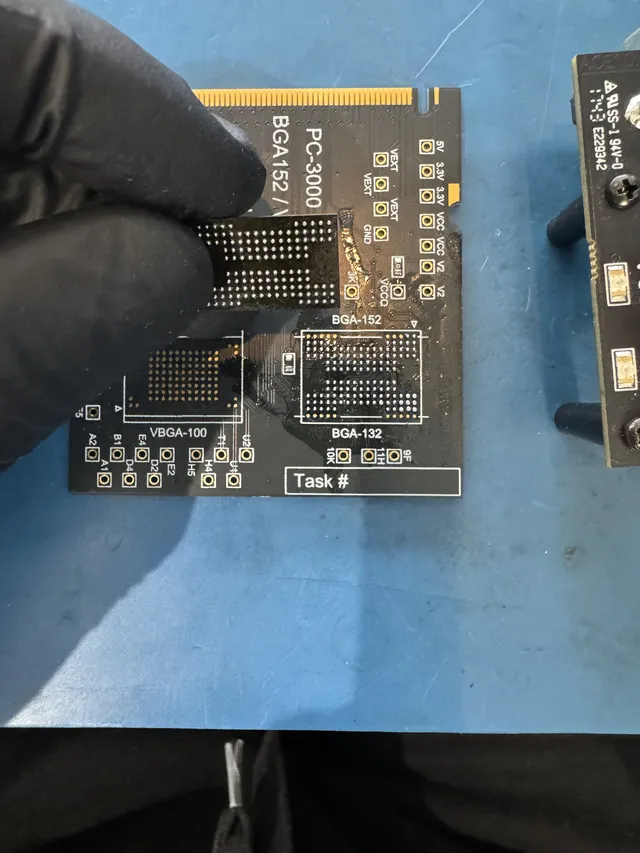
On a stick with a separate memory chip, the markings on the chip tell us which reader fits. For a chip-off recovery, we loosen the chip with controlled hot air, lift it off the board and clean it. Then we copy what's on it with our PC-3000 Flash reader.
On a one-piece stick, the chips are sealed together. We work out which tiny contacts on the stick lead to the memory, then run fine wires from those contacts to a reader so we can copy the memory in place.
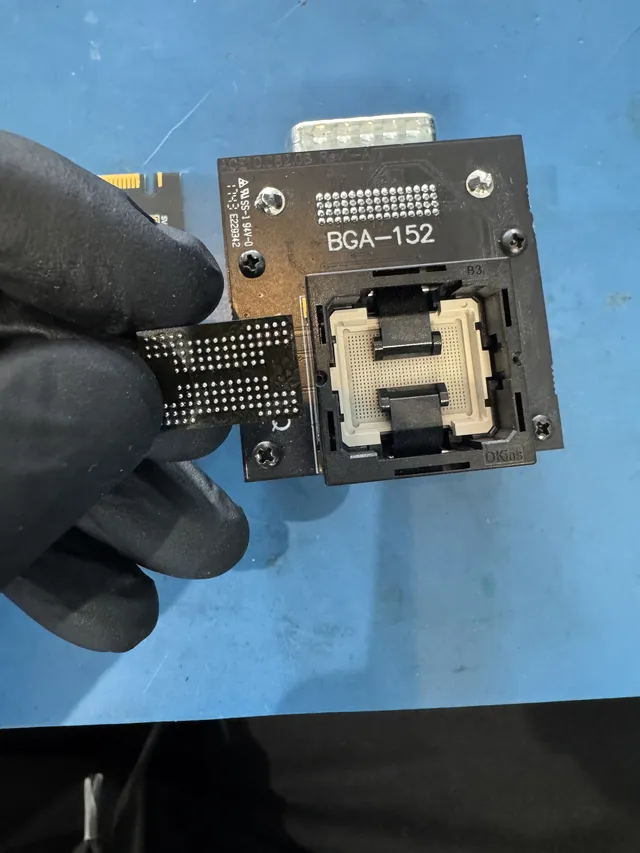
We put the memory chip in a reader so we can get the data even if the flash drive itself has stopped working. -
We put your files back together
A file copied straight from the chip is still in pieces. We work out where the controller put those pieces, undo its scrambling and correct errors from the read. If we can rebuild the index too, you can get a file back with its original name, in the folder where you saved it.
-
We return your files
We put the files we've recovered on a new drive. You can pick it up at the counter or have us mail it to you.
What we'll need from you
You can leave the stick unplugged. A description of what happened the last time you used it is enough to get us started.
- All the pieces, including the plug
If the plug broke off, pack it with the rest of the stick in a small padded box. The loose plug can help us line up the connections on the board.
- What happened and what you've tried
Tell us when you first noticed trouble and what you or someone else tried afterward. A note that it stopped halfway through a copy and you ran a scan tells us quite a bit.
- Which files matter most
If there's a particular photo, recording or folder you'd open first, tell us about it. We'll look for it when we check what came back.
- Your password or recovery key
If you locked the stick or its files, have your password or recovery key handy so you can open what we recover.
Which files can you recover from my USB stick?
We can give you a clearer answer after we've checked your stick. What matters is whether the memory still holds a readable copy of each file you want back.
When files can still be recovered
- The memory chip is intact
A snapped plug, cracked board or failed control chip can keep your computer from reaching files that are still on the memory chip. We can try to read them directly.
- Files were deleted or lost in a quick format
Either can leave the files themselves in memory. If nothing new has been saved over them, we may be able to get them back.
How much does flash drive data recovery cost?
$100 diagnostic, credited toward a successful recovery.
The $100 diagnostic is non-refundable once diagnostics start, and donor drives or replacement parts you approve are non-refundable once ordered, even if recovery fails.
$299 covers logical recovery for an SD card or USB flash drive up to 64GB. For larger sizes, we quote $500 for 128GB, $1,000 for 256GB, and $1,500 for 512GB. Those prices apply when the only damage is to the index that lists your files and folders.
If we need to read the memory chip directly and piece your files back together, it's $1,750 for up to 128GB, $2,500 for 256GB, and $3,000 for 512GB. On a one-piece stick, that means reaching the chip through its tiny contacts. Find your size in the table below to compare the two prices.
We confirm the price for your stick after the diagnostic, before you decide whether to go ahead. Our guide explains how we price data recovery.
- See what we recovered
We'll email you photos showing what we were able to recover, so you can see the result before you pay the recovery fee.
- Ways to pay
We accept cards, Apple Pay and PayPal. If you're eligible, you can also spread the cost with Affirm.
| Type of recovery | Price |
|---|---|
| Files and Folders (up to 64GB) | $299 |
| Files and Folders (128GB) | $500 |
| Files and Folders (256GB) | $1,000 |
| Files and Folders (512GB) | $1,500 |
| Memory Chip Work (up to 128GB) | $1,750 |
| Memory Chip Work (256GB) | $2,500 |
| Memory Chip Work (512GB) | $3,000 |
| Monolithic Recovery | $1,750+ |
| Service | When the assessment starts | Added cost |
|---|---|---|
| Standard diagnostic | Starts in about 4–6 weeks, then recovery time varies by case | No surcharge |
| Priority | Assessment starts within 5–7 days | +$250 |
| Urgent | Assessment starts within 1–2 days | +$500 |
| Emergency | Assessment starts same-day | +$1,000 |
For prices on USB sticks and the other devices we work on, see our full data recovery price list.
How you'll get your recovered files
You'll be able to open what we recover on a new drive and put the stick that failed away.
- Pickup or mail
Your files can go on a new USB flash drive or an external drive. Pick it up at our Lincroft counter or have us mail it to you.
- Make your own backup right away
We keep an offline backup for two weeks in case your new drive goes missing, and we'll delete it sooner if you ask. After that window, you'd pay full price for another recovery from the new drive.
- Your original USB stick
You get your original stick back as well. Even if your computer sees it again after the repair, we'd retire it.
- Keeping your files safe
Keep your files in three different places so you still have them if a stick breaks. When you're finished using a working USB stick, choose Eject on your computer before unplugging it.
Which USB flash drive brands do you work on?
We've worked on SanDisk sticks with sliding plugs, PNY swivel sticks and USB drives from Kingston, Memorex, Dell and Toshiba. Even two sticks sold under the same model name can have different control chips, so we check which one is in yours first.
USB flash drive recoveries from our lab
These are sticks people mailed to us or brought to our Lincroft counter. If we recovered only some of the files, you'll see that in the case entry.
- SanDisk USB flash drive, 256 GB Dropped or physically damaged · Data recovered Mailed from Michigan 2026
- USB flash drive, 128 GB Data recovered Mailed from North Carolina 2026
- USB flash drive, 4 GB Data recovered At our lab's counter in Lincroft 2026
- SanDisk Ultra, 128 GB Data recovered At our lab's counter in Lincroft 2026
- USB flash drive, 64 GB Data recovered At our lab's counter in Lincroft 2026
- USB flash drive, 32 GB Deleted or formatted · Data recovered 2026
- USB flash drive, 64 GB Stopped working or not detected · Data recovered Mailed from Virginia 2025
- USB flash drive, 128 GB Data recovered At our lab's counter in Lincroft 2025
- USB flash drive Deleted or formatted · Data recovered Mailed from Minnesota 2025
- SanDisk USB flash drive, 32 GB Failed or corrupted · Data recovered Mailed from California 2025
- USB flash drive, 512 GB Failed or corrupted · Data recovered Mailed from Ohio 2025
- USB flash drive Stopped working or not detected · Data recovered Mailed from Pennsylvania 2025
- USB flash drive Partly recovered At our lab's counter in Lincroft 2024
- USB flash drive Failed or corrupted · Data recovered Mailed from Alabama 2023
- USB flash drive, 1 TB Data recovered At our lab's counter in Lincroft 2023
These cases come from our ticket system, BenchKey, the shop software we built and run our lab on, with names, contact details and addresses left out. How we publish cases
Is there a USB flash drive repair lab near me?
You can bring your stick to our counter in Lincroft, New Jersey. That's our only lab, and it's where we work on the sticks people send us by mail.
To send yours, fill out the mail-in form and pack the printed slip with your USB stick. If you're in the contiguous US, you can print your prepaid UPS 2nd Day Air label as soon as you finish the form. We cover shipping both ways.
If you're sending the stick from Alaska, Puerto Rico, Hawaii or another island, you'll arrange and pay for shipping yourself.
- Address
- 644 Newman Springs Road, Suite A, Lincroft, NJ 07738
- Hours
- Mon-Fri 10am to 6pm Eastern
- Phone
- (732) 933-7717
Is this the right recovery service for my USB drive?
If yours is a USB thumb drive, you're in the right place. If you have another kind of device with a USB plug, the name on its case can help you find the service you need.
SD and microSD cards
Our SD card recovery page shows how we work on both sizes of card at the bench. You'll also find help below for deleted files or a card that's been formatted.
Portable SSDs and SSD-class USB sticks
Our SSD recovery service covers portable solid-state drives and USB sticks built the same way.
What does USB flash drive repair cover?
We repair the plug or board so we can make a copy of your files. Plan on using a different stick for everyday storage once you've got the files back.
Phones, hard drives and laptops
Our main data recovery services page will point you to the work we do on each of these devices.
Questions about USB stick recovery
Can I get my files back if the memory chip in my USB stick is cracked?
We can read your files straight from an intact memory chip, even if a knock tore the plug loose or cracked the board. Once the chip itself splits, there’s no way to read the files on it. If you can’t tell where the crack ends, send us all the pieces.
How do I choose a recovery lab for a broken USB stick?
Start with the lab's own USB stick cases and prices. Ours are on this page, and you're welcome to bring your stick straight to our Lincroft counter. We email you photos of what we recovered before you pay the recovery fee.
Can I send a USB stick someone already tried to fix?
Yes. Send it as it is and tell us what you or someone else tried, even if a scan found nothing. If a physical repair at home didn't work, we'll go straight to the memory chip to see what we can read.
Can you recover files from USB-C sticks or sticks with two plugs?
Yes, we work on both. A USB-C plug takes delicate work to reattach, and pocket lint can bridge the gaps between its pins. Compact USB 3 and USB-C sticks with fast control chips and tightly packed memory can run hot. Let us know if yours stopped working while plugged into a TV, game console or car.
More help with USB flash drive problems
If your USB files suddenly look like shortcuts, start with the guide on hidden files. You'll also find help with encrypted drives and the cost of recovery.
Encryption and cost
Tell us what you want back from your USB stick
When you ask for a quote, tell us what happened to the stick and which files matter most to you. Even the name of one folder or recording gives us something to look for.