
SSD data recovery for internal and portable drives
We can help you get your photos, documents and other files back from a failed SSD. Even when your computer no longer sees the drive, its memory chips may still hold your files. We check what failed and whether we can get the drive reading long enough to make a copy. If your SSD has disappeared or you've deleted something you need, cancel any request to format the drive and turn it off.
You're welcome to bring your internal or portable SSD to our counter in Lincroft, New Jersey. If you're in the contiguous US, you can also mail your SSD to us with a free shipping label.
- Since 2014One lab, in Lincroft, New Jersey
- 20,000+ ticketsacross all services since 2014
- 4.6 from 345Google reviews
- $100 diagnosticcredited toward a successful recovery
The people we help
Our customers include people from
-

-

-
 AT&T
-
 Marriott
-

-

-
 Tennessee Titans
-

-

-

-

-

-

-

What customers say about our lab
One customer needed to get back to work after a hard reset left them without access to their SSD. Here's how they and other customers describe their experience with us.
Lost my SSD after a hard reset and i thought the world ended. … I paid the rush fee and within 24 hours and a few extra minutes my business came back to life like tragedy never struck in the first place. They saved everything i thought i lost.
I think this is the biggest miracle I've ever experienced in my life!! … MD Repairs is a godsend! Thorough, great communication and genuine care for their clients!!!
I went to several other locations to try and recover my data. These guys did it, and they were patient with my payment as well.
What to do when your SSD fails
The next step depends on what happened to your SSD. If it disappeared or you're trying to recover a deleted folder, leave it off. If the folder still opens and the only problem is that you can't save changes, copy it to another drive.
What helps
- Turn the power off after a failure or deletion
An SSD needs power to clear deleted files. Turning it off stops that process and keeps electricity away from any damaged parts.
- Copy the files that still open
If the SSD stays connected and reads steadily, copy the files you need to a different drive. You can do that even if the SSD has stopped letting you save changes.
- Try one other cable or port
One swap can help you check the connection if the drive is undamaged, still shows up and reads steadily. If you deleted a file you need, leave the drive off.
- Keep a portable SSD in its case
That lets us check the original USB connection along with the drive inside. An M.2 stick or a 2.5-inch SSD from inside your computer can come in on its own.
- Make a note of what you saw
A detail like “the drive disappeared halfway through a copy” gives us a place to start. Include anything you tried afterward, even if it was just another cable.
What to avoid
- Don't keep reconnecting a missing SSD
Once the drive stops showing up, leave it disconnected. The fault may be in its electronics or in the software that runs the drive.
- Cancel requests to format or initialize the SSD
These options prepare the drive to store new files. Choose Cancel if you still need what's on it.
- Skip scans, repairs and system reinstalls
A repair or reinstall can write over files you're trying to save. Even the Windows tool called Optimize Drives can clear space that still holds missing files.
- Hold off on firmware updates
Firmware is the software that runs the SSD itself. If an update stops partway through, the drive may no longer start.
- Skip Secure Erase and factory reset
Both commands erase your files. Save them for a drive you're ready to empty.
- Keep a wet SSD unplugged
Water on the circuit board can carry electricity into parts it shouldn't reach. Keep the drive away from heat, too.
SSD symptoms and what to do next
Choose the description closest to what you saw the last time the drive was connected. You can leave it unplugged.
SSD not detected in BIOS or Windows
If the SSD is missing from both the computer's startup settings (BIOS) and the Windows drive list (Disk Management), recovery software has no drive to read. Leave it disconnected. The chip that runs the SSD, called the controller, can fail while your files are still on the memory chips.
My computer wants to format my SSD
Choose Cancel. The message itself hasn't erased your files. Your Mac or Windows PC may ask to format an SSD when it can't read the file system that organizes your folders. Windows may show the drive as RAW. Your files can still be on the chips until something writes over them.
Can I recover deleted files from an SSD?
It may be possible if the SSD hasn't cleared them yet. Turn the computer off now. A deletion or quick format can trigger TRIM, a command that tells the SSD which space it can clear while it has power.
A full format in Windows 10 or later writes zeros over the formatted space. A completed secure erase or factory reset also erases the files.
Can you recover data from my dead SSD?
Yes, in some cases. A power cut can leave an SSD looking empty if the drive hadn't finished saving its map of where your files are. A surge can damage the circuit board while leaving the memory chips intact. Keep the SSD off and tell us what happened when it stopped working.
Dropped SSD, cracked board or bent plug
Leave the drive unplugged and avoid trying more slots, readers or cases. We can examine a cracked M.2 stick or a portable SSD that landed on its plug to see whether repairing the connection would let us copy your files.
My external SSD stopped showing up
A portable drive can disappear because its USB connection failed, even when the SSD inside still works. Leave it in its case when you send it to us so we can check both the connection and the drive.
My SSD shows the wrong size
If the whole drive shows up as 0 MB or 8 MB, it may have lost the map it uses to find the pieces of your files. The drive might also stay busy or show SATAFIRM S11 where the model name belongs. Leave it off so we can check it.
My SSD says it's read-only
Copy your files to another drive while they still open. As its memory wears out, an SSD may stop accepting changes to protect what you've saved. You might see a message that says “write-protected.” If the files stop opening too, bring the drive in.
My SSD slows down, freezes or disappears
Copy what you need to another drive while the SSD still reads steadily. Files taking longer to save, a freeze during a big copy or a photo that opens scrambled can all point to a failing SSD. Worsening readings in the drive's own health report, called SMART, are another sign.
Can you open my encrypted SSD?
We need either your password or your recovery key to open files you encrypted. That includes files protected by BitLocker on Windows or FileVault on a Mac.
My SSD got wet
Keep it unplugged, even if the case feels dry. Water inside can corrode the circuit board and carry electricity where it doesn't belong. We clean the board before we try to read the memory chips.
My SSD keeps restarting after a firmware update
If the update stopped partway through, the SSD may keep restarting because it has only part of the software it needs. Leave it off and tell us the last thing you saw on screen.
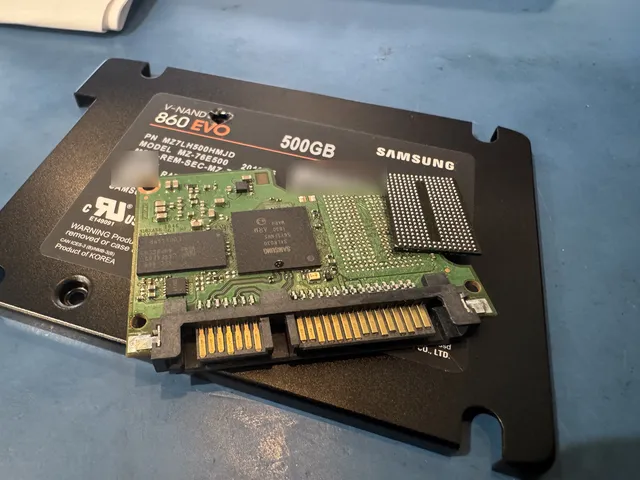
What fails inside an SSD?
The problem can be in the connection, the software that keeps track of your files or the chips themselves. A broken USB plug, for instance, can make all your photos disappear from view even though the memory chips are fine.
| What failed | What you might see | What we try | What we can recover |
|---|---|---|---|
| File system | Your computer asks to format the drive when you try to open it | Make a copy of the SSD and search it for files missing from the folder list | Files we can find on the copy that haven't been overwritten |
| Drive software (firmware) and file map | The wrong size or model name, or a drive that stays busy | Repair the software and the map the drive uses to locate each part of a file | Files we can copy once the drive can find the pieces again |
| Controller chip or circuit board | The SSD is missing from your computer's list of drives | Test the controller and repair damage on the board or at the plug | Files we can read through a working controller or directly from the memory chips |
| Worn memory chips | A read-only warning, or files that won't open | Read the chips to find out how much of each file we can copy | Whole files or parts of files from the areas that still read |
| USB bridge board in a portable SSD | The drive doesn't show up when you plug it into USB | Test the board that connects the USB plug to the SSD inside the case | Files on the SSD inside if only the USB connection failed |
On an SSD with built-in encryption, the controller scrambles each file as it saves it and keeps the key that makes it readable again. That's why we try to get the original controller working. Without its key, the data we read directly from the chips is still scrambled.
Some controllers also compress files to save space. If we read those memory chips directly, unpacking the files is another part of the recovery.
How our SSD data recovery service works
We find out what's keeping you from your files and give you an estimate. With your approval, we try to get the SSD reading long enough to make a copy. If the drive can no longer read through its own controller, we look at whether we can piece files together from the memory chips.
Why an SSD can fail without a sound
An SSD has no moving parts, so it can fail in silence. The click you might hear from a failing hard drive comes from the head that reads its spinning disks.
Even a single photo can be spread across several memory chips. The SSD keeps a map of where each piece belongs, and whether we can use that map depends on what failed inside the drive.
From your quote to your recovered files
-
Ask for a quote
Tell us what happened when you ask for a free quote. You can leave the SSD unplugged, then mail it to us or bring it to our Lincroft counter.
-
We check the SSD
During the $100 diagnostic, we check which part failed and whether the controller can still read the memory chips. That helps us choose how to reach your files.
-
You decide whether to go ahead
Once we've checked the drive, we give you an estimate for the recovery work. We start that work only if you approve it.
-
We try to read the drive through its controller
If our PC-3000 SSD tool supports your exact model and firmware version, we can try putting the controller into service mode. That's a repair setting where we can work on the drive's software and the map it uses to find your files. If we get the drive reading again, we make a full copy.
-
We return the recovered files
We put the files we recovered on a new drive you can pick up or receive by mail.
What to tell us about your SSD
The drive label and what you remember give us a place to start. You can gather these details with the SSD unplugged.
- What's on the label
Tell us the brand, model and storage size printed on the SSD, even if your computer showed a different size the last time you used it.
- What happened and what's been tried
It helps to know if you accepted a format, ran a recovery program or saw an update stop partway through. Include anything someone else tried on the drive, too.
- Your password or recovery key
If you encrypted your files, have your password or recovery key handy so we can unlock them.
- The files you need most
If you remember the name of your project folder or the year you took the family photos, tell us. That gives us something specific to look for.
Which files can you get back from my SSD?
Your files can survive a broken plug, a damaged board or a failed controller. How much we can get back depends on what the memory chips still hold and whether we can read it. During the diagnostic we check both the controller and the memory, with the folders you asked about in mind.
SSD failures we can work on
- An SSD your computer can't find
Even if the controller has stopped responding, we can look for the files you saved before the drive disappeared.
- An SSD reporting the wrong size
A reading of 0 MB can mean the SSD lost its map of your files. Restoring that map may bring your folders back into reach.
- A plug bent in a fall
If the damage is limited to the plug or circuit board, repairing the connection may let us copy what was on the SSD before the fall.
- Water, fire or power surge damage
We've recovered files from drives damaged by water and from drives that went through a fire or power surge. If the memory chips and any encryption key survived, we can try reading through the controller or rebuilding files from the chips.
How much does SSD data recovery cost?
$100 diagnostic, credited toward a successful recovery.
The $100 diagnostic is non-refundable once diagnostics start, and donor drives or replacement parts you approve are non-refundable once ordered, even if recovery fails.
SSD recovery ranges from $1,000 to $2,000 or more. Work we can do through the drive's own controller falls at the lower end. Moving the memory chips puts a job at the higher end, as we explain in our SSD recovery cost guide.
- What you agree to pay
We start recovery after you approve the estimate. If we don't get your files back, your bill is the $100 diagnostic plus any parts we ordered with your approval.
- Ways to pay
We take cards, Apple Pay and PayPal. If you qualify, you can pay over time with Affirm.
- See your recovered files before you pay
We email you photos showing what we recovered from your SSD before you pay for the recovery work.
| Service | Price range |
|---|---|
| SSD / NVMe Recovery | $1,000 - $2,000+ |
| Service option | When the diagnostic starts | Added cost |
|---|---|---|
| Standard diagnostic | Starts in about 4–6 weeks, then recovery time varies by case | No surcharge |
| Priority | Assessment starts within 5–7 days | +$250 |
| Urgent | Assessment starts within 1–2 days | +$500 |
| Emergency | Assessment starts same-day | +$1,000 |
You can also see prices for all our data recovery services.
How will I get my files and my SSD back?
Your recovered files come back on a new drive. Once you have them home, keep copies in three different places so you have another copy to turn to if a drive fails.
- A new drive for pickup or delivery
We put the recovered files on a new USB flash drive or external drive. You can pick it up at our counter or have us mail it to you.
- Our two-week backup
We keep an offline copy for two weeks, then delete it. If you'd like it deleted sooner, call, email or text us. After two weeks, a recovery from the drive we gave you costs full price.
- Your original SSD
You'll also get back the SSD you brought in or mailed to us.
- When we recover only some files
In a partial recovery, we check for the files you asked about. If you sent the SSD for your dad's photos, getting those pictures back may be what matters to you even if other folders are missing.
SSDs we've recovered files from
Customers mailed us these drives from across the contiguous US. Look for the model on your label, like Samsung 870 EVO or WD Blue, to see what happened to a drive like yours.
- SanDisk Extreme, 2 TB Stopped working or not detected · Data recovered Mailed from Massachusetts 2026
- WD Blue Stopped working or not detected · Data recovered Mailed from Montana 2026
- Intel portable SSD, 512 GB Stopped working or not detected · Data recovered Mailed from New Jersey 2026
- WD SSD, 1 TB Failed or corrupted · Data recovered Mailed from California 2026
- Portable SSD, 2 TB Stopped working or not detected · Data recovered Mailed from Washington 2026
- SanDisk Extreme Stopped working or not detected · Data recovered Mailed from Texas 2026
- Portable SSD Water or liquid damage · Data recovered Mailed from New York 2025
- Portable SSD Failed or corrupted · Data recovered Mailed from New York 2025
- SSD Deleted or formatted · Data recovered Mailed from Florida 2025
- Portable SSD Will not turn on or charge · Data recovered Mailed from New York 2025
- WD Black, 1 TB Stopped working or not detected · Data recovered Mailed from Georgia 2025
- NVMe SSD Data recovered Mailed from California 2025
- Samsung 870 EVO Fire or power surge · Data recovered Mailed from Utah 2025
- Samsung 870 EVO Stopped working or not detected · Data recovered Mailed from Texas 2025
- Intel NVMe SSD Data recovered Mailed from New York 2025
- Samsung 870 EVO, 500 GB Failed or corrupted · Data recovered Mailed from California 2025
- SSD Failed or corrupted · Data recovered Mailed from Illinois 2025
These cases come from our ticket system, BenchKey, the shop software we built and run our lab on, with names, contact details and addresses left out. How we publish cases
Find your SSD by brand
You'll find the 860 EVO, 870 EVO and the portable T7 and T9 on our Samsung page. If the label says MX500, BX500 or P-series, choose Crucial and Micron. For an A400, NV2 or KC3000, choose Kingston.
WD Blue and WD Black are under Western Digital. Choose SanDisk for an Extreme portable, or Seagate if that's the name on your drive.
Is SSD data recovery the right service for my drive?
This service covers internal and portable solid state drives. If you're unsure what you have, start with the label on the drive or the device you used to open the files.
NVMe and M.2 SSD data recovery
M.2 describes the shape of the small SSD stick you might see inside a laptop. It can use a SATA connection or the faster NVMe connection. The work we do to recover your files is similar with either one.
Can a dead SSD be repaired?
We can try to get a dead drive reading again, but our SSD repair work stops once we can copy your files. We put anything we recover on a new drive and return the original SSD to you as well.
Is mine an SSD or a hard drive?
A label that says SSD or solid state drive means your files are stored on memory chips. HDD means the drive has spinning disks. If you heard clicking from the drive itself, our hard drive recovery pages and cases below are a good place to start.
Is the storage built into my MacBook?
On T2 and M-series MacBooks, yes. The storage chips are fixed to the main board. We repair that board so the Mac's own security chip can unlock your files.
What if my files were on another device?
Choose the recovery service for the device that held your files. We have pages for phones, iPads, iPods, USB flash drives and SD cards.
Can I send a customer's SSD for recovery?
Yes. If you're a business or IT provider sending a client's SSD, you can use our partnership program.
Where can I find SSD data recovery near me?
Our lab is in Lincroft, New Jersey. Whether you bring your SSD to the counter or send it by mail, it comes to the same lab. Choose your state below for mailing details.
If you're coming in person, you can get directions to our Lincroft counter.
In the contiguous US, fill out the mail-in form to print your free UPS 2nd Day Air label and packing slip right away. Put the slip inside the box and the label on the outside.
- Address
- 644 Newman Springs Road, Suite A, Lincroft, NJ 07738
- Hours
- Mon-Fri 10am to 6pm Eastern
- Phone
- (732) 933-7717
Northeast
Southeast
Midwest
Common questions about SSD data recovery
Can I send my SSD after another shop tried to recover it?
Yes, even if the other shop opened the drive. Tell us exactly what they tried so we can take that into account when we check your SSD.
Will a warranty replacement get my SSD files back?
No. Your files stay on the original SSD when you exchange it under warranty. If you need them back, hold on to that drive for recovery before you send it back for a replacement.
Can an unplugged SSD still hold my files years later?
Yes, it can. SSD memory can hold files for a long time without power, though worn chips lose data sooner. If you've found an old SSD with files you need, send it in soon so we can check what's still there.
Are my files gone if a chip died in my M-series MacBook?
A board repair may let us copy your files. If the main processor or one of the chips that store your files has died, we can’t get them back. You can drop your MacBook off in Lincroft or mail it to us for a $100 diagnostic. We’ll tell you what failed before you decide whether to go ahead.
Can recovery software get files off my SSD?
It can help if your computer recognizes the SSD and the drive reads steadily. Use software that reads from the SSD without writing to it, and save what you recover on another drive.
How long does SSD data recovery take?
With standard service, we start the diagnostic in about 4 to 6 weeks. Recovery takes additional time. Repairing the folder list or the drive's software takes less time than fixing the controller, and work on the memory chips takes the longest. Rush service gets the diagnostic started sooner.
SSD recovery and backup guides
If you'd like to know more about how we read a failed SSD, what recovery costs or how to back up your files, you'll find those guides here.
Tell us what happened to your SSD
To get a quote, tell us which files you need and what you remember from the last time you used the SSD. It's fine if all you know is that a folder wouldn't open. You can leave the drive unplugged.