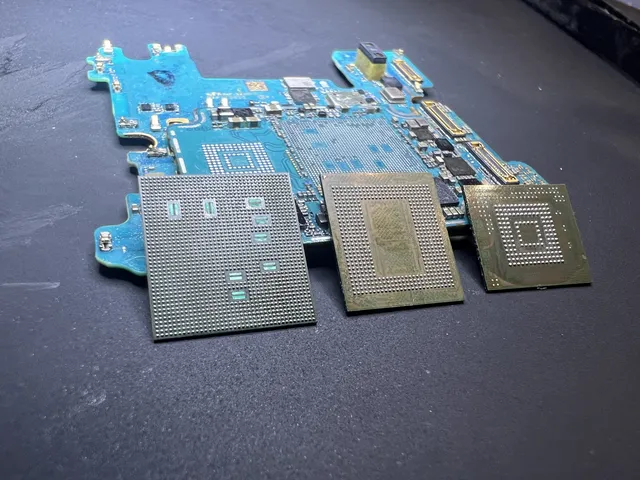
How to Ship a Hard Drive Safely for Mail-In Recovery
In this article
To ship a hard drive for data recovery, seal it in an anti-static bag, wrap it in at least 2 inches of bubble wrap on every side, and pack it snugly in a sturdy corrugated box so it can't shift. Never use a padded mailer, never tape the bare drive, and never open the drive. The data on the platters is usually fine: the goal is to keep bad packaging from finishing off an already-fragile drive.
- Anti-static: bag the drive (or wrap in aluminum foil); never bubble-wrap it bare
- Cushion: 2+ inches of bubble wrap all around, then fill box gaps so nothing moves
- Box & label: double-wall corrugated, H-tape seams, mark FRAGILE
- Ship tracked: UPS/FedEx/USPS; overnight only if water/fire damaged
Ready to send it in? See how our mail-in data recovery works.
To ship a hard drive for data recovery, wrap it in anti-static material, cushion it with at least 2 inches of bubble wrap on every side, and place it in a sturdy corrugated box. That's the short version. The drive needs to survive drops, vibrations, and temperature swings during transit. MDrepairs is a data recovery lab in Lincroft, New Jersey. Inadequate packaging can leave drives unprotected in transit. Loose drives rattling around in oversized boxes. Drives tossed into padded mailers with nothing but a sticky note. We've seen it all. The good news? Packing a hard drive correctly takes about five minutes. And it can mean the difference between a successful recovery and a permanently destroyed drive.
This guide covers everything you need to know: what materials to use, step-by-step packing instructions, which carriers to choose, and the mistakes we see people make constantly. If your drive is clicking, not spinning, or completely dead, the data on those platters is probably still intact. Let's keep it that way during shipping.
Why Packaging Matters More Than You Think
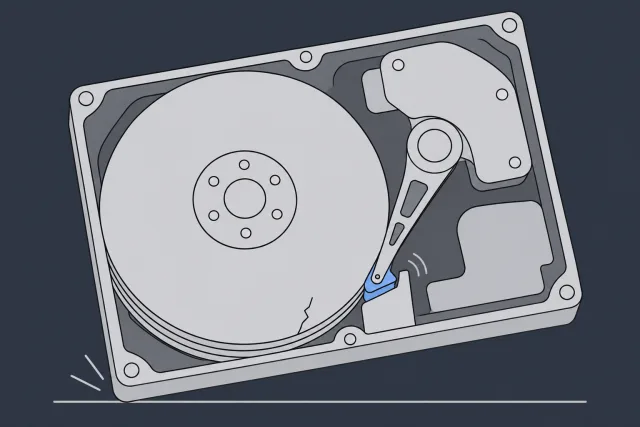
A hard drive is one of the most mechanically delicate things you'll ever ship. Inside every traditional HDD, there are glass or aluminum platters spinning at 5,400 to 7,200 RPM during normal use. The read/write heads float above those platters at a distance smaller than a human hair. When the drive is powered off, those heads park on a ramp or landing zone. But the platters and heads are still incredibly fragile.
 Illustration
Drop a healthy hard drive from table height onto a hard floor? There's a real chance you just killed it. The heads can shift out of alignment. The platters can crack. The spindle motor can seize. Now imagine what happens inside a delivery truck bouncing down the highway for three days.
Here's what shipping carriers won't tell you: packages get dropped. They get stacked under heavy boxes. They sit in trucks that reach 140 degrees Fahrenheit in the summer. Your packaging needs to handle all of that.
What You Need Before You Start
You don't need specialty materials. Everything on this list is available at Walmart, Home Depot, or any shipping store. Most of it you probably already have around the house.
| Material | Why You Need It |
|---|---|
| Anti-static bag | Prevents electrostatic discharge from frying the PCB. Your drive probably came in one originally. |
| Bubble wrap (large bubble) | Shock absorption. You want at least 2 inches of wrap on every side of the drive. |
| Sturdy corrugated box | Double-wall corrugated is ideal. The box should be at least 4 inches larger than the wrapped drive in every dimension. |
| Packing tape | Seal the box properly. Don't use duct tape or masking tape. |
| Packing peanuts or crumpled paper | Fills the gaps so the drive can't shift during transit. |
Step-by-Step: How to Pack a Hard Drive for Shipping
Follow these steps exactly and your drive will arrive safe. We've received drives through the mail. The ones packed this way always show up in the same condition they left.
 Illustration
1 Disconnect and Handle Carefully
If the drive is still installed in a computer, power down the machine completely. Wait 30 seconds for the platters to stop spinning and the heads to park. Then disconnect the SATA and power cables. Hold the drive by its edges. Don't touch the PCB (the green circuit board on the bottom).
2 Wrap in Anti-Static Material
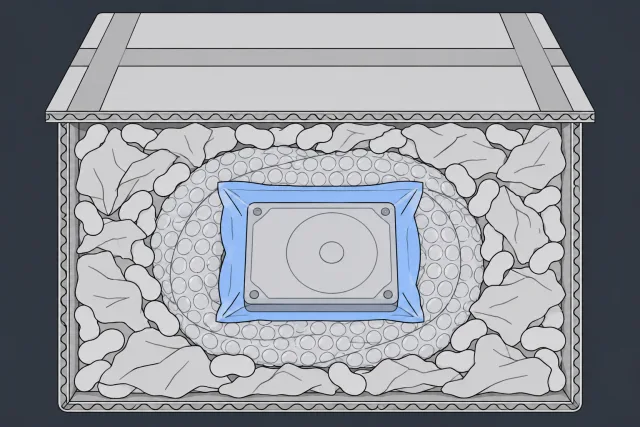
Place the drive inside an anti-static bag. If you don't have one, wrap it in aluminum foil. This step is non-negotiable. Static discharge can destroy the drive's controller board, and then we're dealing with two problems instead of one.
3 Apply Bubble Wrap
Wrap the drive in bubble wrap. Go around it at least 3 to 4 times. You want a minimum of 2 inches of cushioning on every side, including the top and bottom. Tape the bubble wrap closed so it doesn't unravel. The drive should feel like it's floating inside a cushion.
4 Prepare the Box
Use a corrugated cardboard box that's significantly larger than your wrapped drive. Put a 2-inch layer of packing peanuts, crumpled newspaper, or crumpled kraft paper on the bottom of the box. Don't use styrofoam sheets. They crack on impact and stop absorbing shock.
5 Place the Drive and Fill Gaps
Set the wrapped drive in the center of the box, on top of the bottom cushioning layer. Fill all remaining space with packing material. Pack it tight. When you close the box and shake it, the drive should not move at all. If it shifts even slightly, add more material. Movement equals impact damage.
6 Seal and Label
Close the box and seal all seams with packing tape. Use the H-taping method: tape across the center seam, then tape along both edges. Write "FRAGILE" and "THIS SIDE UP" on at least two sides of the box. Yes, carriers sometimes ignore these labels. But sometimes they don't, and that's worth the 30 seconds it takes to write them.
Shipping External Hard Drives
External drives are a little easier to pack because the enclosure provides an extra layer of protection. But don't get overconfident. The drive inside that plastic or aluminum shell is the exact same fragile mechanism as a bare internal drive.
For external drives, follow the same steps above. Keep the drive inside its enclosure. Don't disassemble it. The enclosure adds some shock absorption, and removing it just creates more risk. Wrap the entire external drive (with its case) in anti-static material, then bubble wrap, then box it up.
One thing people forget: don't include the USB cable or power adapter loose in the box. Loose cables and adapters become projectiles during shipping. They'll bang into the drive repeatedly. Either tape them to the outside of the bubble-wrapped drive, or put them in a separate zip-lock bag.
What About Laptop Drives?
2.5-inch laptop drives are smaller and slightly more resilient than 3.5-inch desktop drives, but they still need proper packaging. The platters are thinner. The tolerances are tighter. Pack them the exact same way.
If the drive is still inside a laptop and you can't remove it, you have two options. Ship the entire laptop (expensive but safe). Or take the drive out yourself. Most modern laptops have an accessible drive bay on the bottom panel. A Phillips screwdriver and a YouTube tutorial is all you need. If you're not comfortable doing it, a local computer shop will remove it for five or ten bucks.
SSDs vs. HDDs: Does Shipping Matter?
Solid-state drives have no moving parts. No spinning platters, no read/write heads, no spindle motor. They're essentially circuit boards with memory chips soldered on. So yeah, SSDs are dramatically more durable during shipping than traditional hard drives.
That said, you should still pack an SSD properly. The PCB can crack if it takes a hard enough impact. The NAND flash chips can come desoldered. The connector can break. These things are unlikely with good packaging, but why risk it?
Use the same packing process described above. The anti-static bag is actually more important for SSDs than HDDs, because the entire device is one big circuit board. Static discharge is the primary risk, not physical shock.
For more on SSD recovery specifically, check our data recovery services page. SSDs have their own set of challenges when it comes to getting data back, especially with TRIM and wear-leveling.
Choosing a Carrier and Shipping Speed
Every major carrier will get the job done if you pack correctly. The differences come down to speed, tracking, and insurance.
| Carrier | Best Option | Notes |
|---|---|---|
| UPS | UPS Ground or 2nd Day Air | Reliable tracking. Includes $100 declared value. |
| FedEx | FedEx Ground or Express Saver | Good tracking. $100 included coverage. Slightly faster Ground service than UPS in some areas. |
| USPS | Priority Mail | Affordable. Includes $100 insurance. 2-3 day delivery. Flat rate boxes can save money on heavy drives. |
Should You Pay for Faster Shipping?
It depends on how urgent your situation is. Here's the honest answer: for most data recovery cases, ground shipping is fine. Your data isn't degrading while the drive sits in a box. The bits on those platters don't care whether they arrive in 2 days or 5.
The exception is if your drive has water damage. Corrosion starts eating at the platters and PCB components within days of exposure. If your drive got wet, overnight it. Every hour counts.
For fire-damaged drives, the same urgency applies. Soot and ash are corrosive. Head and platter work takes place in a laminar-flow work area.
Tracking Is Non-Negotiable
Always use a service that includes tracking. Always. You need to know when the package is delivered so you can follow up with the lab. You also want proof of delivery in case something goes wrong. Every option listed above includes tracking by default.
Once you ship, send the tracking number to your recovery lab. We'll watch for it and start the intake process as soon as it arrives.
Common Mistakes That Destroy Drives in Transit
1. Using a Padded Mailer Instead of a Box
Padded mailers (those bubble-lined envelopes) are designed for books, documents, and T-shirts. Not hard drives. A padded mailer provides maybe a quarter-inch of cushioning. That's nothing. One drop from waist height and the drive slams into the ground with almost no protection. Don't do it.
2. Shipping the Bare Drive with No Wrapping
Some people put the bare drive directly into a box with some newspaper around it. The problem? Newspaper compresses to nothing on impact. And without an anti-static bag, the drive's PCB is exposed to static discharge from every piece of packing material it touches. Bubble wrap is especially bad for static. Always wrap in anti-static material first.
3. Using a Box That's Too Big with Not Enough Fill
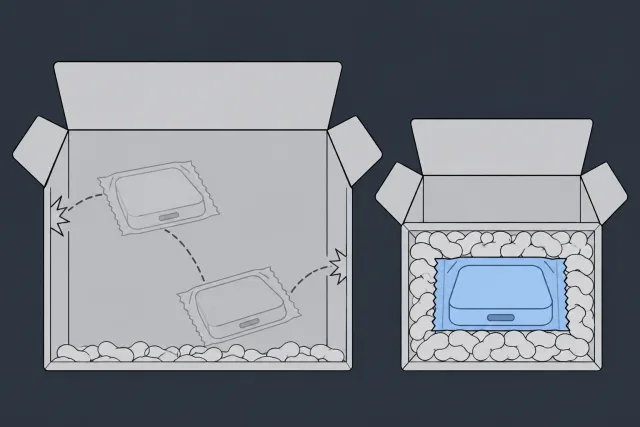
Bigger box doesn't mean better protection. If you put a small drive in a giant box and only half-fill the empty space, the drive will bounce around inside like a pinball. Every bounce is an impact. Use a box that's appropriately sized, and fill every gap with packing material.
 Illustration
4. Leaving the Drive Powered On
This sounds obvious. But we've had people ship laptops with the lid closed (sleep mode, not shutdown) with the hard drive still spinning. The drive is running, experiencing constant vibration from the truck, and eventually the heads crash into the platters. Always fully power down and disconnect before shipping.
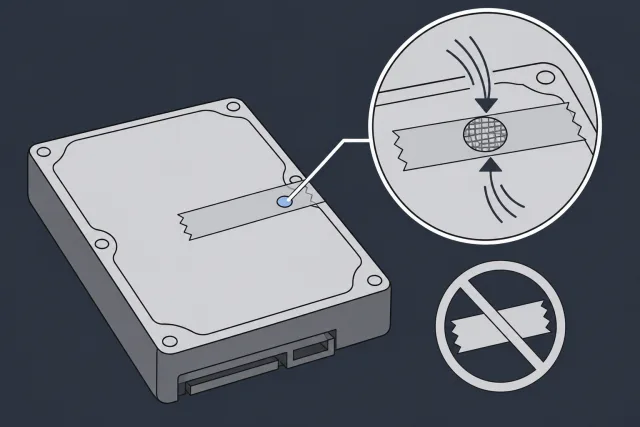
5. Taping the Drive Directly
Don't put tape directly on the hard drive's casing. Adhesive residue can get into the drive through the breather hole (the small hole covered by a filter on most drives). The breather hole equalizes air pressure inside the drive. If you block it or contaminate it, you're asking for trouble.
 Illustration
What to Include in the Box
Besides the drive itself, include these items to speed up the intake process at the lab:
- Your name and phone number on a piece of paper inside the box. Shipping labels can get damaged or torn off.
- A brief description of the problem. "Drive was clicking, then stopped being detected" is way more helpful than "it's broken." The more details you give, the faster we can start the right recovery process.
- A list of priority files or folders. If you mainly need the family photos from the "Pictures" folder, tell us. We'll target those first.
- The original enclosure (for external drives). Sometimes the enclosure itself is the problem, not the drive. We test both.
Don't include power cables for internal drives. We have every connector type in the lab. Don't include your computer unless we specifically ask for it. And don't include cash or gift cards for payment. This isn't a scam. We invoice like a normal business.
Getting Your Drive Back After Recovery
Once recovery is complete, we ship your original drive and the recovered data back to you. We pack the original drive using the exact same method described above. Your recovered data comes on a new external hard drive or USB drive, depending on the size.
We use UPS with tracking on every outbound shipment. You'll get a tracking number as soon as it ships.
Want to know what the recovery process looks like on our end? Here's a look inside our lab:
What Does Mail-In Data Recovery Cost?
The honest answer: it depends on what's wrong with the drive. A simple logical recovery (deleted files, corrupted file system) runs $1,000 to $1,500. A mechanical failure involving head and platter work costs more. Severe platter damage is the most expensive tier.
We publish our full pricing breakdown on our data recovery pricing page. The diagnostic is $100, credited toward a successful recovery. You approve the estimate before recovery work starts.
You send us the drive, we tell you exactly what's wrong and what it'll cost, and you decide whether to proceed. If you say no, we ship the drive back at no charge.
How Long Does the Whole Process Take?
From the moment you drop your package at the carrier to the moment you have your data back, these are the stages to plan for:
| Stage | Typical Time |
|---|---|
| Shipping to our lab | 2 to 5 business days (ground) |
| Diagnostic | Regular queue; confirm availability for an earlier rush assessment start |
| Overall recovery estimate | 4 to 6 weeks in the standard queue before diagnosis starts, plus time for recovery |
| Return shipping | UPS 2nd Day Air |
Our detailed guide on how long data recovery takes breaks down every phase if you want the full picture. Rush options advance only the diagnostic start. Call to confirm availability; rush does not set a recovery completion date.
The diagnostic is the critical step. That's where we determine what failed, whether the data is recoverable, and what it'll cost. If you want more details about what happens during a diagnostic, our hard drive recovery page walks through the process.
What If Your Drive Was Dropped Before Shipping?
Dropped drives need extra care during packing. If your drive took a fall and now it's making clicking or beeping sounds, the internal heads may be stuck on the platter surface or bent out of alignment. Any additional impact could push them further into the platters and cause scratches.
For dropped drives:
- Don't try to power it on again. Every spin-up attempt with damaged heads risks scratching the platters.
- Use extra bubble wrap. Go 5 to 6 layers instead of 3 to 4.
- Place the drive with the PCB (circuit board) facing up in the box. This keeps the heavier platter assembly on the bottom, which is slightly more stable during transport.
- Choose a faster shipping method. The less time in transit, the fewer impacts the drive experiences.
If you dropped your drive and want to understand what might be happening inside, we wrote a full guide on dropped hard drive data recovery that covers exactly what breaks and what we can fix.
Frequently Asked Questions
Can I ship a hard drive through USPS?
Absolutely. It's affordable, includes tracking and $100 of insurance, and typically delivers in 2 to 3 business days. Just make sure you pack the drive properly. USPS handles packages roughly, same as every other carrier. The flat rate medium box is usually the perfect size for a single 3.5-inch drive with proper cushioning.
Do I need to insure my hard drive shipment?
All three major carriers (USPS, UPS, FedEx) include $100 of declared value coverage by default. For most hard drives, that covers the replacement cost of the physical drive itself. But here's the thing: insurance only covers the value of the hardware, not your data. No carrier will reimburse you for lost files. Still, adding $300 to $500 of coverage for a few extra dollars is worth it. If the package gets crushed or lost, at least you're not out the shipping cost too.
Should I remove the hard drive from my computer before shipping?
Yes, always. Shipping an entire desktop tower or laptop is expensive, adds unnecessary weight, and introduces more failure points. The computer case doesn't protect the drive any better than proper bubble wrap and a box. Plus, a heavy computer bouncing around in transit puts way more stress on the drive than a lightweight, properly cushioned package. Remove the drive, pack it right, and ship just the drive.
What if I don't have an anti-static bag?
Wrap the drive in aluminum foil. It's not a perfect anti-static solution, but it provides a basic Faraday cage effect that shields the PCB from electrostatic discharge. You can also buy anti-static bags online for a couple of dollars if you have time to wait. The important thing is that you never wrap a bare drive directly in bubble wrap. Bubble wrap generates static electricity through friction, and that static can damage or destroy the drive's controller board.
How do I know if my hard drive is worth sending for recovery?
If the data matters to you and you don't have a backup, it's worth sending. That's really the only question. Family photos you can't replace? Business records you need? A thesis you spent a year writing? Those are all worth it. Check our pricing page to understand the cost ranges before you ship.
Can I hand-deliver my drive instead of shipping it?
If you're in the New Jersey area, yes. We accept walk-in drop-offs at our lab. Just call us at (732) 933-7717 to set up a drop-off time. If you're searching for data recovery near you, we also serve customers across all 50 states via mail-in. Mail-in recovery prospects depend on the condition of the device and its data.
What happens if the carrier damages my drive during shipping?
If a drive arrives at our lab with obvious shipping damage (crushed box, cracked casing, loose components), we document everything with photos before we even open the anti-static bag. We'll notify you immediately. Even if the external casing took a hit, what we can recover depends on the condition of the platters. The platters are protected inside the sealed drive housing. If the carrier's handling caused the damage, you can file a claim with them using our documentation. Proper packing helps protect the drive, but cannot eliminate shipping damage.