Phone Fell in Water: The First 24 Hours Checklist
Our founder and lead technician, Joseph Montanti, handles cases personally.
Phones go swimming constantly: pools, toilets, lakes, the ocean, washing machines. We receive them in the mail every week, from fishing-trip fumbles to a customer who jumped into the ocean with his iPhone in his pocket. The pattern in who gets their photos back is boringly consistent: it's the people who cut power fast and didn't cook the board with a charger. Here's the exact do/don't checklist for your first 24 hours.
On this page
Minutes 0 to 10: the moves that matter most
- Out of the water, obviously. Seconds count less than you'd think versus what comes next, but don't leave it soaking.
- Power it off completely. Not sleep. Off. If it's already off or dead, leave it that way.
- Do not plug it in. Not to charge, not to "check if it's alive." Electricity flowing through wet circuitry is what actually kills phones: it turns clean water exposure into shorted components and burned traces.
- Take the case off, and let water drain out of the ports. Gently shake it out, charging port facing down.
- Dry the outside with whatever's handy before opening the SIM tray. The outside isn't the battle, but it doesn't hurt.
Hours 1 to 24: the checklist
| Do | Don't |
|---|---|
| Keep it powered off, even if it "seems fine" | Don't charge it or plug it into anything |
| Leave it in a dry, ventilated spot, ports down | Don't bury it in rice (it doesn't reach interior water and adds dust) |
| Note what kind of water and how long it was in | Don't use a hair dryer or oven; heat pushes moisture deeper and cooks adhesives |
| Check what's backed up from another device (iCloud/Google) | Don't keep testing the buttons "to see if it still works" |
| If the data matters, contact a lab today, not next week | Don't wait for it to "dry out for a few days" before deciding |
Why the urgency? Because the enemy isn't water, it's what water does over time on a powered or mineral-coated board: corrosion. Minerals and salts eat copper traces and component legs, and the process accelerates every hour the board sits wet, and every second it sits wet with power. Salt water is the worst case; it's dramatically more conductive and more corrosive. A pool phone handled well on day one is usually a routine case. The same phone charged twice and left in a drawer for three weeks is an excavation.
Not all water is equal: know your enemy
What your phone fell into changes the urgency level:
- Clean fresh water (a glass, a puddle, a pool briefly): the mildest case. Pools add chlorine, but a fast retrieval with power off is very survivable.
- Toilet and washing machine water: worse than it sounds and not just for the obvious reason. Soaps and cleaning agents are surfactants; they help water creep deeper into connectors and under chips than plain water goes. Washing machine phones also tumbled for a full cycle, so add impact damage to the list.
- Salt water: the emergency tier. Salt makes water massively more conductive (instant shorts if powered) and keeps corroding even as it dries, leaving crusted deposits across the board. For an ocean dunk, wipe the outside with a soft, lint-free cloth; salt inside still needs professional cleaning.
And a note on "but my phone is IP68 water resistant": that rating was earned by a brand-new phone in still, clean lab water. Two years of drops, temperature swings, and an aging adhesive seal later, real-world resistance is a lottery ticket, not a warranty. Treat every dunk as if the water got in, back up accordingly, and be pleasantly surprised when it didn't.
About rice (and what actually helps)
Rice absorbs humidity from air, slowly. It does not pull water out from under soldered chips, beneath connectors, or inside shields where it actually pools. What the rice ritual mostly does is create a false sense of action while corrosion works undisturbed for 48 hours. Our full water damaged phone recovery guide walks through why, and what a proper board cleaning involves instead: disassembly, ultrasonic cleaning in the right solutions, corrosion removal under magnification, and inspection of the components water hits first. That's the treatment that changes outcomes, and the earlier it happens, the better the odds.
If the phone still works: you're on borrowed time
A phone that survived the dunk and still runs is an opportunity with a deadline. Water-exposed boards can fail days or weeks later as corrosion quietly spreads. So, today:
- After a technician checks that it's safe to power on, back up everything immediately. iCloud, Google, or a computer. Photos, messages, notes, authenticator apps, all of it.
- Verify the backup actually completed. Open it and look.
- Watch for late symptoms: random restarts, battery draining fast, speaker crackle, screen flickers, a camera that fogs. Any of those after a swim means the board took damage; act while it still boots.
Once the backup is verified, charging and normal use are your call. The risk is now to the hardware, not your memories.
If the phone is dead: what a lab can actually do
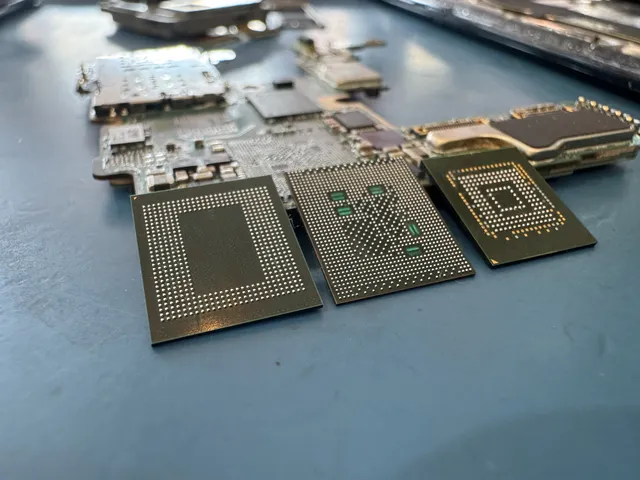
Here's the part most people don't know: a water-dead phone usually has healthy data inside. Your photos live in flash memory, which tolerates immersion far better than the power circuitry around it. The lab's job is to either revive the board (cleaning plus repairing the specific corroded or shorted components) or, when the board is too far gone, to work at chip level. This is exactly the work in our cell phone data recovery service, and water phones are one of the largest categories we see: fishing-trip Galaxys, pool iPhones, an ocean iPhone whose owner had been quoted $3,500 elsewhere before finding us. Even a phone found at the bottom of a lake, risking twenty thousand photos, came through with its owner's canoe-trip fumble forgiven. Toilets and salt water have their own quirks, covered in our toilet and saltwater iPhone guide.
Frequently Asked Questions
My phone fell in water but seems fine. Should I worry?
Cautiously, yes. Water resistance ratings help, but seals age and impacts break them. After a technician checks that it's safe to power on, back up everything and watch for late symptoms (restarts, heat, fast battery drain, foggy camera) over the next two weeks. A working phone after a dunk is a gift; the smart response is making its data expendable immediately.
Should I put my wet phone in rice?
No. Rice can't reach the water that matters, under chips and inside connectors, and the days it wastes are the exact window when cleaning would have prevented corrosion damage. Power off, dry the outside, ports down, and decide fast whether the data on it is worth professional cleaning.
Can data be recovered from a phone that died in water?
Usually, yes. The memory chip storing your photos is one of the most water-tolerant parts of the phone. Labs repair the board or its components so the original storage and security hardware can work together; reading a removed chip alone does not decrypt modern phone data. Success rates are highest when the phone arrives soon and uncharged.
Does salt water make phone data recovery impossible?
No, but it shrinks the window. Salt is aggressively conductive and corrosive, so ocean phones need power cut immediately and cleaning as fast as possible. We've recovered data from ocean-dunked phones with no signs of life; speed and not charging are what kept those recoverable.
How long do I have to recover data from a water damaged phone?
Think in days, not months. Fresh water handled well (off, uncharged, to a lab within days) has excellent odds. Every added week of sitting wet, and every charging attempt, moves the case from cleaning toward reconstruction. If it's already been weeks, don't give up; just stop charging it and get it evaluated.
Get help with data recovery
Bring your device to our Lincroft lab during opening hours, or mail it in.
How to mail your deviceThe $100 diagnostic is non-refundable once diagnostics start, and donor drives or replacement parts you approve are non-refundable once ordered, even if recovery fails.
More lab videos
Published by MDrepairs
MDrepairs is a data recovery and electronics repair lab in Lincroft, New Jersey. Our founder and lead technician Joseph Montanti films real cases for our YouTube channel, showing tools, repair steps and recovery outcomes.
Keep reading
- Phone Recovery Apps: What They Can and Can't Do
- Old Phone Won't Charge: Getting the Photos Off It

- Phone Ran Over or Crushed? Recovering Photos and Messages