Phone Recovery Apps: What They Can and Can't Do
Our founder and lead technician, Joseph Montanti, handles cases personally.
We're a data recovery lab, so you might expect us to trash recovery apps wholesale. We won't, because that would be dishonest: there are real cases where a $60 app is exactly the right answer and mailing us your phone would be overkill. But we also see the aftermath every week, people who bought three different apps, burned days scanning, and arrived at the lab with less money and sometimes worse odds. So let's draw the map properly.
On this page
What these apps actually do under the hood
Strip away the marketing and phone recovery apps have four real mechanisms:
- Reading a working phone. They connect over USB and export photos, messages, and contacts through the phone's normal interfaces. Genuinely useful, especially for moving texts to a computer, which phones make weirdly hard.
- Mining backups. They parse iTunes/Finder and iCloud backups (and some Android equivalents) and extract individual items, like one deleted conversation, without restoring the whole backup. This is their best trick, and it recovers "deleted" data that was really just trapped in a backup.
- Scanning app databases on the phone. Deleted texts sometimes linger inside app database files for a while before cleanup. Apps can occasionally surface those remnants on iPhone, and on rooted Androids they can scan more deeply.
- System repair modes. Reinstalling the OS around your data to fix boot loops and stuck logos: legitimate, but it's the same thing iTunes Update does for free, with the same risks.
Notice what's missing: none of these mechanisms read deleted data straight off modern phone storage. That's not a software quality problem. It's encryption and TRIM working exactly as designed. When a modern iPhone or Android deletes a file, the encryption bookkeeping for that data is discarded and the storage marks it for erasure. What's actually gone is mathematically gone, and no app on Earth changes that. We explain the same dynamic on computers in our software vs. professional recovery guide.
Where an app is honestly worth the money
The backup-mining use case deserves special praise. Most people don't realize how many backups they're carrying: an old iTunes backup on the family computer, iCloud backups from before the incident, Google and Samsung cloud copies. An app that can open those and pull out one conversation is doing real, worthwhile work.
Where the $60 evaporates
| Scenario | What actually happens |
|---|---|
| Phone won't turn on | The app can't connect to a dead phone. Nothing scans. This is board-level lab work. |
| Deleted months ago, no backups | Encryption + TRIM already destroyed it. The scan finds cached thumbnails at best. |
| "Deep scan" on unrooted Android | Without root, the app sees roughly what a file manager sees. The headline feature needs root, mentioned in fine print. |
| Broken screen, can't unlock | The phone must be unlocked and trust the computer. No unlock, no access, regardless of app. |
| Water damaged phone | Connecting and pushing power into a shorted board risks making a recoverable case worse. |
The honest decision flow
2. Phone works + item might be in a backup? A reputable app's free scan mode will show you what it can find before you pay. Pay only if the preview shows your actual data.
3. Phone works + item was never backed up + deleted a while ago? Be honest with yourself about the odds. The app will happily take $60 to confirm what encryption already decided.
4. Phone dead, wet, broken, or not detected? Skip the apps entirely. Every hour and every charge cycle matters. This is hardware work.
For the deleted-data-on-iPhone case specifically, we wrote a full honest breakdown of the odds in can you recover deleted data from an iPhone, including exactly when a lab can and can't help.
What a lab does that no app can
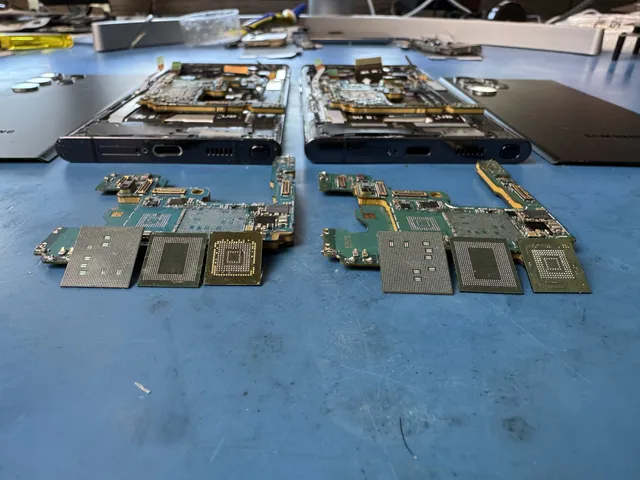
The app's hard boundary is the phone itself: it can only talk to a phone that boots, unlocks, and cooperates. A board-level lab works below that boundary. We repair the power circuits, charging chips, and shorted components that keep a phone from turning on, revive the phone long enough to extract everything, and handle the drops, water damage, and "my repair shop gave up" cases where software never had a chance. The dividing line is simple: if the phone works, software might be your answer. If the phone doesn't work, hardware is the answer. When you're on the hardware side of that line, our cell phone data recovery service is where those cases go, with mail-in from anywhere and no data, no charge.
Frequently Asked Questions
Do phone data recovery apps actually work?
Within their real capabilities, yes: exporting data from working phones, extracting items from iTunes/iCloud/Android backups, and catching recently deleted remnants that haven't been cleaned up yet. Outside those capabilities, no: they cannot recover data that phone encryption has already discarded, and they can't communicate with a phone that won't power on or unlock. Judge any app by its free preview scan, not its landing page.
What's the best data recovery app for a dead phone?
None of them, and any app marketed for that job is selling you something it can't deliver. A phone that won't turn on can't run or connect to software. Dead phones are repaired at the board level: fix the power fault, boot the phone, extract the data. Spending on apps first just delays the fix and, with charging attempts, can worsen the underlying fault.
Can recovery apps get back permanently deleted photos without a backup?
Almost never on a modern phone. Once a photo leaves Recently Deleted (or was deleted past the 30-day window), encryption and storage cleanup destroy the underlying data quickly. Apps sometimes surface thumbnails or cached copies, which can be better than nothing, but the full-resolution originals are typically unrecoverable by any method once the phone's housekeeping has run. Backups are the exception, which is why apps dig so hard for them.
Are free phone recovery apps safe?
Ranges from fine to predatory. The reputable names offer genuine free scan previews with paid export. The sketchy end bundles adware, demands root access it shouldn't have, or takes subscriptions that quietly renew. Download only from official sites, read the refund policy first, and be suspicious of any app promising recovery from dead or wiped phones, because that promise is physically impossible to keep.
When should I skip the apps and go straight to a professional?
When the phone won't turn on, took water or drop damage, isn't detected by a computer, has a dead screen you can't unlock past, or when the data matters enough that you don't want scan-writes gambling with it. Also when apps already failed: repeated scanning doesn't improve odds, it burns time. A free phone consult helps you decide whether your case calls for DIY or lab work.
Get help with data recovery
Bring your device to our Lincroft lab during opening hours, or mail it in.
How to mail your deviceThe $100 diagnostic is non-refundable once diagnostics start, and donor drives or replacement parts you approve are non-refundable once ordered, even if recovery fails.
Published by MDrepairs
MDrepairs is a data recovery and electronics repair lab in Lincroft, New Jersey. Our founder and lead technician Joseph Montanti films real cases for our YouTube channel, showing tools, repair steps and recovery outcomes.
Keep reading
- Old Phone Won't Charge: Getting the Photos Off It

- Phone Ran Over or Crushed? Recovering Photos and Messages

- Phone Fell in Water: The First 24 Hours Checklist