Old Phone Won't Charge: Getting the Photos Off It
Our founder and lead technician, Joseph Montanti, handles cases personally.
If an old phone won't charge, its battery can be dead while the photos are still in flash storage. The quickest way to get the pictures may be through iCloud Photos, Google Photos or the old phone's memory card. If the pictures exist only on a modern encrypted phone, you need the original handset working long enough to unlock it.
On this page
Look for the pictures without powering the phone
- From a computer, sign in to the Apple or Google account you used on the phone.
- In iCloud Photos or Google Photos, look for a date or event you remember. Open a few full-size pictures and download them.
If the camera photos are there but screenshots or pictures from a messaging app are missing, Google Photos may have backed up the camera folder but skipped the other device folders. Google's missing-photo checks.
An older Android phone may have saved the camera folder on a removable microSD card. A card set up as internal storage belongs with the original phone. Google's explanation of portable and internal SD storage.
- With the phone off, remove a card used as portable storage and insert it in a card reader.
- If the computer asks to format it, dismiss the prompt and keep it with the handset. If it opens, look in DCIM for the camera photos.
Battery, port or a phone with a dead screen?
Disconnect a wet, swollen or unusually hot phone. Leave it off the charging pad and unplug the cable. A bulging back or lifting screen needs service before you try to get the photos.
Google's swelling guidance and Apple's liquid-alert guidance.
| What you see on a dry, undamaged phone | What it suggests |
|---|---|
| A battery symbol finally appears after a delay | The phone had enough power to show the charging screen. A deeply discharged battery can take time to get there. |
| It charges wirelessly but the cable makes no connection | The phone can accept power through its wireless circuit. The cable, plug and port are the next places to check. |
| The phone rings or vibrates but the screen stays black | The handset may be running with a display fault. The pictures may be one working display and passcode away. |
| A working cable and wall adapter produce no response | The battery, battery connection, port or board can interrupt the power path. They require different repairs. |
Don’t open the phone to reseat its battery, fit a “revival” pack or improvise a power connection. Apple explains the battery hazard.
- Test the outlet, cable and wall adapter with another device first.
- Use the connector that belongs to the old phone. Look into the port with a light for damaged contacts or compacted debris. Avoid forcing the plug in or digging around with a pin.
How long to charge it and which buttons to use
Apple's charging and restart steps for a dry iPhone leave your pictures in place. Restore or factory reset erases them.
- Charge for half an hour. If it still shows only a battery icon or won’t start, use the buttons for your model.
- On iPhone 8 or later, quickly press and release Volume Up, then Volume Down, then hold the side button until the Apple logo appears. On iPhone 7 or 7 Plus, hold the side button and Volume Down together until the logo appears. On iPhone 6s, the original SE or older, hold Home and the side or top button until the logo appears.
- Allow another half hour on the charger.
Use the restart instructions for your Android model. A long-unused Pixel with a fully drained battery can take up to 25 minutes to respond. A compatible wireless pad can bypass a bad port on a dry, undamaged phone that supports it. Google’s Pixel charging and display checks.
- On a Pixel with a blank screen, hold Power for about 35 seconds, then wait about two minutes.
- Call the Pixel from another phone. If it rings but there is no picture, have the screen checked.
- If Fastboot or Recovery appears, choose the normal startup option (Start or Reboot system now). Leave Wipe data/Factory reset alone.
If it wakes up, make the photo copy
When the phone unlocks, save the pictures to your computer. If it restarts or gets unusually hot while transferring, disconnect it and stop.
- Unlock the phone, connect a data-capable USB cable and tap the USB notification.
- Select File transfer and copy DCIM and the other photo folders you need to the computer. Open sample pictures there, then eject the device.
Import iPhone photos on a Mac or Windows PC
- On Windows, install Apple Devices first. Connect the iPhone by USB, unlock it and tap Trust if asked.
- Open Photos on the computer. Select the connected iPhone, choose the pictures and import them. Check the imported files on the computer. If iCloud Photos used optimized storage, you may need to download full-resolution originals from iCloud.
A known passcode matters after a restart. On a modern encrypted phone, removing the storage chip doesn't turn it into a readable camera card. If the phone belonged to a relative or you no longer know the code, start with the authorized account backups and any pictures shared with family members. Keep the original handset rather than erasing it to get through setup. Accessing a deceased family member's device and backups.
A torn battery connector on an old iPhone
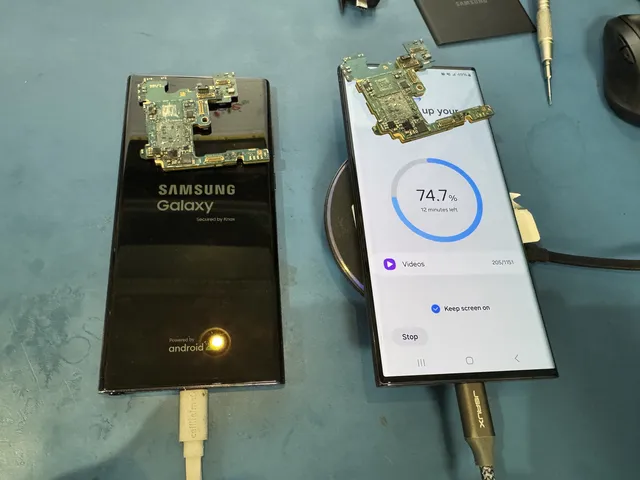
An iPhone 4S that showed little response to power had its battery connector torn completely off the board. Joe cleaned the pads, soldered on a connector from a donor board and recovered the pictures. Watch the iPhone 4S battery connector repair.
A black screen can call for different work. On a Google Pixel, Joe found a missing filter beside the screen connector, fitted a donor filter and recovered the pictures. Watch the Pixel screen-connection repair.
If you can't find another copy, MDrepairs in Lincroft, New Jersey, offers a phone recovery assessment to distinguish a battery or port problem from damage to the original board.
Get help with data recovery
Bring your device to our Lincroft lab during opening hours, or mail it in.
How to mail your deviceThe $100 diagnostic is non-refundable once diagnostics start, and donor drives or replacement parts you approve are non-refundable once ordered, even if recovery fails.
Published by MDrepairs
MDrepairs is a data recovery and electronics repair lab in Lincroft, New Jersey. Our founder and lead technician Joseph Montanti films real cases for our YouTube channel, showing tools, repair steps and recovery outcomes.
Keep reading
- Phone Recovery Apps: What They Can and Can't Do
- Phone Ran Over or Crushed? Recovering Photos and Messages

- Phone Fell in Water: The First 24 Hours Checklist