
iPhone Fell in the Toilet or Ocean: Why Saltwater Damage Is Worse
Our founder and lead technician, Joseph Montanti, handles cases personally.
If your iPhone fell in a toilet or sea water, disconnect any cable and turn it off. Wipe the outside with a soft, lint-free cloth and keep it off while arranging help with contamination inside. Saltwater leaves conductive residue after the water evaporates, so an iPhone that looks dry can still have a damaged board. The photos may remain in storage even when the phone no longer starts.
On this page
What to do if your iPhone falls in water
- Shut it down if it is still running. On a Face ID iPhone, hold the side button and either volume button until the sliders appear, then drag Power Off. On a Home-button model, hold the side or top button for the power-off slider. These are Apple's shutdown steps. Leave the wet iPhone unopened when you take it in for help. If the screen will not respond, skip the force restart and let a technician disconnect the battery.
- Remove exterior liquid. Wipe the surfaces, then gently tap the phone against your hand with the connector facing down. Leave it in a dry area with airflow and keep it out of sealed plastic bags. Apple recommends this handling, including waiting until the phone is dry before opening the SIM tray.
- Clean accessible exterior contamination. Use a soft cloth slightly dampened with water, keeping moisture out of openings. For disinfecting the outside after you dropped it in a toilet, Apple permits a 70 percent isopropyl-alcohol wipe. Its instructions exclude bleach, hydrogen peroxide and immersion in cleaning agents. Surface cleaning does not reach contamination under board components.
Keep a wet or malfunctioning phone off charging, including a wireless charger, and avoid restarting it to check whether it survived. Rice, heat, compressed air and objects pushed into the connector can add damage; Apple's liquid-alert guidance specifically rules them out. A liquid-detection alert protects the connector, so overriding it is the wrong step when the goal is preserving the phone's files.
Why saltwater keeps causing trouble after drying
Dissolved salts make water conductive. On a circuit board, that lets current take paths between connections that should be separate. Contamination and moisture also support corrosion, which damages metal connections. As water evaporates, its dissolved material stays behind.
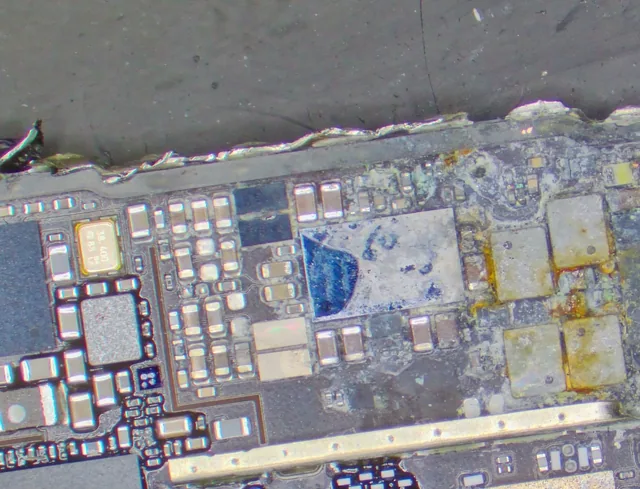
Residue can become conductive again when it takes up moisture. GEN3's documentation for electronics-contamination testing explains the link between ionic contamination, leakage current and corrosion. That is why drying the outside and removing contamination inside are different jobs.
A short can prevent startup immediately. Corrosion can instead leave the phone working for a while, then interrupt a connection or create a new short. The time and liquid exposure influence the damage, but there is no fixed ten-minute or two-day cutoff that decides whether pictures can be recovered. Inspection follows the damaged circuits and checks whether the original data-bearing hardware still works.
| Liquid | What can remain | Why the distinction matters |
|---|---|---|
| Ocean or salt water | Dissolved salts and other contamination. | Evaporation leaves residue that can keep affecting electrical connections. |
| Toilet water | Water, bowl contents and any cleaning products present. | The outside needs appropriate cleaning, and contamination inside needs separate attention. |
| Pool water | Pool-treatment chemicals and dissolved minerals; salt in a saltwater pool. | A clear-looking liquid can still leave residue. |
| Soda, juice or sweetened coffee | Sugars and other dissolved ingredients. | A sticky coating can remain after the visible liquid has gone. |
| Tap water | Dissolved minerals. | Ordinary water can still cause shorts and corrosion inside a phone. |
Samsung's device guidance also identifies salt and chlorine as damaging contaminants; handling instructions still need to match the particular phone.
What an ocean-damaged iPhone repair involves
In this ocean-damaged iPhone, Joe found a hot capacitor and burnt board material causing a short. He cleared the damaged area and replaced a corroded USB controller, then repaired display circuitry when the phone powered up with backlight but no image. The customer's pictures were recovered.
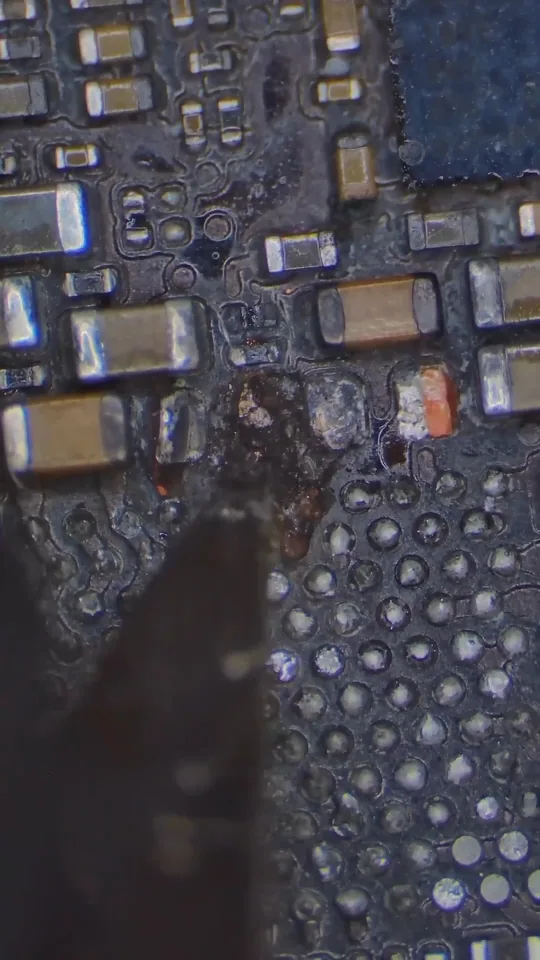
In another iPhone recovered after an ocean drop, several shorted components drew current as soon as power was applied. Joe removed the shorts, including a failed baseband processor, and replaced the USB controller. The phone reached the point where its photographs could be saved.
These repairs can restore enough function for extraction without restoring every phone feature. In particular, the baseband processor handles cellular communication; removing a failed one in a supported repair is different from removing the main processor that protects the stored data. The intended result is access to the files on the original phone.
The original storage and security hardware matter
iPhone files are encrypted. Apple's Secure Enclave documentation describes a hardware key that ties protected data to its device. Data Protection also uses the passcode for protected classes of files.
A storage chip containing data therefore needs the corresponding security hardware and credentials to turn those bytes into usable photographs or messages. A new motherboard contains different hardware. Replacing the board may restore the handset while leaving the original files behind.
For a phone that has sat in a drawer for a month, the recovery question is still whether that original hardware can be restored sufficiently to unlock and read the data. Age since the spill is not a substitute for examining it. A corroded charging component and destroyed storage or security silicon present very different repair problems.
The board work behind liquid-damage recovery costs
The price depends on the repair needed to make the files accessible. A connection repair and a board with several damaged circuits involve different amounts of work. The listed liquid-damage recovery prices are:
| Work category | Listed price |
|---|---|
| Clean and reassemble | $1,000 to $2,000 |
| Moderate board repair | $1,000 to $2,000 |
| Major board repair | $1,000 to $2,000 |
| Original-hardware recovery assessment | $3,500 |
The diagnostic costs $100, credited toward a successful recovery, and you approve the estimate before recovery work begins. Standard recovery is estimated at 4–6 weeks and varies by case. Rush service changes when assessment starts rather than setting a completion date.
MDrepairs accepts phones at its Lincroft, New Jersey lab and through its mail-in service. Before shipping a contaminated phone, contact the lab for packing instructions, especially if its battery or case is damaged. iPhone recovery costs also depend on the model and the original components needed for access.
Water resistance and files already saved elsewhere
A phone in a back pocket can slip into the toilet when you sit down. Move it somewhere dry first. Water resistance is tested under controlled conditions and can diminish with use. Apple's ratings vary by iPhone model; they do not make an ocean swim an intended use. Its guidance advises against swimming, bathing and intentional submersion, and its limited warranty excludes liquid damage. AppleCare accidental-damage coverage is a separate repair or replacement option subject to the plan's terms.
A replacement phone does not retrieve files that existed only on the damaged one. Before authorizing replacement or erasure, check what you already have. On another computer or device, open iCloud Photos with the same Apple Account and look for the dates you need. Apple's download instructions explain saving selected photos and videos from that existing library. An earlier computer or iCloud backup may provide another copy.
If the iPhone is already dry, running steadily and unlocking normally, back up its local contents before further service or troubleshooting, even if it has not been cleaned or repaired. For an iCloud backup, use Settings > your name > iCloud > iCloud Backup > Back Up Now, following Apple's backup steps; end the session if it heats up or starts rebooting. Use its existing battery charge for this; do not keep a newly wet phone running, reconnect power or charge it to make a backup.
Get help with data recovery
Bring your device to our Lincroft lab during opening hours, or mail it in.
How to mail your deviceThe $100 diagnostic is non-refundable once diagnostics start, and donor drives or replacement parts you approve are non-refundable once ordered, even if recovery fails.
More lab videos
Published by MDrepairs
MDrepairs is a data recovery and electronics repair lab in Lincroft, New Jersey. Our founder and lead technician Joseph Montanti films real cases for our YouTube channel, showing tools, repair steps and recovery outcomes.
Keep reading
- iPhone Stuck on “Attempting Data Recovery”: What to Check Before Restore
- Photos Missing After an iOS Update? Don't Panic Yet
- Deleted Photos on iPhone: Recovery Past 30 Days