Hard Drive Whining or Buzzing Sound: Electrical vs Mechanical Failure
Our founder and lead technician, Joseph Montanti, handles cases personally.
If your hard drive is whining, the cause is almost always electrical: a failing capacitor on the PCB, a struggling motor driver IC, or a voltage regulator getting too hot. If your drive is buzzing, the cause is almost always mechanical: a spindle bearing degrading, the heads chattering against the ramp, or a vibration resonance in the chassis. The two sounds are easy to confuse but they point at very different problems. Whining means the board needs attention before the motor takes damage. Buzzing means the inside of the drive is wearing out and the heads may crash within hours or days.
The single most important step regardless of which sound you hear: power the drive off now. Every additional minute of operation with abnormal noise is more damage. If you're hearing whining, the failing electrical component is heating up and could kill the motor next. If you're hearing buzzing, the failing bearing is generating heat and metal-on-metal contact that destroys the platter alignment. Disconnect the drive, leave it off, and call (732) 933-7717 before anything else.
On this page
Whining vs Buzzing: What You're Actually Hearing
People use these words interchangeably, which makes diagnosis harder. Let's pin them down.
Whining is a high-pitched, sustained sound. Think of it as a steady tone, often in the 1 kHz to 10 kHz range. It can be a thin squeal, a sustained hiss, or a pulsing high tone that varies in pitch as the drive's load changes. The pitch often follows the spinning of the platters or the PWM (pulse-width modulation) frequency of the motor driver. You hear it most clearly when the drive is doing work: spinning up, reading, or writing.
Buzzing is a lower-pitched, mechanical sound. Think of it as a rough rumble or a coarse vibration in the 100 Hz to 1 kHz range. It can be steady or pulsating. It often has a "rough" quality, like something is grinding against something else at low speed. You hear buzzing most clearly when the drive is just sitting at idle or during seek operations.
The key distinction: whining is steady and pure-tone. Buzzing is rough and lower. If you can't tell which one you're hearing, the third option is clicking, which is sharp and rhythmic, not sustained at all. Clicking, beeping, and grinding all have their own meanings. Whining and buzzing are different from those.
Whining = Electrical Failure
When you hear a hard drive whine, the source is almost always something electrical, usually on the PCB. Electronic components produce audible sounds when they fail in specific ways. The whine you hear is literally the high-frequency oscillation of a degraded component.
Common electrical whine sources:
- Failing electrolytic capacitors that have lost dielectric properties
- Motor driver ICs operating outside their normal PWM frequency due to a hardware fault
- Voltage regulators that are oscillating instead of holding steady voltage
- Inductors with shifted resonance frequencies due to mechanical damage
- The brush noise of the spindle motor itself when the bearings are worn (less common)
The good news about electrical whine: the data is usually fine. The PCB is producing sound but the heads and platters are intact. A PCB repair (which we covered in detail in our PCB articles) can fix the electrical issue and the drive returns to normal operation. The bad news: if you ignore the whine and keep using the drive, the electrical failure can cascade. A failing voltage regulator can deliver wrong voltage to the motor, which can damage the motor or the heads. What started as a simple PCB fix can become a full mechanical recovery.
Capacitor Whine: The High-Pitched Squeal
Electrolytic capacitors are the small cylindrical components on the PCB that smooth voltage spikes. They use a wet electrolyte (a chemical solution) between metal plates. Over time, the electrolyte dries out. The capacitor loses capacitance and starts to fail. As it fails, it can produce a high-pitched whine because it can no longer suppress the PWM noise from the switching power supply.
The whine sounds like a tiny squeal at around 2 to 5 kHz. It's especially noticeable in a quiet room. Sometimes you hear it more when the drive is doing heavy work, sometimes more at idle. The pitch is steady or slowly varies.
Capacitor failure progresses. First the cap whines. Then it leaks (you'll see dried brown residue around its base if you look closely). Then it stops working entirely. Once it fails completely, the voltage rail it was supporting becomes unstable. Other components downstream see voltage swings they weren't designed for. Eventually the drive's controller resets or refuses to operate.
Motor Driver IC Whine: The Buzzing-Whine Hybrid
The motor driver IC sits on the PCB and provides the alternating currents to the three or four coils of the spindle motor. It uses PWM at a specific frequency (usually 20-30 kHz, above human hearing). When the driver is healthy, you can't hear the PWM. When the driver is failing, the PWM frequency can drift into the audible range, producing a whine that has buzz-like qualities (because PWM is fundamentally a square wave).
Motor driver whine often varies with drive activity. Spinning up produces one frequency. Sustained spinning at full speed produces another. Seeking is different again. The whine tracks the work the drive is doing, which is a giveaway that the driver IC is the source.
Motor driver failures are more dangerous than capacitor failures because the driver controls the motor directly. A driver that's producing wrong PWM can deliver wrong currents to the motor windings, which can overheat them or damage the bearings indirectly through electrical stress.
Voltage Regulator Failure
Modern drives have voltage regulators that step the 12V and 5V from the PSU down to the 1.8V, 1.5V, and 3.3V the chips actually need. Failing regulators can whine for a few reasons:
- The switching frequency has drifted from its designed setpoint
- The regulator is in protection mode and pulsing on/off (which sounds like a fast tick or buzz)
- The output capacitor is degraded and no longer filtering the switching noise
Regulator whine often appears specifically during spin-up or during heavy seek activity, when the drive's power consumption changes rapidly. The regulator is working harder to maintain voltage and any weakness in its design becomes audible.
Failed voltage regulators can also kill the drive entirely by either delivering wrong voltage or by failing in a way that pulls the PSU rail down. Catch them early.
Buzzing = Mechanical Failure
When you hear a hard drive buzzing, the source is mechanical. Something inside the sealed HDA is making physical contact or moving in a way it shouldn't. The sounds are lower-pitched and rougher than electrical whines because mechanical vibrations are inherently at lower frequencies than electronic switching.
Common buzzing sources:
- Spindle bearing degradation
- Head ramp contact during seeks (heads bouncing against the ramp)
- Chassis resonance with desk or surface vibrations
- Loose internal components if the drive has been dropped
The bad news about mechanical buzz: it's usually more serious than electrical whine. Mechanical failures often progress to head crashes or full bearing seizure within hours or days of becoming audible. The drive is telling you it has limited time left.
Spindle Bearing Buzz: The Death Rattle
The spindle motor uses bearings to let the platters spin freely at 5,400, 7,200, or 10,000 RPM. Modern drives use fluid dynamic bearings (FDB), which use a thin film of oil between the spinning shaft and the stationary housing. Older drives used ball bearings. Both can fail.
When bearings degrade, they produce a buzzing or rumbling sound as the spinning components contact the stationary ones unevenly. Fluid bearings dry out, the oil film breaks down, and metal touches metal. Ball bearings develop pitting or lose lubrication and the balls grind rather than roll. The result is the buzz you hear.
Bearing buzz often follows a progression:
- Faint buzz at first. Only audible if you're listening for it. The drive still works normally.
- More pronounced buzz. Audible across the room. Drive starts having occasional read errors as platter speed becomes unstable.
- Buzz with rattle. Bearing is on its way out. Drive starts having frequent errors and slow performance.
- Drive stops or seizes. The bearing locks up. Drive becomes silent (because the motor can't move). At this point you're in stuck-spindle territory.
The window between "faint buzz" and "seized motor" is typically days to weeks for consumer drives. Enterprise drives can take longer because they're designed for higher cycle counts, but they fail the same way. Once you hear bearing buzz, the clock is ticking.
Head Positioning Chatter
The heads are positioned by an actuator arm that swings across the platters. The arm parks at the ramp (outside the platter) when the drive is idle, and swings to specific positions when seeking. During normal operation, the arm movements are quiet. Slight chatter is normal during heavy seek activity.
When something goes wrong with the head positioning, you can hear a coarse buzzing or chattering sound. Causes include:
- Damaged ramp. If a drop or impact damaged the head ramp, the heads bounce on the damaged surface during parking and unparking. You hear a buzz at idle as the heads vibrate against the ramp.
- Failing voice coil motor (VCM). The VCM moves the actuator. If it's failing, the actuator can move erratically and produce buzzing as it overshoots and corrects.
- Stuck or damaged bearing in the actuator pivot. Less common but possible. The actuator pivots on its own bearings, separate from the spindle bearings.
Head chatter is often a precursor to a head crash. The heads are not moving in the controlled, smooth arc they should. They may strike the platter. Once heads contact the magnetic surface, you have platter damage, which is a much more expensive recovery.
Chassis Vibration Resonance
Sometimes what sounds like a buzz is actually the drive vibrating in sympathy with something else. Common scenarios:
- Drive mounted on a hollow plastic enclosure that resonates at the platter rotation frequency
- Drive sitting on a desk that resonates with the drive's vibrations
- Drive in a server chassis where the cooling fans vibrate at a similar frequency to the drive
Resonance buzz is benign for the drive itself, but it can be annoying. The simple test: pick up the drive while it's running. If the buzz stops or changes character, it was resonance. If the buzz persists in your hand, it's coming from the drive itself.
How to Tell Which One You're Hearing
Put your ear within a few inches of the drive (don't touch it while running). Listen for 10 seconds. Try to characterize the sound: is it high or low? Rough or pure? Steady or pulsing?
PCB whines are easiest to localize by leaning close to the green board on the bottom of the drive. Mechanical buzzes are easier to feel through the metal chassis. If the sound is mostly from the bottom, it's likely electrical. If it's from the entire chassis, it's likely mechanical.
Move files, run a backup, do something that makes the drive work. Does the sound change pitch or intensity? Electrical whines usually track with drive activity because the PWM frequency varies with load. Mechanical buzzes are usually more constant.
After 10 minutes of operation, touch the green PCB on the bottom of the drive briefly (it's safe, just don't hold). Healthy PCB temperature is warm. If one specific spot is much hotter than the rest, that component is likely failing electrically.
Lifting the drive off its surface eliminates resonance. If the buzz stops or changes significantly, it was resonance. If the buzz continues, it's internal to the drive.
| What You Hear | Likely Cause | Action |
|---|---|---|
| High-pitched steady whine, varies with load | Failing capacitor or voltage regulator | Power off, send for PCB repair |
| Whine with buzz quality, follows motor activity | Motor driver IC failure | Power off, more urgent than cap whine |
| Lower-pitched rumbling buzz, constant | Spindle bearing degradation | Power off, prioritize recovery before bearing seizes |
| Buzz with chatter during seeks | VCM or ramp problem | Power off, head crash risk |
| Buzz that stops when drive is lifted | Chassis resonance, not internal | Move drive to different surface, no recovery needed |
Urgency: Hours vs Days vs Weeks
Different failure modes have different timelines. The urgency depends on which kind of sound you're hearing.
Capacitor Whine: Weeks to Months
A whining capacitor can run for weeks or months before fully failing. The drive may seem fine other than the noise. There's time to back up, plan a recovery, and replace the drive. But the failure is progressing and will eventually take down the rest of the PCB. Don't wait forever.
Motor Driver Whine: Days to Weeks
A failing motor driver can run for a while but the failure tends to accelerate because the driver feeds the motor. Once the driver starts producing wrong currents, motor damage compounds. The window is shorter than capacitor failure.
Voltage Regulator Whine: Days
Failing regulators can fail catastrophically, taking the rest of the PCB with them. Days, not weeks. Power off now and send the drive in.
Bearing Buzz: Hours to Days
Spindle bearing failure is the most urgent. Once you hear a bearing buzz, you have somewhere between hours and a few days before the bearing seizes entirely. The drive may slow down, generate read errors, or eventually just stop. Recovery is easiest while the drive is still spinning. Power it off, but plan to send it in soon.
VCM or Head Chatter: Hours
If the heads are chattering, head crashes are imminent. Hours, maybe minutes of safe operation remain. This is the most urgent of all. Power off immediately.
What to Do Right Now
Disconnect from your computer or shut down the system. Stop the noise from continuing. Every minute is more damage.
Write down a description of what you heard. When did it start? Was there a trigger event (drop, surge, power cycle)? This helps the lab pinpoint the cause faster.
Before you panic, see if you have any backups. Time Machine on Mac. File History on Windows. Cloud backups via OneDrive, iCloud, Backblaze, iDrive, etc. The data you can pull from backups doesn't need to be recovered. Knowing what's already safe helps you prioritize what to recover.
If a full recovery isn't possible, which files matter most? Photos, financial records, work projects, family videos. Make a list before you send the drive in.
The diagnostic comes before the recovery estimate. (732) 933-7717.
What Not to Do
- Keep using the drive. Every minute of operation with abnormal noise is more damage. The drive is telling you it needs help.
- Run disk repair tools. chkdsk, Disk Utility First Aid, fsck. These tools assume a healthy drive and write to it. On a drive with mechanical issues, writes destroy data.
- Try to "warm it up" or "let it settle". The drive doesn't have a warm-up phase. The noise isn't going away. Continued operation just makes it worse.
- Open the drive yourself. The HDA must be opened in a clean, filtered work area. Dust on the platters causes head crashes.
- Try the freezer trick. Doesn't work for whining or buzzing. Adds condensation damage if you try.
- Drop or tap the drive thinking it'll dislodge something. Drops and taps cause head crashes. The drive's noise is internal to working components, not stuck debris.
- Run recovery software against the running drive. Recovery software triggers heavy reads that stress the failing components. Image first with proper tools, then run recovery on the image.
Inside the Lab: Diagnosis and Recovery
The lab approach depends on whether the sound is electrical or mechanical. The initial diagnosis guides the work that follows.
Sound Analysis
We power the drive briefly and record the sound with a high-quality microphone. The recording is analyzed for frequency content: the spectrum tells us roughly where the sound is coming from. A pure tone at 3 kHz suggests capacitor whine. A complex spectrum with 7,200 Hz fundamental and harmonics suggests bearing rumble.
Electrical Diagnosis for Whining Drives
Voltage rails are checked for proper levels and stability. Capacitors are tested for ESR (equivalent series resistance) which climbs as caps fail. Hot spots on the PCB are identified with thermal imaging. These tests help identify the failing component.
Component-Level Repair
For most electrical issues, the fix is component replacement. Failing capacitors are desoldered and replaced. Failed voltage regulators are swapped for new ones. Bad motor driver ICs are replaced with matched parts. The repair is fast and inexpensive compared to mechanical work.
Mechanical Diagnosis for Buzzing Drives
Head and platter work is done in a laminar-flow work area. Bearing wear is visible as discoloration on the spindle. Ramp damage is visible as scratch patterns. Head position errors are diagnosed by watching the actuator's behavior during powered operation.
Mechanical work in a filtered work area
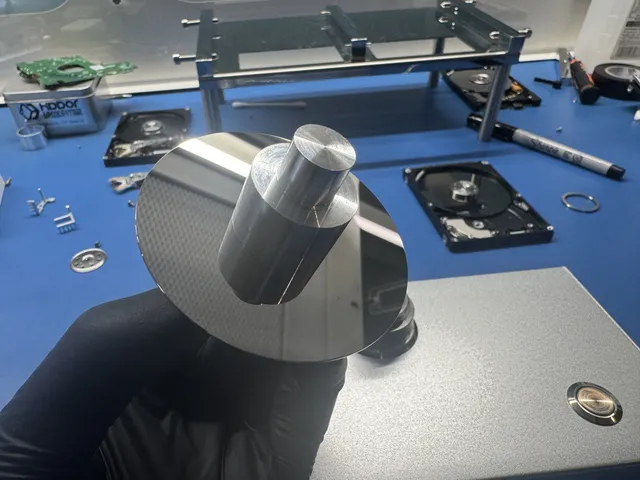
For bearing failure, the recovery path is a platter swap to a donor drive with a working motor. For VCM or actuator issues, we may need to replace the entire head stack assembly. Both procedures take place in a laminar-flow work area.
Imaging After Repair
Once the drive is stable (either electrically repaired or mechanically swapped), we image it sector by sector using storage-industry-grade tools like PC-3000. The image lives on a separate target drive. We never write to the source.
Cost Breakdown
| Failure Type | Typical Range | Why |
|---|---|---|
| Capacitor whine, single component replacement | $1,000 to $1,500 | Quick PCB repair plus imaging |
| Motor driver IC failure, full PCB swap | $1,000 to $1,500 | Donor PCB plus ROM transplant plus imaging |
| Voltage regulator failure with cascade damage | $1,000 to $1,500 | Multiple components affected, more diagnosis time |
| Bearing buzz caught early, drive still spinning | $1,500 to $3,000+ | Image before bearing seizes, may not need swap |
| Bearing failure progressed to platter swap | $2,250 to $3,500+ | Platter transfer to donor in a laminar-flow work area |
| VCM or head crash from chatter, head swap needed | $1,500 to $3,000+ | Head stack replacement plus careful imaging |
The listed electrical cases cost $1,000 to $1,500. The listed head-replacement case costs $1,500 to $3,000+. The difference is significant, which is why catching the symptoms early matters. A whining capacitor caught at the whine stage is a $1,000 repair. The same drive ignored for a month, where the cap took out the motor driver, then the motor, can become a $3,000+ mechanical recovery. More on recovery pricing. The $100 diagnostic is credited toward a successful recovery and is non-refundable once diagnostics start. Donor drives or replacement parts you approve are non-refundable once ordered, even if recovery fails. You approve the estimate before recovery work starts.
Preventing This From Happening Again
Listen to Your Drives Periodically
Pay attention to the sounds your drives make. The baseline sound of a healthy drive is a quiet whoosh of the platters and soft chatter during seeks. Anything that develops over time (a new whine, a new buzz) is the drive telling you something.
Replace Aging Drives Before They Fail
Hard drives running 24/7 for 5+ years are on borrowed time. The bearings, capacitors, and other components have accumulated wear. Once a drive reaches the "started making noise" stage, every additional month is rolling the dice. Replace before you have to recover.
Use SMART Monitoring to Catch Electrical Issues Early
SMART data tracks several attributes that hint at impending PCB issues: temperature, reallocated sectors (which can cascade from voltage instability), and seek error rate. Monitor SMART once a quarter with CrystalDiskInfo or DriveDx. Replace drives showing degrading attributes.
Use Power Conditioning for Important Drives
A UPS (uninterruptible power supply) or at minimum a quality surge protector extends component life. Voltage spikes, sags, and noise on the power line all stress capacitors and regulators. Clean power means longer-lived components.
Keep Drives in Cool, Quiet Environments
Heat accelerates aging. Vibration accelerates mechanical wear. Keep drives at ambient temperature (under 30C), with good airflow, and on a stable surface. Don't stack drives unless they're designed for it. Don't put a drive on a subwoofer.
Back Up Important Data to a Second Location
The 3-2-1 backup rule: three copies, two media types, one offsite. Cloud backups (Backblaze, iDrive, Carbonite) are cheap insurance against any single drive failure. Local backups to a separate physical drive add a second layer. The vast majority of "I lost everything" stories come from people who had one copy of everything important. More on backup planning.
FAQ
How can I tell if the buzzing is from the drive or from my computer fan?
Disconnect the drive from your computer while leaving the computer running. If the buzz goes away, it's the drive. If the buzz continues, it's something else in your system (fan, PSU, etc.).
My drive whines only sometimes. Should I be worried?
Yes, even intermittent whining is a warning. Components that produce sound when failing usually progress to total failure. The intermittent stage is the cheapest time to recover the data and replace the drive. Don't wait until the whine is constant.
Will the noise stop if I let the drive cool down?
Sometimes briefly, but the underlying issue isn't temperature-related. Failing capacitors and bearings produce noise regardless of temperature in the steady state. Cooling might temporarily reduce the noise but the failure is still progressing.
Can I just replace the PCB myself to fix the whine?
Possibly for capacitor-level issues if you have soldering skills. For PCB swaps, modern drives need a ROM transplant (the original drive's adaptive data must move to the new board), which requires hot air rework on a tiny chip. More on PCB swap process.
Is there any difference in recovery success between WD, Seagate, Toshiba, and Hitachi drives?
The cost may vary because donor sourcing differs by brand. Some Hitachi enterprise drives have limited donor availability, which can increase cost. More on what we cover for HDDs.
How long does recovery take?
Our standard recovery estimate is 4–6 weeks; timing may vary by case. Mechanical damage and donor availability can add time. More on recovery timelines.
Should I send the drive in if I'm not sure whether it's whining or buzzing?
Yes. We diagnose and tell you exactly what's wrong. Mistaking electrical for mechanical (or vice versa) can lead to wrong DIY attempts, but we have the equipment to assess the actual cause.
Will recovery software help me before I send the drive in?
Generally no for drives making abnormal sounds. The software triggers heavy reads that stress the failing components. Image first with lab-grade tools, then run recovery on the image. Software run directly on a noisy drive often makes things worse.
What if I already used the drive for a few hours after hearing the noise?
The damage progresses but recovery is usually still possible. Tell us upfront how long you used the drive after the noise started. This helps us plan the recovery approach and gives you a realistic expectation.
Do you ship to people outside New Jersey?
Yes. We accept hard drive cases by mail-in from across the US. You generate a free prepaid UPS label on the mail-in form (contiguous US), packing instructions, and signed delivery confirmation. How to ship safely.
MDrepairs is an independent data recovery lab serving customers nationwide via mail-in service. Head and platter work is done in a laminar-flow work area. See all our recovery services.
Get help with data recovery
Bring your device to our Lincroft lab during opening hours, or mail it in.
How to mail your deviceThe $100 diagnostic is non-refundable once diagnostics start, and donor drives or replacement parts you approve are non-refundable once ordered, even if recovery fails.
Published by MDrepairs
MDrepairs is a data recovery and electronics repair lab in Lincroft, New Jersey. Our founder and lead technician Joseph Montanti films real cases for our YouTube channel, showing tools, repair steps and recovery outcomes.
Keep reading
- BitLocker Recovery Key Not Working? Check the Key ID Before Resetting
- exFAT Drive Corrupted? Cross-Platform Rescue Guide
- External Drive Painfully Slow? It May Be Dying