Crucial MX500 Stopped Responding? Firmware vs Hardware Failure
In this article
A Crucial MX500 that stops responding may have a connection, power, firmware, controller, or NAND fault. Detection alone cannot distinguish them. Preserve the original drive and recover important data before an RMA: a warranty replacement does not return your files. Modern encrypted SSDs do not have a simple donor-controller or chip-off fallback.
The MX500's reliability reputation is real but uneven. Drives that ran light office workloads tend to last 7+ years. Drives that ran databases, virtual machines, or constant video editing wear faster. By year 3 or 4 of heavy use, write-amplification on the MX500 chews through its rated endurance. The drive can boot fine on Monday and refuse to be detected on Tuesday. We'll walk through how to diagnose, what to try, and when to send it to a lab.
How the MX500 Typically Fails
The MX500 uses a Silicon Motion controller and Micron NAND, with hardware revisions across its production life. Recovery support must match the actual controller, firmware, and NAND configuration; a model name alone is not enough. The controller manages the flash translation layer that maps logical sectors to physical flash locations.
The Slow Death Pattern
The drive develops slow read speeds on old data first. Boot times start creeping up. Then random freezes. Then the drive disappears from the OS occasionally. Then one day BIOS doesn't see it at all. This whole sequence can take weeks or hours depending on how hard the drive is being worked.
If you're catching the drive in this slow-death window, you're lucky. You have time to back things up. SMART data trends are the best early-warning system. Run CrystalDiskInfo monthly. Watch the numbers move.
The Sudden Drop Pattern
Other times the drive is fine and then it isn't. Power down at the end of the day, power up the next morning, drive doesn't show up in BIOS. No warning. This usually means the controller hit an internal error during the previous shutdown that left the FTL in an inconsistent state. On boot, the controller can't validate its own tables and refuses to come online.
The Capacity Drop
Some MX500s exhibit a variant of the 8MB bricked-mode behavior. The drive shows up but reports the wrong capacity (often 0MB or a fraction of the real size). Same underlying cause: FTL corruption or exhausted spare blocks. More on this state in our 8MB bricked-mode guide.
The Thermal Latch
Excessive temperature can contribute to throttling or instability, but a particular read speed does not diagnose overheating. Slowness can also come from NAND read errors, interface problems, or firmware. Avoid repeatedly power-cycling an unstable SSD to obtain short bursts of access.
Firmware Bug or Hardware Failure?
This is the first question to answer because it changes everything that comes next. Here's how to tell.
| Symptom | Likely Cause | Recovery Approach |
|---|---|---|
| Drive shows correct capacity but won't boot Windows | OS-side corruption or partial firmware | Boot another OS, image the drive, copy files |
| Drive shows correct capacity but read errors | NAND wear, ECC failures on specific blocks | Image with retry logic, salvage what's readable |
| Drive shows wrong capacity (0MB or tiny) | FTL corruption, bricked mode | Lab tools required, do not run fixes |
| Drive intermittently appears in BIOS | Controller PCB or power issue | Lab diagnosis, possible donor swap |
| Drive never appears anywhere | Power, PCB, controller, firmware, or NAND fault | Assess and preserve the original electronics; chip-off is not an encryption bypass |
| Drive present but slow (50 MB/s reads) | NAND wear or thermal throttle | Image now, replace drive, salvage data |
If you're in the top three rows, there's a reasonable chance you can recover the data yourself with care. If you're in the bottom three rows, you need lab help.
Check the SMART Data First
Before doing anything else, pull the SMART data. Free, takes 2 minutes, tells you a lot.
Windows: CrystalDiskInfo
Download CrystalDiskInfo. Open. Select the MX500 from the dropdown. Look at the health percentage in the top-left. Below that, scroll the SMART attributes.
What to Look At on MX500
| Attribute | Meaning | Warning Threshold |
|---|---|---|
| 05 Reallocated Sectors Count | NAND blocks that failed and were swapped out | Above 0 means wear is happening |
| 09 Power-On Hours | How long the drive has been spinning | Over 35,000 hours is 4 years of constant power |
| 0C Power Cycle Count | How many times the drive booted | High count with low hours suggests instability |
| AB Program Fail Count | Failed NAND program operations | Any non-zero value is concerning |
| AC Erase Fail Count | Failed NAND erase operations | Any non-zero value is concerning |
| AD Wear Leveling Count | Average wear across blocks | Higher means more wear |
| BB Reported Uncorrectable Errors | Read errors ECC couldn't fix | Any value above zero means data has been lost |
| F1 Total LBAs Written | Total writes in lifetime | Compare to TBW rating for your model |
What TBW Means for MX500
Check the endurance specification for the exact capacity and revision. TBW is a warranty/endurance measure, not a countdown to failure. A drive can fail below that rating or keep working above it. Interpret SMART units using the model's documentation and prioritize an actual backup over a predicted remaining lifetime.
Known MX500 Firmware Issues
The MX500 has shipped with several firmware revisions over its lifetime. Some had bugs that affect failure patterns. Knowing your firmware revision helps figure out what's happening.
M3CR023 and Earlier
Early and later MX500 revisions use different firmware branches. Record the installed revision and consult Crucial's support information for that exact drive; do not assume an issue or update applies merely because another MX500 owner reported it.
M3CR032
Firmware release notes describe which fixes apply to a particular revision. A reported sleep/resume problem does not by itself establish the cause of a drive that no longer responds.
M3CR045 and Later
A newer firmware number does not rule out firmware failure, and a missing drive is not a suitable candidate for a speculative update. For a healthy drive, back up first and use only the update matched by Crucial's tools.
The Write Amplification Issue
Some MX500 owners have measured higher-than-expected write amplification, where the host writes 1GB but the drive writes 3-4GB internally to flash. This eats endurance faster than the drive's TBW rating predicts. Workloads with lots of small random writes are most affected. Database servers, VM hosts, NVR systems, busy mail servers.
Safe Steps You Can Try Yourself
If the drive is partially responsive, these are non-destructive moves that occasionally bring it back. Don't run any of these if the drive reports 0MB capacity. That's bricked mode and these steps will make it worse.
If the MX500 is your OS drive, boot from a Windows install USB or a Linux Live USB. From the Live environment, can you see the drive? Can you see partitions? Can you read individual files? Each step tells you something. If you can see partitions and read files, copy them off now before doing anything else.
SATA cables fail more than you'd think. SATA ports on the motherboard can also fail. Swap to a new cable and a different port. If the drive suddenly works, you had a connection issue and the drive is fine (back it up anyway, the failure scared you for a reason).
Power down completely. Unplug the PC for 5 minutes. Boot back up. Some MX500s recover from soft errors with a true cold boot. This is safe to try.
If SMART shows the drive has reached or exceeded its TBW rating, the drive is at end of life. Even if you can see files now, the next read or write could be the last. Image the drive immediately to a new SSD. Don't try to keep using it.
What NOT to Do
- Run Crucial Storage Executive's "Secure Erase" feature. This wipes the drive. People click it thinking it'll "reset" the drive and fix it. It does the opposite of help.
- Update the firmware on a malfunctioning drive. Firmware updates require the controller to be healthy. A drive that's already in trouble can be permanently bricked by a failed firmware update.
- Format or repartition the drive. These commands write to the drive. On a drive with file system damage, write operations can spread the damage and overwrite recoverable data.
- Run CHKDSK or fsck with fix flags on a failing drive. These tools assume the drive works correctly. On a failing drive, they'll write incorrect repairs that destroy what was salvageable.
- Send it for RMA before extracting data. Crucial wipes RMA returns. You'll get a working drive back, with none of your data on it.
- Run the drive in a USB enclosure. USB-to-SATA bridges issue weird commands during enumeration that can trigger the failing controller into worse states.
The Crucial RMA Trap
Crucial's warranty process is a refurb model. You ship them the failed drive. They ship you back either a refurbished drive of the same model or a different-but-equivalent model. They explicitly wipe (or destroy) the drive you sent in. Their warranty does not include data recovery and they make this clear in the fine print.
This means if your MX500 has data you care about, you have two paths:
- Skip the RMA, send to a recovery lab. Request a recovery assessment before deciding whether to use the warranty replacement. Drive comes back to you (with or without working state, depending on what was wrong). You buy a new drive yourself.
- RMA the drive, accept the data loss. You get a free replacement drive. You lose every photo, document, and file that was on the original. This is the right path only if you have a current backup that covers everything.
Inside the Lab: MX500 Recovery Process
When an MX500 arrives at MDrepairs, this is roughly how we approach it.
Diagnosis on PC-3000 SSD
ACE Lab lists support for specified MX500 configurations, including encrypted variants. We identify the controller and firmware and check the supported recovery operations before attempting service-mode access. Such access still requires functioning hardware; it does not replace an electrically dead controller.
FTL Repair
If supported and sufficient service information survives, a virtual translator can reconstruct access to logical sectors without relying on the damaged normal mapping. This is not a guaranteed restoration of the SSD to service, and the resulting readable data must be copied to separate storage.
The flash translation layer changes as the SSD writes and relocates data. Its metadata, backup structures, and the NAND containing them can be damaged. A specialist may use surviving information to reconstruct the mapping, but neither an intact backup nor a successful rebuild can be assumed before examination.
NAND Imaging With Retry
For unstable reads, we prioritize accessible data and control timeouts, retries, and power handling. Repeatedly forcing a weak area can waste the drive's remaining access window. Read-retry adjustments depend on the supported controller and NAND; we cannot promise a particular recovery percentage from a worn SSD.
NAND read-retry can change the sensing thresholds used to distinguish stored charge states. That is different from changing the SSD's supply voltage, and it does not mean every PC-3000 utility exposes arbitrary voltage adjustments. The available settings and their usefulness depend on the hardware and failure.
Donor PCB or Controller Swap
An electrically failed controller is a serious limit on an encrypted SSD. A generic replacement does not supply the original drive's encryption information. We first assess repairable power and PCB faults and whether the original controller can still operate; any donor-board work must preserve the required original components and device-specific information.
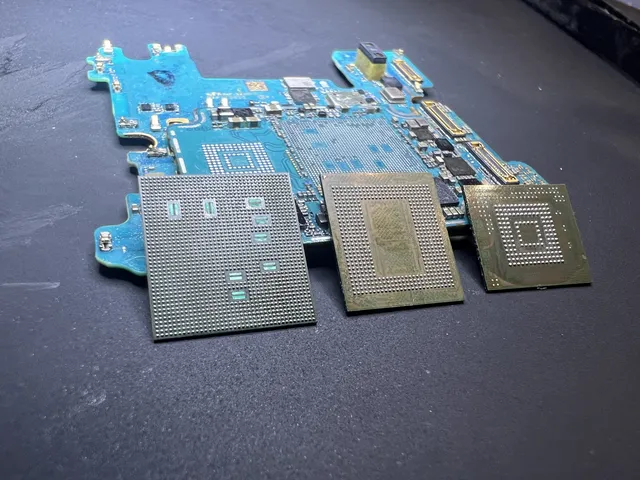
Why MX500 chip-off is not a recovery fallback
Reading removed NAND chips from an encrypted MX500 produces encrypted, controller-organized data, not usable files. A donor controller does not automatically restore its keys. Recovery depends on preserving the original encryption path or a specifically supported recovery method. Our chip-off guide distinguishes this from reconstructing supported unencrypted USB drives and memory cards.
How Much Does MX500 Recovery Cost?
Pricing depends on what we have to do to get the data.
| Drive State | Typical Range | What's Involved |
|---|---|---|
| Drive detected, files mostly readable | $1,000 to $1,500 | Imaging with retry, file recovery |
| FTL corruption, controller responds to service tools | $1,000 to $1,500 | FTL repair plus imaging |
| Drive disappears or reports the wrong capacity | Quoted after diagnosis | Assess hardware and supported firmware/translator access |
| Donor controller swap | $1,500 to $2,000+ | Donor sourcing, BGA rework, FTL pairing |
| Controller or encryption path cannot be restored | May be unrecoverable | Raw NAND extraction is not a substitute for the missing encryption path |
The $100 diagnostic is applied to a successful recovery and is non-refundable once diagnostics start. Donor drives or replacement parts you approve are non-refundable once ordered, even if recovery fails. You approve the estimate before recovery work begins. Our full pricing guide goes into more detail. SSD recovery service page is here.
How to Stop This From Happening Again
MX500s are good drives but they're not magic. Here's how to keep your next one alive longer and protect the data when this one inevitably fails.
Replace SSDs Used in Database/VM Workloads at Year 3
Consumer SSDs were never designed for sustained random writes. If your MX500 hosts a database, runs VMs, or sees heavy small-file writes, plan a 3-year replacement cycle. Move to a Samsung 870 EVO or 870 Pro for a similar drop-in, or consider an enterprise-rated SSD like the Samsung PM893 or Micron 5400 Pro if budget allows. Or move database workloads to a separate dedicated drive that you treat as disposable.
Watch the SMART Trend, Not Just the Snapshot
Most SSD-monitoring tools take a one-time reading. The useful metric is how fast attributes are changing. If your "Total LBAs Written" went up by 5TB this month and your drive is rated for 360 TBW, you're 6 years from end of life. If it went up by 30TB this month, you're 1 year. Same drive, very different timeline.
Don't Skip Backups Just Because SSDs "Don't Fail Like HDDs"
This myth dies hard. SSDs fail at lower rates than HDDs over short windows but fail more abruptly when they do. A hard drive's death is usually loud and slow. An SSD's death is usually silent and instant. Backups matter more on SSDs, not less. Pick a service that runs automatically. Our cost-vs-recovery analysis covers when backups would have saved the money.
Use a UPS If You Have Critical Data
Mid-write power loss is a top cause of MX500 FTL corruption. A $90 UPS on the desktop prevents most of these incidents. If you have important work or a home server, this is non-optional.
Run Storage Executive's Health Check Monthly
Crucial's Storage Executive tool does a quick health scan that catches some failure patterns early. Run it once a month. If health drops or warnings appear, plan a replacement and back up everything before the drive gets worse. Crucial Storage Executive download.
FAQ
Does Crucial offer data recovery as part of warranty?
No. Crucial's warranty replaces the drive. They explicitly do not recover data. If you RMA the drive, your data goes with it. Crucial recommends backups but doesn't provide a recovery service.
Why does my MX500 keep slowing down after years of use?
Two reasons. First, NAND read speeds degrade as cells age and the controller has to do more retries. Second, the drive's spare block pool shrinks as cells fail and get remapped. With fewer spares, the controller can't run garbage collection as efficiently. Slow drive often precedes drive failure by months. Replace it before it fails.
Can I update the firmware to fix the failure?
Do not attempt a firmware update on an MX500 that is losing data, vanishing, or failing reads. Recover data first. Updates are maintenance for a stable drive after a verified backup, using Crucial's matching revision.
My MX500 disappears when I install software. What's going on?
The drive is throwing errors during sustained writes. Either NAND is wearing out or the controller is struggling. Check SMART for ERR (uncorrectable errors). Plan a clone to a new SSD as soon as possible.
How long does MX500 recovery take?
The standard recovery estimate at MDrepairs is 4–6 weeks; timing may vary by case. Donor parts and drive condition can affect the schedule. Ask about rush diagnostic availability; an earlier assessment start does not set a recovery completion date. More on recovery turnaround times.
Can I clone my failing MX500 myself?
If the drive is still readable, yes. Use a free cloning tool like Macrium Reflect Free (Windows) or Carbon Copy Cloner (Mac). Clone to a new SSD. If the clone completes without errors, swap the new drive in and shelve the old one. If the clone errors out, you have a partial copy. The remaining files require lab work.
Will the recovered data work on a different brand SSD?
Yes. The recovered data is delivered as standard files. You can put it on any drive, any brand. There's no MX500-specific format lock-in.
Are the 2TB and 4TB MX500 models more prone to failure?
Capacity alone does not establish recovery odds. Different MX500 revisions can use different NAND and firmware, so the actual device must be identified. The number of chips is not a reliable shortcut for predicting whether a failed drive can be recovered.
Does the MX500 use full-disk encryption?
The drive's internal hardware encryption and any user-enabled security lock are separate questions. ACE Lab lists encrypted MX500 recovery support for specified configurations; absence of an Opal password is not proof that raw NAND contains plaintext. BitLocker can add another encryption layer and requires its valid unlock material after storage access is restored.
Do you ship the recovered data on a new drive?
Yes. We can return data on a USB drive, external hard drive, or upload to a cloud service of your choice. The original MX500 comes back to you in whatever state it's in after recovery work. Mail-in service details here.
MDrepairs is an independent data recovery lab serving customers nationwide via mail-in service. We're not affiliated with Crucial or Micron. We don't sell SSDs or do warranty replacements. Our specialty is getting data off drives that have failed.
How MDrepairs can help
Real cases like this come through our New Jersey lab every week. If you are dealing with one now, start here.