How to Recover Data from RAID Drives: A Professional Guide
In this article
To recover data from a failed RAID array, power the system down immediately and do not let the controller rebuild. A rebuild started on a degraded array can overwrite your data with bad parity and make the loss permanent. Professional recovery clones every drive to safe copies first, then virtually reconstructs the array (drive order, stripe size, parity rotation) to extract the files.
- Power off now: stop any auto-rebuild before it overwrites data
- Do NOT re-initialize disks, run chkdsk/fsck, reorder drives, or force a rebuild
- Document the RAID level, drive count, and controller/NAS model
- Send the full set of drives to a lab for cloning + virtual rebuild
Array down? Start with professional RAID data recovery: clone-first.
RAID systems are built for redundancy, but they are not infallible. When a RAID array fails, recovering the data is fundamentally different and more complex than recovering files from a single computer. The way data is striped across multiple disks creates a complex puzzle. Attempting to solve it with standard software can make the situation worse, sometimes causing permanent data loss.
Successful recovery depends on understanding precisely why the array failed before attempting any fix. It requires professional, lab-grade tools and techniques to safely reconstruct the array and extract the data.
Why RAID Systems Fail and What It Means for Your Data
A RAID (Redundant Array of Independent Disks) provides excellent protection against a single drive failure. However, this redundancy can create a false sense of security. The system is only as strong as its weakest link, and when one component fails, it can trigger a cascade of issues that lock you out of your critical data.
Understanding the root cause of the failure is the first step toward a successful recovery.
RAID failures are rarely straightforward and often result from a combination of issues that overwhelm the array's built-in safeguards. To fully grasp why these systems fail and what makes recovery so challenging, it is helpful to understand the foundational RAID configurations that determine how data is stored.
Common Causes of RAID Failure
A RAID array is a delicate ecosystem where hardware and software must operate in perfect sync. If one part falters, the entire system can fail. The failures below affect different parts of the array:
- Multiple Drive Failures: This is a classic failure scenario. A RAID 5 array, for example, is designed to tolerate the failure of one drive. The problem is that drives purchased and installed at the same time often have similar lifespans. When one drive fails, the remaining drives are placed under immense stress during the rebuild process. This stress is often the final push that causes a second drive to fail, taking the entire array offline.
- RAID Controller Failure: The controller is the brain of the RAID system. A power surge, firmware corruption, or simple component wear can cause it to fail. When the controller fails, the array becomes unreadable, even if the individual member drives are perfectly healthy.
- Human Error: Accidental reformatting, pulling the wrong drive during a replacement, or an improper server shutdown can corrupt the RAID configuration data. Without this "map," the controller no longer knows how to assemble the data from the disks.
- Logical Corruption: This occurs when the hardware is functional, but the data structure is damaged. A virus, file system error, or software bug can corrupt the logical layer, causing files to disappear or become inaccessible.
Physical vs. Logical Failures
Distinguishing between a physical and a logical failure is critical. The wrong response can be catastrophic. Running software-based recovery tools on a physically failing drive is one of the fastest ways to turn a recoverable situation into permanent data loss.
A physical failure indicates a mechanical or electronic problem with one or more drives. The symptoms are often unmistakable:
- Clicking, grinding, or beeping noises from a drive.
- A drive is no longer detected by the RAID controller's BIOS.
- The entire server or NAS device fails to power on.
A logical failure means the hardware is functional, but the data has become disorganized or corrupt. You might observe symptoms such as:
- The array appears "online," but volumes or partitions are missing.
- Files and folders have vanished or produce errors when opened.
- The operating system reports the disk is "corrupt" or needs formatting.
Lab Insight: Never assume a RAID failure is purely logical. Often, an underlying physical issue - such as a drive's degrading read/write heads - first manifests as a logical error. Running
chkdskor a file system repair tool in this state forces the unstable drive to perform stressful operations, which can lead to severe platter damage and destroy the data permanently.
At MDRepairs, our nationwide mail-in service begins with a professional diagnostic evaluation to identify the exact root cause. We use specialized hardware imagers to safely clone each drive without stressing failing components. This preserves the original data while we work on a secure copy to reconstruct your array. This lab-level methodology is essential to safely recover data from RAID drives.
Your First Response to a Failed RAID Array
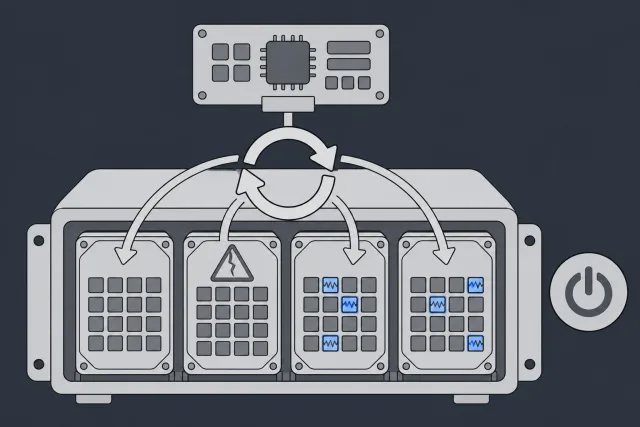
When a RAID array goes offline, the steps you take next can determine whether your data is recoverable or lost forever. While it may seem counterintuitive, the single most important action is to power down the system immediately.
Leaving a failed or degraded array running is a significant risk. In an attempt to self-heal, the RAID controller might initiate an automatic rebuild. If this rebuild starts with a failing drive or uses an incorrect configuration, it will systematically overwrite your valid data with corrupt parity information, effectively shredding the files you are trying to save.
 Illustration
The Dangers of Common "Fixes"
When a RAID crashes, the server's operating system or the controller's management software will likely offer "helpful" suggestions. These automated prompts are a leading cause of permanent data loss we see in our lab. Resisting the urge to click "Initialize" or "Repair" is absolutely critical.
Here is what you should absolutely avoid doing:
- Don't initialize disks. This action wipes the partition data, which is like erasing the table of contents for the entire array, making recovery exponentially more difficult.
- Don't run
chkdskorfsck. These utilities are designed for single, healthy drives. On a failed array, they cannot interpret the complex data structure and often end up scrambling data, complicating or preventing a professional recovery. - Don't swap drive order or reseat drives randomly. The physical order of the drives in the array is critical. Shuffling them can corrupt the array's metadata and trick the controller into performing a destructive rebuild.
- Don't insert a new drive and start a rebuild. Unless you are 100% certain which drive has failed and that all other drives are perfectly healthy, forcing a rebuild is a gamble. If a second drive has an undetected issue, the rebuild will fail and likely result in total data loss.
A failed rebuild is one of the most destructive events for a RAID array. It overwrites your data with garbage, and there is no "undo" button. Powering down the system is your best defense against this outcome.
Document Everything You Know
Before seeking professional help, take a moment to gather key information. On a separate computer, document everything you know about the setup. This information is invaluable to a data recovery engineer and can significantly expedite the process.
Attempt to record these details:
- RAID Level: Was it RAID 5, RAID 6, RAID 10, or another configuration?
- Number of Drives: How many disks were in the array?
- Controller Info: What is the make and model of the RAID card (e.g., Dell PERC) or NAS enclosure (e.g., Synology DS920+)?
- What Happened: Did you see specific error messages? Did you hear unusual noises? Was there a recent power outage?
This information provides a crucial head start. Once the system is powered off and you have documented the details, it is time for a professional evaluation. Our lab in Lincroft, New Jersey accepts mail-in cases for diagnosis. This ensures no further damage occurs and provides a clear path to recover data from RAID drives.
Diagnosing the RAID Failure and Recovery Potential
When a RAID array fails, the immediate question is, "Is my data recoverable?" The answer depends on which drives still read and what happened to the array. The symptoms your system displays, from blinking drive lights to error messages, are the first clues to understanding the problem and determining the correct recovery strategy.
Interpreting these signs correctly is crucial. For example, a single blinking amber light on a drive in a RAID 5 array typically indicates the array is in a degraded state - still operational but running without redundancy. However, if a second drive fails, the situation becomes critical. Recovering data from a RAID 5 with two failed drives is a complex, lab-level procedure that involves mathematically reconstructing the missing data, a task beyond the capabilities of any off-the-shelf software.
To help prevent turning a recoverable situation into a permanent one, follow this initial response guide.
The most critical takeaway is simple: at the first sign of a problem, power the system down. This single action prevents the array from attempting to "fix" itself and causing irreversible damage.
Common RAID Failure Symptoms and Potential Causes
To help you better understand what your RAID system might be indicating, here is a table of common symptoms, their likely causes, and what they mean for data recovery.
| Symptom | Potential Cause | What It Means for Recovery | Recommended Action |
|---|---|---|---|
| Single blinking drive light; array is degraded but accessible | Single Drive Failure: A drive has dropped out due to a mechanical or logical issue. | The array's redundancy is still active. | Power down. Do not replace the drive and initiate a rebuild without a verified backup. |
| Multiple drive failure lights; array is offline or inaccessible | Multiple Drive Failures: Two or more drives have failed, exceeding the array's fault tolerance. | Recovery is complex but possible with professional intervention. | Power down immediately. Do not attempt to force drives online or run utilities. |
| "RAID Offline" or "Foreign Configuration" error message | Controller Failure or Configuration Loss: The RAID controller has failed or lost the array's configuration data. | The data on the drives is usually intact. | Power down. Do not re-initialize or create a new array. |
| Clicking, grinding, or beeping noises from the drives | Physical Drive Failure: A drive has a severe mechanical issue, such as a head crash. | Recovery depends on the severity of platter damage. Immediate shutdown is critical. | Power down immediately to prevent further physical damage. |
| Array disappears after a power outage or reboot | False Failure / Stale Data: Drives may have fallen out of sync, or the controller marked them as failed incorrectly. | Requires careful handling to avoid a destructive rebuild. | Power down. Do not trust the controller's "rebuild" prompts. |
These are general guidelines. Every RAID failure is unique, and the best course of action is always to stop, power down the system, and get a professional assessment.
The Limits of Software Diagnostics
It is tempting to run a diagnostic utility or recovery software for a quick answer. However, these tools have a major blind spot: they can only see what the operating system reports. Software cannot detect the subtle physical degradation that precedes catastrophic drive failure, such as weakening read/write heads or growing instability on the magnetic platters.
Consider a drive with failing heads. It may still be able to read data, but it is struggling. A software scan forces that weak drive to perform thousands of stressful read operations, which can easily push it into a catastrophic head crash, grinding the read heads into the data platters and destroying the data. This is precisely why we advise against running any software utilities on a potentially failing array.
Lab Insight: Our experience shows that the type of failure is the most critical factor in recoverability. A head fault and platter damage impose different limits; the surviving data needs assessment before a result can be estimated. The key is to prevent irreversible platter damage by powering off the device.
What a Professional Evaluation Truly Reveals
A professional diagnostic process goes far deeper than any software can. When an array arrives at MDRepairs for our nationwide mail-in evaluation, we first connect each drive to specialized hardware imagers. These tools are not simple hard drive docks; they communicate with drives at the firmware level, allowing us to safely clone every sector without stressing the drive's delicate internal components.
This hardware-first approach reveals the true health of each drive, identifying problems invisible to a standard computer:
- Firmware Corruption: We can detect and repair damage to a drive’s service area - the internal software required for it to power on and be recognized.
- Media Degradation: Our imagers can map bad sectors on the fly and intelligently work around them, extracting data from areas a normal system would abandon.
- Head Failures: We can pinpoint which read/write heads are weak or dead, which tells us if parts replacement in a laminar-flow work area is necessary.
Only after we have a perfect, stable clone of every drive do we begin the virtual reconstruction of the array. Using the cloned data, we determine the exact RAID parameters - such as stripe size, block order, and parity rotation. This meticulous, safety-first process allows us to recover data from RAID drives without ever again touching the original, fragile media.
Inside the Lab: The Professional RAID Recovery Process
When a failed RAID array arrives at our lab, the process is not about plugging it in and running software. Professional RAID recovery is a meticulous, multi-stage operation that combines specialized hardware, deep firmware knowledge, and forensic precision. The top priority is always the safety of your original drives.
The journey begins by treating each drive not as part of an array, but as an individual patient requiring a thorough examination.
Forensic Drive Imaging: The First and Most Critical Step
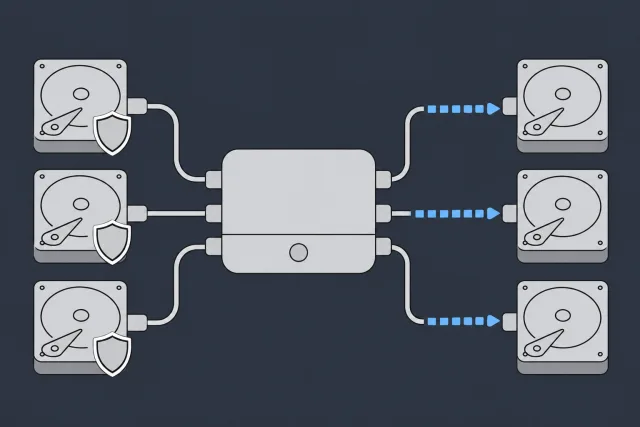
The absolute, unbreakable rule of professional data recovery is to work on a clone, never the original media. Before any attempt to rebuild the array, every drive is connected to a hardware imager. These are not simple cloners; tools like the PC-3000 or DeepSpar Disk Imager communicate directly with a drive's firmware, allowing us to create a perfect, sector-by-sector copy without stressing its delicate mechanical parts.
 Illustration
Why is this superior to software cloning? A hardware imager can:
- Bypass the Operating System: It reads the drive without relying on Windows or macOS, avoiding system-level errors that can crash a failing drive.
- Handle Bad Sectors Intelligently: The imager can be configured to skip damaged areas, read stable data first, and then return to unstable spots, maximizing data extraction from a dying drive.
- Prevent Further Damage: It provides precise control over power and commands, ensuring a physically failing drive is not pushed into total failure.
Head and platter work is done in a laminar-flow work area. Our engineers perform microscopic repairs, often transplanting read/write heads from a matching donor drive. The sole purpose of this procedure is to make the drive stable enough for one final imaging pass.
Virtual Array Reconstruction: Putting the Puzzle Together
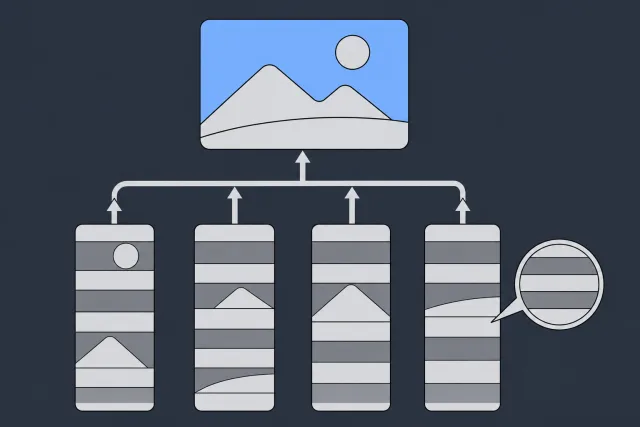
Once we have stable clones of all member drives, your original hardware is safely set aside. From this point forward, all work is done virtually using the cloned data. Our engineers become digital detectives, piecing together the complex puzzle of the original RAID configuration.
This involves determining the specific parameters that define how data was written across the drives:
- Drive Order: The exact physical sequence of the drives.
- Stripe Size: The size of the individual data blocks written to each disk.
- Parity Rotation: The algorithm used to distribute redundancy data (critical for RAID 5 and 6).
- Data Offset: The precise starting point of user data on the drives.
Even if the RAID controller has lost this information, we can reverse-engineer it by analyzing data patterns in the raw hex code of the drive images. This painstaking process is guided by years of experience recognizing the unique signatures left by different controllers and NAS systems from manufacturers like Synology or QNAP. Customers can mail their drives to our lab in Lincroft, New Jersey.
 Illustration
File System Navigation and Data Extraction: The Final Stage
Only after successfully rebuilding the array in a virtual environment can we access the logical structure - your familiar folders and files. Our tools then navigate this reconstructed file system to identify your critical data and verify its integrity.
We can locate specific files, check for corruption, and build a file list for your review. This is the moment of truth where we confirm the recovery was a success.
Lab Insight: RAID recovery depends on the surviving member data and array structure. A methodical process supports assessment, but does not guarantee the requested files can be recovered.
Once you approve the file list, we extract your data onto a new, healthy external hard drive and prepare it for secure shipment back to you.
How to Choose a Reputable RAID Recovery Service
When your RAID fails, the partner you choose for recovery is the most important decision you will make. This is a specialized field, and not all data recovery services are equally equipped. A professional lab uses a clean, filtered work area and firmware-level hardware tools for complex systems. A standard computer repair shop typically does not, and may inadvertently make the situation worse.
Your data's future hangs in the balance. Look for a team with experience on your specific type of RAID array.
Questions to Ask Any Recovery Provider
Before entrusting your drives to any provider, you must vet them with a few direct questions. Their answers will reveal whether they are a genuine lab or a storefront that outsources complex work.
A professional service will be transparent and confident about their process. Be sure to ask the following:
- Do you have a clean, filtered work area? A drive opened for a head swap must be handled in a clean, filtered work area. This prevents microscopic dust particles from landing on the platters and causing permanent, catastrophic damage.
- What professional hardware tools do you use? An expert will readily state that they use tools like the PC-3000 or DeepSpar Disk Imager. These are specialized hardware platforms, not just software, that communicate directly with a drive's firmware - a critical capability for safely imaging unstable or failing drives.
- Can you walk me through your RAID reconstruction process? The correct answer always starts with creating a perfect, sector-by-sector clone of every drive. Only after they have safe copies do they begin the virtual reconstruction. If they mention running any software on your original drives, it is a massive red flag.
Lab Insight: Be immediately suspicious of any company that provides a flat-rate quote over the phone without seeing the drives. A legitimate lab knows that the true complexity of a RAID failure - and its price - can only be determined after a detailed, hands-on diagnostic of each individual drive.
The Importance of a Transparent Process
Trust is paramount in data recovery and is built on transparency. A professional data recovery company should provide confidence by explaining their process at every step.
This begins with the initial evaluation. A proper diagnostic report is not a one-line summary; it clearly explains what failed, the proposed recovery strategy, and a firm price quote. It is also important to have realistic expectations. Expert-led RAID recovery is not guaranteed.
What to Look for in a Recovery Service
As you evaluate your options, here are key indicators of a trustworthy, professional lab:
- Written payment terms: Ask what the diagnostic costs and which approved charges still apply if recovery fails.
- Nationwide Mail-In Service: A lab that handles cases from across the country, like our Lincroft, New Jersey lab serving New York data recovery clients by mail, has the proven logistics for secure shipping and clear remote communication.
- Clear Service Tiers: A reputable lab will offer different service levels based on urgency, such as standard, priority, and emergency options, demonstrating an understanding that every client's situation is different.
- Case Studies and Reviews: A proven track record is invaluable. Look for detailed case studies or customer reviews that mention RAID or NAS systems similar to yours, whether it is a multi-drive Dell server or a Synology NAS.
At MDRepairs, our entire process is built on these principles. We start every case with a professional, no-obligation diagnostic evaluation for all mail-in recoveries, giving you a clear, honest assessment so you can recover data from RAID drives with confidence.
Answering Your Questions About RAID Data Recovery
When your RAID fails, questions and concerns arise quickly. It is a stressful, high-stakes situation that demands clear answers. We receive the same urgent inquiries every day in our lab, and we have compiled straightforward answers to the most common questions.
How Much Does Professional RAID Data Recovery Cost?
This is often the first question, and the honest answer is: it depends. The cost is not based on the amount of data but on the complexity of the failure. A simple logical issue, such as a corrupted configuration on healthy drives, is far less complex - and less costly - to resolve than a case involving multiple physically failed drives that require work in a clean, filtered work area and donor parts.
For this reason, any lab that offers a flat price over the phone without a physical evaluation should be viewed with caution. A firm, fair quote is only possible after our engineers have performed a hands-on diagnostic of each drive.
A Quick Word of Advice: Be cautious of low, flat-rate pricing, as it often indicates the provider is not equipped for complex hardware failures. The $100 diagnostic is credited toward a successful recovery. You approve the estimate before recovery work starts.
Can I Just Use Software to Recover the RAID Myself?
Attempting to use recovery software on a failed RAID is one of the biggest gambles you can take with your data. Such software is designed for simple scenarios, like recovering a deleted file from a healthy hard drive, not for an unstable RAID environment.
If even one drive has a physical issue - bad sectors, a weak motor, or failing heads - a software scan can force it into catastrophic failure. We have seen it countless times: the read/write heads crash into the data platters, turning a recoverable case into permanent data loss. A professional evaluation is always the safest path forward.
How Long is This Going to Take?
The standard wait for the diagnostic is 4 to 6 weeks. Recovery time depends on the case. Queue, parts, drive condition, imaging and delivery affect the schedule.
- Logical Failures: If the drives are healthy but the file system or RAID configuration is corrupt, timing depends on drive condition and imaging.
- Physical Failures: When a case involves multiple failed drives requiring work in a laminar-flow work area and sourcing specific donor parts, the process is more intensive.
After our initial diagnostics, we will provide a realistic time estimate based on our findings. For time-critical situations, MDRepairs offers nationwide priority and emergency options to move the diagnostic start ahead in the queue. Confirm availability with the lab; rush doesn't set a recovery completion date.
Can You Get Data Off My Synology or QNAP NAS?
Yes, absolutely. Our engineers are experts at recovering data from all major brands, including Synology, QNAP, Drobo, Western Digital, and many others.
These devices present unique challenges because they often run custom Linux-based operating systems (using Btrfs or EXT4 file systems) that standard tools cannot recognize. Our process is specifically designed for these setups.
First, we create a perfect, bit-by-bit clone of each drive from your NAS, ensuring the original drives are never at risk. Our engineers then work with these clones to virtually reconstruct the array, reverse-engineering the exact proprietary structure your NAS model used. Once it is virtually rebuilt, we can check which files are readable. This lab-level approach is essential for navigating the complexities of modern NAS systems.
At MDRepairs, our team of expert engineers is equipped to handle the most complex RAID failures from servers and NAS devices across the country. If you're facing data loss, our mail-in diagnostic service provides a safe, no-obligation evaluation to determine the best path forward. For a professional assessment of your case, learn more at https://mdrepairs.com.
When a RAID Rebuild Is the Wrong Move
A RAID rebuild is not a recovery plan when the array is already unstable. A degraded RAID 5 with one failed drive may still appear readable, but the rebuild puts heavy read stress on every remaining disk. If a second drive is slow, dropping sectors, or beginning to fail, the rebuild can collapse before it finishes and leave the array offline.
Failed rebuilds can also overwrite parity with bad data. Once that happens, the original stripe and parity relationships may be damaged, which makes reconstruction harder and can reduce what is recoverable. The same risk applies to NAS boxes such as Synology and QNAP systems that suddenly drop the array, mark drives as missing, or prompt you to repair the storage pool.
Before replacing disks or clicking rebuild, power the unit down and talk with a RAID data recovery lab. MDRepairs offers nationwide service, rush diagnostic options for business arrays, and a secure mail-in data recovery process when the data matters. Confirm rush availability; it doesn't set a recovery completion date.
What to do when one drive fails in a four-drive RAID 5
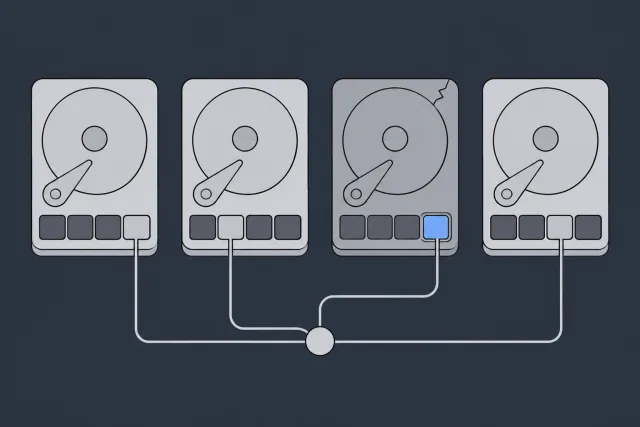
In a four-drive RAID 5, one failed disk usually puts the array into a degraded state. The array can often keep running because RAID 5 stores parity across the member drives, allowing the missing drive's data to be calculated from the remaining disks. The correct action for normal IT operations is to identify the failed drive, replace it with a compatible drive, and let the RAID controller rebuild the array. That answer assumes the array is still accessible, the remaining drives are healthy, and there is a current backup.
 Illustration
In real recovery work, the details matter. A rebuild is one of the most stressful events a RAID set can experience because every surviving drive must be read heavily for a long period. If another drive has unreadable sectors, unstable heads, timeout issues, or stale metadata, the rebuild can fail and make the situation worse. Before replacing anything, record the bay order, drive serial numbers, controller messages, RAID level, stripe size if known, and which disk is marked failed. Do not initialize the array, create a new virtual disk, or accept prompts that rewrite configuration.
If the RAID 5 is still online and the data is backed up, replacing the failed disk and rebuilding is reasonable. Monitor the rebuild and check the backup afterward. If the array is offline, missing critical data, or reporting more than one problem drive, stop and image the member disks before attempting a rebuild. A lab can reconstruct the RAID virtually from disk images, test parity rotation and stripe parameters, and recover the file system without forcing damaged drives through a controller rebuild.
The biggest mistake is swapping drives blindly or trying multiple rebuild combinations. RAID controllers write metadata, and a failed rebuild can change the evidence needed to determine the original layout. For business servers, NAS units, and database volumes, a controlled recovery process is safer than trial and error. MDRepairs handles RAID recovery cases from our New Jersey lab and supports mail-in RAID, NAS, and server media nationwide.
Frequently Asked Questions
What should I do first when one disk fails in RAID 5?
First, confirm which physical disk failed and document the drive order, serial numbers, and controller status. If the data is backed up and the array is otherwise healthy, replace the failed disk and rebuild. If the data is not backed up or other disks show errors, stop and image the drives.
Can a RAID 5 rebuild cause data loss?
Yes. A rebuild can fail if another member disk has bad sectors, firmware problems, or stale RAID metadata. Because the rebuild reads all surviving disks heavily and writes new parity information, it can turn a degraded but recoverable array into a more complex recovery case.