Phone Showing a White Screen? Causes, Fixes, Data Safety
In this article
The "white screen of death" name makes it sound terminal. It rarely is. The backlight works, the phone usually still runs, and the fault sits somewhere between the operating system and the glass. The job is figuring out which side of that line you're on, software or hardware, because the fixes live on opposite sides.
First, which white screen do you have?
- Pure white, no logo, phone otherwise responsive (it rings, vibrates, makes sounds): hardware leaning. The phone is running; the image isn't reaching the panel correctly.
- White screen with a logo that never progresses: software leaning. The phone is stuck early in boot, classically after a failed update or jailbreak.
- White flickers, stripes, or white that comes and goes with pressure or angle: hardware, almost certainly the display connector or flex cable, and classically after a drop.
- White only in one app, or after unlocking: software, and app-level at that. The gentlest case.
At a glance:
| What you see | Most likely cause | First move | Risk to your data |
|---|---|---|---|
| Pure white, phone still rings and buzzes | Display connector or panel | One force restart, then gentle handling | Low, until someone resets it |
| White with a logo, never finishes booting | Failed update or corrupted software | Computer update (never restore) | Low if you avoid Restore |
| White flicker, changes with pressure or angle | Loose or damaged flex cable after a drop | Stop flexing it, back up at first chance | Rising with every flex |
| White after liquid exposure | Board-level damage | Power off, do not charge it | High if it stays powered |
| White in one app only | App bug | Update or reinstall the app | None |
Note what yours does. Every step below is more useful when you know which pattern you're treating.
The force restart, by brand
A force restart clears crashed software without touching your data, and it resolves a large share of white screens on the spot:
Samsung Galaxy: hold volume down + the side button together for 10 to 20 seconds.
Pixel and most other Androids: hold power for 30 seconds, or power + volume down.
If the phone comes back, back it up today. White screens that appear once have a habit of returning, and a backup taken now makes the sequel boring instead of devastating.
Software fixes that don't cost you data
For the logo-stuck and white-after-update patterns:
- Charge first. Thirty minutes on a wall charger rules out the low-battery boot hang that mimics a white screen.
- Computer update, never restore. Connect to a computer, enter recovery mode, and when offered Update or Restore, choose Update. Update reinstalls the operating system around your data. Restore erases the phone. The buttons sit next to each other; the outcomes could not be further apart.
- Android Safe Mode. On many Androids, holding the power menu's Restart option offers Safe Mode. If the white screen vanishes there, a recently installed app is the culprit: uninstall the newest ones and reboot normally.
The hardware white screens
When restarts and updates change nothing, or the white arrived right after a drop, the fault is physical:
- A loosened display connector. The screen connects to the logic board with small ribbon connectors, and a hard knock can unseat one just enough to lose the image while keeping the backlight. For a technician this is a quick reseat. As a first-ever DIY repair on a phone full of irreplaceable photos, it's how connectors and their sockets get broken for good.
- A failing display assembly. Panels die of age and impact. If the phone demonstrably runs behind the white (rings, vibrates, casts to a TV), a quality screen replacement restores access, and your data was never in danger.
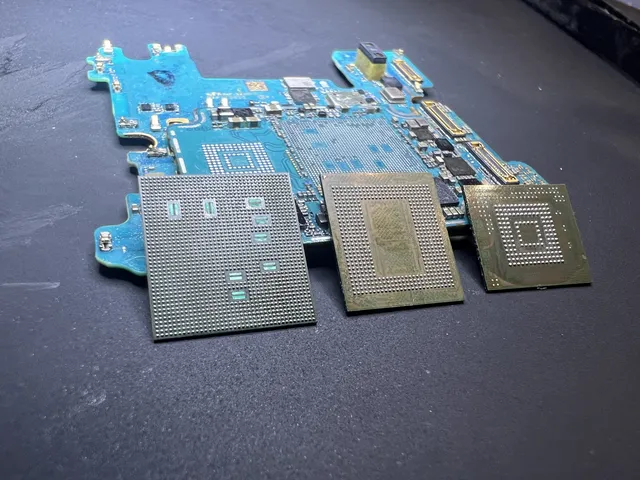
- Board-level faults. Liquid exposure and hard drops can damage the circuitry that feeds the display. The tell: a new screen doesn't fix it. This is lab work, and it's still very recoverable.
By the way, if your screen is dark rather than white, that's a sibling problem with its own decision tree (black usually means backlight or deeper display path; white means lit but empty). The distinction matters to a technician, so mention which one you have when you call.
Getting the data out
Priorities, in order: check whether iCloud or Google backed the phone up recently (log in from a computer and read the backup date). If the phone still responds, connect it to a computer it has previously trusted and pull a backup through Finder, iTunes, or file transfer, no screen needed for an already-paired computer. If neither works, our cell phone data recovery lab can assess the phone.
Frequently Asked Questions
Is the white screen of death permanent?
Rarely. Software white screens resolve with a force restart or a computer-based update. Hardware white screens are usually a connector or panel problem, both fixable, with the phone's storage untouched throughout.
My phone shows white after I dropped it. Software or hardware?
Hardware until proven otherwise. Drops jar display connectors loose and crack panels, and white-with-flicker or white-that-changes-with-pressure makes it near-certain. Do the force restart once to be thorough, then stop experimenting: the data is intact, and gentle handling until the connector is reseated keeps it that way.
Will a screen replacement fix a white screen?
If the panel or its connection is the fault, yes, and that covers most drop-related white screens. If the board circuitry driving the display failed (common after liquid), a new screen stays white. A competent shop tests before selling you the part; a lab tests because the diagnosis decides the whole recovery plan.
Can I fix a white screen by updating my phone?
Sometimes, when the cause is software. Do it through a computer in recovery mode and choose Update, which reinstalls the OS while preserving data. Never choose Restore, and never accept an update prompt that warns it will erase the device. If Update fails partway, stop there: that's the moment to protect the data rather than escalate.
Does the white screen mean my photos are already gone?
No. The white screen lives in the display path or the software that draws to it; your photos live in the phone's storage, a separate system entirely. In the overwhelming majority of white screen cases the storage is untouched and perfectly readable once access is restored. The data only becomes unreachable when the storage itself or the board circuits protecting its encryption are damaged, or when a factory reset destroys the keys. That last one is the only cause on the list that's voluntary, which is why every section of this guide repeats the same advice: don't reset.
The white screen comes and goes. Should I wait until it fails completely?
No. Intermittent means a marginal connection or component that is one bad day from permanent, and a phone that still works part-time is a phone that can still be backed up. Back it up during the next working window, then repair on your schedule instead of the failure's schedule.
How MDrepairs can help
Real cases like this come through our New Jersey lab every week. If you are dealing with one now, start here.
- iPhone Data Recovery Logic-board and NAND recovery from dead and damaged iPhones. Learn more
- Cell Phone Repair Screen and board phone repair for every brand, NJ local. Learn more
- Data Recovery Services Every device and failure type, recovered in our New Jersey lab. Learn more
- Hard Drive Data Recovery Mechanical, firmware and logical HDD recovery on every brand. Learn more