Hard Drive Repair Cost vs Recovery Cost: Know the Difference
In this article
Most people searching "hard drive repair cost" are actually shopping for the wrong service. It's a completely fair mistake: when a drive starts acting up, "repair it" feels like the obvious goal. But a mechanical hard drive isn't a transmission. Nobody rebuilds one and hands it back for another five years of service. This post breaks down what each service really costs in 2026, what you get for the money, and how to figure out which one you actually need.
Repair and recovery are two different purchases
Here's the cleanest way to think about it:
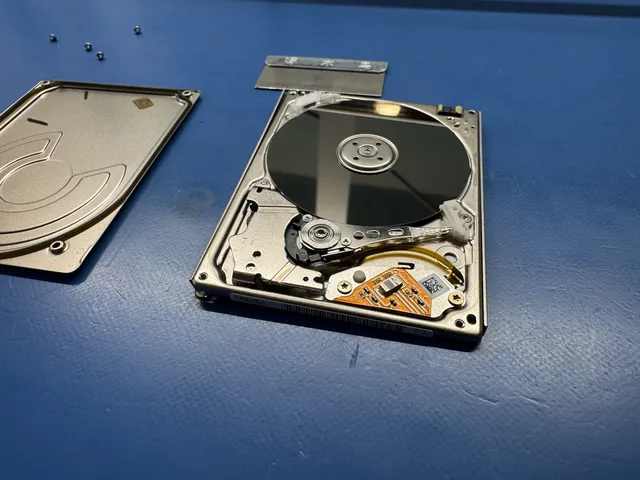
Repair asks: can this drive work again? The answer for a mechanically failing drive is almost always no, not in any lasting way. Drives are precision-sealed assemblies spinning at 5,400 to 7,200 RPM with heads flying nanometers above the platters. Once the hardware starts to go, it only goes one direction. Even in our lab, when we swap heads or transplant platters, the "repaired" drive lives just long enough to copy the data off. Then it's retired. We've covered why in our post on whether hard drive repair is actually a thing.
Recovery asks: can we get the files back? That's a real service. The drive itself is treated as a donor-quality carcass; the mission is your photos, your business records, your projects. Everything a recovery lab does (imaging, head swaps, firmware repair, platter work) exists to serve that one goal.
What "hard drive repair" actually costs (and buys you)
When you see hard drive repair advertised, here's what's usually behind the price:
| Service sold as "repair" | Typical 2026 price | What you really get |
|---|---|---|
| Computer shop diagnostic | $50 to $150 | Confirmation the drive is failing, quote for a new drive |
| Software "repair" (chkdsk, utilities) | $0 to $100 | File system patch-up on a healthy drive; risky on a failing one |
| Drive replacement + OS reinstall | $150 to $300 incl. new drive | Working computer, your files NOT included |
| Circuit board (PCB) swap | $20 board + labor | Usually a dead end; modern boards need chip-level ROM transfer |
Notice what's missing from every row: your data. A shop can absolutely get your computer running again for a couple hundred dollars. It does that by putting a blank drive where your full one used to be. If you didn't have a backup, "repaired" and "everything gone" arrive in the same box.
What data recovery costs in 2026
Recovery pricing tracks the type of failure, not the size of the drive or the sticker on it. Broad honest ranges across the industry:
Logical failures: roughly $300 to $700. The drive hardware is fine but the data is unreachable: accidental format, deleted partition, corrupted file system. Lab work is imaging plus reconstruction.
Electronic and firmware failures: roughly $400 to $900. Burnt circuit board with ROM transfer, or corrupted firmware modules that make a drive report 0 bytes or hang the computer. Specialist equipment territory, but usually no cleanroom needed.
Mechanical failures: roughly $700 to $1,500+. Clicking, beeping, or dead-silent drives with failed heads or seized motors. This is cleanroom work: opening the drive, transplanting matched donor parts, then nursing a weak drive through a full image. Donor parts alone can run $100 to $300.
For the complete breakdown by device and failure type, our full data recovery pricing guide goes deep on every tier, and the data recovery cost page has current MDrepairs pricing. After diagnostics, you approve a recovery estimate before recovery work begins.
Which one do you actually need?
Match your situation to the row that fits:
| Your situation | What you need |
|---|---|
| Drive died, everything is backed up | Neither. Buy a new drive. |
| Computer slow/erroring, files still open fine | Back up NOW, then replace the drive |
| Drive clicking, beeping, or not detected, files needed | Recovery, and stop powering it on |
| Deleted or formatted by accident, drive healthy | Recovery (logical); stop writing to the drive |
| Windows won't boot, files needed, no backup | Recovery first, then let any shop rebuild the computer |
That last row is where the most money gets wasted. The correct order is data first, computer second. Any competent shop can reinstall Windows after your files are safe. Nobody can reinstall your photos.
Why "just repair it first" backfires
The most expensive path we see runs like this: drive acts up, owner pays a shop to "repair" it, the shop runs utilities and stress tests against failing hardware for a few days, the drive gets dramatically worse, and THEN it arrives at a recovery lab. A case that would have been a mid-range recovery is now a platter-damage case, or not recoverable at all.
The failure you start with may be recoverable. The failure created by repairing it sometimes isn't.
Frequently Asked Questions
How much does it cost to repair a hard drive?
A shop diagnostic runs $50 to $150 and almost always ends with "replace the drive," because failing mechanical drives can't be meaningfully repaired. Replacing the drive and reinstalling your system runs $150 to $300 including the new hardware. None of that includes getting your files back, which is a separate service called data recovery.
Is it cheaper to repair a hard drive or recover the data?
Repair (really, replacement) is cheaper if you don't need the files: under $300 all-in. Recovery costs more ($300 to $1,500+ depending on the failure) because it's specialist lab work. The trap is paying for repair attempts first, which can physically worsen the drive and push the eventual recovery into a higher price tier.
Can a hard drive be repaired without losing data?
Sometimes, for purely logical problems on healthy hardware, file system tools can fix errors in place. But on a drive with any physical symptom, repair utilities actively endanger the data. A recovery lab flips the order: image the drive first so the data is safe, then nobody cares what happens to the patient.
Why is data recovery so much more expensive than repair?
Because it's a different job. Repair swaps a $70 part. Recovery can mean cleanroom disassembly, matched donor parts, firmware surgery, and days of monitored imaging on unstable hardware, with a specialist's time attached to every step. You're paying to get irreplaceable files back, not to make a computer boot.
Is a $100 diagnostic worth it for an old drive?
If the drive holds anything you'd genuinely miss, yes, because the diagnostic tells you exactly what failed, what's recoverable, and a firm price before you commit a cent more. At MDrepairs, the diagnostic is credited if recovery succeeds. If the drive holds nothing important, skip everything and recycle it.
How MDrepairs can help
Real cases like this come through our New Jersey lab every week. If you are dealing with one now, start here.