G-Drive and LaCie Failures: What Creative Pros Should Know
In this article
Walk into any edit bay and you'll see the same two families: silver G-Drive bricks stacked like ingots, and orange LaCie Ruggeds rattling around backpacks. Creative pros treat these as the professional choice, and the marketing leans hard into that. From the recovery bench, the picture is more specific. Here's how each family actually fails, what the early warnings look like, and how to keep an active project from dying with the drive.
What's actually inside each brand
First, a fact that surprises a lot of editors: neither G-Technology nor LaCie makes hard drives. Both are enclosure brands wrapped around standard mechanisms. G-Drive products have historically shipped with HGST and Western Digital mechanisms inside; LaCie is owned by Seagate, so its enclosures almost always contain Seagate drives, with the portable Rugged line using 2.5-inch mobile mechanisms and the desktop d2 line using 3.5-inch drives.
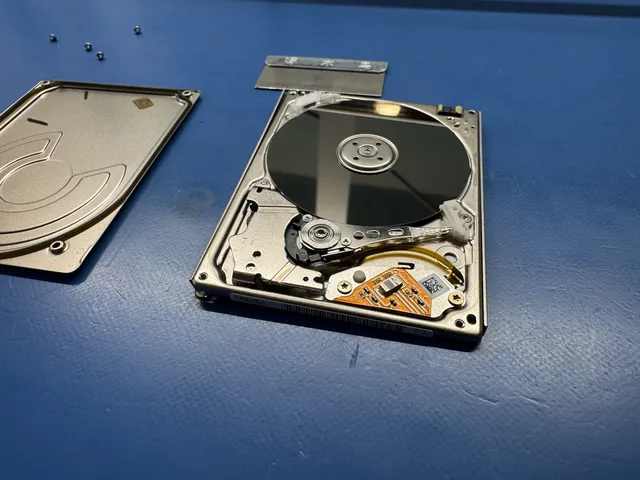
That matters because when the mechanism inside fails, recovery is a hard drive job, not a brand job. The premium you paid was for the case, the cable, and the badge. The platters spinning inside obey the same physics as any external hard drive we recover.
How G-Drives fail on the bench
The classic G-Drive is a desktop 3.5-inch drive in a vented aluminum shell. The failure patterns we see follow directly from that design:
- Head failures from age and duty cycle. Editors run these drives hard: scrubbing timelines, rendering, verifying footage. After years of that, read/write heads wear out and you get the classic tick-tick-tick. If you hear it, power off. Our clicking-drive guide explains why continuing to power a clicking drive grinds oxide off the platters.
- Tip-overs and desk drops. A desktop drive spinning at 7200 RPM does not forgive being knocked over while running. Head and platter work needs a clean, filtered work area.
- Bridge board and power faults. The USB-C interface board and the external power brick fail more often than people expect. The good news: when the enclosure electronics die but the drive is healthy, recovery is usually straightforward and the data is fully intact.
- Heat soak in racks. Stacked G-Drives in a warm studio run hot for years. Heat accelerates mechanical wear quietly; the drive that "was fine yesterday" usually wasn't.
How LaCie drives fail on the bench
LaCie's failure profile splits by product line.
The Rugged line fails in the field. The orange bumper creates real confidence, and that confidence is the problem. Ruggeds get thrown in camera bags, used as shuttle drives, dropped on location, unplugged mid-write when a shoot wraps. The bumper helps a powered-down drive survive a fall. It does much less for a drive that's spinning when it hits, and nothing at all for connector damage or corruption from yanked cables. Head and platter work after a drop needs a clean, filtered work area. Our LaCie not-mounting guide walks through the triage for that exact morning-after scenario.
The d2 and desktop RAID lines fail like small servers. More electronics in the enclosure means more that can die that isn't the drive: controller boards, power supplies, fans. And the two-drive RAID models double the mechanical risk. RAID 0 across two drives means either drive failing takes the whole volume, so the "pro" striped configuration editors buy for speed is statistically twice as likely to lose the project as a single disk. If one member of a striped pair fails, that's a RAID recovery job and order of operations matters enormously.
Side by side: what creative pros should actually expect
| G-Drive (typical desktop) | LaCie Rugged (typical portable) | |
|---|---|---|
| Mechanism inside | 3.5-inch WD/HGST, 7200 RPM | 2.5-inch Seagate mobile |
| Most common death | Worn heads, tip-over while running | Drop damage, connector/cable abuse |
| Warning signs | Clicking, slow scrubbing, disappearing mid-render | Beeping, not spinning up, mounting only sometimes |
| Non-drive failures | Bridge board, power brick | USB-C port, cable, bumper-hidden case damage |
| Recovery difficulty when mechanical | Head/motor work in a clean, filtered work area | Same, plus higher platter-damage rate from drops |
Notice what's not in that table: a winner. The honest comparison isn't "which brand is reliable." It's "which failure style matches how you work." Desk-bound editors mostly see G-Drive-style mechanical aging. Run-and-gun shooters mostly see LaCie-style trauma. Buy accordingly, and back up accordingly.
Protecting active projects (the part that actually matters)
Recovery is our business, so believe us when we say: the goal is for you to never need us. Working editors lose projects to single-drive failures constantly, and it's almost always a workflow gap, not bad luck.
- Two copies during the shoot. Offload cards to two drives before formatting a single card. A shuttle drive plus a master. Every time, no exceptions, even when it's midnight and the client is buying drinks.
- Follow 3-2-1 for the project archive. Three copies, two different media, one off-site. The full logic is in our 3-2-1 backup guide, but the short version for editors: your RAID is not a backup, and neither is the Rugged in your bag if the master lives there too.
- Treat striped RAID as a scratch disk. RAID 0 is for speed on data you can rebuild. Renders, caches, proxies. Never the only copy of source footage.
- Retire drives on a schedule. A drive that's shuttled daily for three years owes you nothing. Move it to light archive duty before it decides for you.
- Listen to your drives. New noises, slower scrubbing, mounts that take longer than they used to. Drives usually whisper before they scream.
The early-warning checklist for both brands
Drives rarely die without dropping hints first. Editors are just too busy to hear them. Put these on your radar and act on the first one, not the fourth:
- Sounds that weren't there last month: clicking, buzzing, a high whine, or a beep at power-on. On a G-Drive desktop unit, new sounds are the number one pre-failure signal. Power down and offload.
- Mounting roulette: the drive appears on the desktop sometimes, needs replugging other times, or takes noticeably longer to show up. That's not a "Mac thing." It's a countdown.
- Scrubbing that stutters on footage that used to play clean: often the first symptom of a drive relocating data away from weakening sectors, and it shows up in the timeline before it shows up anywhere else.
- Heat you notice: a Rugged that's uncomfortably hot after an offload, or a desktop unit whose case stings to touch, is aging itself fast.
- SMART warnings, if you ever look: a utility like DriveDx or the free smartctl will read a drive's own health counters through most enclosures. Reallocated and pending sector counts above zero on a project drive mean migrate now.
The response to every item is the same and it's boring: copy the project off while the drive still cooperates, then decide about the drive at leisure. Data first, hardware questions second.
Frequently Asked Questions
Are G-Drives more reliable than LaCie?
Neither brand has a meaningful reliability edge, because both are enclosures around standard mechanisms: WD/HGST inside most G-Drives, Seagate inside LaCie. What differs is failure style. Desktop G-Drives tend to die mechanically from age and duty cycle, while portable LaCie Ruggeds tend to die from field abuse. Match the tool to your workflow and keep real backups either way.
Why is my G-Drive clicking?
Clicking almost always means the read/write heads are failing to find servo data, either from head wear or from physical damage. It will not fix itself, and every additional minute of power risks scoring the platters. Power it down and have it evaluated before deciding anything.
Does the orange bumper actually protect a LaCie Rugged?
It helps a drive that's powered off survive modest falls, which is genuinely useful for transport. It can't protect spinning platters from a drop during use, and it does nothing for yanked cables, damaged ports, or corruption from unsafe ejects.
Can data be recovered from a dead G-Drive or LaCie?
Recovery depends on what failed. If the enclosure electronics failed, the drive itself still needs assessment. Head and platter work uses a clean, filtered work area before imaging.
Should video editors use RAID 0 externals like the LaCie 2big?
For speed on rebuildable data, sure. As the only home of source footage, no. Striping doubles your exposure: either member drive failing takes the whole volume. If a striped pair holding unique footage fails, stop using it immediately and treat it as a professional recovery job, because DIY attempts on RAID members routinely make things unrecoverable.
How MDrepairs can help
Real cases like this come through our New Jersey lab every week. If you are dealing with one now, start here.
- LaCie Data Recovery Recovery from LaCie external and RAID enclosures. Learn more
- Hard Drive Data Recovery Mechanical, firmware and logical HDD recovery on every brand. Learn more
- Data Recovery Services Every device and failure type, recovered in our New Jersey lab. Learn more
- Mail-In Data Recovery Free insured shipping both ways (contiguous US), anywhere in the US. Learn more