How Much Does Data Recovery Cost in 2026? A Professional Lab's Guide to Pricing
In this article
Data recovery costs $299 for deleted files on a healthy 64GB SD card. On a 1TB hard drive, recovering files after a head crash costs $1,500. The exact price depends on what failed and how much lab work it takes.
- Logical (deleted/formatted/corrupt), 1TB hard drive: $1,000
- Mechanical HDD (crashed heads), 1TB: $1,500
- SSD / NVMe, 2TB and under, without moving the memory chips: $1,000 to $1,500
- RAID / server array: Quote per case
A diagnostic confirms the failure first, so you get a firm quote to approve before recovery work starts. The $100 diagnostic is credited toward a successful recovery. See our full data recovery cost breakdown.
Every case starts with a $100 diagnostic, charged when your device arrives. Once the diagnostic starts, the fee isn't refundable.
That's the short answer. But if you want to understand why prices vary so much and what recovery costs for your device, keep reading.

Data Recovery Pricing by Device and Failure Type
Every recovery is different. A formatted USB stick is not the same job as a clicking hard drive with damaged platters. Match the size on your label as well as what went wrong. For hard drives, look above for 1TB and below for 2TB or 3TB. For cards, look above for 64GB and below for 128GB.
| Device | Failure Type | Price |
|---|---|---|
| Hard Drive (HDD) | Logical (deleted files, format, corruption), 2TB | $1,250 |
| Hard Drive (HDD) Hard drive recovery cost |
Crashed heads, 3TB | $2,500 |
| SSD / NVMe | 2TB and under, memory chips transferred to a new board | $1,500 to $2,000+ |
| Phone (iPhone/Android) iPhone recovery cost |
iPhone 14 series or Galaxy Note 20, without a processor swap | $2,000 |
| RAID / Server | Multi-drive rebuild | Quote per case |
| USB / SD Card | Deleted files or a damaged file system, 128GB | $500 |
Your final price depends on the exact diagnosis. Even if all you want is one photo, a drive with crashed heads still needs a working set of heads to read it. That's why every case starts with a diagnostic.
The Four Types of Drive Failures (and What They Cost)
Price tracks directly with complexity. A software problem on a healthy 1TB drive costs less than replacing crashed heads in that same drive. A hard drive repair quote might cover putting a new drive in your computer. In a recovery, we need the old drive to work long enough to copy your files. Here's how the four main failure types break down.

Logical Failures ($1,000 for a 1TB hard drive)
The drive works fine physically. Something went wrong on the software side. Maybe you accidentally formatted the wrong partition. Maybe the file system got corrupted and Windows keeps asking you to format. Maybe a virus scrambled your directory structure.
We don't need to open the drive for a logical recovery. Our lab software scans a copy of the drive to reconstruct the file structure. If Windows offers to format a drive that still holds files you need, choose Cancel.
Here are some examples.
- Accidentally deleted an important folder
- Formatted the wrong external drive
- Drive shows up as "RAW" in Windows
- File system corruption after a power outage
Electrical Failures ($1,000 for a 1TB hard drive)
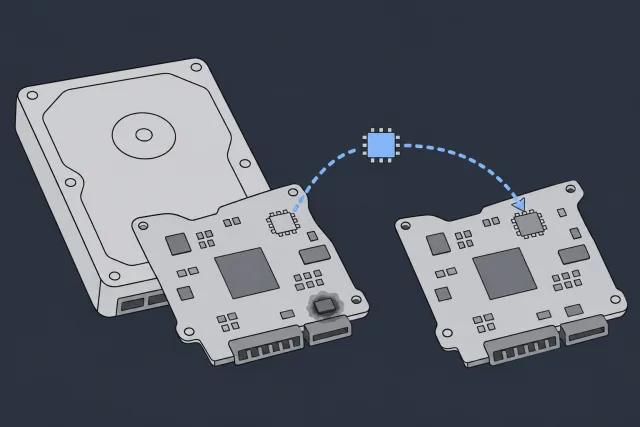
Something fried on the circuit board. Power surge, wrong adapter, static shock. The drive can seem completely dead. No spin, no sound, maybe a faint burning smell.
The fix isn't as simple as swapping the board from another drive. On some hard drives, a separate ROM chip on the circuit board holds settings unique to that drive. We have to desolder that chip and move it to a healthy donor board, or reprogram the new board with the original data. Delicate micro-soldering work.
 Illustration
Firmware Failures ($1,000 for a 1TB hard drive)
Think of firmware as the drive's internal operating system. When it gets corrupted, the drive can't boot properly. It might spin up but show 0 MB of capacity. It might appear with a garbled name. It might freeze your entire computer.
Consumer file recovery software can't fix this. Professional tools like the PC-3000 can access the drive's Service Area, a hidden zone where part of the firmware lives. Repairing a damaged module can get the drive talking again so we can copy your data.
Mechanical Failures ($1,500 for crashed heads on a 1TB hard drive)
This is the expensive one. Something physical broke inside the drive. Head crash, seized motor, stiction (heads stuck to the platter surface). A head swap takes matched donor parts and precise work inside the drive.
That clicking sound? A single click can be the heads parking. Repeated hard clicks or grinding mean you should power the drive down. A damaged head can scrape the surface that holds your data.
When we open your drive, we keep dust off the platters because a speck caught under a moving head can leave part of a file unreadable. If the heads have failed, we transplant a working head assembly from a matched donor drive, copy the sectors we can read, and then extract data from the copy. It's surgery.

Not sure what's wrong with your drive?
Send it in for a $100 diagnostic. We'll tell you what failed and what it'll cost. You decide whether to go ahead with recovery.
Request a Recovery QuoteData Recovery Costs by Device Type
The type of device matters almost as much as the failure type. Recovering files from a USB stick is fundamentally different work than rebuilding a failed RAID array. Here's what to expect for each.

Hard Disk Drives (HDDs)
For your quote, the model and capacity printed on your drive's label matter. If your 2TB external hard drive keeps clicking, power it down. If the diagnostic confirms crashed heads, recovery costs $2,000, or $2,500 for a WD My Passport 2TB in the Charger family. Your estimate shows a separate price for any donor drive we need to buy.
The price spread is huge because the gap between "I accidentally deleted a folder" and "the heads crashed and gouged the platters" is enormous. On an 8TB to 10TB HGST or WD Ultrastar helium drive, a logical problem costs $2,000. Crashed heads that need a helium refill on that same drive cost $4,000 to $5,000+.
Solid-State Drives (SSDs and NVMe)
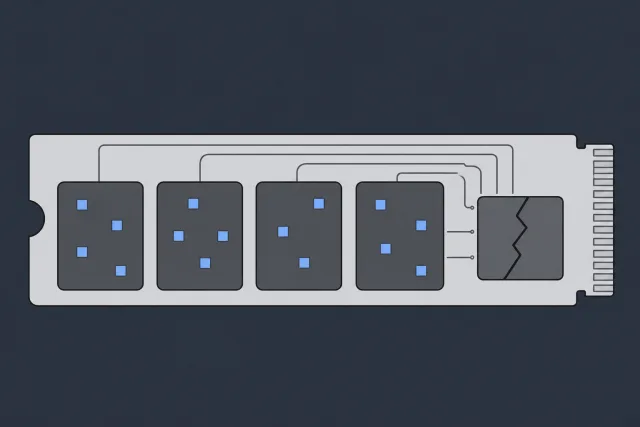
No moving parts, but SSDs fail in their own ways. Controller chip dies, NAND memory degrades, firmware corrupts. When the controller fails, pieces of your files can still be on the memory chips, but the drive can't put them back in order.
 Illustration
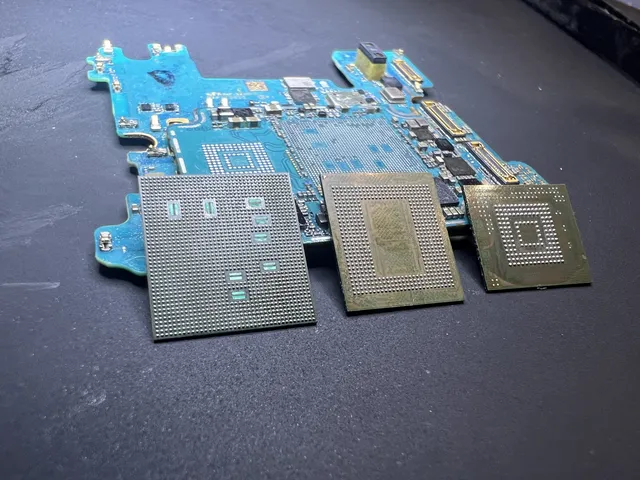
Recovery can mean moving the memory chips to a new board. On an SSD of 2TB or less, that work costs $1,500 to $2,000+, depending on how many chips have to move. That's why complex SSD recovery can cost more than replacing the heads in a hard drive.
RAID Arrays and Servers: Quote per case
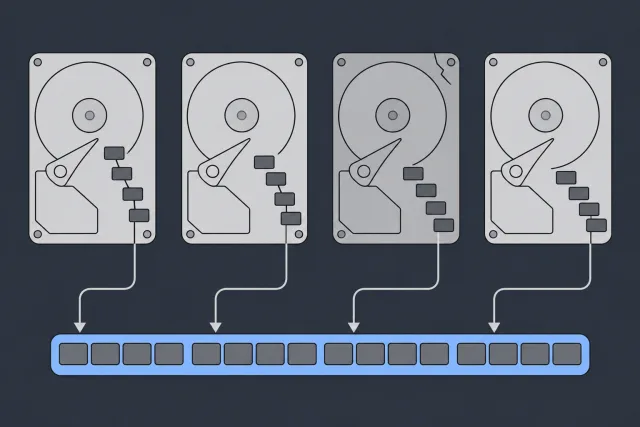
RAID recovery involves multiple drives that have to be read in a specific configuration. If one of the drives we need has crashed heads, we have to recover that drive before we can put the pieces of your files back in order.
 Illustration
We have to figure out the RAID level and drive order. On a striped array, a file can be spread across several drives. Get the stripe size or drive order wrong and the pieces won't line up. If the array is offline and holds your only copy, leave the drives in their original slots and don't start a rebuild. Read more about RAID recovery in our dedicated guide.
Phones (iPhone and Android)
Modern phones are heavily encrypted. If the phone is dead, you can't just pull the storage chip and read it because the data is encrypted and unreadable without the phone's processor. We may need to repair the logic board through micro-soldering to get the phone to boot. Once it boots, you still need your iPhone passcode or your Android PIN, password or pattern to open the files.
This is component-level repair under a microscope. It's delicate, slow, and requires specialized training. That's why broken phone recovery costs more than you might expect. For an iPhone 11, it's $1,500 without a processor swap. If a cracked board or heavy liquid damage means the original processor has to move to a donor board, it's $3,500 for an iPhone or Android phone. Those photos and messages can be irreplaceable.
USB Drives and SD Cards
File system corruption on a healthy 64GB flash drive or SD card costs $299 to recover. If we need to read the memory directly, that work is $1,750+. We remove the memory chip from a USB stick or read it through tiny contacts on an SD card, then piece the files back together.
Reading the chip directly won't unlock encrypted files. If you've got a hardware-encrypted USB and forgot the password, don't keep guessing. Some models erase their contents after too many wrong attempts.
Why DIY Software Can Make Things Permanently Worse
When a drive fails, the first instinct is to download recovery software. For logical problems on a healthy drive, that can work. Scanning a drive with physical damage can make it worse.

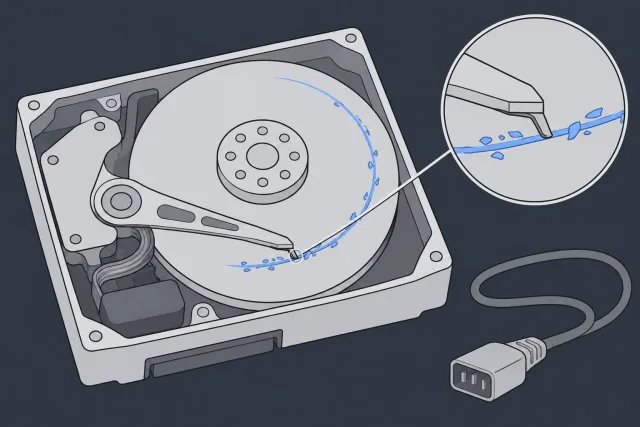
Running software on a clicking drive keeps the platters spinning under heads that may already be scraping the surface. Once the magnetic coating is gone, the data stored on that spot is gone too.
 Illustration
Software has a narrow use case. It's designed for logical problems on physically healthy drives. Deleted files on a working drive? Stop saving new files to it. Use a different drive for the recovery software and for any files it finds, so you don't overwrite the originals.
What Actually Happens at the Lab
You're not just paying for a fix. You're paying for a controlled, methodical process, from finding the fault to making a separate copy of your files.
Tell us what happened. The symptoms, any sounds, anything you tried. This backstory gives us crucial clues before we even see the hardware. You can drop your device off in Lincroft, New Jersey, or mail it to that same lab.
This is not just "plugging it in." We do a visual inspection of the circuit board and connectors. If we suspect damage inside a hard drive, we look at the heads and platters. If we suspect a firmware fault, we test the drive's internal software. Only after the diagnostic can we give you a firm quote.
You get a clear price with a full breakdown of what's needed. If you approve, we proceed. If you mailed it in and decline, we ship your device back. Return shipping is free to the contiguous US mainland. The $100 you paid for the diagnostic isn't refunded.
Depending on the failure, the original drive may need micro-soldering, a head swap or firmware repair before it can be read. Once it's readable, we make a sector-by-sector copy of what we can and recover the files from that copy.
After extraction, we verify file integrity. Open the folders in your recovery report to see which files came back and which may be damaged. You decide whether to pay for recovery after you see the report. For a drive recovery, we transfer your files to a new external drive or USB flash drive and mail it back, or you can pick it up. Back it up right away. We keep an offline copy for two weeks, then delete it. If you sent an iPhone, it may ask for your face or fingerprint before we can copy its files to a drive. In that case, we back it up to your own iCloud account. Sign in to that account on another iPhone to get your photos and videos back.
Rush Service and Emergency Pricing
Rush service moves up the start of the diagnostic. Recovery takes additional time depending on what we find.
| Service Tier | When the diagnostic starts | Best For |
|---|---|---|
| Standard | 4 to 6 weeks | Your device enters the queue in arrival order. |
| Priority | Within 5 to 7 days | You need an earlier start and can wait several days. |
| Urgent | Within 1 to 2 days | Work is on hold until you know what went wrong. |
| Emergency | Same day | For true emergencies where every hour counts. |
The standard wait is 4 to 6 weeks before we reach your device in line and start the diagnostic. Before you mail your device, you can see how much extra Priority, Urgent and Emergency each cost.
What Else Affects the Price?
A few other factors can push costs higher:
- Encryption: If your drive uses BitLocker or FileVault, have the password or recovery key ready. If you saved your BitLocker key to your personal Microsoft account, open your Microsoft recovery keys on another device, sign in, and match the key ID on your screen to find the 48-digit key.
- Fire or water damage: The device needs careful cleaning and stabilization before any recovery work can begin. Corrosion spreads fast, so time is critical.
- Severe platter damage: Multiple donor drives may be needed. If the platters must come out to clean contamination or head-crash dust, or to inspect scratches, the price is $500 + $2500 - $3000+. The first amount covers inspection and cleaning. The rest is for recovery.
How MDRepairs Compares to the Competition
Not all recovery companies work the same way. Here's what to ask when you're comparing estimates.
National Retail Chains
If you leave your device at a storefront, ask where the work will be done and who will give you the estimate. A price for copying photos from a working drive covers a different job from getting files off a drive that won't read.
Large Mail-In Labs
Before you mail a drive, find out what the diagnostic costs, who pays return shipping, and whether you'll see which files came back before you pay for recovery.
MDRepairs: Direct Lab, No Middlemen
Your device goes straight to our lab in Lincroft, New Jersey. Every case starts with a $100 diagnostic. Return shipping to the contiguous US mainland is free whatever the outcome.
Ready for a real quote?
You decide whether to go ahead after the diagnostic. If it helps to spread out the cost, we offer financing through Affirm and Afterpay.
Start Your DiagnosticFrequently Asked Questions About Data Recovery Costs
Is SSD recovery cheaper or more expensive than hard drive recovery?
It depends on the failure. On a 1TB hard drive, recovering deleted files costs $1,000. On an SSD of the same size, recovery without moving the memory chips costs $1,000 to $1,500. An SSD can clear deleted data in the background, so even a healthy drive may no longer hold the files.
Why can't you give me a flat-rate quote over the phone?
Different failures can look the same from the outside. Giving you a phone quote without seeing the drive would be guessing, and guessing can overcharge you for a simple problem or lowball a complex one that gets revised upward later. Neither is honest. A hands-on diagnostic is the only way to give you a real number.
Do I pay if you can't recover my data?
Yes. The $100 diagnostic applies in every case. Once the diagnostic starts, that fee isn't refunded. If nothing can be recovered, there's no recovery charge. If only some photos come back, your report shows which ones we recovered and which may be damaged. After you see it, you can decline the files without paying the recovery fee. If you want those files, you pay the full recovery price because reading around the damage takes extra work.
What's a "donor drive" and does it cost extra?
A donor drive is a healthy drive we source specifically for its compatible parts. If your hard drive has failed heads, we transplant a working head assembly from the donor into yours. You pay separately for any donor drive we need to buy. Its price is on the estimate you sign before we order it. A MacBook can need a donor part, too. If we move its processor and storage chips to another board, the price is $3,500 + donor board. The replacement board costs extra.
How does water damage affect the price?
Water damage adds complexity because corrosion can spread across internal components. If water gets onto the disks inside your drive and we have to take them out to clean them, the price is $500 + $2500 - $3000+. The first amount pays for inspection and cleaning, and the rest is for recovery. Leave the drive powered off. If corrosion has reached the platters, additional donor parts and careful cleaning can push the cost up.
Can I ship my drive to you from anywhere?
We handle mail-in recoveries nationwide. When you start your case, fill out the mail-in form and print the packing slip. From the contiguous US mainland, you can generate a free UPS 2nd Day Air label (contiguous US) right away. If you're in Alaska, Hawaii, Puerto Rico or on an island, you arrange and pay for shipping. Pack the drive in an anti-static bag, wrap it in bubble wrap, and put it in a sturdy box with the packing slip. Attach the shipping label to the outside.
How long does recovery take?
The standard wait is 4 to 6 weeks before we reach your device in line and start the diagnostic. If you need us sooner, we start the diagnostic within 5 to 7 days with Priority, within 1 to 2 days with Urgent, or the same day with Emergency. Recovery takes additional time depending on what we find. Read our full guide on data recovery timelines for more detail.
Is data recovery worth the cost?
That depends on what's on the drive. Family photos that exist nowhere else? A business database with years of client records? Tax documents? If you've got a backup, open the files you need on another device before you spend anything on recovery. We wrote a full breakdown of whether data recovery is worth it if you're on the fence.
Want a firm number instead of a range? Call to tell us what happened. You get an estimate after the $100 diagnostic and decide whether to go ahead with recovery.
Get Your QuoteCurrent service pricing and rush options are always listed on our data recovery pricing page.
If the Data Matters, Take the Safe Route
If your drive clicks repeatedly, disappears, overheats, or keeps corrupting files, stop using it. Our full list of data recovery services covers hard drives, SSDs, phones, memory cards, and RAID. You can drop yours off in Lincroft, New Jersey, or mail it in from across the US. The diagnostic is $100, applied toward a successful recovery.
Sources
- When Data Loss Occurs
- PC-3000 HDD. How to find out the problems in WD Marvell drives.
- Identifying Hard Drive Sounds and Determining What They Mean
- Samsung Solid State Drive White Paper
- What Happens When a Disk Fails in Different RAID Configurations?
- Apple Platform Security
- File-based encryption
- IRONKEY™ BASIC S250/D250 User Guide
- About Stolen Device Protection for iPhone
- Find your BitLocker recovery key
- Packing & Shipping Instructions
- Terms & Conditions