They are miracle workers! My phone was in a creek for a year and another lab failed to recover my data from it. I saw this company on TikTok do a micro soldering recovery … They recovered all 20 GB of data from my phone!
Samsung Galaxy Data Recovery in Rockwall, TX
345 Google Reviews · 2M+ Followers · Nationwide Service
- $100 Flat Diagnostic
- Free Shipping (contiguous US)
Broken Samsung Galaxy phone in Rockwall? MDRepairs recovers the data at our lab in Lincroft, NJ. MDRepairs pulls photos, texts, contacts, WhatsApp messages, and app data from dead, water damaged, and broken Galaxy phones shipped from Rockwall and the wider Texas area. Galaxy S24 Ultra, S23, S22, Note 20, Z Fold, Z Flip, A54 - we work on every Samsung model at our dedicated microsoldering lab in Lincroft, NJ. Knox encryption binds your data to the processor inside your specific phone, and our board-level repair process is built to handle it. Our recovery process works on phones that local repair shops have already declared dead, because we go beyond surface-level diagnosis and work directly on the motherboard.
About this recovery service
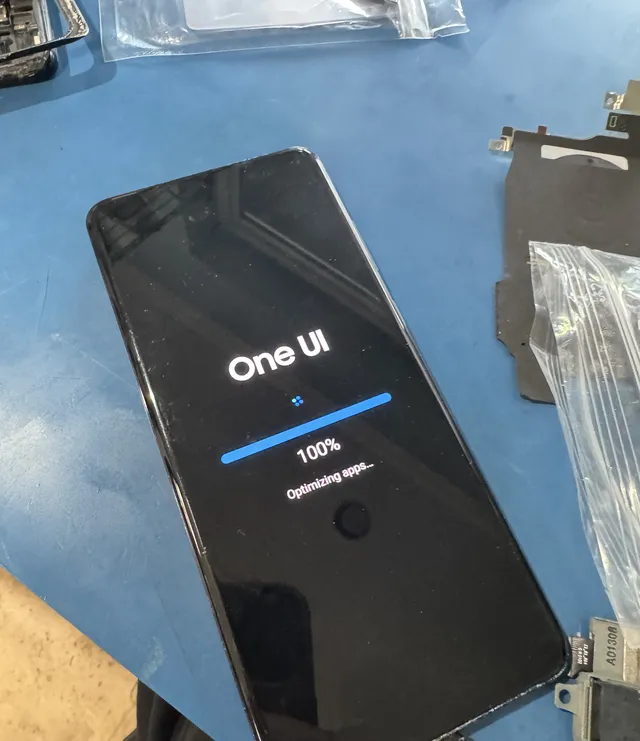
Shipping a Samsung Galaxy from Rockwall to our lab takes 3-4 business days through our mail-in service. UPS shipping is free both ways. Our facility at 644 Newman Springs Road, Suite A, Lincroft, NJ 07738 is where every single recovery happens. No outsourcing, no middlemen. We diagnose the board, perform the microsoldering repair, boot the phone into One UI, and pull every file. No data, no charge.
Local Proof
Trusted for Samsung Galaxy Recovery in Rockwall, TX
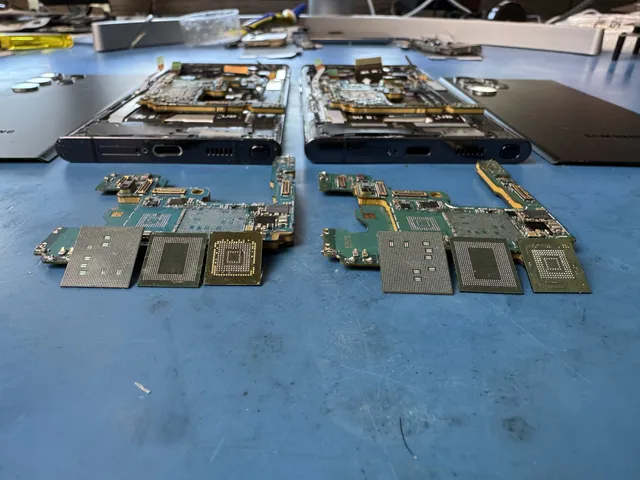
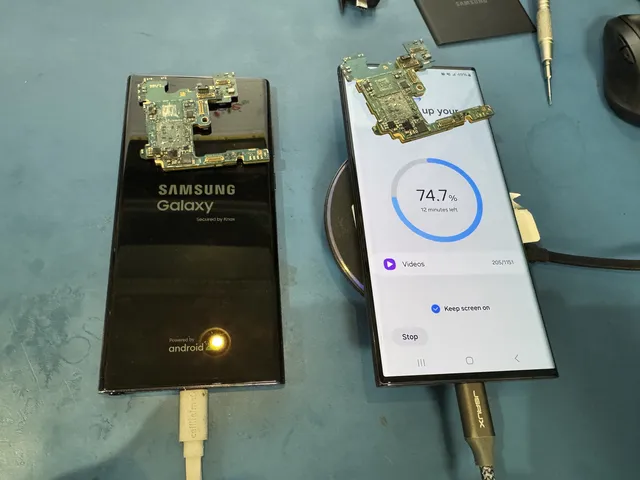
Customers from Rockwall often tell us they found MDRepairs through a video on YouTube Shorts, TikTok, or Instagram Reels. That is because our lead technician Joseph Montanti films every Samsung Galaxy recovery from start to finish. Dead Galaxy S phones, flooded Note boards, bricked Z Flips - all of it documented on camera. With 2 million followers watching, Rockwall residents have likely already seen our work before they ever need to reach out.
Real Phone Recoveries, Filmed Start to Finish
MDrepairs doesn't just talk about mobile data recovery - we show it. Our lead technician Joseph Montanti films real phone recoveries from the moment a device hits the bench through final data extraction. From corroded Samsung Galaxy boards to iPhones snapped in half, over 2 million followers watch us bring phones back from the dead on YouTube, TikTok, and Instagram.
- 4.6 Google rating
- from 345 Google reviews
- 2M+ Followers watching real recoveries
- $100 diagnostic, credited toward a successful recovery.
The people we help
Our customers include people from
-

-

-
 AT&T
-
 Marriott
-

-

-
 Tennessee Titans
-

-

-

-

-

-

-

Reviews
What Our Customers Say
4.6
Start Here
What's happening with your phone?
Pick your device. You'll see what might be wrong, what to avoid, and whether it's urgent.
Mechanical - power it OFF now
Dead phone, alive data - it lives on one chip.
Your photos and messages live in a storage chip that usually survives whatever killed the phone. Board-level repair brings the phone up long enough to pull everything. Skip the rice, skip the third repair attempt - each one risks the board.
Mechanical - power it OFF now
Corrosion is the clock. Keep it OFF.
Water does not destroy the data - the corrosion that spreads while the phone sits does. Do not charge it, do not "wait and try tomorrow." Off, bagged, shipped: that is how water-damaged phones come back with every photo.
Logical - act calmly, act soon
Screen is the cheap part. Access is what matters.
If the phone still vibrates or rings, the data is fine behind a dead display. We restore access, pull a verified copy of everything, and you decide if the phone itself is worth fixing afterward.
Serious - stop using it
Usually software or storage - both recoverable.
A phone stuck on the logo is often a storage fault or a failed update, not a dead board. Do not factory reset it - that is the one step that genuinely erases everything. Diagnostic first, reset never.
Pricing
How Much Does Samsung Galaxy Data Recovery Cost?
Every Samsung Galaxy recovery for Rockwall customers starts with a $100 diagnostic. This covers our full board-level evaluation under a microscope. If you choose to proceed, the $100 counts toward your total. There are no extra fees stacked on top.
Pricing after the diagnostic depends on the complexity of the failure. Logical recoveries and software issues run between $1,500-$2,000. Board-level repairs with microsoldering sit at $1,500-$2,000. Complex chip-off cases or heavy physical damage may go above that range. We always provide a fixed quote before starting any repair work. If we do not recover data, you owe nothing beyond the diagnostic. Reach us anytime at 732-933-7717.
How Long Does Cell Phone Data Recovery Take?
With standard service, we usually start your diagnostic in 4–6 weeks. Recovery takes additional time depending on what we find. If you need us sooner, we start the diagnostic within 5 to 7 days with Priority, within 1 to 2 days with Urgent, or the same day with Emergency. Rush service costs extra.
-
4–6 weeks
Standard
Included
We usually start the diagnostic in 4–6 weeks. Recovery time after that depends on your case.
-
5 - 7 days
Priority Rush
+$250
Diagnostic assessment starts within 5–7 days, ahead of the standard queue; confirm availability. Completion timing varies.
-
1 - 2 days
Urgent Rush
+$500
Diagnostic assessment starts within 1–2 days, ahead of the standard queue; confirm availability. Completion timing varies.
-
Same Day
Emergency
+$1,000
Diagnostic assessment starts same-day, ahead of the standard queue; confirm availability. Completion timing varies.
Rush windows cover the start of diagnostic assessment; confirm availability. They do not promise completed diagnosis or recovery. We usually start the diagnostic in 4–6 weeks. Recovery time after that depends on your case. Mail-in ships with a free prepaid label (contiguous US) and typically reaches our lab in 2-3 business days.
Data Types
Types of Data We Recover From Samsung Galaxy Phones in Rockwall, TX
Photos & Videos
Every photo and video stored in your Samsung Gallery, including camera shots, screenshots, slow-motion clips, screen recordings, and locally saved files. We recover from the DCIM folder, Google Photos local cache, and Samsung Cloud offline storage. Rockwall customers send us Galaxy phones packed with years of irreplaceable memories that never made it to the cloud. Everything comes back organized and viewable.
Text Messages
Full SMS and MMS message history, RCS conversations, group chats, and all shared media within those threads. We extract directly from the Samsung messaging database stored on the device. Complete conversation history with timestamps preserved exactly as they appeared on your Galaxy. Includes both Samsung Messages and Google Messages data, going back as far as the phone stored them.
WhatsApp & App Data
WhatsApp chat history, media, voice notes, and documents. Signal and Telegram conversations. App data from banking, health, fitness, and productivity apps. Notes stored in Samsung Notes, Google Keep, or third-party note apps. We pull data from individual app sandboxes on the device storage, not from cloud accounts. If the app stored anything locally on your Galaxy, we extract it.
Contacts
Every contact saved on the phone itself, including names, phone numbers, email addresses, physical addresses, and notes attached to each entry. We recover contacts stored locally in the Samsung Contacts app database, separate from any Google or Samsung Cloud sync. Many Rockwall customers have contacts saved only on-device that exist nowhere else.
Call Logs & Voicemail
Complete call history with incoming, outgoing, and missed calls including timestamps and durations. Saved voicemail recordings stored locally on the device. Visual voicemail messages that were cached by your carrier app. Many Rockwall Samsung users rely on call logs for business records, legal documentation, or personal reference without realizing how much data exists only on the phone.
Documents & Downloads
PDFs, Word documents, spreadsheets, presentations, and every file in your Downloads folder. We also recover files saved to Samsung My Files, Google Files, and any documents stored locally by third-party file manager apps. If a file was on your Galaxy phone storage when it failed, our process finds it and adds it to your recovery package.
Board-Level
Why Samsung Galaxy Data Recovery in Rockwall, TX Requires Board-Level Work
We Work on the Actual Board
Most repair shops in Rockwall and across Texas plug Samsung phones into software tools and hope for a response. When that does not work, they send it out. MDRepairs opens the phone, inspects the logic board under a microscope, and performs the repair directly. Microsoldering, reballing, component-level replacement. We fix the hardware that connects to your data.
Knox Encryption Handled In-House
Samsung Knox ties your encrypted data to the specific processor on your phone's motherboard. There is no workaround through a cable or software tool. The only way to access Knox-protected data is to repair the original board so the phone boots and authenticates natively. MDRepairs does this at our own bench using microsoldering equipment. No outsourcing to a third-party lab.
Transparent Process on Camera
We film Samsung Galaxy recoveries and post them publicly on YouTube, TikTok, and Instagram. Rockwall customers can watch what we actually do before they ship their phone. No stock photos, no vague promises. You see the board under the microscope, the soldering iron on the component, and the phone booting back up with data intact. Over 2 million followers watch this work happen in real time.
One Lab, One Team, No Middlemen
Your Galaxy phone goes to one location, 644 Newman Springs Road, Suite A, Lincroft, NJ 07738. One team handles the intake, diagnosis, repair, data extraction, and return shipment. There is no chain of subcontractors between your phone and the technician. Rockwall customers deal directly with the people doing the actual work on their device.
How Cell Phone Data Recovery Works
From the moment you ship your phone to the day your files land in your hands - five clear steps, no surprises, and a $100 diagnostic credited toward your recovery.
-
Submit a Quote & Ship Your Phone
Fill out our quote form or give us a call. You can generate a free prepaid UPS label on the mail-in form for shipments from the lower 48, except islands. Wrap your phone in padding, place it in a small box, and drop it at any UPS location. Your device goes directly to our Lincroft, NJ lab. We use UPS 2nd Day Air both ways. On each trip, you can expect delivery by the end of the second business day after UPS gets your box. Weekends and holidays don't count.
-
Device Diagnostics
Our technicians disassemble your phone and run component-level diagnostics using thermal cameras, oscilloscopes, and microscopes. We test for short circuits, check for liquid damage, evaluate chip integrity, and figure out the best recovery approach. This is covered by the $100 diagnostic fee.
-
Recovery Quote & Approval
After diagnostics, we send you a detailed assessment and an exact recovery quote. You decide whether to proceed. If you do, the diagnostic fee is applied toward the total cost. No hidden fees, no surprises.
-
Board Repair & Data Extraction
We perform motherboard repair through microsoldering to get your phone to power on and reach a usable state. For iPhones, we create a full iTunes backup once the device boots and unlocks. For Android phones, we extract data directly from internal storage using specialized tools. In severe cases, we transplant the CPU and storage chip to a working donor board.
-
Data Delivered
We send proof of recovery before requesting payment. Your recovered data is delivered through our secure data delivery portal or shipped on an external drive. We keep a copy of your files offline for two weeks, then delete it.
Call 732-933-7717 $100 diagnostic, credited toward a successful recovery.
Galaxy dead or boot-looping? Knox does not stop chip-level recovery in our lab - get a free quote.
Affirm financing, if eligible Causes
Common Causes of Samsung Galaxy Data Loss in Rockwall, TX
Water & Liquid Damage
Dropped in a pool, caught in the rain, spilled coffee, knocked into a sink. Rockwall Galaxy owners bring us phones exposed to every kind of liquid. Water corrodes the solder connections on the logic board and shorts out components instantly. Even if the phone seems fine at first, corrosion spreads over hours and days. We clean the board, replace damaged components through microsoldering, and restore functionality long enough to pull a full data backup.
Cracked or Shattered Screen
A cracked screen on a Samsung Galaxy often means more than broken glass. On many Galaxy S and Z series models, the display is fused to the digitizer, and severe impacts can damage the flex cables connecting the display to the motherboard. When a screen replacement does not fix the issue, Rockwall customers send us the phone for board-level diagnosis and data extraction that goes beyond a simple part swap.
Dead Phone / No Power
Your Galaxy suddenly will not turn on, will not charge, and shows no signs of life. This is usually a board-level failure involving the power management IC, charging IC, or other critical components. Software tools are useless when the phone has no power. MDRepairs diagnoses the specific board failure and performs the microsoldering repair needed to get the phone booted long enough to extract a complete data backup.
Boot Loop / Stuck on Logo
Your Galaxy powers on but cycles endlessly through the Samsung logo without reaching the home screen. Boot loops on Samsung phones are caused by corrupt system partitions, failed software updates, NAND storage degradation, or damaged boot components on the motherboard. Rockwall customers dealing with this issue have often already tried factory reset through recovery mode. We go deeper, working at the board and storage level to either repair the boot chain or extract data directly.
Failed Software Update
A One UI or Android update that fails mid-install can leave your Galaxy in an unusable state. Sometimes it boots to recovery mode. Sometimes it does not boot at all. Factory reset through recovery wipes your data. MDRepairs extracts data from phones stuck in this state by working at the storage level, bypassing the corrupted operating system entirely to reach the files stored on the NAND chip.
Physical Impact Damage
Dropped from a height, run over by a car, crushed under heavy equipment. Physical trauma can crack the logic board, sever trace connections, or unseat BGA components without visible external damage. Rockwall Galaxy owners send us phones that look fine on the outside but are dead because of internal board fractures. We inspect under a microscope, identify the break points, and bridge or replace the damaged sections to restore enough function for data extraction.
Water Damage
Samsung Galaxy Water Damage Data Recovery
Water damage is one of the most common reasons Rockwall Samsung Galaxy owners contact MDRepairs. Whether the phone went into a pool, got caught in a rainstorm, or took a splash from a spilled drink, the damage pattern is similar. Liquid reaches the logic board and starts corroding solder joints and component leads within minutes. The phone may still work initially, then die hours or days later as corrosion spreads across the board.
Our process for water-damaged Samsung Galaxy phones starts with a full ultrasonic cleaning of the logic board to halt active corrosion. After cleaning, we inspect every connection under the microscope and replace any components that were shorted or corroded beyond function. Microsoldering restores the connections the water destroyed. Once the board is stable, we boot the phone into One UI and pull a complete data backup. Rockwall customers get their photos, texts, contacts, and app data back even from phones that local shops declared unrepairable.
Dead Phone
Dead Samsung Galaxy? Your Data Is Still There
A completely dead Samsung Galaxy that will not power on or charge is not necessarily a lost cause. Rockwall customers ship us Galaxy S, Note, Z Fold, and Z Flip phones that show zero signs of life, and we recover data from the majority of them. The most common board-level failures behind a dead Galaxy include blown power management ICs, damaged charging ICs, shorted capacitors, and disconnected battery connector pads.
We diagnose dead Samsung Galaxy phones by injecting controlled voltage and measuring current draw patterns across the board. This tells us which circuit has failed before we remove a single component. Once we identify the fault, we replace the damaged parts through microsoldering and get the phone powered on enough to extract a full backup through One UI. The repair does not need to be permanent. It just needs to hold long enough to pull every file off the device.
By Model
Samsung Galaxy Data Recovery by Model in Rockwall, TX
Galaxy S Series (S24, S23, S22, S21, S20)
The Galaxy S line is our most common recovery. These flagship phones use Qualcomm or Exynos processors with Knox encryption tied to the CPU. When the board fails, your data is locked behind that specific chip. MDRepairs handles S series recoveries through microsoldering repair of the original board, not chip transfers. We keep the Knox chain intact so the phone boots and authenticates normally, giving us a clean path to every file. Rockwall customers send us Galaxy S phones with every type of failure.
Galaxy Note Series (Note 20, Note 10, Note 9)
Galaxy Note phones carry the same Knox encryption as the S series but often contain heavier workloads. Business documents, S Pen notes, large file libraries, and years of accumulated data. The Note line also has unique hardware including the S Pen digitizer layer and larger batteries, both of which create additional failure points. MDRepairs recovers data from dead, water-damaged, and physically damaged Galaxy Note phones at our Lincroft lab.
Galaxy Z Fold & Z Flip
Samsung's foldable phones introduce a flex cable hinge connection between the two display halves that is a known failure point. Z Fold and Z Flip devices also have compact, layered motherboards that make standard repair more difficult. Water and physical damage hit these models harder because of the hinge gap. MDRepairs has the microsoldering capability to work on the smaller board layouts used in foldable Galaxy phones. Rockwall Z Fold and Z Flip owners send us phones that folded shut and never turned on again.
Galaxy A Series & Budget Models
Galaxy A54, A34, A14, and other A-series phones are some of the most popular Samsung devices worldwide. They use the same Knox encryption framework as flagship models, meaning data recovery still requires board-level work when the phone will not boot. These models often have MediaTek processors rather than Qualcomm, which changes the diagnostic and repair approach. MDRepairs handles both chipsets. A-series phones from Rockwall arrive at our lab regularly.
Advanced
Chip-Off, JTAG & ISP Recovery for Samsung Galaxy
Chip-off recovery is a last-resort technique where we physically remove the NAND flash storage chip from the Samsung Galaxy motherboard and read it using specialized equipment. This approach is reserved for cases where the board is too damaged to repair through microsoldering, such as phones that were burned, severely crushed, or suffered catastrophic electrical failure.
The challenge with Samsung Galaxy chip-off is Knox encryption. Because Knox binds the encryption key to the CPU, removing the storage chip alone does not automatically give us readable data. Chip-off on Samsung devices works best on older models with weaker encryption or situations where we can also recover the key material from the processor. MDRepairs evaluates whether chip-off is viable during the $100 diagnostic and gives Rockwall customers an honest assessment before proceeding.
Microsoldering
Samsung Galaxy CPU Repair & Chip Transplant
Samsung Galaxy phones rely on a system-on-chip (SoC) that contains the CPU, GPU, and Knox security coprocessor in a single package. When this chip fails or loses connection to the board, the phone is completely dead and the encrypted data becomes inaccessible through any software method. The only path to recovery is repairing the physical connection between the SoC and the motherboard.
MDRepairs performs CPU-level repairs on Samsung Galaxy phones using precision microsoldering and reballing techniques. We rework the BGA solder connections underneath the processor to restore electrical contact with the board. For Rockwall customers, this means we can recover data from Galaxy phones that other shops and even other data recovery labs have given up on. If the SoC itself is not internally damaged, reballing and reflow can bring the board back to life.
Boot Loop
Samsung Galaxy Stuck on Logo or Boot Loop
A Samsung Galaxy stuck in a boot loop keeps restarting at the Samsung logo or One UI loading screen without ever reaching the home screen. Rockwall customers dealing with this issue have usually tried clearing the cache partition, booting into safe mode, and even factory reset through recovery mode. A factory reset wipes your data, and it often does not fix the underlying issue anyway.
Boot loops on Samsung Galaxy phones stem from multiple causes: corrupted system files from a failed OTA update, degraded NAND storage blocks, damaged eMMC or UFS controller, or component failures on the motherboard that prevent stable voltage delivery during boot. MDRepairs diagnoses the root cause at the board level. If the storage is intact, we repair the boot chain. If the NAND itself is failing, we extract data directly from the storage chip. Either way, your data comes back.
Recovery Factors
What Samsung Galaxy Data Recovery Depends On
MDRepairs maintains a high success rate on Samsung Galaxy data recovery because we do the work ourselves at the board level. We are not a middleman sending your phone somewhere else, and we are not limited to software-only tools. When a Galaxy phone arrives from Rockwall, our technician opens it, inspects the board under a microscope, and makes a hands-on determination about what is failing and how to fix it.
Water damage, dead phones, boot loops, cracked screens with unresponsive digitizers, Knox-encrypted devices that will not authenticate - we recover data from all of these at rates well above industry average. The cases we cannot recover typically involve physically destroyed NAND storage chips or CPUs with internal die fractures. Even then, we provide a clear explanation of why recovery was not possible. The $100 diagnostic fee is all you pay if we cannot get your data back.
Knox Security
Samsung Knox: Why You Cannot Recover Galaxy Data Without Credentials
Samsung Knox is a hardware-backed security platform that encrypts your data and ties the decryption keys to the specific processor inside your Galaxy phone. This is not a software lock you can bypass with a cable tool or third-party app. The encryption is bound to the physical silicon of your CPU. If the CPU cannot boot and authenticate, the data stays encrypted and unreadable.
This is exactly why board-level microsoldering is the only reliable method for recovering data from Knox-protected Samsung Galaxy phones. The phone's original motherboard must be repaired so it boots natively through One UI and unlocks through your PIN, pattern, or biometric. MDRepairs does this work at our own lab in Lincroft, NJ. Rockwall customers who have been told their Galaxy data is unrecoverable often discover that the real issue was just a failed component that nobody else had the skill to replace.
Lab & Tools
Samsung Galaxy Data Recovery Lab - Tools & Equipment
MDRepairs is not a local phone repair franchise in Rockwall - we are a dedicated data recovery lab that handles Samsung Galaxy phones from across the country. Every recovery happens at 644 Newman Springs Road, Suite A, Lincroft, NJ 07738. Joseph Montanti, our lead technician, personally works on the boards and films the process for our 2 million followers on YouTube, TikTok, and Instagram. What you see in the videos is exactly what happens to your phone.
Rockwall customers choose us because the work is transparent, the pricing is straightforward, and the results are real. $100 diagnostic fee that applies toward the total. No data, no charge beyond that. Free UPS shipping both ways (contiguous US) through our mail-in program. One lab, one technician team, no subcontractors. Your Samsung Galaxy stays in our hands from the moment it arrives until we ship it back with a flash drive of recovered data.
DIY Fails
Why Samsung Galaxy Recovery Software Fails
Before contacting MDRepairs, many Rockwall Samsung Galaxy owners try software recovery tools they find online. Apps like Dr.Fone, Tenorshare, iMobie, and dozens of others promise to recover data through a USB connection. Here is the reality: if your Galaxy phone does not power on, does not boot past the Samsung logo, or has a board-level failure, no software tool can reach the data. These tools require a functioning phone that responds to ADB or MTP connections.
Even when a Galaxy phone does turn on, software tools are limited to data that the operating system makes accessible. Knox-encrypted storage, deleted files below the filesystem level, and app data in protected sandboxes are all beyond the reach of cable-based extraction. MDRepairs works at the hardware level, directly on the board and storage chips. That is the difference between plugging in a USB cable and actually fixing the phone to recover what is on it.
Backups
Samsung Cloud & Smart Switch: What They Do and Do Not Back Up
Samsung Cloud and Google account backups are the first thing Rockwall Galaxy owners check when their phone dies. The reality is that Samsung Cloud has limited storage and most users never configured it properly. Google backups cover app layouts and some settings but rarely include full photo libraries, text message history, WhatsApp data, or locally stored files. If the data was not actively syncing before the phone failed, it is not in the cloud.
MDRepairs exists specifically for the data that did not make it to any backup. Your Samsung Galaxy stores a massive amount of data locally on the device, from the full-resolution copies of photos that Google Photos compressed, to SMS databases, call logs, app data, and documents. When the phone dies, all of that local data is only accessible by repairing the board and booting the device. That is what we do at our lab in Lincroft, NJ for Rockwall customers and everyone else nationwide.
Business
Business & Enterprise Samsung Galaxy Data Recovery in Rockwall, TX
Rockwall business owners and professionals carry Samsung Galaxy phones loaded with critical data. Customer contacts, vendor communications, project files, financial documents, two-factor authentication apps, business WhatsApp conversations, and operational data that exists nowhere else. When a Galaxy phone used for business fails, the impact goes beyond personal inconvenience. It can halt operations, delay projects, and cut off communication channels.
MDRepairs treats business recoveries from Rockwall with the urgency they deserve. Our $100 diagnostic gives you a clear answer quickly, and our recovery process gets your data back as fast as the repair allows. We extract everything to a flash drive organized by data type: contacts, messages, photos, documents, app data. Your business information comes back structured and ready to import into a new device or archive. We handle confidential data with appropriate care at our secure lab facility.
First Steps
What to Do When Your Samsung Galaxy Dies
Do This
- Stop using the phone immediately. Do not try to charge it repeatedly, force restart it, or plug it into a computer. Each failed boot attempt can cause additional damage to a failing board.
- Leave it powered off. If it is in a boot loop, let the battery drain. Do not try recovery mode. Do not attempt a factory reset. Factory reset erases your data and often fails to fix the actual problem.
- Keep it dry. If water damage is involved, do not put it in rice. Rice does not stop corrosion and can introduce starch and debris into the phone. Pat it dry and leave it alone.
- Contact MDRepairs at 732-933-7717 or start the mail-in process online. We will tell you exactly how to pack and ship it from Rockwall for free.
- Write down your lock screen PIN or pattern. We will need this to access the phone after repair. Knox encryption requires authentication through the original lock screen.
Do Not Do This
- Do not take it to a general repair shop. Most phone repair stores in Rockwall are equipped for screen and battery replacements. They do not have microsoldering equipment or the training to work on Samsung logic boards. An inexperienced technician can cause irreversible damage.
- Do not attempt a factory reset. This erases your data permanently and usually does not fix the underlying hardware failure that caused the problem in the first place.
- Do not open the phone yourself. Samsung Galaxy phones have ribbon cables, flex connectors, and fragile board-to-board connections that are easy to tear. Opening without proper tools and technique can turn a recoverable phone into a non-recoverable one.
- Do not use software recovery tools. Dr.Fone, Tenorshare, and similar programs cannot access data from a phone that will not boot. They can make things worse by sending commands to a failing storage controller.
- Do not put a water-damaged phone in rice. This does nothing to stop corrosion and wastes critical time. Every hour corrosion spreads, the recovery becomes harder.
After Recovery
After Recovery: How You Receive Your Galaxy Data
After MDRepairs recovers your Samsung Galaxy data, we copy everything to a USB flash drive organized by type: photos, videos, messages, contacts, documents, app data. We ship the flash drive along with your original phone back to Rockwall through UPS. You plug the drive into any computer and immediately have access to all recovered files. No special software needed.
From there, you can transfer the data to a new Samsung Galaxy, an iPhone, or store it on a computer or external drive as a permanent backup. We recommend setting up Samsung Cloud or Google Photos auto-backup on your new device so this situation does not repeat itself. If you need help understanding what was recovered or have questions about the files, our team is available at 732-933-7717 after delivery.
Comparisons
Samsung Galaxy Data Recovery vs. Other Services
Samsung vs. iPhone Recovery
Both Samsung Galaxy and iPhone data recovery require board-level work when the phone will not boot. The key difference is the encryption system. Samsung uses Knox tied to the Qualcomm or Exynos SoC, while Apple uses the Secure Enclave on their A-series and M-series chips. MDRepairs handles both at our Lincroft lab with the same microsoldering approach: repair the original board so the phone boots and authenticates natively, then extract a full backup.
MDRepairs vs. Local Rockwall Repair Shops
Local phone repair shops in Rockwall are set up for screen replacements, battery swaps, and charging port repairs. They do not perform microsoldering, board-level diagnosis, or Knox-encrypted data recovery. When a local shop tells you the phone is unrepairable or sends it out to another company, that is the point where MDRepairs takes over. We do the work that general repair shops are not equipped to handle.
MDRepairs vs. Other Data Recovery Companies
Many data recovery companies are brokers. They accept your phone, ship it to a third-party lab, mark up the price, and send it back. MDRepairs does every recovery in-house at 644 Newman Springs Road, Suite A, Lincroft, NJ 07738. You can watch our technician work on Samsung Galaxy boards in our YouTube, TikTok, and Instagram videos. No middlemen, no outsourcing, no mystery about who is touching your device. Rockwall customers deal directly with the team doing the actual repair.
We cover the UPS label and the trip home in the lower 48, except islands. $100 diagnostic, credited toward a successful recovery. If we can't get any files back, there's no recovery fee.
Affirm financing, if eligibleSources & References
The technical details, standards, and methods referenced on this page come from publicly available documentation. We cite our sources so you can verify independently.
-
NIST Special Publication 800-88 Rev. 1 - Guidelines for Media Sanitization
U.S. National Institute of Standards and Technology guidelines covering data sanitization methods for all media types including mobile device flash storage. Referenced for our discussion of factory reset effectiveness and when data can or cannot be recovered after a wipe.
-
Apple Platform Security Guide
Apple's official documentation on hardware encryption architecture, Secure Enclave, file data protection classes, and the encryption chain used in every iPhone and iPad. Referenced for our explanation of why iPhone chip-off recovery requires the original Secure Enclave and passcode.
-
Samsung Knox Security Platform
Samsung's defense-grade security platform documentation covering hardware-backed encryption, real-time kernel protection, and device integrity verification on Galaxy devices. Referenced for our discussion of Samsung-specific recovery challenges and Knox trip counters.
-
IEEE 1149.1 - JTAG / Boundary Scan Standard
The IEEE standard defining the Test Access Port and boundary scan architecture used in JTAG data extraction. Referenced for our explanation of how JTAG recovery works by accessing test points on a phone's logic board to read storage data directly.
-
Cellebrite UFED - Universal Forensic Extraction Device
Industry-standard mobile forensic extraction platform used by law enforcement and data recovery labs worldwide. Referenced as one of the primary forensic tools we use for software-level and advanced logical extractions from both iOS and Android devices.
-
iFixit Teardown Guides
Detailed component-level teardowns of smartphones showing internal layouts, chip placements, and board designs. Referenced as a general resource for understanding phone internals and identifying storage chip locations for JTAG, ISP, and chip-off procedures.
-
Android Open Source Project - Security Documentation
Google's official documentation on Android encryption implementation, file-based encryption (FBE), full-disk encryption (FDE), verified boot, and hardware-backed keystore. Referenced for our explanation of how Android encryption varies by version and manufacturer and why older Android devices are generally easier to recover than newer ones.
FAQ
Samsung Galaxy Data Recovery FAQ - Rockwall, TX
How much does Samsung Galaxy data recovery cost for Rockwall customers?
Pricing is the same for all customers nationwide. Our $100 diagnostic fee covers a full board-level evaluation of your Galaxy phone. If you approve the recovery, that fee applies toward the total. Software recoveries run $1,500-$2,000. Board-level microsoldering repairs fall between $1,500-$2,000. Advanced cases may be higher. You receive an exact quote before we begin any work beyond the diagnostic. If we cannot recover your data, you only pay the $100 diagnostic fee.
How do I send my Samsung Galaxy from Rockwall to MDRepairs?
Start by calling 732-933-7717 or visiting our mail-in page to generate a free prepaid UPS label on the mail-in form (contiguous US). Pack your Galaxy phone in a small box with padding, attach the label, and drop it off at any UPS location in Rockwall. Shipping from Rockwall, TX typically takes 3-4 business days. UPS shipping is free both ways.
Can you recover data from a water-damaged Samsung Galaxy?
Yes. Water damage recovery is one of our most common services. We ultrasonically clean the logic board, inspect for corrosion under a microscope, and replace damaged components through microsoldering. Once the board is stable, we boot the phone and extract a complete backup. Do not put the phone in rice and do not try to charge it. Keep it off and ship it to us as soon as possible. Corrosion spreads quickly, so faster action leads to better results.
What if my Samsung Galaxy is completely dead?
A Galaxy phone showing no signs of life usually has a board-level failure, typically involving the power management IC, charging circuit, or other critical components. We inject controlled voltage and trace the failure to the specific component, then replace it through microsoldering. The phone does not need to work permanently. It just needs to boot long enough for us to pull a full backup of your data.
Do I need to know my Samsung lock screen PIN?
Yes. Samsung Knox encryption requires authentication through your original lock screen PIN, pattern, or password after the phone boots. Without it, we can repair the board but cannot access the encrypted data. If you use biometric unlock (fingerprint or face), you still have a backup PIN or pattern set during initial setup. Please provide that when you ship your phone.
How long does Samsung Galaxy data recovery take?
Most Samsung Galaxy recoveries take 3-7 business days from the time your phone arrives at our lab. Complex board repairs or cases requiring chip-off work may take longer. We provide status updates throughout the process. Add 3-4 days for shipping each way from Rockwall to our lab and back.
Can you recover deleted photos from a Samsung Galaxy?
If the phone is functioning and the photos were recently deleted, Samsung's Trash feature in the Gallery app may still have them for up to 30 days. If the phone is broken or the files were deleted longer ago, recovery depends on whether the storage blocks have been overwritten. MDRepairs can attempt deleted file recovery during the extraction process, but success rates for deleted data vary depending on how much the phone was used after deletion.
What Samsung Galaxy models do you recover data from?
Every model. Galaxy S24 Ultra, S23, S22, S21, S20, S10, S9, S8, and older. Galaxy Note 20, Note 10, Note 9, Note 8. Galaxy Z Fold 5, Z Fold 4, Z Fold 3, Z Flip 5, Z Flip 4, Z Flip 3. Galaxy A54, A34, A14, A13, and all other A-series models. Galaxy Tab series tablets as well. If Samsung made it and it has data you need, we work on it.
Is my data kept confidential during recovery?
Yes. Your data stays at our Lincroft, NJ lab throughout the entire process. We do not send devices to third parties, and no outside contractors handle your phone. Recovered data is copied to a flash drive that ships directly to you. We do not keep copies of your data after the recovery is complete and the drive has been delivered.
What happens if you cannot recover my data?
If MDRepairs cannot recover your Samsung Galaxy data, you pay only the $100 diagnostic fee. No recovery, no additional charge. We return your phone to Rockwall through UPS at no cost. We also provide a written explanation of what we found and why recovery was not possible, so you have a clear understanding of the situation.
No question matches that - it's probably faster to just ask us: (732) 933-7717 or .
Coverage
Samsung Galaxy Data Recovery Near Rockwall
We serve these cities through our secure mail-in program. We cover the UPS label and the trip home in the lower 48, except islands.
Dallas | Forney | Royse City
Looking for samsung galaxy data recovery elsewhere in Texas? View all samsung galaxy data recovery cities in Texas, or visit our main samsung galaxy data recovery page.
Related Services
More Data Recovery Services in Texas
MDrepairs offers professional data recovery for all device types. We serve Texas through our secure mail-in program with free shipping both ways (contiguous US).
Lost your data? We'll get it back.
$100 diagnostic, credited toward a successful recovery. If we can't get any files back, there's no recovery fee. We cover the UPS label and the trip home in the lower 48, except islands.