They are miracle workers! My phone was in a creek for a year and another lab failed to recover my data from it. I saw this company on TikTok do a micro soldering recovery … They recovered all 20 GB of data from my phone!
Cell Phone Data Recovery in Toa Baja, PR
from 345 Google reviews · 2M+ followers of our recovery videos · Mail-in recovery nationwide
- $100 flat diagnostic fee
Cell phone data recovery in Toa Baja, PR starts with finding a lab that actually does the work in-house.
About this service
MDRepairs is that lab. Based in Lincroft, NJ, we handle every recovery ourselves using board-level microsoldering, chip-off NAND extraction, JTAG and ISP protocols, and CPU-level repairs. We recover data from iPhones, Samsung Galaxy phones, Google Pixel, Motorola, OnePlus, LG, and every other cell phone brand on the market.
We operate as a mail-in service for customers in Toa Baja, PR. You ship your device to our lab, we perform a full diagnostic under magnification, and we give you a firm quote before doing any recovery work. The process is straightforward, and you arrange and pay for shipping; USPS is the cheaper option to make it as easy as possible. Everything happens at our facility, so there's no middleman, no subcontracting, and no passing your phone between multiple companies. You deal directly with the technicians handling your device. For more details on how to send your phone to us, visit our mail-in data recovery page.
The cases we handle from Toa Baja, PR are the ones that fall outside of what a normal phone repair shop can do. Phones that won't power on, devices with liquid corrosion on the logic board, phones that got run over or crushed, devices that overheated and killed components on the board. These require microsoldering stations, chip programmers, hot air rework stations, and years of experience reading schematics and tracing circuits. That's what our Lincroft lab is built for.
Watch how we recover files from a phone
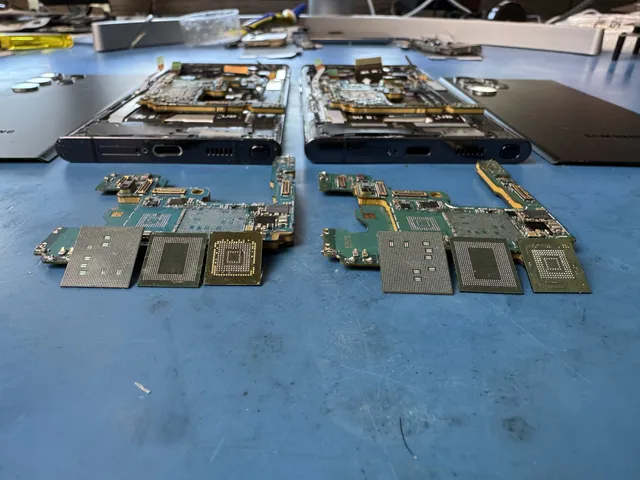
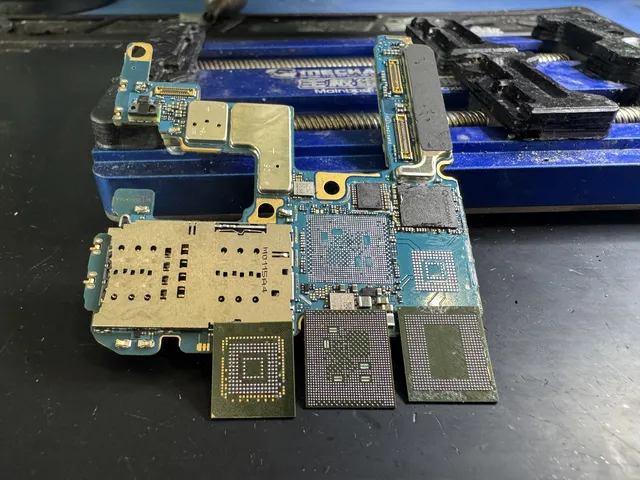
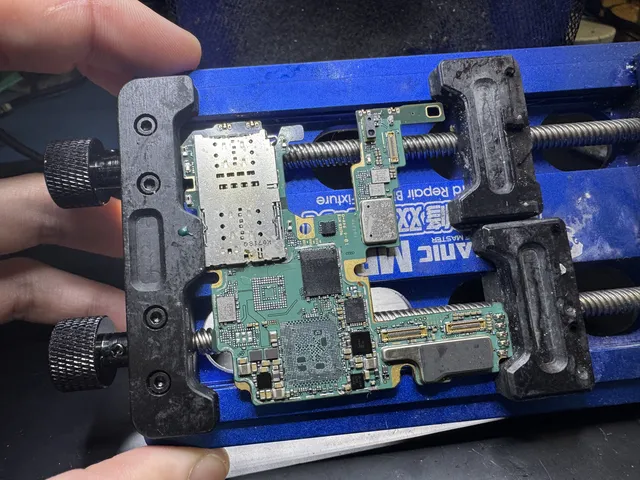
Joseph Montanti, our founder, films what goes into mobile phone data recovery, from the moment a phone reaches our bench until we copy its files. You can watch our engineers work on a corroded Samsung Galaxy board or an iPhone that snapped in half. We share our recovery videos with 2M+ followers across YouTube, TikTok and Instagram.
- 4.6 Google rating
- 345 Google reviews
- 2M+ followers of our recovery videos
- $100 diagnostic, credited toward a successful recovery
The people we help
Our customers include people from
-

-

-
 AT&T
-
 Marriott
-

-

-
 Tennessee Titans
-

-

-

-

-

-

-

Reviews
What customers say about getting their files back
4.6
First steps
What's happening with your phone?
Pick the closest match to see what might be wrong, what to avoid and how soon to act.
Keep it powered off
Your phone may still hold your photos
Your photos and messages are stored on a chip that can stay intact when the phone won't start. We work on your phone's own board to get it running long enough to copy those files. If you've already tried a repair, leave the phone as it is. Another attempt could damage the board.
Keep it powered off
Keep your wet phone off the charger
The storage chip can still hold your photos, but corrosion can spread across the board while the phone sits. Leave it off and unplugged. Put it in a bag as it is, without trying to dry it with rice or heat, and send it to us as soon as you can.
Act soon
A broken screen can leave your files intact
If your phone rings or vibrates while the screen stays dark, the display may be all that's keeping you from your files. We get to those files and make a copy. Once we've checked the copy, you can decide whether to have your phone repaired.
Stop using it for now
Don't factory reset your phone
A failed update or a problem reading storage can leave your phone stuck on the logo or restarting over and over. A factory reset would erase the files you want back. Leave the phone as it is so we can diagnose what's keeping it from starting.
Pricing
How Much Does Cell Phone Data Recovery Cost?
We base the price on the make and model of your phone and how badly it's damaged. iPhone recovery takes extra time at the bench, as does moving a processor off a badly damaged board. On Android phones, chip-off means we remove the memory chip to read it. With JTAG or ISP, we reach the storage through connections on the board.
Your diagnostic
We start with a $100 diagnostic. After we examine your phone, we explain what we found and give you a recovery quote to approve. We credit the diagnostic fee toward a successful recovery.
Use the quote form to tell us which phone you have and what happened to it. Our guide explains what affects the cost of data recovery. You can also see price ranges for all our recovery services.
- Chip-Off / JTAG / ISP Recovery
- $1,500 - $2,000
- iPhone (3GS - 11 )
- $1,000 - $1,500
- iPhone ( 12 / 13 / 14 / 15 / 16 / 17 Series)
- $2,000
- Samsung Galaxy / Android
- $1,500 - $2,000
- CPU Swap (broken board / severe liquid)
- $3,500
If your phone's board is cracked, snapped or too badly damaged by liquid to repair, we move its original processor and storage chip together to a working donor board. Look for "CPU Swap (broken board / severe liquid)" in the table.
Ways to pay
- Credit Cards
- PayPal
- Apple Pay
Pay over time
- Affirm Pay over time if you qualify
- Afterpay 4 interest-free split payments
We charge the diagnostic fee when your phone arrives. Once the recovery work is complete, we email you a report showing which files we got back. You can look through it before you pay for recovery.
Pricing
What does cell phone data recovery cost in Toa Baja, PR?
MDRepairs uses transparent, flat-rate pricing for cell phone data recovery. Customers in Toa Baja, PR pay the same rates as everyone else - no geographic surcharges, no rush fee markups unless you specifically request expedited service. Everything starts with a $100 diagnostic that covers the full board-level inspection.
For iPhones, models from the 3GS up through the iPhone 11 cost $1,000 to $1,500 for a complete recovery. The iPhone 12 through 17 line costs $2,000 because of the additional security layers Apple added to newer hardware. Samsung Galaxy phones and all other Android devices run $1,500 to $2,000. If we can't recover your data, you pay nothing beyond the initial diagnostic.
Your files
What data can we recover from your phone?
Photos & Videos
Wedding footage, birthday celebrations, travel memories, everyday moments with family - all of it sits on the phone's NAND storage chip regardless of whether the phone powers on. Our extraction methods access the chip directly without needing the phone to boot. When we recover photos and videos, we extract everything the storage chip held, including files in the recently deleted album, screenshots, burst photos, slow-motion videos, Live Photos, and edited versions alongside their originals. The recovery captures the full camera roll as it existed on the device.
Messages & Texts
Your text conversations and messaging app histories are stored on the device's internal storage. iMessage, SMS, WhatsApp, Facebook Messenger, Telegram, Signal - all of these keep local copies of your conversations on the phone's NAND chip. Cloud backups often miss older messages or media attachments, making device-level extraction the only complete recovery option. Our recovery process captures the full messaging database including deleted conversations that haven't been overwritten. Each message retains its timestamp, sender information, and any attached media files. Group conversations are preserved with all participant names and the complete thread history.
Contacts
Contact databases on cell phones contain more than just phone numbers. There are email addresses, physical addresses, notes, birthday reminders, linked accounts, and custom fields that may only exist on the device. We recover the entire contact database during extraction. Beyond the basic name and number, contact entries often contain detailed information that took years to build up: home and work addresses, anniversary dates, notes about preferences or allergies, company details, and relationship labels. Our extraction captures the complete contact record, not just the phone number.
Notes & Documents
Saved documents, notes, voice recordings, and downloaded files represent a significant portion of recoverable data. Many users store critical documents on their phones - contracts, medical records, business files, school assignments - without maintaining backups elsewhere. All of this data resides on the storage chip. Business users often store critical documents on their phones without secondary backups: signed contracts, expense receipts, project plans, client correspondence, and proprietary files from business apps. Personal users store insurance cards, medical documents, school assignments, and financial records. All of this sits on the storage chip.
App Data
Individual app data includes authentication tokens, health and fitness records, financial app history, social media content, game progress, and proprietary app files. This data lives in isolated containers on the phone's storage chip. Our extraction methods pull complete app data as part of the recovery. Cryptocurrency wallet apps, banking apps with transaction histories, stock trading records, and financial planning tools all maintain local databases on the phone. For users with significant financial data on their device, recovery can restore access to account information, transaction history, and authentication credentials.
Calendar & Call History
We also recover calendar events, complete call logs with timestamps and durations, browser history and bookmarks, and Wi-Fi network credentials. These smaller data categories are often overlooked but can be important for business documentation, legal matters, or personal record-keeping. For legal and business purposes, complete call logs with precise timestamps, call durations, and contact information can be critically important. We recover the full call history database, not just recent calls, which can include thousands of entries spanning the entire life of the phone.
Board repair
Why is cell phone data recovery different from getting files off other devices?
Direct Lab Access
When you contact MDRepairs from Toa Baja, PR, you're reaching the technicians who will actually work on your phone. No intake centers, no call centers, no middlemen adding markup. Your device ships directly to our Lincroft, NJ lab and stays there from diagnostic through delivery of your recovered data. When you call or email, you're talking to someone who understands the technical details of your case, not a customer service representative reading from a script.
Beyond Parts Swapping
Standard phone repair means replacing modules - screens, batteries, charging ports. Data recovery means working on the logic board itself, identifying which of hundreds of tiny components has failed, and either repairing or replacing it with surgical precision. Our technicians have years of training in this specialized discipline. The difference between module-level repair and board-level repair is like the difference between changing a car tire and rebuilding an engine. Both involve the same vehicle, but they require completely different skills, tools, and training.
Clear Cost Before Work Begins
We charge $100 for a diagnostic that includes microscope inspection and board-level testing. After the diagnostic, you get a specific recovery price. You decide whether to proceed. If you say yes and we can't get your data, you only pay the diagnostic fee. No risk beyond the initial evaluation. We also never charge percentage-based recovery fees. Some services price recovery as a percentage of the data's 'value,' which creates a perverse incentive to inflate the importance of recovery. Our pricing is based on the work required, not what we think you'll pay.
Straight Talk on Chances
Before you approve any recovery work, we tell you exactly what we found during the diagnostic. We don't sugarcoat bad news and we don't inflate expectations. When we say a case looks good, it's because the damage pattern matches cases we've successfully resolved before. We also document our diagnostic findings with photos and clear explanations so you understand exactly what happened to your phone and why we're recommending a specific recovery approach.
Wait times
How long does cell phone data recovery take?
Standard Diagnostic Start in 4 to 6 Weeks
Our standard turnaround handles most recovery cases. Your device enters the queue and receives a thorough diagnostic and recovery process. For Toa Baja, PR customers, this is the most popular option and covers the full range of diagnostic and recovery work at our standard price.
Rush Diagnostic Start
When Toa Baja, PR customers need data recovered urgently, our rush service puts their device at the front of the line. Recovery work begins immediately upon arrival. Rush service adds a premium to the recovery cost, but for time-sensitive situations, the faster turnaround is worth it. Rush is popular with business customers who need critical data recovered on a tighter schedule. The additional fee varies by case complexity.
Emergency
Days
For the most time-sensitive cases, emergency service provides immediate attention. This tier is typically used for active corrosion situations, legal discovery deadlines, or business data that's needed yesterday. Your phone goes under the microscope within hours of arrival. Emergency service carries the highest priority and the highest fee, but it's the right choice when the data is needed immediately or when active damage (like spreading corrosion) makes every hour count.
Our process
How cell phone data recovery works
1
Get a Quote & Ship Your Phone
Fill out the free quote form with your phone model and a description of the damage. We'll send you shipping instructions for getting your phone from Toa Baja, PR to our Lincroft, NJ lab. Pack it securely in a padded envelope or small box and ship it with tracking.
2
Complete Device Inspection
The standard wait is 4 to 6 weeks before we reach your device in line and start the diagnostic. We put your phone under the microscope for the diagnostic. We inspect the logic board for damage, test power management circuits, evaluate the storage chip condition, and identify what failed. This diagnostic is covered by the $100 fee. You'll receive an email or phone call with a detailed explanation of what we found and an estimate for the recovery work.
3
Data Recovery Process
After you approve the quote, recovery work begins. The technique we use depends on what's wrong with your phone. Board repair through microsoldering, chip removal and reading with professional programmers, direct memory access via JTAG or ISP, or advanced CPU-level work. We match the recovery method to the specific damage on your device. Recovery times vary from hours to days depending on the complexity. A straightforward power IC replacement might take a single session. A chip-off extraction with filesystem reconstruction can take several days of work.
4
Data Delivery
Once recovery is complete, we transfer your data to a USB flash drive. Photos, videos, messages, contacts, and all other recovered files are organized and ready for you to browse. We ship the USB drive and your original device back to Toa Baja, PR with tracking. You verify the data, and the job is done. If you want us to wipe the phone after recovery for security purposes, we can do that as well. Just let us know your preference when you approve the recovery.
Causes
What can cause data loss on your phone?
Liquid Contact & Water Damage
Phones exposed to liquid are among the most time-sensitive cases we handle from Toa Baja, PR. beach drops across the island, surfing and water sports, hurricane flooding, rainforest stream exposure, constant salt air damage are common scenarios in the area. Water resistance ratings give people false confidence. Those seals weaken with age, heat exposure, and physical impacts. Once water breaches the casing, it attacks solder joints and corrodes traces on the logic board. Quick action improves outcomes.
Physical Impact & Drops
Dropping a phone might crack the screen and still leave it functional, or it might jar loose a microscopic solder ball under the CPU and kill the phone completely. The damage is unpredictable because it depends on the exact angle and force of impact. What looks like a minor drop can cause a board-level failure that prevents the phone from turning on, even though the storage chip containing your data is perfectly fine.
Temperature & Battery Damage
Heat kills phones in ways people don't expect. The tropical maritime with consistent warmth year-round climate means prolonged sun exposure and hot vehicles are real risks for phone hardware. When internal temperatures exceed safe limits, solder joints weaken, battery chemicals degrade, and adhesives holding components in place soften. We also see phones damaged by failed battery replacements where the technician accidentally punctured or short-circuited something on the board.
Gradual Component Failure
Not every dead phone has a dramatic backstory. Many just stop working after years of normal use. Electronic components have finite lifespans. Capacitors dry out, ICs degrade, flash memory cells wear down, solder joints fatigue from thousands of heating and cooling cycles. Your phone turning off one day and refusing to come back on isn't unusual after 3-5 years of use. The data, however, is almost always intact.
Failed Updates & Software Corruption
Software updates that fail mid-installation can leave a phone unable to boot. iOS and Android updates rewrite critical system partitions, and an interruption during this process - whether from a dying battery, a lost connection, or a bug in the update itself - can brick the device. The data is still on the storage chip, but the phone can't access it because the operating system is corrupted. Factory reset attempts in this situation often make things worse.
Power Surge & Charging Damage
Using non-certified chargers, damaged lightning cables, or charging during electrical storms puts your phone at risk. A voltage spike through the charging port hits the power management IC first, and that single component failure can make the entire phone non-functional. Phones killed by electrical damage often have perfectly intact storage chips because the surge gets absorbed by the power management circuitry before reaching the NAND.
Water damage
How does data recovery work if your phone got wet?
Living in Toa Baja, PR means your phone faces specific water risks. Beach drops across the island, surfing and water sports, hurricane flooding, rainforest stream exposure, constant salt air damage create the kind of liquid damage situations that kill phones fast. Modern phones have water resistance ratings, but those seals weaken with age, screen replacements, and physical impacts. When water bypasses the seals and reaches the logic board, corrosion starts immediately on the exposed copper traces and component leads.
If your phone got wet, the worst thing you can do is plug it in to see if it still works. Applying power to a wet circuit board causes electrolysis, which accelerates corrosion dramatically. Don't put it in rice - that's a myth that wastes the critical early hours when professional cleaning could prevent permanent damage. Instead, power the phone off, don't charge it, and ship it to our lab as soon as possible. Every hour of delay gives corrosion more time to spread.
At our Lincroft lab, water-damaged phones go through ultrasonic cleaning to remove contaminants, followed by a microscope inspection to assess the damage. We identify and replace corroded or short-circuited components, repair damaged board traces, and work to restore enough functionality to extract your data. Even heavily corroded boards can yield successful recoveries when treated properly and quickly.
Dead phone
Phone data recovery when your phone won't turn on
If your phone suddenly stopped turning on, you can send it to us from Toa Baja, PR. No warning, no gradual decline - it just went dark. This is unsettling, but it's actually one of the more straightforward categories of data recovery. A completely dead phone typically has a single point of failure on the logic board that's preventing it from powering up. The storage chip, where all your data lives, is usually completely fine.
Our diagnostic process involves testing each major circuit on the phone's logic board. Power management, charging, CPU connection, baseband, display output - we check each system methodically to isolate the failure. Sometimes it's a single blown component that costs pennies to replace. Sometimes it's a more complex failure requiring chip-level work. Either way, the goal is the same: identify the failure, determine the best extraction path, and get your data back.
We encourage Toa Baja, PR customers with dead phones to contact us sooner rather than later. While a dead phone's data isn't at immediate risk in most cases (the storage chip is stable when unpowered), there are exceptions. Phones with active water damage inside will continue corroding even when off. Phones with swelling batteries should be addressed before the battery puts physical pressure on the board. And phones with business-critical data shouldn't sit in a drawer when the solution is a diagnostic and recovery at our lab.
Devices
How cell phone data recovery varies by device
Apple
iPhone
iPhone data recovery covers every model Apple has released since the 3GS. Models from the 3GS through iPhone 11 use legacy board architectures our technicians know inside and out, with recovery priced at $1,000 to $1,500. The iPhone 12 through 17 generations introduced enhanced hardware security and redesigned internals, making recovery more involved at $2,000. We handle both categories regularly.
Samsung
Galaxy
Samsung Galaxy data recovery covers the full range of models from early Galaxy S devices to the current S25 series and foldables. Each generation uses different storage technology, encryption methods, and board layouts. Our lab has the chip programmers, schematic access, and technical knowledge to handle every Samsung variant. Pricing runs $1,500 to $2,000.
All Brands
Android
Beyond Samsung, we recover data from Google Pixel phones (all generations), Motorola, OnePlus, LG (discontinued but still in use), Xiaomi, Sony, HTC, and every other Android manufacturer. Android device recovery involves similar board-level techniques to iPhone recovery but with additional variables since there are hundreds of different board designs across manufacturers. Our pricing for Android devices is $1,500 to $2,000.
Tablets & Others
iPad, Tablets & More
Beyond phones, we recover data from iPads (all generations), Samsung Galaxy Tabs, Microsoft Surface devices, and other tablets. The recovery process is similar to phone recovery since these devices use the same storage technology and encryption methods. We also recover data from iPod Touch devices, Apple Watches (in limited cases), and other mobile devices that use NAND flash storage.
Phone storage
Reading phone storage with chip-off, JTAG or ISP
Chip-off recovery is a technique where we physically remove the NAND flash storage chip from the phone's logic board, read its raw contents using a chip programmer, and reconstruct the data from the binary dump. This method is used when the logic board is too damaged to repair, or when the phone uses older storage technology that doesn't rely on hardware encryption keys tied to a separate secure processor.
For devices with modern hardware encryption (most phones made after 2015), chip-off alone won't decrypt the data because the encryption keys are stored in a separate secure element on the board. In these cases, we need to either repair the board enough to access the keys, or use the chip-off data in combination with other techniques. Our Lincroft lab has professional chip programmers including the UP-828 and IP-Box that can read every common NAND and eMMC chip type found in cell phones. For Toa Baja, PR customers dealing with severely damaged phones, chip-off is often the last resort that works when nothing else can.
Chip-off is considered a last-resort technique because it's destructive to the connection between the chip and the board. Once the chip is removed, it can be read by our programmer, but putting it back on the original board and having the phone work normally again is rarely possible. For this reason, we always attempt non-destructive recovery methods first: board repair, ISP connections, JTAG access. Only when these methods aren't viable do we proceed to chip-off, and always with your approval after explaining the process.
Microsoldering
Repairing the processor and the connections on your phone's board
When the CPU itself is the point of failure, data recovery becomes a high-difficulty operation. Modern smartphone processors are directly tied to the device's encryption system. The Secure Enclave (iPhone) or Trusted Execution Environment (Android) generates unique keys stored within the CPU package. A failed CPU means those keys are locked away, and no amount of NAND reading will decrypt the data without them.
Our approach to CPU failures depends on the damage type. If the CPU has a cold solder joint, we can reball and reflow it. If the CPU has internal damage, we may attempt a transplant to a donor board that provides the surrounding infrastructure the CPU needs to function long enough for data extraction. This is painstaking work that pushes the limits of what's possible in a recovery lab. We offer this capability to Toa Baja, PR customers from our Lincroft, NJ facility.
The economics of CPU repair in data recovery deserve explanation. This procedure requires extensive setup, specialized stencils for reballing, precise temperature control during reflow, and often multiple attempts with careful diagnosis between each one. A single CPU reball and reflow can take several hours of focused work under the microscope. For Toa Baja, PR customers, CPU repair represents the highest tier of recovery difficulty, and the pricing reflects the time, skill, and risk involved. When we recommend this approach during the diagnostic, it's because we've exhausted the simpler options and this is the remaining path to your data.
Boot loop
Why your phone shuts off or keeps restarting
Boot loops and random shutdowns are among the most frustrating phone failures because the phone appears to be partially functional but can't finish starting up. The Apple logo appears, a loading bar might fill partway, and then the phone restarts. Or the phone boots to the home screen but crashes after seconds or minutes. These patterns indicate either corrupted system software or a hardware component that fails under load.
Software-based boot loops from failed updates or corrupted partitions can sometimes be resolved through DFU mode or recovery mode data extraction without board-level work. Hardware-based loops require identifying and fixing the failing component, whether that's a degraded NAND chip, an unstable power management IC, or a thermal issue that causes the processor to shut down. For Toa Baja, PR customers, we recommend not attempting factory resets or iTunes restores, as these can overwrite data on the storage chip. Send the phone to our lab as-is and let us determine the safest extraction approach.
For Toa Baja, PR customers dealing with a boot loop, the most important thing is to avoid making it worse. Don't attempt DFU restores, iTunes resets, or Android recovery mode wipes. These operations erase data and overwrite the storage, which is the opposite of what you want. A boot loop phone that still has its data intact is in a much better position than one that's been wiped during a failed repair attempt. Ship the phone to our lab in its current state and let us determine the safest extraction method based on the actual cause of the loop.
First steps
What to do if your phone dies
Do This
Stop using the phone right away. If your phone is showing signs of failure - glitching, overheating, randomly shutting down - stop using it before it dies completely. Continued use of a failing phone can cause additional damage to the storage chip.
Store it properly. Place the damaged phone in a dry, cool location. Don't put it in rice (it doesn't work and introduces contaminants), don't use a hair dryer (the heat can cause additional damage), and don't put it in the freezer (moisture condensation when you take it out). Just keep it dry and at room temperature.
Contact MDRepairs. Fill out our quote form or call us at 732-933-7717. We'll walk you through the shipping process to get your phone from Toa Baja, PR to our Lincroft, NJ lab. The sooner we receive it, the better your chances, especially for water damage cases.
Write down your passcode. If your phone has a passcode, PIN, or pattern lock, write it down and include it with your device when you ship it from Toa Baja, PR. We need this to decrypt your data after board repair. Without the passcode, recovery options are severely limited on encrypted devices.
Don't Do This
Don't plug it in to charge. A damaged phone that receives power can experience additional short circuits on the board. If the phone is dead, charging won't bring it back - it might make things worse by damaging additional components.
Don't take it to a phone repair shop for data recovery. Phone repair shops fix screens and batteries. They don't have the microsoldering equipment, chip programmers, or training needed for board-level data recovery. Some will attempt it anyway, and their mistakes can make the phone unrecoverable.
Never factory reset a failing phone. Resetting erases data. It doesn't fix hardware problems. If your phone is failing because of a board-level issue, a reset will destroy your data without solving the underlying problem. Leave the phone in its current state.
Don't attempt DIY disassembly. Phone internals are fragile and densely packed. Without proper tools and training, you risk cutting flex cables, dislodging surface-mount components, or cracking the logic board. Any of these mistakes can make data recovery significantly harder or impossible.
Don't freeze your phone. Another common myth suggests freezing a dead phone can revive it. Freezing causes moisture condensation inside the device when it returns to room temperature, which can cause additional water damage on top of whatever already killed the phone. Never put your phone in a freezer.
Phone condition
What does cell phone data recovery depend on?
Recovery success varies by damage type and device condition. Your phone's storage chip is unaffected by a power management IC failure, a charging circuit fault, or a simple short in another component. Water-damaged phones recovered within the first few days also have strong success potential, especially with fresh water exposure. Phones that have been sitting in a drawer for months after water damage are harder because corrosion has had time to spread.
The most challenging scenarios include phones with destroyed CPUs (where encryption keys become inaccessible), devices that have been through fires or extreme heat, and phones that were previously opened by unqualified repair shops that caused additional damage. Toa Baja, PR customers improve their chances by sending the phone to our lab as quickly as possible and avoiding any repair attempts beforehand. Our diagnostic will give you a realistic assessment of your specific case's chances before you commit to recovery.
We track outcomes across every case that comes through our lab, and we use that data to give Toa Baja, PR customers realistic expectations during the diagnostic. When we say a case looks good, it's based on pattern matching against thousands of previous cases with similar damage profiles. When we flag a case as risky, it's because we've seen similar situations go both ways. This experience-based assessment is more valuable than any percentage claim because it's specific to your phone's actual condition, not a marketing statistic.
Encryption
Why we need board repair tools to reach your encrypted files
Hardware-level encryption on modern phones is the defining challenge of cell phone data recovery. Since roughly 2014 for iPhones and 2020 for most Android devices, all user data is encrypted with keys that are generated, stored, and never released by a dedicated security processor. You can't bypass this encryption, brute-force it in any reasonable timeframe, or extract the keys through software alone.
For iPhones, the Secure Enclave is a separate chip on the logic board that holds the encryption keys. For Samsung and other Android phones, similar functionality exists in the Trusted Execution Environment or a dedicated security element. The practical implication for Toa Baja, PR customers is that data recovery requires working with the original hardware. We can't just read the storage chip and hand you the data. We need the original board's security processor to be functional so the data can be decrypted. This is why board repair is central to our recovery process.
For Toa Baja, PR customers, the practical takeaway is this: data recovery from a modern phone is not as simple as reading a storage chip. The encryption layer means we need the original hardware to cooperate. Our recovery process is designed around this reality. We repair boards, restore connections, and get the original security processor communicating with the storage chip so that decryption happens naturally through the phone's own hardware. It's more complex than reading an unencrypted hard drive, which is why phone data recovery costs what it does.
Our lab
Tools in our cell phone data recovery lab
The equipment in our Lincroft, NJ lab is purpose-built for cell phone data recovery at the board level. Standard phone repair shops don't carry this type of gear because it's designed for a completely different kind of work. For Toa Baja, PR customers and everyone who ships to our lab, here are the tools that make recovery possible.
Amscope Stereo Microscope
All board-level work happens under magnification. Our Amscope stereo microscopes provide up to 45x zoom with LED ring illumination, giving our technicians a clear view of components smaller than a grain of sand. Every diagnostic inspection, every solder joint, every trace repair is done under the scope.
Quick 861DW Hot Air Station
Removing and replacing BGA chips (processors, storage, power management ICs) requires precisely controlled hot air. The Quick 861DW provides adjustable temperature and airflow settings that let us heat specific areas of the board without affecting nearby components. This is critical for chip removal, reballing, and reflow operations.
JBC Precision Soldering Iron
JBC soldering stations deliver rapid heat-up times and precise temperature control that standard irons can't match. Our JBC irons use interchangeable cartridge tips smaller than a pencil point, allowing us to solder and desolder individual surface-mount components that are fractions of a millimeter across.
Phoneboard & ZXW Schematics
Board schematics are the roadmaps that show every circuit, component, and connection on a phone's logic board. Phoneboard and ZXW provide detailed schematics for virtually every iPhone and major Android device, letting our technicians trace signal paths, identify component values, and pinpoint failure points systematically rather than guessing.
DC Power Supply & Multimeter
A bench DC power supply lets us inject controlled voltage into the phone's power circuits, bypassing the battery to test how the board responds. Combined with a precision multimeter, we can measure current draw, check voltage at test points, and identify shorts or open circuits across the board. These are the first tools we reach for during diagnostic.
Chip Programmers (UP-828 & IP-Box)
When chip-off extraction is required, professional chip programmers read the raw data from NAND flash and eMMC storage chips. Our UP-828 and IP-Box programmers support every common storage chip found in cell phones, with adapter sockets for different pin configurations. These read the binary data that gets reconstructed into your photos, messages, and files.
Your options
How to choose a cell phone data recovery service
MDRepairs is based in Lincroft, New Jersey, in Monmouth County. We're not a call center that ships your device to some unknown lab. When Toa Baja, PR customers send their phone to us, it goes directly to the technicians who will work on it. That direct relationship means real accountability and clear communication throughout the recovery process. No wondering where your device is or who has it.
What sets our lab apart is the combination of equipment, experience, and honesty. We have the professional tools for board-level work. Our technicians have years of experience with phone data recovery across every major brand and model. And we give you honest assessments during the diagnostic rather than inflated promises designed to get you to approve expensive work. If a case doesn't look good, we tell you before you spend money on it. That straightforward approach is why we maintain strong reviews and repeat customers from across the country, including Toa Baja, PR.
We've invested in building not just a capable lab, but a trustworthy one. Our reviews speak to the consistency of our work and our communication. Before you mail your phone from Toa Baja, PR, read our reviews and watch our recovery videos on social media. You'll find that most recovery companies show stock photos and marketing copy. We show our actual lab, our actual equipment, and our actual recoveries.
Recovery apps
Why phone data recovery software needs a working phone
Recovery software marketed online targets a very narrow scenario: a working, unlocked phone with accidentally deleted files. These programs scan through the phone's operating system to find remnants of deleted data on the storage. When the phone is dead, this entire approach is irrelevant. There's no operating system to scan through because the phone isn't running. The data is on a chip that the phone can't access, and software can't bridge that gap.
For Toa Baja, PR customers dealing with physically damaged phones, the path to recovery runs through board-level hardware work, not software downloads. Our Lincroft lab recovers data by repairing or bypassing the phone's hardware failures to access the storage chip directly. No app or program can replicate what a microscope, soldering iron, and chip programmer can do.
Another common mistake we see from Toa Baja, PR customers is attempting DIY board repair based on YouTube tutorials. Board-level microsoldering is a skilled trade that takes years to learn. Watching a 10-minute video doesn't prepare you for the realities of working on components smaller than a grain of sand, managing heat profiles that can destroy adjacent parts, or diagnosing failures that require schematic interpretation and systematic testing. We've received phones where DIY attempts caused more damage than the original failure, turning a straightforward recovery into a difficult or impossible one.
iPhone security
How Stolen Device Protection and other security features affect recovery
If your iPhone runs iOS 17.3 or later with Stolen Device Protection enabled, additional security steps may be part of the recovery workflow. This feature restricts certain device operations unless the phone recognizes it's in a familiar location, and it enforces biometric checks and time delays for sensitive actions. When shipping your phone from Toa Baja, PR, let us know if this feature is active so our team can factor it into the recovery plan and avoid unnecessary delays.
For Toa Baja, PR customers, these security features are generally a good thing - they protect your data from unauthorized access. During recovery, they require an extra step of verification. As long as you know your passcode and account credentials (Apple ID or Google account), the security features won't prevent data recovery. Include these credentials when shipping your phone to our lab, and let us know about any security features you have enabled so we can plan accordingly.
Work phones
Cell phone data recovery for businesses
Businesses in Toa Baja, PR depend on cell phones for operations that go far beyond personal communication. Client contact databases, project management apps, financial transaction records, email archives, contracts, and proprietary business data all live on employee phones. When a phone fails, that data loss can disrupt operations, delay projects, and create compliance problems. MDRepairs works with businesses of all sizes, from sole proprietors to corporate teams, with the understanding that business data often needs faster turnaround and more careful handling.
With pharmaceuticals manufacturing, tourism, rum production, aerospace, federal government as major sectors in the area, we understand the types of business data at stake. We offer priority and rush service options for business customers who need their data recovered on a tighter timeline. Confidentiality is standard - we don't share device contents or customer information with anyone. If your business in Toa Baja, PR needs data recovered from employee phones, contact us to discuss your specific situation and timeline requirements.
Data privacy and confidentiality are inherent to our recovery process. We don't browse through recovered data beyond verifying that the extraction was successful. Files are transferred to a USB drive, the drive is shipped to you, and our copies are deleted after 30 days.
Service options
Data Recovery for Damaged Phones
MDRepairs vs. Manufacturer Support
Neither Apple nor Samsung performs data recovery from physically damaged phones. Their support teams can help with software issues, warranty replacements, and cloud backup restoration, but if the phone is dead and you don't have a backup, their answer is always the same: there's nothing they can do. MDRepairs picks up where manufacturer support ends. We recover data from dead phones using board-level techniques that Apple and Samsung simply don't offer as a service.
If you have AppleCare+, it covers accidental damage repair, not data recovery. Apple will replace the phone under warranty but won't attempt to recover data from the damaged device. That's where MDRepairs fills the gap for Toa Baja, PR customers.
MDRepairs vs. Repair Shops in Toa Baja, PR
Local phone repair shops are equipped for screen and battery replacements. Data recovery from a non-functional phone is a fundamentally different discipline. It requires board-level diagnostic capability, microsoldering equipment, chip programming tools, and schematics software that repair shops don't carry. Attempting recovery without these tools risks further damage. MDRepairs is purpose-built for recovery work, with professional equipment and trained technicians dedicated to extracting data from damaged devices.
We don't disparage local repair shops - they provide a valuable service for screen and battery replacements. But data recovery is a fundamentally different discipline. The best auto mechanic in the world isn't necessarily qualified to rebuild a transmission. Similarly, the best phone repair tech isn't equipped for board-level data extraction without specific training and equipment.
MDRepairs vs. Broker Recovery Services
Search for cell phone data recovery and you'll find services that appear to have locations everywhere. Most of these are intake operations that collect devices and forward them to an actual lab somewhere else. You're paying their markup on top of the lab's price. MDRepairs cuts out the middleman because we are the lab. Your phone comes directly to our Lincroft facility, we do the work in-house, and you deal with us throughout the entire process.
Look for these signs of a broker: no lab photos on their website, no technician profiles, multiple 'locations' that are all just mailing addresses, and pricing that seems too low (they need room for both their margin and the actual lab's fee). MDRepairs shows you our lab, our equipment, and our work because we're the ones doing it.
After recovery
How we get your files back to you
Recovered data gets delivered to you on a USB flash drive, organized by file type for easy browsing. Photos in one folder, videos in another, messages exported in readable format, contacts as a standard vCard file, and any other recovered data in clearly labeled directories. Plug the drive into any Mac or Windows computer to access everything. We ship the drive and your original device back to Toa Baja, PR with full tracking.
With your data safely recovered, the next step is making sure you never face this situation again. Set up automatic cloud backups on your new phone (iCloud for iPhone, Google Drive for Android) and consider doing periodic local backups to your computer as well. Our after recovery guide walks you through the complete process of transferring data to a new device and establishing a backup routine.
For Toa Baja, PR customers transferring recovered data to a new iPhone, you can use AirDrop to send photos and videos directly, import contacts via the vCard file, and manually save any documents to your preferred cloud storage. For Android users, connecting the USB drive to your computer and transferring files via cable or cloud service is the most straightforward approach. Our post-recovery guide provides step-by-step instructions for both platforms.
FAQ
Cell Phone Data Recovery FAQ - Toa Baja, PR
How much will it cost to recover data from my phone in Toa Baja, PR?
Cell phone data recovery at MDRepairs starts with a $100 diagnostic fee that covers a complete board-level inspection of your device. If you approve the recovery, that $100 goes toward your final bill. iPhone 3GS through 11 models typically cost $1,000 to $1,500. iPhone 12 through 17 models run $2,000. Samsung and Android devices generally cost between $1,500 and $2,000. If we can't recover your data, you only pay the diagnostic fee. These prices are the same for all customers, including those in Toa Baja, PR.What's the turnaround time for phone data recovery from Toa Baja, PR?
Testing usually starts 4-6 weeks after your phone arrives. Rush service and emergency service are available for urgent cases at additional cost. You'll receive updates throughout the process.How do I send my phone from Toa Baja, PR for data recovery?
Start by filling out the quote form on our website. We'll send you shipping instructions. Pack your phone in a padded mailer or small box with bubble wrap, then ship it with tracking to our lab in Lincroft, NJ. You'll arrange and pay for shipping from Puerto Rico to our lab. We begin the diagnostic as soon as your device arrives.Can you recover data from a water-damaged phone?
Yes. When water reaches the logic board, it causes corrosion that spreads over time. The sooner you get the phone to our lab, the better your chances. Don't try to turn it on or charge it, and don't put it in rice. Ship it to us as quickly as possible. We clean the board ultrasonically, repair corroded components, and extract your data.Is it possible to get data from a completely dead phone?
Absolutely. A dead phone doesn't mean dead data. The storage chip inside the phone operates independently of the components that make it turn on. In most cases, the chip is perfectly fine while something else on the board has failed. We identify the failure, repair it or work around it, and pull your data from the storage chip. This is the core of what we do.What will the diagnostic tell me about my phone?
We diagnose your device for $100 to find out what it would take to reach your files. That diagnostic fee goes toward the price of a successful recovery. We look for power problems and other board faults. We also look for damage from water exposure. A destroyed processor on an encrypted phone or fire damage can make recovery more involved. We give you an estimate based on what we found. You get to think it over, and we start the recovery only if you approve it. If we can't get any files back, there's no recovery fee.Do you need my iPhone passcode for data recovery?
If the phone is locked with a passcode and the storage is encrypted (all iPhones since iOS 8), we need the phone to be able to boot and authenticate to decrypt the data. Our recovery process involves repairing the board to get the phone functional, at which point your passcode unlocks the encryption. We don't bypass or crack passcodes. If you know your passcode and the phone can be repaired to boot, recovery is possible. If you've forgotten your passcode, recovery is significantly more limited.What happens if the recovery is unsuccessful?
You're only charged the $100 diagnostic fee if recovery is unsuccessful. This covers the complete board-level inspection of your device. If we determine during the diagnostic that recovery isn't possible, or if we attempt recovery and it doesn't succeed, you pay nothing further. We take on the risk of the recovery attempt, not you.Do you recover data from Android phones in Toa Baja, PR?
Yes, we recover data from all Android devices including Samsung Galaxy, Google Pixel, Motorola, OnePlus, LG, Xiaomi, and every other Android manufacturer. Android phones use similar storage technology to iPhones, and our lab has the chip programmers, schematics, and board-level tools to work on every major Android platform. Recovery pricing for Android devices from Toa Baja, PR is $1,500 to $2,000 depending on the model and damage type.Do you need the phone's password for data recovery?
For modern smartphones with encryption (virtually all phones made since 2015), yes, we need your passcode. All data on the phone is encrypted, and the passcode is required to decrypt it. Without the correct passcode, the data is unreadable even after board repair. Please include your passcode when shipping your device. If you've forgotten your passcode, contact us to discuss what limited options may be available for your specific device model.
No question matches that - it's probably faster to just ask us: (732) 933-7717 or .
Ask us
Need help getting your files off your phone?
Split the cost of your recovery with Affirm. Explore financing Subject to eligibility.
Nationwide mail-in service
By city
Cell Phone Data Recovery in Puerto Rico
See all the cities we serve in Puerto Rico or visit our cell phone data recovery page.
Where to read more about phone data recovery
Your phone keeps your photos and messages on a storage chip. In these public guides and standards, you can see where the chip sits on the board, how your files are protected and what happens to them if the phone is erased.
-
NIST Special Publication 800-88 Rev. 1 - Guidelines for Media Sanitization
A factory reset can leave your photos and messages unreadable. To see why, look at how data is erased from different kinds of storage, including the flash memory inside your phone.
-
Apple Platform Security Guide
On a newer iPhone or iPad, reading the storage chip alone leaves your photos and messages encrypted. Apple's official guide shows how your passcode works with the Secure Enclave, the part of your device that protects the keys needed to unlock those files.
-
Samsung Knox Security Platform
A newer Galaxy needs its original board to unlock your files. Knox, Samsung's security system, ties your encrypted files to that hardware and protects the software that runs your phone. A built-in indicator records whether the phone has run unofficial system software.
-
IEEE 1149.1 - JTAG / Boundary Scan Standard
On some phones, we can read the storage chip through the JTAG port while the chip is still on the board. The port is there to test the connections between chips.
-
Cellebrite UFED - Universal Forensic Extraction Device
Logical extraction means copying files through your phone's own software. For a tool like UFED to make that copy, your iPhone or Android phone has to start up and respond.
-
iFixit Teardown Guides
In photos of a phone taken apart, you can see where the storage chip sits. On some older or budget phones, we can use JTAG or ISP to read that chip through connections on the board. With chip-off, we remove the chip to read it.
-
Android Open Source Project - Security Documentation
On some older Android phones, we can read the storage chip directly. A newer phone can protect its encryption keys in hardware, so we may need the original board to unlock your files. Google's official guide to Android security covers how phones verify their software at startup and encrypt individual files or the whole drive. These protections vary by Android version and phone maker.
Other devices
More Data Recovery Services in Puerto Rico
You can mail any of these devices to us from Puerto Rico. Choose your device to see how we work on it.
Tell us which files you need back
$100 diagnostic, credited toward a successful recovery. If we can't get any files back, there's no recovery fee.