They are miracle workers! My phone was in a creek for a year and another lab failed to recover my data from it. I saw this company on TikTok do a micro soldering recovery … They recovered all 20 GB of data from my phone!
Cell Phone Data Recovery in Guaynabo, PR
from 345 Google reviews · 2M+ followers of our recovery videos · Mail-in recovery nationwide
- $100 flat diagnostic fee
Your phone holds years of irreplaceable data. When that phone stops working, the data doesn't just vanish. It's still sitting on the storage chip inside, waiting to be extracted by someone who knows how. MDRepairs provides cell phone data recovery for customers throughout Guaynabo, PR, covering iPhones, Samsung Galaxy, Google Pixel, OnePlus, Motorola, and all other Android devices.
About this service
Our Lincroft, NJ lab uses microsoldering, JTAG, ISP, and chip-off methods to pull data from phones that are completely dead.
MDRepairs works with customers across Guaynabo, PR through our mail-in recovery service. You send your phone to our Lincroft, NJ lab and we handle everything from there. Our technicians perform a complete diagnostic under high-powered magnification, identify the failure point, and give you a quote before any recovery work begins. The same team that evaluates your device is the one that performs the recovery. No outsourcing, no middlemen.
We focus on the recoveries that actually require specialized equipment and training. When a phone is physically damaged at the board level, standard repair techniques won't cut it. Microsoldering under a microscope, chip-off extraction with specialized programmers, JTAG and ISP connections for direct memory access, CPU transplants - these are the methods that get data back from phones that are genuinely broken. If you're in Guaynabo, PR and you need data recovered from a phone that won't turn on, we're the lab to call.
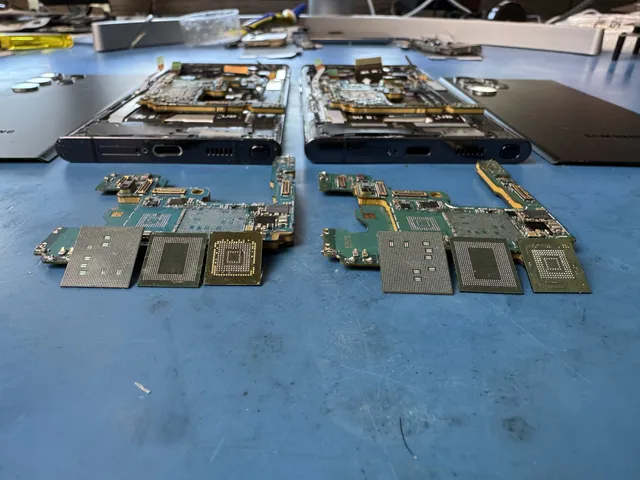
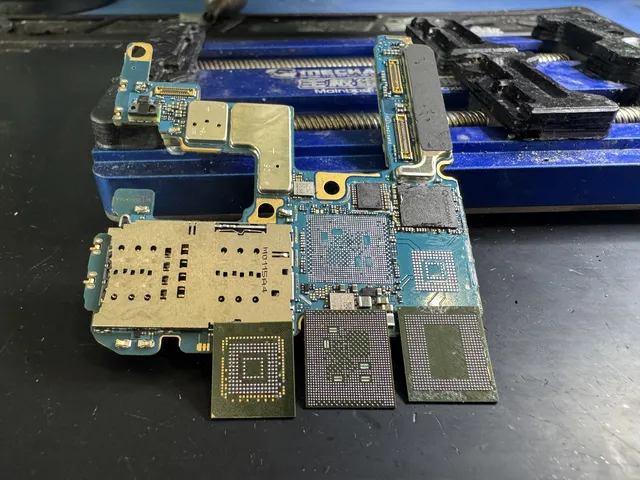
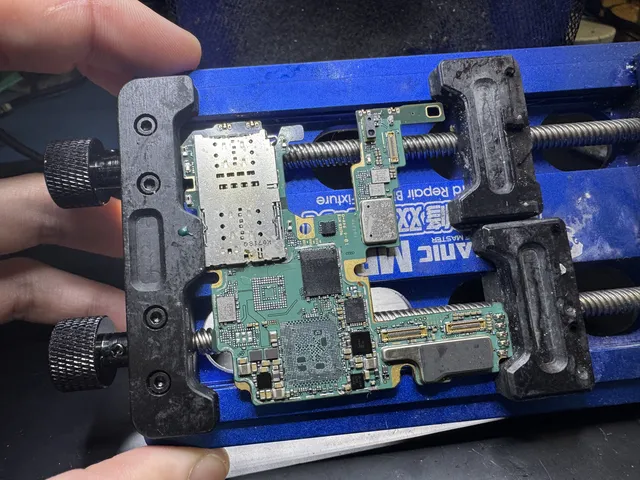
Watch how we recover files from a phone
Joseph Montanti, our founder, films what goes into mobile phone data recovery, from the moment a phone reaches our bench until we copy its files. You can watch our engineers work on a corroded Samsung Galaxy board or an iPhone that snapped in half. We share our recovery videos with 2M+ followers across YouTube, TikTok and Instagram.
- 4.6 Google rating
- 345 Google reviews
- 2M+ followers of our recovery videos
- $100 diagnostic, credited toward a successful recovery
The people we help
Our customers include people from
-

-

-
 AT&T
-
 Marriott
-

-

-
 Tennessee Titans
-

-

-

-

-

-

-

Reviews
What customers say about getting their files back
4.6
First steps
What's happening with your phone?
Pick the closest match to see what might be wrong, what to avoid and how soon to act.
Keep it powered off
Your phone may still hold your photos
Your photos and messages are stored on a chip that can stay intact when the phone won't start. We work on your phone's own board to get it running long enough to copy those files. If you've already tried a repair, leave the phone as it is. Another attempt could damage the board.
Keep it powered off
Keep your wet phone off the charger
The storage chip can still hold your photos, but corrosion can spread across the board while the phone sits. Leave it off and unplugged. Put it in a bag as it is, without trying to dry it with rice or heat, and send it to us as soon as you can.
Act soon
A broken screen can leave your files intact
If your phone rings or vibrates while the screen stays dark, the display may be all that's keeping you from your files. We get to those files and make a copy. Once we've checked the copy, you can decide whether to have your phone repaired.
Stop using it for now
Don't factory reset your phone
A failed update or a problem reading storage can leave your phone stuck on the logo or restarting over and over. A factory reset would erase the files you want back. Leave the phone as it is so we can diagnose what's keeping it from starting.
Pricing
How Much Does Cell Phone Data Recovery Cost?
We base the price on the make and model of your phone and how badly it's damaged. iPhone recovery takes extra time at the bench, as does moving a processor off a badly damaged board. On Android phones, chip-off means we remove the memory chip to read it. With JTAG or ISP, we reach the storage through connections on the board.
Your diagnostic
We start with a $100 diagnostic. After we examine your phone, we explain what we found and give you a recovery quote to approve. We credit the diagnostic fee toward a successful recovery.
Use the quote form to tell us which phone you have and what happened to it. Our guide explains what affects the cost of data recovery. You can also see price ranges for all our recovery services.
- Chip-Off / JTAG / ISP Recovery
- $1,500 - $2,000
- iPhone (3GS - 11 )
- $1,000 - $1,500
- iPhone ( 12 / 13 / 14 / 15 / 16 / 17 Series)
- $2,000
- Samsung Galaxy / Android
- $1,500 - $2,000
- CPU Swap (broken board / severe liquid)
- $3,500
If your phone's board is cracked, snapped or too badly damaged by liquid to repair, we move its original processor and storage chip together to a working donor board. Look for "CPU Swap (broken board / severe liquid)" in the table.
Ways to pay
- Credit Cards
- PayPal
- Apple Pay
Pay over time
- Affirm Pay over time if you qualify
- Afterpay 4 interest-free split payments
We charge the diagnostic fee when your phone arrives. Once the recovery work is complete, we email you a report showing which files we got back. You can look through it before you pay for recovery.
Pricing
What does cell phone data recovery cost in Guaynabo, PR?
Data recovery pricing for Guaynabo, PR customers follows our standard rate structure. The process starts with a $100 diagnostic evaluation. During this step, our technicians inspect your device under a microscope, test for board-level failures, and determine what recovery approach your phone requires. This fee applies toward the total cost if you approve the recovery.
iPhone 3GS through 11 recoveries are $1,000 to $1,500. iPhone 12 through 17 models are $2,000 based on the specific model and damage complexity. Samsung Galaxy and Android device recoveries cost between $1,500 and $2,000. We don't add shipping surcharges for mail-in customers, and you're never charged beyond the diagnostic fee if we can't successfully recover your data.
Your files
What data can we recover from your phone?
Photos & Videos
Family photos, vacation videos, baby's first steps, graduation ceremonies - moments you can never recreate. When your phone dies, these memories don't disappear from the storage chip. We extract them directly from the NAND flash, bypassing the broken operating system entirely. Recovery captures every image format the phone stored: HEIC, JPEG, ProRAW, PNG screenshots, and all video formats including 4K and slow-motion recordings. We pull the complete camera roll including photos you may have deleted, since deleted files often remain on the storage chip until overwritten by new data.
Messages & Texts
Text messages and chat histories contain conversations you can't get back from anywhere else. iMessage threads, WhatsApp conversations, Signal messages, Telegram chats, Instagram DMs - all stored locally on your phone's storage chip. Even if cloud backup captured some of them, the full conversation history with all media attachments lives on the device itself. During extraction, we recover complete message threads with timestamps, read receipts, and all attached media including photos, videos, voice messages, GIFs, and shared links. Group chat histories come back intact with all participants identified. The recovered messages can be browsed on any computer.
Contacts
Phone contacts that were never synced to iCloud or Google exist only on the device's storage chip. This includes phone numbers, email addresses, notes, custom labels, and linked social media profiles. Our extraction pulls the complete contact database from the NAND storage. The contact recovery process captures every field stored in the phone's contact database. This includes multiple numbers per person, linked email accounts, physical addresses, company information, job titles, notes, relationships, and contact photos. All of this data lives on the NAND chip.
Notes & Documents
Voice memos, notes, documents, and downloaded files are all recoverable from the NAND storage chip. This includes Apple Notes, Google Keep, Microsoft Office files, PDFs, and any other documents saved to the phone's internal storage. For many users, their phone is their primary filing cabinet. We regularly recover content that people didn't realize they had stored only on their phone: scanned documents, saved passwords in notes, audio recordings of meetings, downloaded email attachments, saved webpages, and medical imaging files shared by healthcare providers. The phone's storage contains far more document data than most users realize.
App Data
App data covers everything from social media content to banking records, health data, two-factor authentication codes, and gaming saves. Each app stores its data in a sandbox on the phone's storage. When we perform a full extraction, we recover app data alongside photos, messages, and contacts. Authenticator apps like Google Authenticator, Microsoft Authenticator, and Authy store time-based codes locally on the device. Losing access to these can lock you out of banking accounts, email, cryptocurrency wallets, and work systems. Our recovery can extract these authenticator databases and restore your access to secured accounts.
Calendar & Call History
Call history with timestamps, calendar events, browser bookmarks, and browsing history complete the picture of recoverable data types. Business professionals often need call logs to document client communications. Calendar entries may contain meeting details and notes not synced to any other platform. Wi-Fi network credentials, Bluetooth pairing data, and saved passwords from the keychain are additional data categories we can recover. These may seem minor, but reconnecting to dozens of networks and re-pairing all your accessories from scratch is a real inconvenience that recovery eliminates.
Board repair
Why is cell phone data recovery different from getting files off other devices?
The Lab, Not a Broker
Many recovery services that show up in Guaynabo, PR search results are intake operations that ship your phone to a third-party lab. MDRepairs is the lab itself. When your device arrives at our Lincroft facility, it stays here until the work is done. You get direct access to the people doing the actual recovery work. This direct relationship also means your phone isn't sitting in a truck between two companies for days. It arrives at our lab and stays there until recovery is complete.
Microsoldering Capability
Real cell phone data recovery requires working at the microscopic level on the phone's logic board. We use precision soldering irons with tips smaller than a pencil point, hot air rework stations calibrated to within a few degrees, and 40x magnification to repair and replace individual surface-mount components. This isn't something you can learn from YouTube. Years of training go into developing the hand-eye coordination and circuit knowledge needed for this work. Our technicians work under microscopes daily, building the skills through thousands of hours of practice.
Honest Pricing Structure
The $100 diagnostic fee covers a complete board-level evaluation. You get a firm recovery quote based on what we actually find wrong, not a vague estimate. If you approve, the diagnostic fee counts toward your total. If we can't recover your data, there's no additional charge. Period. Our pricing is public and consistent. We don't negotiate based on how desperate you seem or charge different rates for different customers. The price is based on your device model and the work required.
No False Promises
We have years of experience working on phones and use professional equipment for recovery. During the diagnostic, we explain what failed and how the damage affects the work needed to reach your files. You get to think it over, and we start the recovery only if you approve it.
Wait times
How long does cell phone data recovery take?
Standard Diagnostic Start in 4 to 6 Weeks
Most recoveries from Guaynabo, PR go through our standard turnaround. Your device is processed in the order received, with the same level of diagnostic thoroughness and recovery expertise applied to every case in the queue. Customers from Guaynabo, PR typically choose standard turnaround when the recovery isn't time-critical. You'll receive status updates as your case progresses through the queue.
Rush Diagnostic Start
Rush service prioritizes your device ahead of the standard queue. If you need us sooner, we start the diagnostic within 5 to 7 days with Priority, within 1 to 2 days with Urgent, or the same day with Emergency. Rush moves up the day we start diagnosing your device. How long the recovery itself takes still depends on what we find. Contact us when you submit your quote to discuss rush availability.
Emergency
Days
Emergency service is reserved for the most urgent cases. Active water damage where corrosion is spreading, legal proceedings with hard deadlines, or business-critical data that can't wait. Your phone receives immediate attention the moment it arrives at our lab. Emergency cases are rare and typically involve active corrosion, legal deadlines with court-imposed dates, or business situations where the cost of delay exceeds the emergency premium.
Our process
How cell phone data recovery works
1
Submit a Quote & Send Your Device
Start by filling out the quote form on our website with your device model and a description of what happened. Once submitted, you'll receive shipping instructions. Pack your device in a padded mailer or a small box with bubble wrap, then ship it with tracking. You arrange and pay to send your phone to our lab.
2
Board-Level Diagnostic
The standard wait is 4 to 6 weeks before we reach your device in line and start the diagnostic. We put your phone under the microscope for the diagnostic. We test the major circuits on the logic board, examine the NAND flash storage chip, evaluate power management components, and document what failed. The $100 diagnostic fee covers this entire inspection. You receive detailed findings and a recovery quote. We photograph the board under magnification to document its condition at intake. This documentation helps us track what we find and provides a record of the phone's state when it arrived.
3
Recovery & Data Extraction
If you approve the quote, we begin the recovery process. Depending on your phone's specific failure, this might involve microsoldering damaged components, performing a chip-off extraction, using JTAG or ISP connections, or performing a CPU transplant. The method depends entirely on the damage and device model. Some recoveries require multiple approaches or waiting for specialized parts. We keep you updated on progress and don't proceed with additional steps without your approval.
4
Receive Your Recovered Files
We put all recovered data onto a USB flash drive, organized so you can easily find your photos, videos, messages, and other files. The drive and your original phone ship back to Guaynabo, PR with tracking information. Plug the drive into your computer, verify your data, and you're all set. We retain your data on our secure systems for 30 days after delivery in case you need us to resend or verify anything. We delete our offline copy of your files after two weeks.
Causes
What can cause data loss on your phone?
Water & Liquid Exposure
Liquid damage remains the leading cause of phone failures from Guaynabo, PR customers. Despite IP68 water resistance ratings on newer phones, these seals degrade over time and fail after drops or screen replacements. Beach drops across the island, surfing and water sports, hurricane flooding, rainforest stream exposure, constant salt air damage cause board-level corrosion that spreads rapidly. The critical factor is time - the sooner we receive your water-damaged phone, the more data we can typically save.
Impact & Crush Damage
Phone drops cause damage that ranges from cosmetic to catastrophic. A cracked screen is obvious, but internal damage to the logic board is invisible from the outside. BGA connections under the processor and storage chips can fracture on impact, killing the phone while leaving the data intact. Even phones run over by vehicles often have recoverable data because the NAND chip itself is surprisingly resilient.
Heat Damage & Battery Issues
Extreme temperatures are a hidden threat to phone hardware. With tropical maritime with consistent warmth year-round in the region, phones left in vehicles or exposed to prolonged heat can suffer solder joint failures and battery degradation. Swollen batteries exert pressure on the board, potentially cracking connections. Even a battery replacement gone wrong can short-circuit board components, turning a simple repair into a data recovery case.
Age & Wear
Phones that simply stop working one day with no obvious cause are usually experiencing component fatigue. Capacitors wear out, power management ICs degrade, NAND flash memory cells reach their write limits, and solder connections develop micro-fractures from years of thermal cycling. The phone worked fine yesterday and today it won't turn on. This is normal wear and tear at the component level, and it's fully recoverable in most cases.
Software Failures & Update Issues
Operating system corruption from failed updates, interrupted factory resets, or botched jailbreaks can make a phone unbootable. The phone might show an error screen, get stuck on the logo, or refuse to respond entirely. Your data hasn't gone anywhere - it's still sitting on the NAND chip. But the phone's OS can't load it because system-level files were corrupted during the failed operation.
Electrical Damage & Power Surges
Cheap chargers, damaged cables, lightning strikes, and power surges can fry charging circuits and power management components on the logic board. A single voltage spike through the charging port can destroy the Tristar or Tigris IC on an iPhone, killing the phone instantly. The NAND storage chip is usually protected from these surges by intervening components, so the data typically survives even when the phone is electrically dead.
Water damage
How does data recovery work if your phone got wet?
Water damage cases from Guaynabo, PR follow patterns tied to the local environment. When liquid reaches the logic board, it creates conductive paths between components that shouldn't be connected, causing short circuits. Salt water and chlorinated water are particularly aggressive because they leave behind mineral deposits that continue corroding the board even after the phone dries out.
The biggest mistake people make with a water-damaged phone is trying to turn it on. Powering up a phone with liquid still on the board can cause additional short circuits and further damage. Rice doesn't help either - it doesn't absorb moisture from inside a sealed phone case, and the starch dust can introduce additional contaminants. The right move is to power the phone off immediately, avoid charging it, and get it to a recovery lab as quickly as possible. Time matters with water damage because corrosion spreads every hour.
Our lab handles water damage recovery by first disassembling the phone and cleaning the logic board in an ultrasonic cleaner with specialized cleaning solution. We then inspect the board under magnification to identify any components that were destroyed by the liquid exposure. Corroded traces get repaired, blown components get replaced, and the board gets tested point by point until the phone boots and we can extract your data.
Dead phone
Phone data recovery when your phone won't turn on
When a phone from Guaynabo, PR arrives at our lab completely dead, it doesn't mean the data is gone. The storage chip inside the phone operates independently of the components that make the phone turn on. A dead phone usually means a board-level component failure - something in the power delivery chain, the processor connection, or the charging circuit has stopped working. The NAND flash memory chip holding your photos, messages, and files is almost always unaffected.
Diagnosing a dead phone requires systematic testing of the logic board. We check power rails with a multimeter, look for shorts with a thermal camera, inject voltage to trace signal paths, and examine the board under magnification for visible damage. Each test narrows down the failure point. Once we know what failed, we determine the best recovery approach - whether that's repairing the board to boot the phone, or bypassing the board entirely with a chip-level extraction.
For Guaynabo, PR customers, a dead phone is not a death sentence for your data. Our systematic diagnostic process narrows down the failure to specific components on the board. Power management IC failures, Tristar/Tigris charging IC failures, baseband processor issues, and fractured BGA connections under the CPU are the most common culprits. Each has a defined repair path that our technicians have performed hundreds of times. The data is waiting on the NAND chip while we fix the board around it.
Devices
How cell phone data recovery varies by device
Apple
iPhone
Every iPhone from the 3GS to the current iPhone 17 is recoverable at our lab. The 3GS through iPhone 11 series share similar enough board architectures that recovery is well-established at $1,000 to $1,500. iPhone 12 and newer models brought significant changes to board layout and security, increasing recovery complexity and pricing to $2,000. Both categories are within our standard capability.
Samsung
Galaxy
We recover data from every Samsung Galaxy device, including the S series, Note series, A series, Z Fold and Z Flip models, and older J and Grand series phones. Samsung's storage architecture has evolved significantly over the years, and our lab maintains the tools and knowledge to work with every generation. Samsung Galaxy recovery costs between $1,500 and $2,000 depending on the model.
All Brands
Android
We work on the full spectrum of Android devices: Google Pixel (all generations), Motorola, OnePlus, LG, Xiaomi, Oppo, Nokia, Sony, and more. Each manufacturer uses different board designs, storage chip configurations, and security implementations. Our experience across these platforms means we can handle whatever Android device arrives from Guaynabo, PR. Pricing is $1,500 to $2,000.
Other Devices
iPads & Tablets
Our recovery capability extends to tablets including every iPad generation (Mini, Air, Pro, standard), Samsung Galaxy Tab series, Amazon Fire tablets, and other Android tablets. These devices use the same NAND flash storage and encryption architecture as their phone counterparts. iPod Touch devices through the latest generation are also within our scope. The techniques, pricing, and turnaround are comparable to phone recovery. Guaynabo, PR customers with damaged tablets should contact us using the same quote process as phone recovery.
Phone storage
Reading phone storage with chip-off, JTAG or ISP
Chip-off extraction involves physically removing the phone's storage chip and reading it outside the phone using dedicated hardware. This is the most invasive recovery technique we use, reserved for cases where the logic board can't be repaired. The chip gets desoldered from the board using controlled hot air, cleaned, and placed into a compatible socket on our chip programmer. The programmer reads every block of data from the chip, and our software reconstructs the filesystem.
Modern smartphones encrypt data at the hardware level, which means chip-off by itself produces encrypted data on newer phones. We work around this by either pairing the chip data with keys recovered from the secure processor, or by using chip-off on older devices where encryption wasn't hardware-bound. For Guaynabo, PR customers with heavily damaged phones, we evaluate whether chip-off makes sense during the initial diagnostic and explain the encryption implications before proceeding.
After removing the NAND chip, our technicians clean the contacts, identify the chip type and pinout configuration, and select the appropriate adapter for our chip programmer. The programmer reads the raw binary data block by block, creating a complete image of the storage chip's contents. This raw image then goes through filesystem reconstruction software that reassembles the data into recognizable files: photos, videos, messages, contacts, and application data. The entire process from chip removal to file delivery can take several days for complex cases.
Microsoldering
Repairing the processor and the connections on your phone's board
CPU-level repair represents the most technically demanding work we do in cell phone data recovery. The processor on your phone doesn't just run the operating system. It generates and stores the encryption keys that protect your data. When the CPU fails, the phone dies and the encryption keys become inaccessible. You can't install a different CPU because the keys won't match. The original processor must be repaired.
Repairing or reballing a phone CPU requires BGA rework equipment and meticulous technique. The processor sits on a grid of tiny solder balls, each one critical for proper function. We remove the CPU, clean the pads, apply fresh solder balls using stencils, and reseat the chip with a controlled reflow profile. For Guaynabo, PR customers, this procedure is available at our Lincroft lab and is used when the CPU is identified as the failure point during diagnostic.
CPU transplant procedures are the most technically demanding operations in our lab. The process involves removing the failed CPU from the original board, cleaning the pads, then either reballing the same CPU and reflowing it back onto the board, or carefully transferring it to a donor board that provides the supporting infrastructure the CPU needs. Each step carries risk. The CPU can be damaged by excessive heat. Solder bridges between the microscopic ball grid can short circuit traces. And the alignment has to be perfect for the hundreds of connections to make proper contact. A CPU transplant gives us another way to reach your files when the original board is too damaged to repair.
Boot loop
Why your phone shuts off or keeps restarting
A phone stuck in a boot loop keeps restarting endlessly without ever reaching the home screen. You see the Apple logo or Android boot animation, sometimes a loading bar, and then it restarts and repeats. Phones that randomly shut down mid-use and won't stay on long enough to back up fall into a related category. Both situations mean something is preventing the operating system from fully loading.
Boot loops have both software and hardware causes. On the software side, a corrupted filesystem, failed update, or damaged system partition can prevent the OS from initializing. On the hardware side, a failing NAND chip, degraded power rail, or overheating component can cause the phone to crash and restart continuously. Our technicians at the Lincroft lab diagnose which type it is and apply the appropriate recovery method. Software-caused loops may allow data extraction through DFU or recovery mode access. Hardware-caused loops require board-level repair to stabilize the device long enough to pull the data. Guaynabo, PR customers dealing with this issue should avoid repeated restart attempts, as each boot cycle can further degrade a failing storage chip.
One common misconception from Guaynabo, PR customers is that a phone stuck in a boot loop means the data is corrupted. That's rarely the case. The boot loop usually occurs because the operating system can't fully initialize due to either software corruption in system files (not your personal data) or hardware instability. Your photos, messages, and files sit in a separate partition from the system files. Even when the OS is completely corrupted, the data partition is almost always intact and recoverable through direct extraction methods at our lab.
First steps
What to do if your phone dies
Do This
Power it off immediately. If your phone is still on after damage, shut it down. Continuing to use a damaged phone risks further damage to the logic board and storage chip. The sooner you stop using it, the better your recovery chances.
Store it properly. Place the damaged phone in a dry, cool location. Don't put it in rice (it doesn't work and introduces contaminants), don't use a hair dryer (the heat can cause additional damage), and don't put it in the freezer (moisture condensation when you take it out). Just keep it dry and at room temperature.
Reach out to our lab. Call 732-933-7717 or submit a quote through our website. We'll give you shipping instructions for sending your phone from Guaynabo, PR to our Lincroft lab. Time matters for many types of damage, so don't wait weeks to act.
Document what happened. Write down what the phone was doing before it failed, when it happened, and any relevant details (got wet, was dropped, just stopped working). This information helps our technicians during the diagnostic and can guide the recovery approach. Include this in your quote submission when you contact us from Guaynabo, PR.
Don't Do This
Don't attempt to charge it. Plugging in a damaged phone can cause short circuits on the logic board, especially if there's liquid inside. A voltage spike through a damaged charging circuit can destroy components that were previously intact.
Don't take it to a phone repair shop for data recovery. Phone repair shops fix screens and batteries. They don't have the microsoldering equipment, chip programmers, or training needed for board-level data recovery. Some will attempt it anyway, and their mistakes can make the phone unrecoverable.
Never factory reset a failing phone. Resetting erases data. It doesn't fix hardware problems. If your phone is failing because of a board-level issue, a reset will destroy your data without solving the underlying problem. Leave the phone in its current state.
Don't try to open it yourself. YouTube teardown videos make it look simple, but phone disassembly requires specific tools and techniques. One slip with a pry tool can sever a flex cable or crack the logic board. These are the kinds of mistakes that turn recoverable phones into unrecoverable ones.
Don't put it in rice. This is the most persistent myth in phone repair. Rice does not draw moisture out of a sealed phone. It doesn't create meaningful suction or absorption through the charging port or speaker grille. What rice can do is introduce starch dust and small particles into the phone's internals, creating additional contamination. Skip the rice and send the phone to a real recovery lab.
Phone condition
What does cell phone data recovery depend on?
The recovery approach depends on the type and extent of the damage, the phone model, and how the phone was handled after it failed. We use the diagnostic at our Lincroft lab to find out whether the phone's storage chip is intact. If your phone got wet, stop charging it. A power management failure can keep the phone from turning on even when its storage chip is intact.
The cases that prove most difficult are phones with CPU damage where the encryption keys are tied to a destroyed processor, devices that were exposed to extreme heat (house fires, for example), and phones with additional board damage from a previous repair. Keep your phone powered off, avoid DIY repairs, and send it to our lab.
During the diagnostic, we look at your phone model and what's damaged. For example, we look at whether the fault is in the power chip or the processor. If your phone got wet, tell us when it happened. We give you an estimate based on what we found. You get to think it over, and we start the recovery only if you approve it.
Encryption
Why we need board repair tools to reach your encrypted files
Every modern smartphone encrypts its data by default. iPhones have used full-disk encryption since iOS 8, and Android has required it since Android 10. This encryption can't be disabled by the user. It's built into the hardware at the factory level, and it's the single biggest factor that separates phone data recovery from other types of data recovery like hard drives or USB flash drives.
On iPhones, the encryption keys are generated and stored inside the Secure Enclave, a dedicated security processor on the logic board. On Android devices, the keys are held in the Trusted Execution Environment within the main processor or a separate security chip. In both cases, the keys never leave the secure hardware. This means that reading the NAND storage chip alone produces encrypted, useless data. To decrypt it, you need access to the original security processor with its unique keys. That's why our recovery process focuses on repairing or maintaining the original board's functionality rather than just extracting raw chip data. For Guaynabo, PR customers, this is important context for understanding why phone data recovery is more complex and expensive than hard drive recovery.
Understanding encryption helps explain why phone data recovery is priced differently than hard drive recovery. With a hard drive, the data is usually unencrypted and accessible once you solve the mechanical or electronic failure. With a phone, solving the hardware failure is only step one. Step two is ensuring the encryption system can function so the data becomes readable. Both steps require specialized knowledge and equipment, which is why recovery from phones demands a higher level of expertise and commands a different price point than traditional data recovery.
Our lab
Tools in our cell phone data recovery lab
Cell phone data recovery requires specialized equipment that goes beyond standard phone repair tools. At our Lincroft, NJ lab, we maintain a full suite of professional diagnostic and repair instruments designed specifically for board-level work on mobile devices. Here's what we use to recover data for customers in Guaynabo, PR and across the country.
Amscope Stereo Microscope
All board-level work happens under magnification. Our Amscope stereo microscopes provide up to 45x zoom with LED ring illumination, giving our technicians a clear view of components smaller than a grain of sand. Every diagnostic inspection, every solder joint, every trace repair is done under the scope.
Quick 861DW Hot Air Station
Removing and replacing BGA chips (processors, storage, power management ICs) requires precisely controlled hot air. The Quick 861DW provides adjustable temperature and airflow settings that let us heat specific areas of the board without affecting nearby components. This is critical for chip removal, reballing, and reflow operations.
JBC Precision Soldering Iron
JBC soldering stations deliver rapid heat-up times and precise temperature control that standard irons can't match. Our JBC irons use interchangeable cartridge tips smaller than a pencil point, allowing us to solder and desolder individual surface-mount components that are fractions of a millimeter across.
Phoneboard & ZXW Schematics
Board schematics are the roadmaps that show every circuit, component, and connection on a phone's logic board. Phoneboard and ZXW provide detailed schematics for virtually every iPhone and major Android device, letting our technicians trace signal paths, identify component values, and pinpoint failure points systematically rather than guessing.
DC Power Supply & Multimeter
A bench DC power supply lets us inject controlled voltage into the phone's power circuits, bypassing the battery to test how the board responds. Combined with a precision multimeter, we can measure current draw, check voltage at test points, and identify shorts or open circuits across the board. These are the first tools we reach for during diagnostic.
Chip Programmers (UP-828 & IP-Box)
When chip-off extraction is required, professional chip programmers read the raw data from NAND flash and eMMC storage chips. Our UP-828 and IP-Box programmers support every common storage chip found in cell phones, with adapter sockets for different pin configurations. These read the binary data that gets reconstructed into your photos, messages, and files.
Your options
How to choose a cell phone data recovery service
Customers in Guaynabo, PR choose MDRepairs because we're the lab, not a middleman. Your phone ships directly to our Lincroft, NJ facility where our technicians perform every step of the recovery in-house. No outsourcing, no third-party labs, no markups from intermediaries. You get transparent communication from the people actually handling your device.
Beyond the direct access, our lab offers the full range of advanced recovery techniques: microsoldering, chip-off extraction, JTAG and ISP protocols, CPU repair, and more. We maintain professional equipment, reference schematics for every major phone model, and years of documented experience. During the diagnostic, we explain what we found and what it would take to reach your files.
Our lab has been featured across social media platforms with millions of followers watching our recovery work in real time. We post real cases, real techniques, and real results because we have nothing to hide. Customers from Guaynabo, PR and across the country can watch us work before deciding to send their phone.
Recovery apps
Why phone data recovery software needs a working phone
DIY data recovery software exists for a specific scenario: a fully functional phone where files were accidentally deleted. These tools require the phone to be powered on, unlocked, and connected via USB. They scan the filesystem for deleted file markers and attempt to reconstruct them. None of this is possible when the phone is dead, water-damaged, or stuck in a boot loop. The phone has to be working for software to work.
Guaynabo, PR customers sometimes spend time on software attempts before reaching out to our lab. While this rarely causes additional damage, it wastes time that could matter for corrosion-prone water damage cases. If your phone has a physical problem preventing it from turning on or booting normally, software is not the answer. Board-level hardware work is the only path forward, and that requires a lab like ours.
The DIY temptation is understandable, especially when the data is important and the recovery cost feels high. But the risk-reward calculation heavily favors professional recovery. A $100 diagnostic tells you exactly what's wrong and what recovery will cost. A DIY attempt costs nothing upfront but risks permanently destroying the data you're trying to save. For Guaynabo, PR customers considering their options, the safest first step is always a professional diagnostic, not a YouTube repair tutorial.
iPhone security
How Stolen Device Protection and other security features affect recovery
iOS 17.3 introduced Stolen Device Protection, which adds biometric requirements and location-based restrictions to certain iPhone operations. For Guaynabo, PR customers with this feature enabled, it can add considerations to the recovery process. After board repair, the phone may require Face ID or Touch ID verification for specific actions, and some operations enforce a one-hour security delay regardless of circumstances. Mentioning this feature when you contact us helps our technicians prepare the appropriate recovery path for your device.
Beyond Stolen Device Protection, Guaynabo, PR customers should be aware that Activation Lock on iPhones and Factory Reset Protection on Android devices can also affect the recovery workflow. These features are designed to prevent unauthorized access to a phone's data, and they remain active even after board repair. We can work with these security features as long as you provide your Apple ID credentials or Google account credentials along with the device. If you're unable to provide account credentials, these security features may limit what we can access during recovery.
Work phones
Cell phone data recovery for businesses
For businesses in Guaynabo, PR, a dead phone can mean more than lost personal memories. It can mean lost revenue, missed deadlines, and broken client relationships. The pharmaceuticals manufacturing, tourism, rum production, aerospace, federal government sectors in the area generate enormous amounts of business data that lives on mobile devices: client contacts, email threads, contracts, financial records, project files, and authentication credentials. When that phone dies, all of it becomes inaccessible.
MDRepairs serves business customers with priority scheduling and confidential data handling. We understand that business recoveries often come with tighter timelines and higher stakes than personal cases. Our rush and emergency service options are designed specifically for these situations. If your company in Guaynabo, PR is dealing with a data-critical phone failure, call us at 732-933-7717 to discuss expedited recovery options.
We also work with legal teams and law enforcement agencies that need data extracted from phones for litigation or investigation purposes. For businesses in Guaynabo, PR dealing with employee device failures, litigation hold requirements, or discovery obligations, we can accommodate the procedural requirements of legal data recovery.
Service options
Data Recovery for Damaged Phones
MDRepairs vs. Apple / Samsung Support
Apple and Samsung can help with software troubleshooting and device replacement under warranty, but neither offers data recovery for physically damaged phones. If your iPhone won't turn on, Apple will offer a replacement and tell you to restore from iCloud. If you don't have a backup, they can't help. Samsung follows the same model. MDRepairs exists specifically for the cases these manufacturers can't or won't handle: physically damaged phones with data that needs to be extracted through board-level techniques that the manufacturers don't offer to consumers.
Samsung's support for Galaxy devices follows the same pattern. They can troubleshoot software, process warranty claims, and send you a replacement, but they cannot recover data from a phone with board-level damage. Their authorized repair centers do parts-level work only.
Recovering Data from a Dead Phone
Phone repair shops in Guaynabo, PR handle screen replacements, battery swaps, and charging port repairs. These are module-level repairs that don't require board-level skill. Data recovery from a dead phone requires entirely different equipment and training: microscopes, microsoldering stations, chip programmers, and schematic software. When a repair shop attempts data recovery without proper tools, they risk causing additional damage that makes the phone unrecoverable. We regularly receive phones that were made worse by well-intentioned but unequipped repair shop attempts.
Guaynabo, PR customers who have already taken their phone to a repair shop should let us know what was done before sending it to our lab. If a repair shop attempted board-level work without proper equipment, we need to assess whether additional damage was caused that could affect the recovery.
Real Lab, No Middlemen
Many data recovery services you'll find online are actually brokers. They accept your device, add their margin, and ship it to a lab. You're paying a middleman fee for someone else's work. MDRepairs is the lab. When you ship your phone to us, it goes directly to the technicians who will diagnose and recover it. No middlemen, no markup, no passing your device between companies. This direct model means better communication, faster turnaround, and lower costs.
Our pricing reflects the actual cost of recovery without a middleman margin on top. When you compare our rates to broker services, factor in that they need to make their cut on top of paying whatever lab they contract with. Direct access to the recovery lab means better pricing for you.
After recovery
How we get your files back to you
Once we've successfully extracted your data, we transfer everything to a USB flash drive. The drive contains your recovered files organized by type: photos, videos, messages, contacts, and any other data categories pulled from the device. You can plug it into any computer and browse through your recovered files immediately. We ship the drive and your original device back to you in Guaynabo, PR with tracking.
After receiving your data, we recommend setting up a proper backup system for your new phone. iCloud or Google Drive automatic backup, combined with periodic local backups to a computer, gives you protection against future phone failures. For detailed guidance on accessing and managing your recovered data, visit our what to do after data recovery guide. It covers transferring files to a new phone, setting up backups, and organizing your recovered data.
We strongly recommend the 3-2-1 backup rule for Guaynabo, PR customers after recovery: keep at least three copies of important data, on two different types of storage, with one copy stored off-site (like cloud storage). Set up automatic iCloud or Google Drive backups on your new phone, enable Google Photos or iCloud Photo Library for your images, and consider doing a monthly local backup to your computer. A few minutes of setup now can prevent the need for professional data recovery in the future.
FAQ
Cell Phone Data Recovery FAQ - Guaynabo, PR
What is the price for cell phone data recovery from Guaynabo, PR?
Recovery pricing starts with a $100 diagnostic evaluation. iPhone 3GS through 11 recoveries are $1,000 to $1,500. iPhone 12 through 17 are $2,000. Samsung Galaxy and Android devices range from $1,500 to $2,000. The diagnostic fee applies to your total if you proceed with recovery. If recovery isn't possible, you only owe the $100 diagnostic. Pricing is consistent for Guaynabo, PR and all customers nationwide.How long does cell phone data recovery take for Guaynabo, PR customers?
Standard testing starts about 4-6 weeks after your phone arrives. Once your phone arrives, Priority starts within 5-7 days, Urgent within 1-2 days, and Emergency the same day. Rush and emergency tiers carry additional fees.What's the process for mailing my phone from Guaynabo, PR?
Fill out the quote form on our website and we'll provide shipping details. Wrap your phone in bubble wrap, place it in a padded envelope or small box, and ship it to our Lincroft, NJ lab with tracking. From Puerto Rico, you'll arrange and pay for shipping to our lab. Once it arrives, your phone enters our diagnostic queue.Is data recovery possible from a phone that got wet?
Water-damaged phones are absolutely recoverable in many cases. The critical factor is time. Corrosion from liquid exposure spreads every hour the phone sits. Power the phone off immediately, don't charge it, skip the rice myth, and ship it to our lab. We use ultrasonic cleaning to remove contaminants, then repair any corroded components on the board to restore enough functionality for data extraction.Can you recover data from a phone that won't turn on?
Yes. A phone that won't power on usually has a board-level component failure, but the storage chip containing your data is almost always intact. We diagnose the failure point, repair or bypass the damaged components, and extract your data either by booting the phone or by accessing the storage chip directly through chip-off or ISP techniques.How likely is it that my phone data can be recovered?
It depends on the damage. Water damage caught within a few days is usually recoverable. Severely burned phones or devices with destroyed CPUs and hardware encryption present the greatest challenges. We assess each case individually during the diagnostic and give you a realistic picture of your chances before you decide whether to proceed.Can you recover data from a locked iPhone?
iPhone data recovery requires the device's passcode because all data is encrypted. Our process repairs the phone's hardware so it can boot and authenticate normally with your passcode. We don't break or bypass the encryption. If you know your passcode and we can get the phone to boot through board repair, your data is accessible. Without the passcode, options are extremely limited due to Apple's encryption architecture.Do I pay if you can't recover my data?
If we can't recover your data, you only pay the $100 diagnostic fee. No recovery, no additional charge. The diagnostic covers a thorough board-level inspection that tells us what's wrong with your phone and whether recovery is feasible. If we determine the data isn't recoverable, or if we attempt recovery and it fails, you don't owe anything beyond that initial diagnostic fee.Can I track my phone's recovery progress?
Yes, we keep Guaynabo, PR customers updated throughout the recovery process. You'll receive confirmation when your phone arrives at our lab, a detailed diagnostic report with our findings and quote, updates during the recovery process, and notification when your data is ready for shipment. You can also call or email us anytime for a status update.What data can you recover from a broken phone?
We recover photos, videos, text messages (SMS and iMessage), WhatsApp conversations, contacts, notes, voice memos, call history, calendar entries, app data, documents, and more. The specific data types depend on what was stored on the phone. During the diagnostic, we identify what data is present on the storage chip. Most customers are primarily looking for photos and messages, but we extract everything the chip contains.
No question matches that - it's probably faster to just ask us: (732) 933-7717 or .
Ask us
Need help getting your files off your phone?
Split the cost of your recovery with Affirm. Explore financing Subject to eligibility.
Nationwide mail-in service
By city
Cell Phone Data Recovery Near Guaynabo
You can mail your device to our lab from any of the cities below.
See all the cities we serve in Puerto Rico or visit our cell phone data recovery page.
Where to read more about phone data recovery
Your phone keeps your photos and messages on a storage chip. In these public guides and standards, you can see where the chip sits on the board, how your files are protected and what happens to them if the phone is erased.
-
NIST Special Publication 800-88 Rev. 1 - Guidelines for Media Sanitization
A factory reset can leave your photos and messages unreadable. To see why, look at how data is erased from different kinds of storage, including the flash memory inside your phone.
-
Apple Platform Security Guide
On a newer iPhone or iPad, reading the storage chip alone leaves your photos and messages encrypted. Apple's official guide shows how your passcode works with the Secure Enclave, the part of your device that protects the keys needed to unlock those files.
-
Samsung Knox Security Platform
A newer Galaxy needs its original board to unlock your files. Knox, Samsung's security system, ties your encrypted files to that hardware and protects the software that runs your phone. A built-in indicator records whether the phone has run unofficial system software.
-
IEEE 1149.1 - JTAG / Boundary Scan Standard
On some phones, we can read the storage chip through the JTAG port while the chip is still on the board. The port is there to test the connections between chips.
-
Cellebrite UFED - Universal Forensic Extraction Device
Logical extraction means copying files through your phone's own software. For a tool like UFED to make that copy, your iPhone or Android phone has to start up and respond.
-
iFixit Teardown Guides
In photos of a phone taken apart, you can see where the storage chip sits. On some older or budget phones, we can use JTAG or ISP to read that chip through connections on the board. With chip-off, we remove the chip to read it.
-
Android Open Source Project - Security Documentation
On some older Android phones, we can read the storage chip directly. A newer phone can protect its encryption keys in hardware, so we may need the original board to unlock your files. Google's official guide to Android security covers how phones verify their software at startup and encrypt individual files or the whole drive. These protections vary by Android version and phone maker.
Other devices
More Data Recovery Services in Puerto Rico
You can mail any of these devices to us from Puerto Rico. Choose your device to see how we work on it.
Tell us which files you need back
$100 diagnostic, credited toward a successful recovery. If we can't get any files back, there's no recovery fee.