Is Mail-In Data Recovery Safe? What Happens to Your Drive
In this article
Handing your only copy of twenty years of photos to a shipping carrier feels wrong. We get it, and we'd rather address that feeling head-on than pretend it isn't there. Recovery labs, including ours, accept drives by mail; careful packaging matters. Here's the entire journey, step by step, plus the specific questions that separate a trustworthy mail-in lab from a middleman with a website.
Why mail-in became the normal way to do this
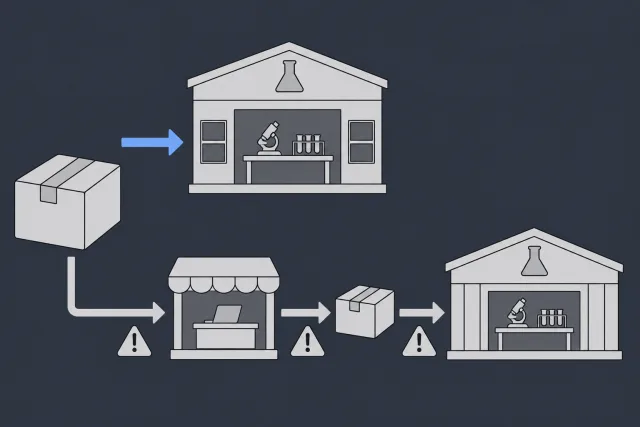
Real data recovery capability is rare. Head and platter work requires a filtered work area. Your town probably has fifty computer shops and zero of those. So the industry consolidated: a handful of real labs, fed by mail from everywhere. Even the drives dropped off at big-box retail counters get shipped out to a central facility. The question was never mail versus local. It's almost always mail to a real lab versus a local shop that will either ship it out anyway or, worse, have a go at it themselves first. Our guide on choosing a recovery service digs into that comparison.
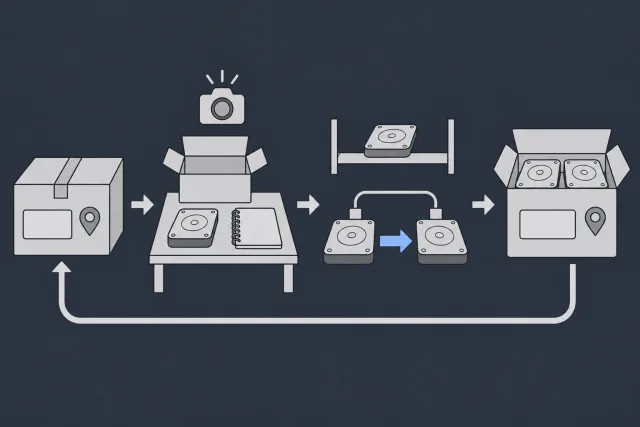
What actually happens to your drive, start to finish
 Illustration
The actual risks, ranked honestly
Let's be straight about what can go wrong, because "nothing ever goes wrong" is a sales pitch, not an answer.
- Poor packaging (the #1 real risk). A bare drive rattling in an envelope can arrive worse than it left. This risk is entirely yours to control, and it's easy: anti-static bag, two inches of padding on every side, snug box. We send instructions with every label.
- Carrier loss (rare, and mitigated). Tracking shows where your package was last scanned. If you already have copies of any of the files, keep those copies at home.
- The hidden middleman (the risk nobody advertises). Plenty of "recovery companies" are intake desks that re-ship your drive to a wholesale lab. Every extra shipment and every extra set of hands multiplies handling risk and stretches your timeline. Ask directly: "Is the recovery performed in your own facility, by your own staff?" A real lab answers in one word.
- Privacy handling. Your files are your files. A legitimate lab accesses only what's needed to verify the recovery, keeps data on isolated internal systems, wipes working copies after the job, and will say all of that in writing.
 Illustration
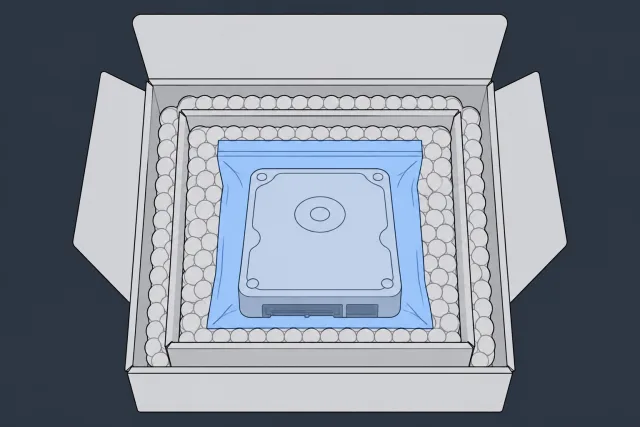
How to pack a drive so it ships safely
- Anti-static protection first. The bag the drive came in, or any anti-static bag. No anti-static bag? Wrap it in paper, never in bubble wrap directly against the PCB (static).
- Then cushion generously. Bubble wrap around the bagged drive, at least two inches on every side.
- Snug box, no rattle. If you shake the box and hear movement, add padding. A drive box inside a slightly larger shipping box is the gold standard.
- Don't ship the accessories. Keep cables, enclosures, and adapters unless asked. For an external drive that's been opened, ship the bare drive; otherwise ship the whole unit and let the lab open it properly.
- Note in the box: your name, case ID, and a one-line description of what happened. It saves a phone call.
 Illustration
Seven questions that vet any mail-in lab in five minutes
| Ask this | The answer you want |
|---|---|
| Who performs the recovery? | "We do, in-house, in our own lab." No hedging. |
| What work area do you use for head and platter work? | At MDrepairs, a laminar-flow work area. |
| What does the evaluation cost? | A flat, stated number. At MDrepairs: $100, credited toward recovery. |
| What if you can't recover my data? | Ask for the diagnostic and approved-parts terms in writing. |
| Do I see proof before paying? | Yes: file listing and sample files, before payment. |
| Is shipping tracked both ways? | Yes, with a prepaid inbound label. |
| What happens to my data afterward? | Working copies wiped after a short verification window. |
Any evasion on the first two questions means you've found a broker, not a lab. And if a quote sounds too cheap to be real, it usually is: our breakdown of why data recovery costs what it does explains the bait-and-switch math some outfits run.
What ships well (almost everything)
Hard drives, SSDs, phones, SD cards, USB sticks, laptops, even multi-drive NAS and RAID sets: all of it ships safely with the packing rules above. Clicking and physically failed drives are fine to ship too; what hurts them is being powered on, not being moved. The full process, including the free label (contiguous US), is on our mail-in data recovery page, and the same flat-fee, proof-before-payment terms apply whether the drive arrives by mail or by hand. For the drive itself, our hard drive data recovery page covers what happens on the bench.
Frequently Asked Questions
Is it safe to mail a hard drive for data recovery?
Yes. Packed properly (anti-static bag, two inches of padding, snug box) and shipped tracked, drives travel safely, including mechanically failed ones. Shipping doesn't spin the platters; power does. The bigger safety question is who receives it, which is why you verify the lab works in-house before you ship.
What if my drive gets lost or damaged in the mail?
We keep a copy of your files for two weeks after we mail the drive back, so we can send them again if it gets lost or damaged. Damage in transit is almost always a packaging failure, so follow the packing steps and there's very little left to chance. If any files still exist anywhere else, keep those copies at home; ship only the failed device.
Can the lab see my personal files?
A recovery technician necessarily works with your filesystem, and verification means opening a few sample files to prove they're intact. A legitimate lab limits access to exactly that, keeps recovered data on isolated systems, and wipes working copies after the verification window. Ask for the data-handling policy in writing; a real lab has one ready.
How long does mail-in data recovery take?
Allow time for shipping on top of the lab work. In the contiguous US, we cover both trips by UPS 2nd Day Air. Once your drive arrives, the standard wait before we start the diagnostic is 4 to 6 weeks. Recovery takes extra time depending on what's wrong with the drive.
Should I make a copy of my data before shipping?
If your drive still works well enough to copy files, absolutely, copy everything you can first and tell the lab what's still missing. But don't fight a failing drive to do it. If it's clicking, erroring, or barely detected, power it down and ship it. Forcing reads on failing hardware destroys data faster than any courier ever will.
How MDrepairs can help
Real cases like this come through our New Jersey lab every week. If you are dealing with one now, start here.