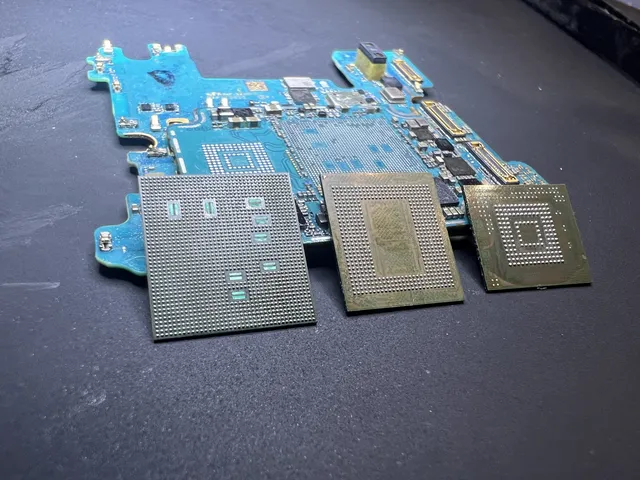
Data Recovery After Fire or Flood: What's Actually Possible
In this article
Water doesn't erase magnetic data, and fire has to reach extreme heat to destroy the storage media inside a drive. What you do in the first few hours matters. The wrong move can turn a recoverable drive into permanent loss.
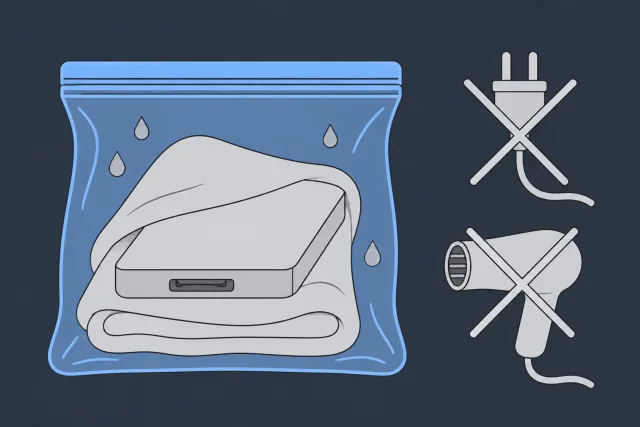
- Do not power on or plug in a wet or smoke-damaged drive: that's the fastest way to lose the data.
- Don't dry it with heat (no hairdryer, oven, or sunlight); leave it wet if needed.
- Seal it in a bag and get it to a lab fast: corrosion is the real clock, not the water itself.
For fire- and water-damaged media, start with professional data recovery services.
Data recovery after fire or flood is possible. Hard drives, SSDs, phones, and flash media are more resilient than most people think. Water doesn't erase magnetic data from hard drive platters. Fire has to reach extreme temperatures before it actually damages the storage media inside a drive. Even after a basement flood or house fire, a lab can check whether the device's storage is still readable. The key is what you do in the first few hours after the disaster. The wrong move, like plugging a wet drive into a computer, can turn a recoverable situation into a permanent loss. The right move is to keep the device powered off, don't try to dry it with heat, and get it to a professional lab as fast as you can.
We're MDrepairs, a professional data recovery lab in New Jersey. Having a solid disaster recovery plan in place before something like this happens makes all the difference. Below, we'll walk through what actually happens to storage devices during fires and floods, what's recoverable, what's not, and what you should do right now if you're dealing with this.
What Water Actually Does to Storage Devices
People assume water kills data. It doesn't. Not directly, anyway.
A traditional hard drive stores data as magnetic charges on spinning metal platters. Water can't erase magnetism. You could submerge a hard drive in a swimming pool for a week, and the magnetic data on those platters would still be intact. The problem isn't the water itself. The problem is what happens after.
The Real Threats from Water Damage
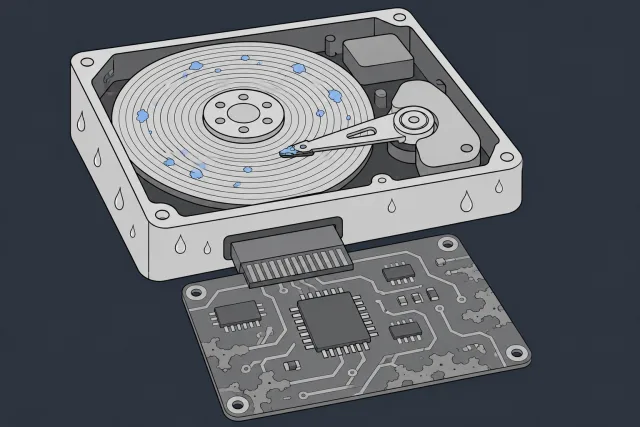
Corrosion. Once air hits the wet electronics, oxidation starts. The circuit board (PCB) on the bottom of the drive has dozens of delicate components. Corrosion can eat through traces and short out chips within days. The longer a wet drive sits without being addressed, the worse this gets.
Contamination. Floodwater isn't clean. It carries mud, sewage, chemicals, and dissolved minerals. When that water gets inside a drive enclosure and dries, it leaves behind deposits on the platters and read/write heads. Those deposits are abrasive. If the drive spins up with contaminants on the platters, the heads can scratch the surface and destroy data permanently.
 Illustration
Short circuits. If a wet drive gets plugged in while moisture is still on the PCB, components can short out. They fish their external drive out of the flood, dry it off with a towel, plug it in, and blow the motor controller or the head preamp.
Saltwater vs. Freshwater
Saltwater is significantly worse than freshwater. The salt accelerates corrosion and leaves behind conductive mineral deposits. A freshwater-submerged drive that gets to a lab within a couple days? Even then, what you can get back depends on the condition of the platters that hold your files. We cover these cases in detail in our water-damaged hard drive guide. A saltwater-submerged drive that sits in someone's garage for two weeks? That's a much harder case. Still possible, but the timeline matters way more.
For handling advice, see our guide to water-damaged hard drives.
What Fire Actually Does to Storage Devices
Fire is a different animal. And honestly? It's less predictable than water.
The good news: hard drive platters are made of aluminum or glass coated with a magnetic alloy. They can handle a surprising amount of heat. The magnetic data on those platters doesn't start degrading until temperatures hit around 500-600 degrees Fahrenheit. Many house fires don't expose every object in the room to those temperatures, especially if the drive was inside a desktop computer, inside a drawer, or in any kind of enclosure that provided some insulation.
What Burns First
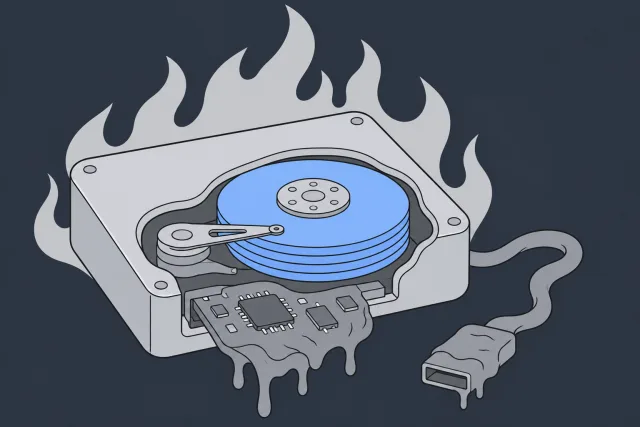
The circuit board goes first. PCBs are made of fiberglass and epoxy with copper traces. The solder starts melting around 370 degrees Fahrenheit. The plastic components warp and melt. But here's the thing: we don't need the original circuit board to recover your data. We can swap it. We can copy data from platters that are still readable.
Cables and connectors melt next. SATA connectors, power cables, external drive enclosures. All plastic or thin metal that deforms quickly. None of this matters for recovery. It's all replaceable.
The drive enclosure itself provides protection. A hard drive is a sealed metal box. Aluminum and steel. It acts as a heat shield for the platters inside.
 Illustration
When Fire Destroys Data
Sustained direct flame over a prolonged period. If the fire burned hot enough and long enough for the interior of the drive to exceed 600+ degrees, the magnetic layer on the platters can degrade. The platters themselves can warp if temperatures go above 1,000 degrees. At that point, recovery becomes partial or impossible.
Industrial fires and structure collapses are the worst cases. A kitchen fire that the fire department puts out in 20 minutes? That drive in the home office down the hall is probably fine. A warehouse fire that burned for hours? Much harder.
What's Recoverable and What's Not
Let's be straightforward. Not everything survives a disaster. But a lot more survives than people expect.
| Scenario | What decides it | Notes |
|---|---|---|
| Drive submerged in freshwater (acted fast) | How much debris reached the platter surfaces | Don't power on. Get it to a lab within days. |
| Drive submerged in saltwater | Whether salt deposits damaged the platter surfaces | Corrosion is faster. Speed matters even more. |
| Drive exposed to fire (not direct flame) | Whether the heat damaged the platters | We check for warping and test whether we can still read the surface. |
| Drive in direct fire (short duration) | Whether the heat warped the platters | PCB gone, but platters often intact inside sealed case. |
| Drive in prolonged intense fire | Which parts of the platters are still readable | Platters may have heat damage. Partial recovery possible. |
| Drive powered on while still wet | Whether powering it on damaged the electronics or scratched the platters | Leave it powered off to avoid further electrical damage or scratches. |
| SSD submerged in water | Whether the memory chips and the controller that reads them still work | No moving parts. Main risk is board corrosion. |
| Phone submerged in water | Whether the original processor and memory chip can still work together | Depends on model and submersion duration. |
We check the parts that hold your files for fire or water damage before we give you an estimate. Is data recovery worth the cost in disaster situations? For most people, absolutely. Irreplaceable family photos, years of business records, legal documents. You can't put a price on some of that. If you're weighing the decision, our breakdown of whether data recovery is worth it covers the cost-vs-value question in detail.
What to Do Right Now (Before Anything Else)
If you're reading this because you just experienced a fire or flood, stop and follow these steps. The next few hours matter more than anything else in the recovery process.
1 Do NOT Power On the Device
We said it before. We'll say it again. Don't plug it in. Don't try to see if it works. Don't press the power button "just to check." Turning it on can make the damage worse.
2 Handle Water-Damaged Drives Correctly
If the drive was submerged, keep it wet. Seriously. Don't try to dry it out. Wrap it in a damp cloth or paper towels, put it in a sealed plastic bag, and get it to a lab. The reason: if contaminants dry onto the platters, they become much harder to remove safely. Keeping it moist until a technician can open it is better than letting mud or minerals bake onto the surface.
 Illustration
3 Handle Fire-Damaged Drives Carefully
If the drive was in a fire, don't try to clean the soot off. Don't scrub it. Don't use chemicals. Just put it in an anti-static bag or wrap it in a clean cloth. The charring on the outside is cosmetic. Leave the inside to the professionals. If the drive is hot, let it cool naturally. Don't dunk it in water to cool it down. Thermal shock can crack glass platters.
4 Document Everything for Insurance
Before you move the device, take photos. Document where it was, what condition it's in, and the surrounding damage. Your insurance company will want this. Many homeowner's and business insurance policies cover data recovery as part of a disaster claim. We can also provide documentation for your claim.
5 Contact a Professional Lab
Time is the enemy. Corrosion doesn't wait. Get the drive to a technician before more corrosion sets in. Don't waste time with a local computer repair shop for disaster recovery. They don't have donor parts. They'll either tell you they can't help, or worse, they'll try something that causes more damage.
How Professional Disaster Recovery Works
So what happens when you bring a fire or flood-damaged drive to our lab? The process is different from a normal drive failure, and it takes longer. But the fundamental approach is the same: get the platters clean, get them readable, and image the data off.
Step 1: Assessment and Triage
We examine the drive externally first. How bad is the damage? Is the enclosure intact? Is the PCB melted? Is there visible water inside? We take photos and log everything. Tell us about water damage when you contact the lab so we can discuss diagnostic availability. Rush options move the assessment start ahead in the queue; they do not set a recovery completion date.
Step 2: Disassembly in the laminar-flow work area
We open the drive in a laminar-flow work area. For a normal drive failure, we might be looking at stuck heads or a seized motor. For disaster recovery, we're dealing with an entirely different set of problems.
For water-damaged drives, we'll see contamination on the platters. Mud, mineral deposits, biological material. The platters have to be cleaned, carefully, using specialized solutions. You can't use tap water. You can't use alcohol. The cleaning process is specific to the type of contamination and the platter material.
For fire-damaged drives, we're checking the platters for heat warping and magnetic degradation. We'll test the surface with specialized equipment to see if the magnetic layer is still readable. If the PCB is destroyed, we swap it with a matching donor board and calibrate it to match the specific drive.
Step 3: Imaging
Once the platters are clean and the drive is mechanically functional, we create a sector-by-sector image. We use hardware-level imaging tools that can work around bad sectors, read errors, and unstable drives. The goal is to pull every readable bit off those platters as fast as possible, because a cleaned disaster drive isn't going to last forever. We get one shot in many cases.
Step 4: Data Extraction and Verification
From the image, we rebuild the file system and extract your data. Then we verify it. We don't just hand you a folder full of files and wish you luck. We check that photos open, that documents aren't corrupted, that databases are functional.
Curious about what recovery costs? Our data recovery pricing page breaks down exactly what you can expect. For disaster cases, pricing depends on the severity of the damage, but we always provide an evaluation first.
Recovery by Device Type
Different devices handle fire and water differently. Here's what we see in the lab.
Traditional Hard Drives (HDDs)
The sealed metal enclosure protects the platters. Magnetic data doesn't erase from water contact. The main vulnerability is the PCB, which is external and replaceable.
The caveat: if the drive was running during the disaster (like a desktop that was on when the flood hit), there's a higher risk of head damage. Sudden power loss while the heads are reading can cause them to land on the platters instead of parking safely. For more about how we handle hard drive data recovery in general, check our HDD page.
Solid State Drives (SSDs)
SSDs have no moving parts, which is both good and bad for disaster recovery. Good because there are no heads to crash and no platters to scratch. Bad because the data is stored on NAND flash chips that can be more sensitive to extreme heat. Also, SSD electronics are more complex than HDD electronics, making board-level repair trickier.
After a flood, board repair can revive your SSD's controller, the chip that reads files. If its firmware (built-in software) allows it, a virtual translator can replace its file map. Chip-off reads only scrambled data from an encrypted drive's NAND memory chips.
Fire is harder. NAND flash chips can be damaged by sustained heat above 300 degrees Fahrenheit. Shorter exposures, they usually survive. But if the chips are physically damaged, the data can't be read off them.
Phones and Tablets
Modern smartphones are surprisingly resilient to water. Most flagship phones from the last few years have IP67 or IP68 water resistance ratings. Even phones without official water resistance often survive brief submersion. The bigger concern with phones is that the data is encrypted. If the phone won't boot, we need to do board-level repair to get it running again so it can decrypt the storage.
Fire damage to phones is tougher. The battery can expand or ignite, causing secondary damage. The logic board components are tiny and densely packed. But if the NAND storage chip survives, the data is there.
USB Flash Drives and SD Cards
The NAND chips are small and can crack from heat. The USB connector can melt. But the chips themselves are surprisingly tough for their size. Fire is the bigger threat because the small form factor means less insulation between the heat source and the storage chips.
RAID Arrays and NAS Devices
RAID and NAS recoveries after disasters are complex. Even if one or two drives are badly damaged, the RAID redundancy can compensate. The key is bringing in ALL the drives, even the ones that look destroyed. We might only need a partial read from a damaged drive to fill in the gaps from the others.
Insurance, Documentation, and Paying for Recovery
This is something most people don't think about until they need it. Many homeowner's insurance policies and business insurance policies cover data recovery after a covered disaster. It falls under "additional living expenses" or "business interruption" coverage in most cases.
What Insurance Typically Covers
- Homeowner's insurance: Often covers data recovery as part of personal property damage. You'll need documentation of the damage and an itemized invoice from the recovery lab.
- Business insurance: Business interruption and property damage coverage frequently includes data recovery. If losing the data would impact business operations, it's usually covered.
- Renter's insurance: Covers personal property, which can include electronics and the cost of recovering data from them.
- FEMA assistance: In declared disaster areas, FEMA may provide assistance for data recovery as part of personal property replacement.
How to Document for a Claim
Take photos of the damaged devices in place before moving them. Get photos of the surrounding damage to show context. Save any reports from fire marshals or FEMA inspectors. Keep the damaged device itself as evidence. And get a detailed invoice from your recovery lab that itemizes the damage, the work performed, and the results.
We provide detailed documentation for insurance claims. Our invoices include the type of damage, the recovery process used, and a description of what was recovered.
What Data Recovery Costs After a Disaster
Disaster recovery typically costs more than standard recovery because of the additional cleaning, parts replacement, and care required. Hard drive recovery runs $1,000 to $3,500+. But remember: many insurance policies cover this entirely.
A diagnostic costs $100 and is credited toward a successful recovery. It is non-refundable once diagnostics start. Approved donor drives and replacement parts are non-refundable once ordered, even if recovery fails. You review and approve the estimate before recovery work begins.
Protecting Your Data Before Disaster Strikes
We'd rather you never need to call us. Honestly. The best disaster recovery is prevention. Here's what actually works.
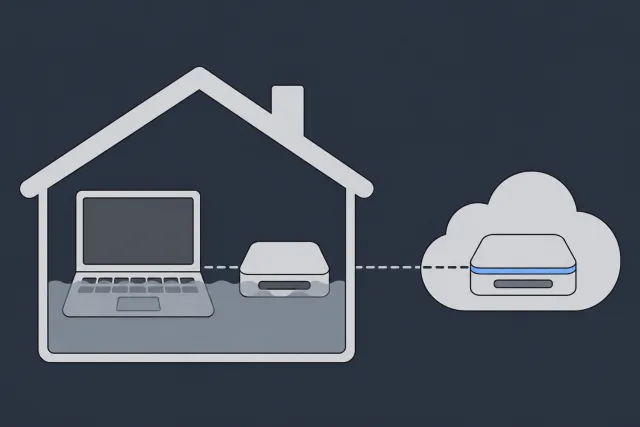
The 3-2-1 Backup Rule
Three copies of your data. Two different types of media. One copy offsite. This is the gold standard, and it's simpler than it sounds.
- Copy 1: Your primary device (your computer's internal drive)
- Copy 2: A local backup (external hard drive, NAS, Time Machine, etc.)
- Copy 3: An offsite or cloud backup (Backblaze, iCloud, Google Drive, or a drive stored at another location)
If your house floods, copies 1 and 2 are both in the same building. They're both gone. That's why copy 3 needs to be somewhere else. Cloud backup is the easiest way to do this. Backblaze is $7 a month for unlimited backup. That's cheap insurance.
 Illustration
Fireproof Safes: Do They Actually Work?
Kind of. Fireproof safes are rated in terms of time and temperature. A UL 72 Class 350 safe keeps internal temperatures below 350 degrees Fahrenheit for a specified duration (usually 30 minutes to 2 hours). That's enough to protect paper documents. But hard drives and SSDs? It depends on the fire and the safe's rating.
A safe rated for media protection (UL 72 Class 125) keeps temps below 125 degrees and humidity below 80%. Those will protect your drives. But they're more expensive than standard fireproof safes. If you're going to put a backup drive in a safe, make sure it's a media-rated safe, not just a document-rated one.
Cloud Backups as Disaster Insurance
For most people, cloud backup solves the disaster problem entirely. If your house burns down, your iCloud photos, your Google Drive documents, and your Backblaze backup are all sitting safely in a data center somewhere. The $7 to $15 per month you spend on cloud backup is the best protection money can buy.
For businesses: consider a business continuity plan that includes offsite backups. Services like Veeam, Datto, and Acronis provide automated offsite backup specifically designed for disaster recovery. The cost is minimal compared to the cost of rebuilding your data from scratch.
Frequently Asked Questions
Can data be recovered from a hard drive that was underwater for days?
Yes. Magnetic data on hard drive platters isn't erased by water. The critical factor is avoiding power-on before professional cleaning. Saltwater corrodes the drive faster than freshwater. Keep the drive wet, don't power it on, and get it to a lab quickly.
Does fire erase data from a hard drive?
Not usually. Hard drive platters can withstand temperatures up to 500-600 degrees Fahrenheit before the magnetic data begins degrading. The sealed metal drive enclosure acts as insulation, protecting platters even when the exterior is charred. The circuit board will melt first, but that's replaceable. In most house fire scenarios, the data on the platters survives. Prolonged industrial fires with sustained extreme temperatures are the exception.
How much does data recovery cost after a fire or flood?
The price depends on the device and what we find during the diagnostic. Disaster cases can need extra cleaning, replacement parts, and specialized handling. You approve the recovery estimate after the diagnostic. Many homeowner's and business insurance policies cover the cost of data recovery after a covered disaster.
Should I put a water-damaged hard drive in rice?
No. This is a myth. Rice doesn't effectively absorb moisture from inside a sealed hard drive enclosure. Worse, rice dust and starch particles can get into the drive's ports and cause additional contamination. For a water-damaged drive, the correct approach is to keep it damp (wrap it in moist paper towels, put it in a sealed bag), don't power it on, and get it to a professional data recovery lab as soon as possible.
Can I recover data from a melted external hard drive?
External hard drives have a standard internal drive inside a plastic or metal enclosure. The enclosure might melt, but the actual drive inside is a sealed metal unit with its own casing. We remove the internal drive from the melted enclosure and work with it directly. If the platters inside survived, recovery is possible regardless of what the outside looks like.
Does homeowner's insurance cover data recovery?
In many cases, yes. Homeowner's insurance typically covers data recovery under personal property damage or additional living expenses when the loss results from a covered event like fire or flood. Business policies often cover it under business interruption coverage. Contact your insurance provider to verify your specific coverage. We provide detailed documentation and itemized invoices to support insurance claims.
How long do I have before water damage becomes permanent?
For freshwater, you generally have a window of several days to a couple weeks before corrosion causes significant additional damage. For saltwater, the window is much shorter. Days, not weeks. Corrosion keeps spreading while the drive sits. Don't try to dry the drive yourself. Keeping it moist and sealed prevents contaminants from drying onto the platters.