
Laptop repair in Middletown, NJ
We replace cracked screens, fix loose hinges and track down charging problems on Windows laptops here in Lincroft. You're welcome to walk in during shop hours and tell us what happened. We'll let you know whether we can give you a free estimate or need to test the laptop further. If your laptop won't turn on, leave it off and bring the charger you were using so we can check both.
- Walk-ins welcomeOne lab, in Lincroft, New Jersey
- 20,000+ ticketsacross all services since 2014
- 4.6 from 345Google reviews
- Free estimate90 days on every repair
The people we help
Our customers include people from
-

-

-
 AT&T
-
 Marriott
-

-

-
 Tennessee Titans
-

-

-

-

-

-

-

What we fix on Windows laptops
We check what's causing the problem before we recommend a repair. If the picture flickers when you tilt the lid, for example, that tells us to look at the hinges and the cable that carries the picture as well as the screen itself.
| Type of repair | Possible causes | What we check | How we fix it |
|---|---|---|---|
| Laptop screen repair Laptop Screen Broken: Getting Data Out Without Repair | A knock or drop, pressure on the lid, or a hinge coming loose | Look for cracks, lines or dark spots on the screen and check the hinges and screen cable | Fit a screen with the right size, connector and brightness for your model |
| Laptop hinge repair for a wobbly lid | A stiff hinge twists the lid, or the plastic posts that hold the hinge screws have cracked | Check the posts and brackets inside the case for strain that could crack the screen | Rebuild the screw posts, fit new brackets and replace any damaged screen trim, back cover, palm rest or frame |
| Laptop keyboard replacement for dead keys | Wear under the keys, a spill or a loose keyboard cable | Check the cable connection first, then test the keys and touchpad | Reconnect the cable or replace the keyboard. If the keyboard is built in, we take the top of the case apart to reach it. |
| Laptop charging port repair | A faulty charger or damage to the charging port, whether it's USB-C or a round DC jack | Test your charger before opening the laptop, even if it only charges when you hold the plug at an angle | Solder a loose port back in place or fit a new one |
| Laptop battery replacement | A battery that no longer holds a charge or has started to swell | See how well the battery holds a charge and look for swelling | Replace the worn or swollen battery |
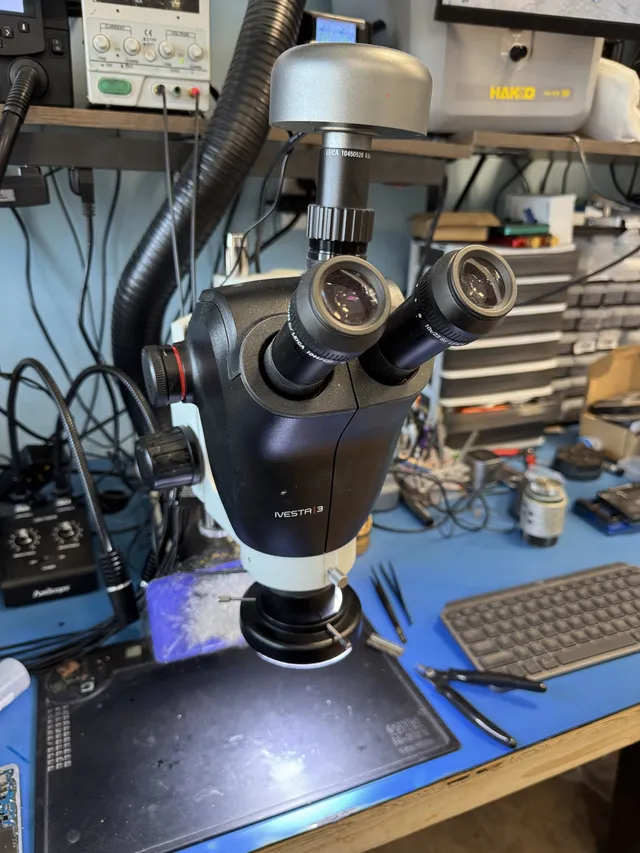
| Laptop won't turn on | A fault in the charger, charging circuit, battery, power button, memory or main board | Test the charger first, then work through the other parts and inspect the main board under a microscope if needed | Replace the part that's keeping the laptop from starting, even if it's a small component on the main board |
| Laptop overheating and fan repair | Dust blocking airflow, a failing fan or dried paste between the processor and the part that cools it | Check that the fan spins and air can move through the vents | Clear out the dust, apply fresh thermal paste and replace the fan if it has failed |
Two laptops can have the same symptoms and need different repairs. You can see how we narrow it down in our video of an HP laptop that wouldn't turn on.
Windows laptop brands we repair
We repair every brand of Windows laptop, including Lenovo, ASUS, Acer, MSI, Samsung and Toshiba. If you need a screen for an HP Pavilion, a Dell Inspiron or a Microsoft Surface, tell us the exact model so we can match the screen. We take Chromebooks too.
We also work on gaming laptops, including Dell's Alienware models. If yours gets too hot while you play, we can check the fan and see how well air is moving through the vents.
What should I do if my laptop goes dead, gets wet or starts to bulge?
Leave it off until we can take a look. When you bring it in, you can tell us what you saw without turning it on to show us.
My laptop won't turn on
Bring the laptop and its charger in together. We'll test the charger first, then check the laptop to see what's keeping it from starting.
The HP gaming laptop in the video shut off and wouldn't turn back on. Joe took out the main board to examine it under the microscope. He found a short circuit at a small switch beside the charging port, but the short was still there after he removed the switch.
He measured the same fault at the charging port connector, so he applied power to the board to see which part got hot. That led him to a capacitor, a small part that stores charge. Once he removed it, the short cleared and the laptop turned on again.
I spilled a drink on my laptop
If it's still running, hold down the power button until it shuts off. Unplug the charger and leave the laptop off, even if the keys feel dry. Liquid can keep eating away at the metal underneath, and rice won't stop that damage.
When you bring the laptop in, we open the case and look for water damage on the keyboard, touchpad, battery, main board and the parts that carry power. Then we can tell you where the spill went and what needs repair.
My laptop is bulging under the keyboard
Stop using the laptop and unplug the charger. A swollen laptop battery is a safety hazard. It can lift the keyboard or touchpad and push the bottom cover out of shape.
Don't press the bulge flat, puncture the battery or try to pry it out. Bring the laptop in with the battery still inside so we can remove it and fit a new one.
How much does laptop repair cost?
The price depends on your laptop model and what needs fixing. When the problem is easy to see, like a cracked screen, a swollen battery or a damaged charging port, we can give you a free estimate.
If we need to open and test the laptop to find the cause, we'll ask whether you'd like to go ahead with the $100 full diagnostic. You pay for it when you drop the laptop off, and the $100 goes toward your repair. We may need that testing after a spill or to sort out trouble with power, software or the main board.
- Your laptop model
Even when two laptops both need a new keyboard, the price can differ. Each keyboard has to fit the case of that particular model.
- The type of screen
A standard laptop screen costs less to replace than an OLED screen or one with a sharper picture or smoother motion. On touchscreen laptops, including models that double as tablets, the glass, touch layer and display come as one part.
- Parts we need to order
If we need to order a part, we check the price of the one that fits your laptop and include it in your estimate.
On the repair quote form, tell us your model and what you've noticed. Something as simple as “I press a key once and get two letters” gives us a place to start.
What happens when you bring your laptop in
We find out what's wrong and tell you what it'll cost to fix. You decide whether to go ahead. If you do, we make the repair and test the laptop before you take it home.
Do I need laptop repair or data recovery?
Ask for a repair if you want to use this laptop again. If all you need are the files, ask about laptop data recovery. We can try to get your photos and documents back even if the laptop never turns on again.
Your laptop repair, step by step
-
You bring it in
Drop by our Lincroft counter during shop hours with your laptop and its charger. If you call ahead with the model, we can check on a part before you make the trip.
-
We find the cause
We start with the problem you describe, whether it's a lid that won't stay open or something you can't see. If the cause is clear, we give you a free estimate. If we need to look deeper, we'll explain what the testing costs.
-
You decide whether to go ahead
We give you the repair price and let you know if we need to order a part. We wait for your okay before we start the repair.
-
We make the repair
Depending on what failed, we might fit a new keyboard or work under the microscope to replace a single small part on the main board.
-
We test your laptop
We check that the repaired part works with the rest of your laptop. Every repair comes with 90 days of warranty coverage.
-
You pick it up
Once we've tested the repair, you can pick up your laptop at the same Lincroft counter where you dropped it off.
Before you bring your laptop in
You don't have to know which part failed. Your usual charger and a description of what happened will help us get started.
- Your usual charger
Sometimes the charger is the only thing that's failed. Bring the one you were using so we can check it with the laptop.
- Your Windows password
Have it handy at the counter so we can sign in and fully test the repair. If Windows is locked, we can still check and repair the hardware.
- What you noticed
Tell us when the trouble started and what the laptop did. If you have a photo of an error message, bring it along so we can see the exact words.
- A backup before your visit
If the laptop still works and is safe to use, save a second copy of the photos and documents you'd miss before you bring it in.
Is it worth repairing my laptop?
If the laptop did what you needed before one part broke, it's worth looking at a repair. The estimate gives you a price to compare with the cost of replacing the whole laptop.
When it makes sense to keep your laptop
- Only one part has worn out
If a worn battery is the reason you have to keep your laptop plugged in, a new battery lets you use it away from the outlet again.
- The repair costs less
If the charging port is all that's broken, fixing it can cost a fraction of the price of a new laptop.
- Your setup works for you
Think about how your programs ran before this happened. If they ran well, a repair lets you keep a setup you like. If the laptop already struggled with your work, a new one may suit you better.
Other ways we can help
- You only need the files
If the main board is beyond repair, laptop data recovery may still let us get your photos and documents onto your next laptop.
- You have a MacBook
We work on Apple laptops too. Our MacBook repair page explains what we can fix on yours.
- You need help with Windows or a desktop
Our computer repair service covers slow laptops, viruses and trouble starting Windows. You can bring us a desktop for repair too.
Where to bring your laptop for repair
Our only laptop repair counter is on Newman Springs Road in Lincroft, part of Middletown Township in Monmouth County.
Whether you're coming from Hazlet, Red Bank or another nearby town, you're welcome to walk in during the hours below.
- Address
- 644 Newman Springs Road, Suite A, Lincroft, NJ 07738
- Hours
- Mon-Fri 10am to 6pm Eastern
- Phone
- (732) 933-7717
North along the bayshore
East along the rivers
Southeast toward the shore
West of Lincroft
Laptop repair questions
Do I need an appointment for laptop repair?
No. You're welcome to walk in Monday through Friday, 10am to 6pm Eastern. If you call ahead with your laptop model, we can check on getting the right part ready for your visit.
How long will my laptop repair take?
We can give you a time estimate once we've checked the laptop and know whether we need to order a part. A screen or battery replacement is usually quicker than replacing a keyboard or working on the main board.
Can I mail in my laptop for repair?
No. We handle laptop repairs in person at our Lincroft counter. If you can't make the trip and only need the files, ask us about data recovery.
Will laptop repair erase my files?
Your files, programs and settings stay as they are when we repair a screen, hinge, keyboard, charging port or battery. We can do those repairs without touching the drive where your files are stored.
Getting files off a failed laptop
If your laptop won't turn on, start with the guides on dead laptops and their drives. If it turns on but stops while loading Windows, the startup guides explain what that can mean for your files.
Dead laptops and their drives
Bring your laptop to Lincroft
Stop by with your laptop and charger and tell us what happened. If it's easier to start from home, ask for a free estimate online with your model and a few words about the problem.