Inside the lab follow MDrepairs on YouTube, TikTok & Instagram - visit our YouTube channel ↗

MacBook Data Recovery

MacBook Data Recovery Spokane WA

Spokane is located in eastern Washington - the Inland Northwest's largest city and home to Gonzaga University.

  • 4.6 Rating
  • 2M+ Followers
  • Nationwide
About this recovery service

When a MacBook fails in Spokane, the data trapped inside its soldered storage cannot be accessed by any Apple Store, Genius Bar, or local repair shop. MDRepairs is a professional data recovery lab in Lincroft, NJ, specializing in MacBook Pro, MacBook Air, iMac, Mac Mini, and Mac Studio recovery. We work directly with Apple's T2 security chip, Apple Silicon processors (M1, M2, M3, M4), and the proprietary NAND flash packages that replace standard SSDs in every modern Mac. Whether you attend Gonzaga or manage a business in downtown Spokane, your MacBook can reach our lab via free mail-in shipping - you generate a free prepaid UPS label on the mail-in form (contiguous US) and your device is fully covered in transit.

Our MacBook recovery process begins with a $100 professional diagnostic where we pinpoint the exact failure - logic board, T2/Apple Silicon processor, NAND flash, or liquid damage. We provide a detailed recovery plan and firm quote before any work starts. Spokane residents ship their MacBooks directly to our Lincroft, NJ lab with free shipping both ways (contiguous US). We recover data from the soldered NVMe storage that no Apple Store or Genius Bar will touch. No data, no charge. Call 732-933-7717.

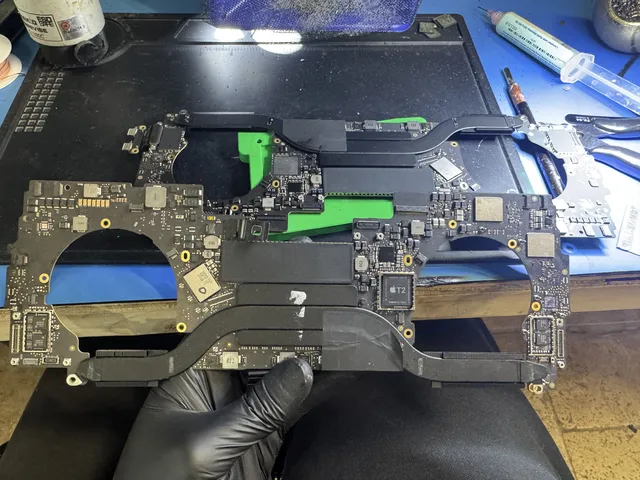
Gloved hand holding a whole MacBook logic board above the bench
Repairing the MacBook's logic board can let its security chip unlock the storage. Once it's unlocked, we can copy the files.
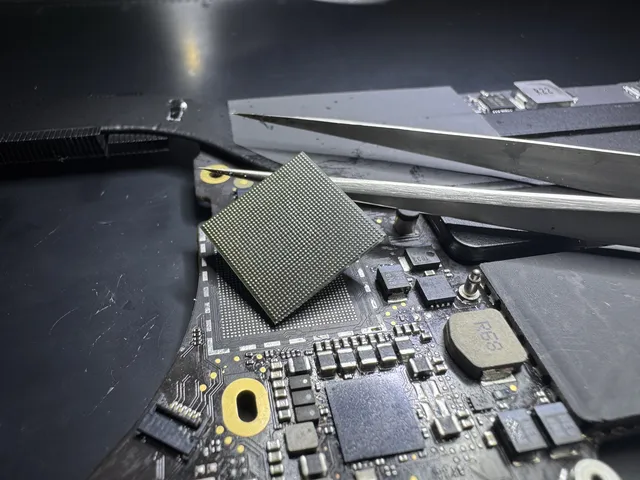
A T2 chip rests upside down on a MacBook board beside open tweezers.
We're doing a T2 chip swap to recover files from a customer's MacBook. Its T2, NAND storage chips and EEPROM memory chip all go onto a donor board.
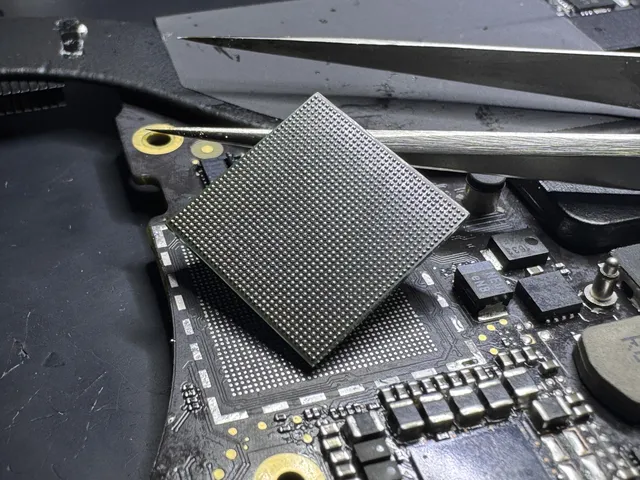
Rows of silver bumps cover the underside of the MacBook's T2 chip.
This MacBook's original T2 chip holds the encryption key we need to read the customer's files. That's why it goes with the storage chips.
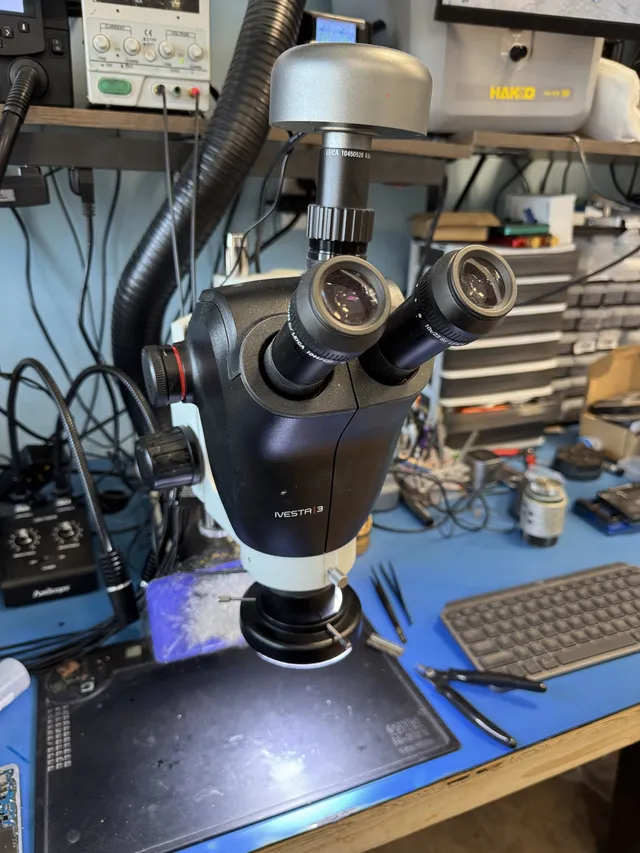
Stereo microscope at the bench with a keyboard to the right
Finding faults and soldering tiny connections on a circuit board can get a dead device running long enough to copy its files.
  • 2M+ Social Media Followers
  • 4.6 ★ Average Rating
  • $100 Flat Diagnostic Fee
  • Free Shipping Both Ways
  • $100 diagnostic credited toward a successful recovery
  • All 50 States Served
Failure Types

Common MacBook Data Loss Scenarios in Spokane

Liquid Damage / Spill

Coffee, water, and beverage spills are the number one killer of MacBooks - and the leading cause of data loss we see in our lab. Liquid seeps under BGA components, corrodes solder joints, and shorts critical power rails on the logic board. The damage is often progressive: a MacBook that works fine after a spill can die days later as corrosion spreads. Our technicians perform ultrasonic cleaning, remove corrosion under a stereo microscope, and micro-solder replacement components to restore board function and data access. When board-level repair alone can bring the Mac back to life, that's the fastest and most cost-effective path to your files.

T2 Security Chip Failure

The Apple T2 chip in 2018-2020 Intel MacBooks acts as the SSD controller and hardware encryption engine - every byte of data on the NAND is encrypted through it. When the T2 fails due to firmware corruption, power surge, or liquid damage, the Mac sees no storage device at all. There is no software workaround. Our lab uses specialized hardware diagnostic tools to interface with the T2 at the board level and restore communication between the chip and NAND. If the T2 itself is beyond repair but the CPU, NAND, and EEPROMs survived, we perform a CPU/NAND/EEPROM swap to a known-good donor board - transplanting the critical components that hold your encryption keys and data to a working motherboard.

Apple Silicon Crash / Failure

On M1, M2, M3, and M4 Macs, Apple moved the SSD controller and Secure Enclave directly into the processor itself. That means when an Apple Silicon chip fails, your storage is completely inaccessible - there is no secondary path to the NAND. Chip-off extraction does not work here because the data is hardware-encrypted and the decryption keys live in the CPU's Secure Enclave. Our recovery method for catastrophic Apple Silicon failure is a CPU/NAND/EEPROM swap: we transplant the original CPU (which holds the encryption keys), NAND packages, and EEPROMs to a donor working motherboard. As long as the CPU silicon survived, your data is recoverable.

FileVault Locked / Recovery Key Lost

FileVault full-disk encryption on macOS is tied to the T2 chip or Apple Silicon Secure Enclave - not just your password. If you've lost your FileVault recovery key and can't log in, or if a firmware update corrupted the encryption state, most shops will tell you the data is gone. Our lab works at the hardware level to restore the authentication pathway between the security processor and the encrypted NAND. In many cases, we can repair the board-level failure preventing FileVault from unlocking and recover your data without the recovery key, as long as the security hardware that holds the encryption keys is intact.

Kernel Panic / No Boot Loop

Repeating kernel panics, the flashing question mark folder, the spinning globe that never loads, or an infinite reboot loop - these symptoms mean your MacBook can't find or load its operating system. Your data is almost certainly still on the NAND, but you can't get to it because storage is soldered to the logic board and can't be removed and plugged into another machine. Our technicians bypass the boot process entirely, diagnose whether the failure is a corrupted file system, failing NAND block, or a board-level hardware fault, and extract your data directly at the hardware level without relying on macOS to boot.

SSD Controller Failure

The storage controller - built into the T2 chip on Intel Macs or the Apple Silicon SoC on M-series Macs - manages every read and write to the soldered NAND flash. When this controller fails, the Mac reports no internal storage in Disk Utility, Recovery Mode, and even DFU mode. The NAND chips still hold your data, but nothing on the board can talk to them. Our first approach is always board-level repair to restore controller function. If the controller is permanently dead, we perform a CPU/NAND/EEPROM swap - moving the storage chips, CPU, and supporting components to a working donor board that can communicate with the NAND and decrypt your data.

Logic Board Failure

A dead logic board doesn't necessarily mean dead data. Power delivery failures, blown capacitors, shorted ICs, and failed voltage regulators can all kill a MacBook while leaving the NAND and CPU completely intact. Our technicians diagnose the exact point of failure using board schematics, thermal imaging, and micro-probing under a stereo microscope. When the fault is repairable - a blown MOSFET, corroded connector, or failed power IC - we micro-solder the fix and restore full data access. For catastrophic board damage where repair isn't viable, we perform a CPU/NAND/EEPROM swap to a donor motherboard, preserving the encryption relationship between your CPU's Secure Enclave and NAND storage.

Accidental Deletion / Failed Time Machine

Emptied the Trash, erased the wrong APFS volume, ran a clean macOS install over your data, or lost your only Time Machine backup? On MacBook SSDs with TRIM enabled, deleted data has a ticking clock - once TRIM processes the deleted blocks, the NAND physically erases them and the data is gone for good. The critical step is to stop using the Mac immediately. If you act fast and the TRIM garbage collection hasn't completed, we can recover deleted files by reading the NAND at the hardware level before the blocks are wiped. Time is the single biggest factor in these cases - contact us before powering the Mac on again.

Physical Drop / Impact Damage

A dropped or crushed MacBook can suffer internal component displacement, cracked solder joints on the logic board, and fractured NAND packages - even when the external case looks fine. Impact forces flex the logic board and can break the microscopic solder connections between BGA chips and the PCB, killing power delivery or storage communication. Our technicians diagnose impact damage using X-ray imaging and stereo microscope inspection to identify cracked joints, displaced chips, and hairline PCB fractures invisible to the naked eye. We then micro-solder the damaged connections, reball BGA components, or perform a CPU/NAND/EEPROM swap if the board damage is too extensive to repair in place.
How It Works

How Your MacBook Recovery Works

  1. 01

    Free Consultation

    Call 732-933-7717 or submit our secure online form. Tell us what happened - liquid spill, no power, kernel panic, FileVault lock - and a recovery engineer will walk you through your options, expected timeline, and pricing range. You generate a free prepaid UPS label on the mail-in form (contiguous US) so your MacBook or bare logic board arrives safely at our lab.
  2. 02

    $100 Board-Level Diagnostic

    At our Lincroft, NJ lab, we put your MacBook under the microscope - literally. Using BGA rework stations and PC-3000 diagnostic platforms, we trace the failure to the exact component: T2 or Apple Silicon processor, NAND flash, power management IC, or liquid corrosion path. You receive a detailed diagnostic report and a firm, no-surprise quote before we touch a single solder joint.
  3. 03

    Precision Recovery

    Our engineers execute the recovery using Apple-specific board-level techniques refined across hundreds of MacBook cases. Depending on the failure, that means repairing the logic board to restore native data access, bypassing T2/Apple Silicon encryption at the hardware level, or performing a CPU/NAND/EEPROM transplant to a known-good donor board when the original board is beyond repair. Every step is performed under magnification with medical-grade precision.
  4. 04

    Verification & Return

    Every recovered file is verified for integrity - documents open, photos render, videos play without artifacts. Your data is transferred to a new external drive and shipped back. We cover the UPS label and the trip home in the lower 48, except islands. We diagnose your device for $100 to find out what it would take to reach your files. That diagnostic fee goes toward the price of a successful recovery. If we can't get any files back, there's no recovery fee.

Free UPS shipping in the lower 48, except islands · $100 diagnostic, credited toward a successful recovery.

Affirm financing, if eligible
Pricing

MacBook Data Recovery Pricing - Spokane WA

MacBook data recovery pricing for Spokane residents depends on the failure type, Mac model, and complexity of the storage architecture. All Spokane customers receive free shipping both ways - you generate a free prepaid UPS label on the mail-in form (contiguous US) so your MacBook arrives safely at our Lincroft, NJ lab. Logical recoveries from bootable boards cost less than hardware failures requiring board-level micro-soldering or CPU/NAND/EEPROM transplants. Every case starts with our $100 diagnostic, and you receive a firm quote before we proceed. No data recovered means no charge beyond the diagnostic fee.

Standard

$1,500

Logical and software-level recovery for MacBooks with functional hardware. Covers accidental deletion, file system corruption, failed macOS updates, and APFS volume repair on boards that still power on and pass diagnostics.
  • APFS file system repair
  • Deleted file recovery
  • macOS corruption repair
  • Time Machine data extraction
  • Free return shipping

Advanced

$1,500

Board-level hardware recovery for MacBooks with component failures, repairable liquid damage, or encrypted storage requiring T2/Apple Silicon bypass. We repair the logic board at the component level to restore native data access.
  • T2 / Apple Silicon bypass
  • Board-level component repair
  • FileVault encrypted recovery
  • Liquid damage board restoration
  • Free return shipping

Critical

$3,500+

CPU, NAND, and EEPROM transplant for MacBooks with catastrophic logic board failure or irreparable liquid damage. The CPU holds the Secure Enclave decryption keys - if the CPU survived, we transplant it along with the NAND and EEPROM to a known-good donor motherboard to unlock and recover your data.
  • CPU / NAND / EEPROM transplant
  • Donor motherboard sourcing
  • Secure Enclave key preservation
  • Full encrypted data reconstruction
  • Free return shipping
See full pricing
Models

Apple Mac Models We Recover for Spokane Customers

MDRepairs recovers data from every Mac with soldered or integrated storage - MacBook Pro, MacBook Air, iMac, Mac Mini, Mac Studio, and Mac Pro. Spokane residents can ship any of the models listed below to our Lincroft, NJ lab using our free mail-in service. Our board-level expertise and specialized tools handle Apple's proprietary storage architecture across every generation, from the first soldered SSDs in 2016 through the latest M4-based machines.

Era 01

Removable PCIe SSD

3 models
  • MacBook Pro 13" (2015) - Intel, Removable PCIe SSD
  • MacBook Pro 15" (2015) - Intel, Removable PCIe SSD
  • MacBook Air 13" (2013-2017) - Intel, Removable PCIe SSD
Era 02

Soldered SSD

7 models
  • MacBook Pro 13" (2016) - Intel, Touch Bar, Soldered SSD
  • MacBook Pro 13" (2017) - Intel, Touch Bar, Soldered SSD
  • MacBook Pro 15" (2016) - Intel, Touch Bar, Soldered SSD
  • MacBook Pro 15" (2017) - Intel, Touch Bar, Soldered SSD
  • MacBook 12" (2015) - Intel Core M, Soldered SSD
  • MacBook 12" (2016) - Intel Core m3/m5/m7, Soldered SSD
  • MacBook 12" (2017) - Intel Core m3/i5/i7, Soldered SSD
Era 03

T2 Security Chip

12 models
  • MacBook Pro 13" (2018) - Intel, T2 Chip, Soldered SSD
  • MacBook Pro 13" (2019) - Intel, T2 Chip, Soldered SSD
  • MacBook Pro 13" (2020) - Intel, T2 Chip, Soldered SSD
  • MacBook Pro 15" (2018) - Intel, T2 Chip, Soldered SSD
  • MacBook Pro 15" (2019) - Intel, T2 Chip, Soldered SSD
  • MacBook Pro 16" (2019) - Intel, T2 Chip, Soldered SSD
  • MacBook Air 13" (2018) - Intel Retina, T2 Chip, Soldered SSD
  • MacBook Air 13" (2019) - Intel Retina, T2 Chip, Soldered SSD
  • MacBook Air 13" (2020) - Intel, T2 Chip, Soldered SSD
  • iMac 27" (2019) - Intel, T2 Chip, SSD / Fusion Drive
  • iMac 27" (2020) - Intel, T2 Chip, SSD / Fusion Drive
  • Mac Mini (2018) - Intel, T2 Chip, Soldered SSD
Era 04

Apple Silicon (M1-M4)

27 models
  • MacBook Pro 13" (2020) - Apple M1, Soldered SSD
  • MacBook Pro 13" (2022) - Apple M2, Soldered SSD
  • MacBook Pro 14" (2021) - Apple M1 Pro / M1 Max, Soldered SSD
  • MacBook Pro 14" (2023) - Apple M2 Pro / M2 Max, Soldered SSD
  • MacBook Pro 14" (2023) - Apple M3, Soldered SSD
  • MacBook Pro 14" (2023) - Apple M3 Pro / M3 Max, Soldered SSD
  • MacBook Pro 14" (2024) - Apple M4, Soldered SSD
  • MacBook Pro 14" (2024) - Apple M4 Pro / M4 Max, Soldered SSD
  • MacBook Pro 16" (2021) - Apple M1 Pro / M1 Max, Soldered SSD
  • MacBook Pro 16" (2023) - Apple M2 Pro / M2 Max, Soldered SSD
  • MacBook Pro 16" (2023) - Apple M3 Pro / M3 Max, Soldered SSD
  • MacBook Pro 16" (2024) - Apple M4 Pro / M4 Max, Soldered SSD
  • MacBook Air 13" (2020) - Apple M1, Soldered SSD
  • MacBook Air 13" (2022) - Apple M2, Soldered SSD
  • MacBook Air 13" (2024) - Apple M3, Soldered SSD
  • MacBook Air 15" (2023) - Apple M2, Soldered SSD
  • MacBook Air 15" (2024) - Apple M3, Soldered SSD
  • iMac 24" (2021) - Apple M1, Soldered SSD
  • iMac 24" (2023) - Apple M3, Soldered SSD
  • iMac 24" (2024) - Apple M4, Soldered SSD
  • Mac Mini (2020) - Apple M1, Soldered SSD
  • Mac Mini (2023) - Apple M2 / M2 Pro, Soldered SSD
  • Mac Mini (2024) - Apple M4 / M4 Pro, Soldered SSD
  • Mac Studio (2022) - Apple M1 Max / M1 Ultra, Soldered SSD
  • Mac Studio (2023) - Apple M2 Max / M2 Ultra, Soldered SSD
  • Mac Studio (2024) - Apple M4 Max, Soldered SSD
  • Mac Pro (2023) - Apple M2 Ultra, Soldered SSD
Era 05

Fusion Drive / Modular SSD

4 models
  • iMac 21.5" (2017) - Intel, SSD / Fusion Drive
  • iMac 21.5" (2019) - Intel, SSD / Fusion Drive
  • iMac 27" (2017) - Intel, SSD / Fusion Drive
  • Mac Pro (2019) - Intel Xeon W, Modular SSD
Storage Architecture 3 sections

MacBook Storage Architecture: From Removable SSDs to Soldered NAND - Spokane WA

Soldered NAND flash storage chips on a MacBook logic board - MacBook data recovery requires chip-level access - Spokane WA

Understanding why MacBook data recovery is so challenging - and why Spokane residents need a specialized lab like MDRepairs - starts with Apple's storage architecture evolution. Before 2016, MacBook Pro and MacBook Air models used removable PCIe SSDs. If your Mac died, a technician could simply pull the SSD module out and plug it into another machine to access your files. That era is over. Starting in 2016 with the MacBook Pro Touch Bar models, Apple began soldering NAND flash storage directly to the logic board. Today, every MacBook Pro, MacBook Air, iMac, Mac Mini, and Mac Studio ships with storage that is physically part of the motherboard - it cannot be removed without specialized desoldering equipment.

For Spokane Mac users, this means a dead MacBook equals inaccessible data unless you have a lab capable of working at the chip level. The storage chips are Ball Grid Array (BGA) components with hundreds of microscopic solder balls connecting them to the PCB. Removing them requires precise thermal profiling to avoid damaging the NAND - too much heat destroys the flash cells, too little leaves solder bridges that prevent clean separation. Our Lincroft, NJ lab uses dedicated BGA rework stations with Apple-specific thermal profiles developed across hundreds of MacBook recoveries.

Continue reading 2 more paragraphs

The situation is further complicated by encryption. Every Mac with a T2 chip (2018-2020 Intel models) or Apple Silicon processor (M1 and later) encrypts all data on the NAND in hardware. The encryption keys live in the T2 chip's Secure Enclave or the Apple Silicon processor's Secure Enclave - not on the NAND itself. This means even if you could desolder the NAND chips and read them in a flash programmer, the data would be encrypted and useless without the corresponding security processor. That is why our primary recovery approach for Spokane customers is board-level repair: we fix the logic board so the original T2 or Apple Silicon chip can decrypt and serve the data natively.

When board repair is not possible - say the T2 or M-series processor is physically destroyed - we perform a CPU/NAND/EEPROM transplant. We desolder the NAND, the CPU (which contains the Secure Enclave), and the board EEPROMs from the dead logic board and transplant all three to a known-good donor motherboard. Because the CPU retains the encryption keys and the NAND holds the encrypted data, this trio works together on the new board exactly as it did on the original. This is the gold standard for catastrophic MacBook recovery, and it is the technique that separates professional labs from shops that simply give up and say the data is gone.

T2 Security Chip and Data Recovery Challenges - Spokane

Apple T2 security chip on a MacBook logic board - T2 chip data recovery challenges - Spokane WA

The Apple T2 security chip, found in Intel-based MacBook Pro and MacBook Air models from 2018 through 2020, fundamentally changed data recovery for Spokane residents and Mac users everywhere. The T2 is not just a security coprocessor - it is the SSD controller. Every read and write operation to the soldered NAND flash goes through the T2, and every byte is encrypted with AES-256 hardware encryption. There is no way to bypass the T2 and access the NAND directly - the data is meaningless without the T2's decryption engine.

When a T2 chip fails, the Mac reports no internal storage. Disk Utility shows nothing. Recovery Mode sees no drive. DFU mode may or may not respond depending on the nature of the failure. For Spokane MacBook owners, this is a terrifying scenario because it looks like the data is gone. But in most cases, the NAND flash chips are perfectly fine - it is the T2 that has stopped talking to them. Common T2 failure causes include liquid damage corroding the T2's BGA solder connections, power surge damage to the T2's power delivery circuit, and firmware corruption after a failed macOS update or botched Apple Configurator DFU restore.

Continue reading 2 more paragraphs

Our Lincroft lab approaches T2 failures methodically. We probe the T2's power rails to determine whether it is receiving clean, stable voltage. We check the clock signals that synchronize the T2 with the NAND and the CPU. We inspect every BGA pad under magnification for corrosion, cold joints, or thermal stress fractures. If the T2 itself is functional but a supporting component has failed - a blown capacitor on the T2 power rail, a corroded resistor in the clock circuit, or a damaged trace between the T2 and NAND - we micro-solder the repair and restore native data access.

When the T2 chip is physically dead, we resort to the CPU/NAND/EEPROM transplant. The T2 is a separate chip from the Intel CPU on these boards, so the transplant involves moving both the Intel CPU and the NAND (plus EEPROMs) to a donor board that has a working T2 and supporting circuitry. This is an extremely delicate procedure because the T2 on the donor board must be compatible with the specific NAND configuration, and the Intel Management Engine firmware must match. Our technicians have performed this procedure across hundreds of T2 Mac cases and maintain an inventory of verified donor boards specifically for Spokane and Washington customers shipping to our lab.

Apple Silicon (M1/M2/M3/M4) Data Recovery for Spokane Residents

Apple M-series silicon chip package - Apple Silicon M1 M2 M3 M4 data recovery - Spokane WA

Apple Silicon represents the most significant challenge in Mac data recovery history, and Spokane residents with M1, M2, M3, or M4 Macs need to understand why. Unlike Intel Macs where the T2 chip was a separate component, Apple Silicon integrates the SSD controller, encryption engine, Neural Engine, and Secure Enclave directly into the main processor die. The M-series chip is the storage controller. When it fails, there is no secondary path to the NAND - period.

This architectural integration means chip-off NAND reading - the traditional last-resort technique where we desolder flash chips and read them in a programmer - produces only encrypted gibberish on Apple Silicon Macs. The AES-256 encryption keys are generated and stored within the Secure Enclave on the M-series die. Without the original CPU, those keys are permanently inaccessible. For Spokane Mac users, this means the CPU must survive for data recovery to succeed. If both the CPU die and the NAND are destroyed - say in a fire or severe physical crushing - the data is unrecoverable by anyone, anywhere.

Continue reading 3 more paragraphs

The recovery method for Apple Silicon Macs with a dead logic board but surviving CPU is the CPU/NAND/EEPROM transplant. We desolder the M-series processor, both NAND packages, and the board EEPROMs from the failed board and transplant them onto a known-good donor motherboard. The donor board provides the power delivery, display output, USB-C connectivity, and supporting circuitry that the original board can no longer supply. Because we transplant the original CPU (with its Secure Enclave keys intact) along with the original NAND (with the encrypted data), the system boots and decrypts as if nothing happened.

This technique requires extreme precision. The M-series processor package has over 1,500 BGA pads. Removing it without damaging any pad requires exact thermal profiling - our BGA rework stations maintain temperature curves within 2 degrees Celsius throughout the reflow cycle. We also x-ray the CPU package before and after removal to verify pad integrity. For Spokane customers shipping Apple Silicon Macs to our Lincroft, NJ lab, we document every step of the transplant process and provide a full diagnostic report before proceeding.

Common Apple Silicon failure scenarios we see from Washington include liquid damage to the power delivery circuitry surrounding the M-series chip, third-party USB-C charger overvoltage events that destroy the PMIC, and physical drop damage that fractures the BGA connections between the M-series package and the logic board PCB. In many of these cases, the M-series die itself survives - it is the supporting circuitry that failed. When that is the case, board-level repair is our first approach because it is faster, less expensive, and less invasive than a full CPU/NAND/EEPROM swap.

Every Mac We Recover 3 sections

MacBook Pro Data Recovery in Spokane: 13-Inch, 14-Inch, and 16-Inch Models

MacBook Pro being repaired in a professional data recovery lab - Spokane WA

The MacBook Pro is the most common machine we receive for data recovery from Spokane and across Washington. From the 2016 Touch Bar models through the 2024 M4-based machines, every MacBook Pro uses soldered NAND flash storage controlled by either a T2 chip (2018-2020 Intel) or Apple Silicon (M1 and later). The storage cannot be removed by any conventional means, and no Apple Store or Genius Bar in Washington will attempt data recovery - Apple's official policy is to replace the logic board and return the dead one, along with your data, to their recycling facility.

The 13-inch MacBook Pro lineup spans from the 2016 Touch Bar (Intel, no T2) through the 2022 M2. The 2016-2017 models without T2 chips are actually recoverable through NAND chip-off because the data is not hardware-encrypted. Starting with the 2018 model, the T2 chip added hardware encryption, making board-level repair or CPU/NAND transplant the only viable approach. The 2020 M1 13-inch was the first Apple Silicon MacBook Pro, and the 2022 M2 13-inch was the last of the 13-inch form factor.

Continue reading 2 more paragraphs

The 14-inch MacBook Pro (2021-2024) uses M1 Pro, M1 Max, M2 Pro, M2 Max, M3, M3 Pro, M3 Max, M4, M4 Pro, and M4 Max processors depending on configuration. These machines have significantly more complex power delivery systems than the 13-inch models, with higher power draw and more sophisticated voltage regulation. Board-level failures in the 14-inch Pro often involve the PMIC (Power Management IC) or the USB-C power delivery controller, both of which can fail independently of the processor and NAND.

The 16-inch MacBook Pro (2019-2024) presents unique recovery challenges due to its larger logic board and higher thermal output. The 2019 16-inch was the last Intel MacBook Pro with a T2 chip, and its larger battery has been involved in swelling incidents that physically press against the logic board and crack BGA connections. The 2021 M1 Pro/Max, 2023 M2 Pro/Max and M3 Pro/Max, and 2024 M4 Pro/Max 16-inch models share the same fundamental recovery approach: board-level repair when possible, CPU/NAND/EEPROM swap when necessary. Spokane residents with any MacBook Pro model can ship to our lab with free mail-in service.

MacBook Air Data Recovery for Spokane Residents

MacBook Air disassembled showing thin internal components and logic board - Spokane WA

The MacBook Air is the most popular Mac sold worldwide, and we see a proportionally high volume of MacBook Air recovery cases from Spokane and across Washington. The Air's thin, lightweight design makes it particularly vulnerable to liquid damage - its compact chassis leaves minimal clearance between the keyboard and the logic board, so any spill reaches critical components within seconds. For Spokane residents, this means a single coffee spill can kill the T2 chip or Apple Silicon processor and lock out all data.

The MacBook Air recovery timeline: the 2013-2017 models used removable PCIe SSDs - if you have one of these, a local technician can pull the SSD and read it in another Mac. The 2018 Retina MacBook Air introduced the T2 chip with soldered, encrypted storage. The 2020 models came in both Intel T2 and Apple M1 variants. The 2022 M2, 2024 M3, and the 15-inch models (2023 M2, 2024 M3) all use Apple Silicon with fully integrated storage.

Continue reading 2 more paragraphs

MacBook Air liquid damage is distinct from MacBook Pro damage because of the Air's fanless design in M1 and later models. Without a fan pulling air through the chassis, liquid tends to pool on the logic board rather than being distributed across internal surfaces. This concentrated exposure often causes more severe localized corrosion - especially around the M-series processor and its immediate power delivery components. Our lab performs ultrasonic cleaning followed by microscopic inspection of every BGA pad and trace in the affected area.

For Spokane MacBook Air owners: if your Air shows any symptom of failure - no power, random shutdowns, kernel panics, or the flashing question mark folder - stop using it immediately. On SSDs with TRIM enabled (all modern Macs), continued use after a storage issue can trigger TRIM garbage collection that permanently erases deleted blocks. Ship it to our Lincroft, NJ lab as quickly as possible using our free mail-in labels. We diagnose every MacBook Air at the board level and provide a firm quote before any recovery work begins.

iMac, Mac Mini, and Mac Studio Recovery - Spokane WA

Mac Mini opened showing internal components for data recovery - Spokane WA

Desktop Macs present unique data recovery considerations for Spokane residents. While MacBooks fail due to portability-related hazards like drops and liquid spills, desktop Macs like the iMac, Mac Mini, and Mac Studio are more commonly affected by power surges, overheating from restricted ventilation, and age-related component degradation. The storage architecture in modern desktop Macs is identical to their laptop counterparts - soldered NAND with T2 or Apple Silicon encryption - which means the same board-level expertise applies.

The iMac lineup includes the 2017-2020 Intel 21.5-inch and 27-inch models (some with T2 chips, some without) and the 2021 M1, 2023 M3, and 2024 M4 24-inch models. Older iMacs with Fusion Drives combine a small SSD with a traditional hard drive - these require both SSD and HDD recovery techniques if the Fusion Drive pair has separated. The 24-inch Apple Silicon iMacs have fully soldered storage with the same encryption challenges as MacBook Pro and Air models.

Continue reading 2 more paragraphs

The Mac Mini has evolved from an easily serviceable machine with a removable 2.5-inch drive to a completely sealed unit with soldered Apple Silicon storage. The 2018 Intel T2 Mac Mini, 2020 M1, 2023 M2/M2 Pro, and 2024 M4/M4 Pro all have soldered NAND. For Spokane residents, shipping a Mac Mini is significantly easier than shipping an iMac - the compact form factor reduces shipping risk and cost. You generate a free prepaid UPS label on the mail-in form (contiguous US) for any desktop Mac.

The Mac Studio (2022 M1 Max/Ultra, 2023 M2 Max/Ultra, 2024 M4 Max) is a professional workstation with soldered storage that often contains irreplaceable creative assets - 4K and 8K video projects, massive Photoshop and Illustrator libraries, Logic Pro sessions, and Final Cut Pro timelines. The professional nature of Mac Studio data makes these recoveries particularly high-stakes for Spokane creative professionals. Our lab treats every Mac Studio case with the urgency it deserves, and rush service is available by calling 732-933-7717.

Inside the Lab 4 sections

FileVault Encryption and MacBook Data Recovery - Spokane

FileVault encryption concept - encrypted MacBook storage requiring specialized data recovery - Spokane WA

FileVault full-disk encryption is enabled by default on every modern Mac, and it adds a critical layer of complexity to data recovery for Spokane residents. On T2-equipped Macs, FileVault combines the T2's hardware AES-256 encryption with a user password or recovery key. On Apple Silicon Macs, the Secure Enclave within the M-series processor manages the same encryption. The encryption is always-on at the hardware level - FileVault simply adds an authentication layer on top of it.

The most common FileVault recovery scenario we see from Spokane is a Mac that was working fine with FileVault enabled, then suffered a hardware failure (liquid damage, power surge, or component death) that prevents it from booting to the login screen. The data is still encrypted on the NAND, the encryption keys are still in the Secure Enclave, and the user still knows their password - but the broken hardware prevents the normal authentication flow from completing. Our job is to repair the board-level hardware fault so the Mac can reach the FileVault login screen, authenticate, and decrypt the data.

Continue reading 3 more paragraphs

A more challenging scenario is when the FileVault recovery key is lost and the user cannot remember their password. If the security hardware (T2 or Apple Silicon) is intact and functional, we can sometimes restore the authentication pathway through board-level repair and firmware-level intervention. However, if both the password and recovery key are truly lost and the security hardware has failed, the encryption is designed to be unbreakable - that is the entire point of Apple's security architecture.

For Spokane Mac users: always store your FileVault recovery key somewhere safe outside your Mac. Apple offers to store it in your iCloud account during FileVault setup - if you chose that option, you can retrieve it at iforgot.apple.com. If you saved it locally or printed it, make sure that copy still exists. In a data recovery scenario, having the FileVault password or recovery key dramatically simplifies the recovery process and reduces cost, because we can focus solely on repairing the hardware fault without needing to address encryption authentication.

Our Lincroft, NJ lab handles FileVault-encrypted recoveries from Spokane and across Washington on a regular basis. The $100 diagnostic determines whether the security hardware survived and whether FileVault can be unlocked once the board is repaired. We provide a clear assessment before any work begins. Call 732-933-7717 to discuss your specific FileVault situation.

Liquid Damage MacBook Recovery - Spokane WA

Liquid damaged MacBook logic board under microscope showing corrosion - Spokane WA

Liquid damage is the number one cause of MacBook data loss we see from Spokane and all of Washington. Coffee, water, wine, soda, and even humidity-related condensation can destroy a MacBook's logic board and lock out the soldered storage permanently. The critical variable in liquid damage recovery is time - what happens in the hours and days after the spill determines whether your data survives.

When liquid enters a MacBook, it does not simply short-circuit the board and stop. The real damage is electrochemical corrosion that begins immediately and accelerates over time. Liquid creates conductive pathways between components that were never meant to be connected, causing current to flow through unintended paths. This electrochemical reaction corrodes solder joints, dissolves copper traces, and deposits mineral residue on BGA pads - all of which worsen even after the liquid dries. That is why a MacBook that seems fine after a spill can die days or weeks later as corrosion spreads.

Continue reading 4 more paragraphs

The worst thing a Spokane MacBook owner can do after a spill is put the Mac in rice. Rice does not absorb moisture from inside a sealed laptop chassis, and the starch dust can contaminate BGA connections further. The correct immediate response is: power off the Mac immediately, do not try to charge it, do not plug anything into it, and contact a professional data recovery lab. If you can, position the MacBook in a tent shape (inverted V) to let gravity pull liquid away from the logic board.

At our Lincroft, NJ lab, liquid damage MacBook recovery begins with complete disassembly and ultrasonic cleaning of the logic board. We use professional ultrasonic baths with specialized cleaning solutions that remove corrosion, mineral deposits, and organic residue without damaging components. After cleaning, every square millimeter of the board is inspected under a stereo microscope at up to 50x magnification. We identify corroded traces, damaged components, and compromised BGA connections that need repair.

Common liquid damage repair procedures for Spokane customers include micro-soldering replacement capacitors, resistors, and ICs; repairing corroded PCB traces with copper wire jumpers; and reballing BGA components that have corroded pad connections. When the T2 chip or Apple Silicon processor has been damaged by liquid corrosion on its BGA pads, we evaluate whether the chip can be reballed (removed, cleaned, re-soldered) or whether a CPU/NAND/EEPROM transplant to a donor board is necessary.

Spokane residents should ship liquid-damaged MacBooks to our lab as quickly as possible. Every day that corrosion continues to spread reduces the chances of a successful board-level repair and increases the likelihood that a more expensive CPU/NAND/EEPROM transplant will be required. Call 732-933-7717 for immediate guidance on handling a liquid-damaged Mac.

Logic Board Failure and Data Access - Spokane Mac Users

MacBook logic board diagnostic with multimeter probes in data recovery lab - Spokane WA

A dead MacBook logic board does not mean dead data - and this is the single most important thing Spokane residents need to understand about Mac data recovery. The logic board is a complex circuit with hundreds of discrete components: voltage regulators, MOSFETs, capacitors, resistors, clock generators, power management ICs, USB-C controllers, and more. Any one of these components can fail and kill the Mac while leaving the NAND flash storage and CPU completely unharmed.

Common logic board failure causes for Spokane MacBook owners include power surge events (plugging into an unstable outlet or faulty charger), age-related capacitor degradation, thermal stress from years of heavy use, and physical impact damage from drops. The symptoms are similar regardless of cause: no power, no chime, no display, or a Mac that starts to boot then immediately shuts down. Apple's response to any of these symptoms is a full logic board replacement at $500-$1,500 - with all data lost.

Continue reading 3 more paragraphs

Our Lincroft, NJ lab takes a completely different approach. We treat the logic board as a repairable circuit, not a disposable part. Using board schematics, thermal imaging cameras, and micro-probing under magnification, we trace the power delivery chain from the USB-C port through the charging IC, power management IC, voltage regulators, and main power rails to identify the exact point of failure. A blown MOSFET, a shorted capacitor, a failed PMIC - these are all repairable components that cost pennies but require board-level soldering expertise to replace.

For Spokane customers, board-level logic board repair is the fastest and most cost-effective path to data recovery. When we can repair the board, the Mac boots normally, FileVault unlocks with your password, and you have full access to your data as if nothing happened. There is no decryption challenge because the original T2 or Apple Silicon chip is still in place and functional. The repair restores the complete hardware environment - data access is a natural consequence of a working board.

When the logic board damage is too extensive for component-level repair - multiple failed ICs, burned-through PCB layers, physically damaged CPU pads - we escalate to the CPU/NAND/EEPROM transplant. This is a last resort because it is more time-intensive and expensive, but it works as long as the CPU die and NAND packages survived the original failure. Ship your dead MacBook from Spokane to our lab using our free labels (contiguous US), and we will determine the most efficient path to your data within the $100 diagnostic.

NAND Chip-Off Recovery for Apple Devices - Spokane

BGA rework station for CPU NAND EEPROM swap MacBook data recovery - Spokane WA

NAND chip-off is a data recovery technique where we physically desolder the NAND flash storage chips from the logic board and read them in a specialized flash programmer. For Spokane residents with older Macs, this can be a viable recovery method - but only for specific models without hardware encryption.

Chip-off works on pre-T2 MacBook Pro and MacBook Air models (2016-2017 with soldered storage, and older models with removable SSDs don't need chip-off at all). On these machines, the NAND stores data without hardware encryption, so reading the raw flash pages produces usable file system data that we can reconstruct into your original files and folders. The process involves heating the NAND BGA packages to their specific reflow temperature, carefully lifting them from the PCB, cleaning the solder balls, and placing them in a chip reader that communicates directly with the NAND controller interface.

Continue reading 3 more paragraphs

For any Mac with a T2 chip (2018-2020 Intel) or Apple Silicon (M1 and later), chip-off alone does not work. The data on the NAND is AES-256 encrypted by the T2 or Apple Silicon Secure Enclave. Reading the raw NAND pages produces encrypted data that is computationally impossible to decrypt without the keys stored in the security processor. This is why our primary approach for encrypted Macs is always board-level repair or CPU/NAND/EEPROM transplant - we need the original security processor to decrypt the data.

There is one scenario where chip-off is used as part of an encrypted Mac recovery: when the NAND packages need to be moved to a donor board as part of a CPU/NAND/EEPROM transplant, the desoldering process for the NAND is essentially the same as chip-off. The difference is that instead of reading the chips in an external programmer, we are transplanting them onto a working board where the original CPU's Secure Enclave can decrypt them. Our Lincroft lab maintains the specialized thermal profiles and BGA rework stations needed for clean NAND removal on every Apple board generation.

Spokane residents with pre-2018 MacBooks that have suffered catastrophic board failure - burned, water-soaked, or physically crushed - should consider chip-off as a viable option. On these older unencrypted models, chip-off can recover data even when the logic board is completely destroyed. Contact our lab at 732-933-7717 to determine whether your specific Mac model qualifies for chip-off recovery.

Good to Know 3 sections

Mac vs. PC Data Recovery - Key Differences for Spokane Customers

If you are a Spokane resident who has experienced data loss on a Windows PC before, you might assume Mac data recovery works the same way. It does not - and understanding the differences is critical to making informed decisions about your recovery options and timeline.

On a standard Windows laptop or desktop, the storage drive - whether a 2.5-inch SATA SSD, M.2 NVMe SSD, or traditional hard drive - is a removable component. If the motherboard dies, a technician simply removes the drive and connects it to another computer. Data recovery from a dead PC with a working drive takes minutes. Even if the drive itself has failed, the storage controller is built into the drive, not the motherboard, so the drive can be diagnosed and repaired independently.

Continue reading 3 more paragraphs

Macs have abandoned this model entirely. Every modern Mac - MacBook Pro, MacBook Air, iMac, Mac Mini, Mac Studio - uses soldered NAND flash storage controlled by the T2 or Apple Silicon processor on the logic board. The storage is physically inseparable from the motherboard, and the encryption keys live in a secure enclave on the security processor. You cannot remove the 'drive' because there is no drive - there are NAND packages soldered to a board, encrypted by a chip on that same board.

This architectural difference means Mac data recovery requires a fundamentally different skill set than PC recovery. PC recovery is primarily a storage discipline - understanding hard drive mechanics, SSD controllers, and file systems. Mac recovery is a board-level electronics discipline - understanding Apple's proprietary hardware encryption, BGA soldering, power delivery circuits, and component-level diagnostics. A shop that excels at PC data recovery may have zero capability for Mac recovery because the tools, training, and techniques are completely different.

For Spokane residents comparing data recovery options: always ask whether the lab performs board-level Mac repair in-house. Many shops accept Mac recovery jobs but outsource them to third-party labs, adding cost, time, and chain-of-custody risk. MDRepairs performs every step of Mac recovery in our own Lincroft, NJ lab with our own technicians and equipment. Your MacBook never leaves our facility once it arrives. Call 732-933-7717 to speak directly with the team that will recover your data.

Preventing MacBook Data Loss in Spokane: Time Machine, iCloud, and Backup Strategies

The best data recovery is the one you never need. For Spokane Mac users, implementing a proper backup strategy is the most important investment you can make to protect your files, photos, and work. Apple provides two built-in backup systems - Time Machine and iCloud - and each has strengths and critical limitations that every Spokane resident should understand.

Time Machine creates automatic hourly backups to an external drive, preserving every version of every file. It is the most comprehensive backup solution Apple offers because it captures your entire system state - applications, settings, documents, photos, and hidden system files. However, Time Machine requires an external drive to be physically connected (or a network NAS), and many Spokane MacBook users rarely connect one. A Time Machine backup from six months ago does not protect the work you did yesterday. For Time Machine to be effective, the external drive needs to be connected regularly.

Continue reading 3 more paragraphs

iCloud provides automatic syncing for specific file types - Photos, Desktop, Documents, and app-specific data. iCloud is excellent for protecting photos and documents because it syncs automatically over Wi-Fi without any action on your part. But iCloud is not a full system backup. It does not back up applications, system settings, or files outside the synced folders. If your MacBook dies and you set up a new one from iCloud, you will have your photos and documents but will need to reinstall every application and reconfigure every setting.

The gold standard for Spokane professionals is the 3-2-1 backup rule: three copies of your data, on two different media types, with one copy stored offsite. In practice: your Mac's internal storage (copy one), a Time Machine drive at home or office (copy two, local), and an offsite backup service like Backblaze, iDrive, or CrashPlan (copy three, offsite). This protects against hardware failure, theft, fire, and even ransomware - because the offsite backup is independent of your local network.

If you are reading this because your MacBook has already failed and you do not have a backup, contact our Lincroft, NJ lab at 732-933-7717. We recover data from MacBooks in every failure scenario - and once we return your data, we strongly recommend setting up the 3-2-1 backup strategy immediately so you never need our services again.

Apple APFS File System and Recovery Considerations - Spokane

Every modern Mac uses Apple's proprietary APFS (Apple File System), which replaced HFS+ starting with macOS High Sierra in 2017. APFS was designed for flash-based storage and introduces features that both help and complicate data recovery for Spokane Mac users.

APFS uses a copy-on-write metadata scheme, meaning file system changes are written to new locations on the NAND rather than overwriting existing data in place. In theory, this makes APFS more resilient to corruption from sudden power loss - if a write operation is interrupted, the previous version of the metadata is still intact at the old location. In practice, APFS corruption does occur, especially after failed macOS updates, forced shutdowns during write-intensive operations, and firmware-level storage failures. When APFS corruption prevents your Mac from booting, our lab can repair the file system structures at the raw storage level to restore access to your files.

Continue reading 3 more paragraphs

APFS Snapshots are another feature relevant to Spokane residents dealing with data loss. macOS automatically creates APFS snapshots before system updates, and Time Machine uses snapshots for local backups between external drive connections. If you accidentally deleted files recently, there may be an APFS snapshot on your Mac that contains the older version of your data. However, snapshots are automatically pruned when storage space runs low, and they are stored on the same NAND as your live data - so they are subject to the same encryption and accessibility constraints as everything else on the drive.

APFS also supports native encryption (separate from the hardware encryption provided by T2 and Apple Silicon). This layered encryption - hardware encryption from the security processor plus optional APFS-level encryption via FileVault - means there are multiple decryption stages involved in accessing your data. Our lab handles both layers as part of the standard recovery process for Spokane customers.

TRIM behavior on APFS volumes is important for Spokane MacBook users to understand. When you delete a file, APFS marks the blocks as free and issues a TRIM command to the storage controller, which tells the NAND to physically erase those blocks during garbage collection. Once TRIM processes the blocks, the data is permanently gone - no recovery technique can retrieve it. This is why we tell every Spokane customer to stop using their Mac immediately after data loss. The longer the Mac runs after deletion, the more blocks TRIM erases permanently. Power off your Mac and ship it to our Lincroft, NJ lab as quickly as possible to maximize recovery chances.

Turnaround

Turnaround Time

Standard turnaround is 4-5 weeks for MacBook data recovery. Spokane residents ship their MacBooks using our free prepaid labels (contiguous US) - transit time from Spokane, WA to our Lincroft, NJ lab is typically 2-3 business days each way. Once your MacBook arrives, it enters our diagnostic queue immediately. Rush service may be available for critical cases - call 732-933-7717 to discuss expedited options. Your recovered data ships back on a new external drive with free return shipping.

Free UPS shipping in the lower 48, except islands · $100 diagnostic, credited toward a successful recovery.

Affirm financing, if eligible
Real Cases

MacBook Data Recovery in Spokane - Our Lab & Expertise

See how our Lincroft, NJ data recovery lab handles real MacBook cases - the same equipment, techniques, and expertise we use for every recovery shipped from Spokane, WA.

Inside the MDRepairs Data Recovery Lab

Lab Tour - Professional Recovery Equipment

Failure

This video provides a complete tour of our Lincroft, NJ data recovery lab, showing the specialized equipment we use for recovery. You'll see the same professional tools, precision microscopes, and board-level diagnostic stations that our technicians use daily.

Recovery

Our lab is equipped with PC-3000 diagnostic platforms, BGA rework stations, stereo microscopes, and a laminar flow cabinet for working on open hard drives. Every device that arrives at MDRepairs - regardless of type - is processed through this same professional environment with the same level of care and precision you see in the video.

Data Recovery Process - From Diagnosis to Data Delivery

Real Recovery Case - Professional Workflow Demonstration

Failure

Watch a real data recovery case from start to finish in our lab. This video demonstrates the step-by-step diagnostic and recovery process our technicians follow for every case - careful device inspection, board-level diagnostics, component-level repair, and verified data extraction.

Recovery

The precision techniques, specialized tooling, and methodical approach shown in this video are the same procedures we apply to every recovery case in our lab. From initial assessment through final data verification and secure delivery, each step follows our established recovery protocol to maximize the chances of a successful outcome.

T2 Chip MacBook Pro Recovery - Liquid Damage Board-Level Repair

MacBook Pro 2020 13-inch (Intel, T2 Chip)

Failure

The owner spilled an entire glass of water across the keyboard of their 2020 MacBook Pro 13-inch while working late at night. The machine immediately shut down and would not power on afterward. They made the common mistake of placing the MacBook in rice for 48 hours before attempting to power it on, which did nothing to address the internal corrosion already spreading across the logic board. By the time the MacBook arrived at our lab, visible corrosion was present on multiple board components near the keyboard connector, including traces running to the T2 security chip. Apple Store inspection declared the machine a total loss - logic board replacement at $799 with all data lost. The owner had 4 years of graduate research data, a completed thesis draft, thousands of research photos from fieldwork, and personal documents spanning a decade.

Recovery

Our board-level inspection under 50x magnification revealed corrosion on three critical trace paths between the T2 chip and the NAND flash packages, plus a corroded resistor in the T2 power delivery circuit. We ultrasonically cleaned the entire board, then performed micro-soldering repairs on the damaged traces using 0.1mm copper wire jumpers under the microscope. The corroded resistor was replaced with a matching component from a donor board. After repair, the T2 chip initialized successfully and we gained read access to the encrypted NAND storage. We imaged the complete 512GB volume, decrypted it with the client's FileVault password, and verified all files. Complete recovery - thesis, research data, fieldwork photos, and 10 years of personal documents. Total repair and extraction time was 12 days.

MacBook Air M1 CPU/NAND Swap - Catastrophic Board Failure Recovery

MacBook Air 2020 (Apple M1, 256GB)

Failure

A 2020 MacBook Air M1 was plugged into a faulty third-party USB-C charger that delivered an overvoltage spike, destroying the M1 processor's power management circuitry and rendering the entire logic board non-functional. The machine showed zero signs of life - no LED indicator, no fan activity, no response to any key combination or SMC reset attempt. The M1 processor was confirmed dead through board-level probing. With the M1 dead, there was no conventional path to access the NAND flash storage because Apple Silicon integrates the storage controller, encryption engine, and Secure Enclave into the processor die. The owner - a freelance graphic designer - had her entire portfolio, active client projects in Adobe Illustrator and Photoshop, and 3 years of design assets totaling approximately 200GB stored locally with no external backup.

Recovery

With the M1 processor confirmed dead but the NAND flash packages, M1 CPU die, and EEPROMs physically intact, we proceeded with a CPU/NAND/EEPROM transplant - the correct recovery method for Apple Silicon Macs with destroyed logic boards. We carefully desoldered the M1 processor (which contains the Secure Enclave and its encryption keys), both NAND flash BGA packages, and the board EEPROMs from the dead logic board using our precision BGA rework station with Apple-specific thermal profiles. All three component groups were then transplanted onto a known-good donor MacBook Air M1 logic board. Because the original M1 CPU retained its Secure Enclave keys, and the original NAND packages contained the encrypted data written by that specific CPU, the donor board booted successfully with full access to the encrypted storage - the CPU, NAND, and EEPROMs functioned together exactly as they had on the original board. We imaged the complete volume and verified every file. Complete recovery of 193GB - full design portfolio, all active Illustrator and Photoshop project files, and the entire 3-year design asset library. Recovery time was 14 days.

The people we help

Our customers include people from

Reviews

What Our Customers Say

My 8Tb MacBook Pro crashed, w no backup. The Apple store wanted to replace the logicboard, which would destroy all my data; unacceptable. … MDRepairs did what the others told me was impossible. They saved every bit of data! This was a minor miracle.
John Baeke
Lost my SSD after a hard reset and i thought the world ended. … I paid the rush fee and within 24 hours and a few extra minutes my business came back to life like tragedy never struck in the first place. They saved everything i thought i lost.
miron trache
You recovered data from my corrupted external hard drive that was crucial to a major project. In fact, three other companies … said it was impossible, that the drive was too far gone. But not for MDrepairs!
Anisa Mehdi
I had an external hard drive crash. I took it to a local shop in Edmond, OK but they were unable to get hard drive up and running … Joe contacted me stating they recovered a little over 81,000 RAW Nikon NEF photo's
Ronald Eugene Estes (Ron)
I send it out to a couple shops out here in vegas, and they weren't able to fix. So later I gave up on it … So I saw the video on Facebook from MB repairs, and I decided to send it out to them. And they were able to recover every single music file.
Daniel Plascencia
Contacted MDRepairs for data extraction for an iPhone 5C and for an old hard drive. … The hard drive had a hard crash where it was clear something mechanical within the HDD had failed. … Regardless, both techs did an amazing job. The data was quickly recovered in just a few days.
Chris Hillerich
Trusted

Spokane's Trusted MacBook Data Recovery Lab - 2M+ Followers Nationwide

MDRepairs has built one of the largest followings in the data recovery industry - over 2 million across YouTube, TikTok, and Instagram - by documenting real recoveries on camera with full transparency. Our founder Joseph Montanti shows MacBook recovery cases from initial teardown through final data extraction, so Spokane residents can see exactly how we handle liquid-damaged MacBook Pros, dead T2 chip boards, and Apple Silicon Macs with failed processors. When you ship your MacBook from Spokane, WA to our Lincroft, NJ lab, you are working with the same team you see on screen - real technicians performing real recoveries, not a middleman broker sending your device to an unknown third-party facility.

FAQ

MacBook Data Recovery FAQ

  • Can you recover data from a MacBook with soldered storage?

    Yes. Every MacBook since 2016 has soldered NAND flash storage that cannot be removed conventionally. Our Lincroft, NJ lab recovers data from soldered storage through board-level repair (restoring T2/Apple Silicon function to access the NAND natively) or CPU/NAND/EEPROM transplant to a donor motherboard. Spokane residents ship to us with free mail-in labels.

  • How much does MacBook data recovery cost for Spokane customers?

    MacBook data recovery at our Lincroft, NJ lab ranges from $1,500 to $3,500+ depending on the failure type. Standard software-level recovery is $1,500. Board-level T2/Apple Silicon repair is $1,500. CPU/NAND/EEPROM transplant for catastrophic failures is $3,500+. Every case starts with a $100 diagnostic, and you get a firm quote before we proceed. Free shipping both ways (contiguous US) for Spokane customers.

  • Can you recover data from a MacBook with a dead T2 chip?

    In many cases, yes. When the T2 chip fails, our first approach is board-level repair to restore T2 function and regain native NAND access. If the T2 is beyond repair but the Intel CPU, NAND, and EEPROMs survived, we perform a CPU/NAND/EEPROM transplant to a compatible donor board. The T2 encrypts all data on the NAND, so the security hardware must be addressed for any recovery to succeed.

  • Do you recover data from Apple Silicon M1, M2, M3, and M4 Macs?

    Yes. Apple Silicon integrates the SSD controller, encryption engine, and Secure Enclave into the processor. When the M-series chip fails, we perform a CPU/NAND/EEPROM transplant - moving the original processor (with its encryption keys), NAND packages, and EEPROMs to a working donor board. As long as the CPU die survived, your data is recoverable.

  • How do I ship my MacBook from Spokane to your lab?

    We provide free shipping both ways (contiguous US). Call 732-933-7717 or submit our online form, and we will send prepaid FedEx or UPS labels to your Spokane address. Pack your MacBook in its original box or any sturdy box with adequate padding.

  • Can you recover data from a liquid-damaged MacBook?

    Liquid damage is the most common MacBook failure we see. Our recovery process includes ultrasonic cleaning, microscopic inspection, and micro-soldering repair of corroded components. When the T2 or Apple Silicon chip is damaged by liquid corrosion, we evaluate board-level repair first and escalate to CPU/NAND/EEPROM transplant if necessary. Stop using the Mac immediately after a spill and contact us.

  • What is your no data, no charge policy?

    If we cannot recover your target data, you pay only the $100 diagnostic fee - no recovery charge. This policy applies to every MacBook, iMac, Mac Mini, and Mac Studio case regardless of the failure type. You receive a full diagnostic report explaining what we found and why recovery was not possible in your specific case.

  • How long does MacBook data recovery take for Spokane residents?

    Standard turnaround is 4-5 weeks from the time your MacBook arrives at our Lincroft, NJ lab. Shipping from Spokane typically takes 2-3 business days each way. Rush service may be available for critical cases - call 732-933-7717 to discuss expedited options.

  • Can you recover data from a MacBook that won't turn on?

    A MacBook that shows no signs of life - no power, no LED, no fan - usually has a logic board failure, not storage failure. The NAND is almost always intact. Our technicians diagnose the board-level fault (blown MOSFET, failed PMIC, corroded power rail) and repair it to restore data access. If board repair is not viable, we perform a CPU/NAND/EEPROM transplant.

  • Do you recover data from iMac, Mac Mini, and Mac Studio?

    Yes. We recover data from every desktop Mac with soldered or integrated storage - iMac (21.5-inch, 27-inch, 24-inch), Mac Mini (2018+), Mac Studio (all models), and Mac Pro. The recovery techniques are identical to MacBook recovery because the storage architecture is the same. Spokane residents can ship any desktop Mac to our lab with free labels (contiguous US).

  • Can you recover data if I forgot my FileVault password?

    If the security hardware (T2 or Apple Silicon) is intact and functional, we may be able to restore the authentication pathway through board-level repair. If you have your Apple ID linked to iCloud, you may be able to retrieve your FileVault recovery key at iforgot.apple.com. Without either the password or recovery key, and with damaged security hardware, FileVault encryption is designed to be unbreakable.

  • What makes MDRepairs different from other data recovery companies?

    We are not a middleman or broker. Every recovery is performed in our own Lincroft, NJ lab by our own technicians. Our founder Joseph Montanti documents real recoveries on YouTube, TikTok, and Instagram - over 2 million followers watch our work. We specialize in Apple's proprietary storage architecture and maintain the board-level expertise, BGA rework stations, and donor board inventory required for T2 and Apple Silicon recovery.

  • Is my data safe during shipping and recovery?

    Yes. You generate a free prepaid UPS label on the mail-in form (contiguous US) for transit from Spokane to our lab and back. Your MacBook is stored in our secured Lincroft, NJ facility throughout the recovery process. We do not outsource any work to third parties. Your recovered data is transferred to a new external drive and shipped back with return shipping. We can sign NDAs for sensitive business or legal data.

  • Can you recover data from a MacBook with a cracked screen?

    A cracked screen does not affect data recovery. The display is completely separate from the storage system. If your MacBook boots but the screen is damaged, your data is accessible - we can extract it through board-level methods without needing the display. If the Mac has both screen damage and a logic board failure from the same impact, we focus on the board-level recovery.

  • Do you offer emergency or rush MacBook data recovery for Spokane?

    Rush service may be available depending on our current caseload. Call 732-933-7717 to discuss your timeline requirements. For Spokane customers with time-critical data, we can coordinate expedited shipping and prioritized diagnostic scheduling. Standard turnaround is 4-5 weeks, but rush cases may be completed faster.

Devices recovered at our lab

These rows come from BenchKey, the ticket system we built for our own shop. Customer names, contact details and descriptions are left out.

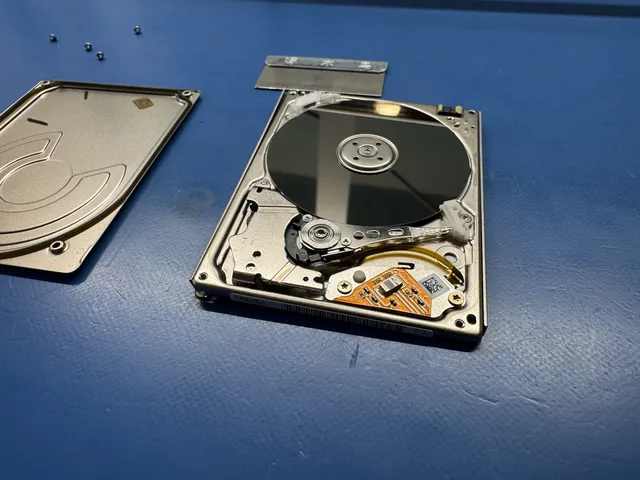
Opened laptop hard drive with platter and heads visible at our Lincroft lab
An opened laptop hard drive shows its platter and heads at our Lincroft lab.
4.6 · 345 Google reviews$100 diagnostic, credited toward a successful recovery
Start your mail-in recovery