Laptop Data Recovery Alameda, CA
Looking for laptop data recovery near Alameda? Skip the local middlemen and ship directly to MD Repairs - a real data recovery lab with clean room capability. We recover data from failed hard drives, dead SSDs, and physically damaged laptops for residents across California. Free prepaid shipping (contiguous US) from Alameda.
- 4.6 Customer Rating
- 2M+ Social Media Followers
- All 50 States
About this recovery service
Our $100 diagnostic examines your laptop drive and provides a firm recovery quote. Standard recoveries run $1,000-$1,500, advanced cases $1,500-$3,000+, and critical recoveries $3,500+. Free return shipping to Alameda included. Get started today - our technicians handle every brand and every failure type in-house.

The people we help
Our customers include people from
-

-

-
 AT&T
-
 Marriott
-

-

-
 Tennessee Titans
-

-

-

-

-

-

-

What Our Customers Say
My 8Tb MacBook Pro crashed, w no backup. The Apple store wanted to replace the logicboard, which would destroy all my data; unacceptable. … MDRepairs did what the others told me was impossible. They saved every bit of data! This was a minor miracle.
Lost my SSD after a hard reset and i thought the world ended. … I paid the rush fee and within 24 hours and a few extra minutes my business came back to life like tragedy never struck in the first place. They saved everything i thought i lost.
You recovered data from my corrupted external hard drive that was crucial to a major project. In fact, three other companies … said it was impossible, that the drive was too far gone. But not for MDrepairs!
I had an external hard drive crash. I took it to a local shop in Edmond, OK but they were unable to get hard drive up and running … Joe contacted me stating they recovered a little over 81,000 RAW Nikon NEF photo's
I send it out to a couple shops out here in vegas, and they weren't able to fix. So later I gave up on it … So I saw the video on Facebook from MB repairs, and I decided to send it out to them. And they were able to recover every single music file.
Contacted MDRepairs for data extraction for an iPhone 5C and for an old hard drive. … The hard drive had a hard crash where it was clear something mechanical within the HDD had failed. … Regardless, both techs did an amazing job. The data was quickly recovered in just a few days.
Real Recoveries from Our Lab
Watch real data recovery work performed in our professional clean room lab.

Clean Room Hard Drive Recovery

Data Recovery Lab Walkthrough

Platter Inspection and Imaging
Common Laptop Failures We Recover in Alameda
Clicking or Grinding Drive
Liquid Damage
SSD Failure
Head Crash
Dropped Laptop
Overheating Damage
Won't Boot
Power Surge
Deleted Files
How Your Laptop Recovery Works
- 1
Contact Us
Get in touch from Alameda, CA by calling us or filling out our online form. You generate a free prepaid UPS label on the mail-in form (contiguous US) and walk you through our $100 diagnostic. - 2
Ship Your Laptop
Use our prepaid label to ship your laptop from Alameda to our recovery lab. We provide packing tips to ensure your device arrives safely. - 3
Diagnostic & Quote
We perform a thorough $100 diagnostic on your laptop drive. You receive a detailed report and recovery quote - no obligation to proceed if the price does not work for you. - 4
Data Returned
After recovery, your data is loaded onto a new external drive and shipped back to Alameda at no extra cost. We verify every file before sending.
Laptop Brands We Recover in Alameda
- Dell XPS 13
- Dell XPS 15
- Dell XPS 17
- Dell Latitude 5430
- Dell Latitude 5530
- Dell Latitude 7430
- Dell Latitude 7440
- Dell Latitude 9430
- Dell Latitude 9440
- Dell Inspiron 14
- Dell Inspiron 15
- Dell Inspiron 16
- Dell Precision 5570
- Dell Precision 5680
- Dell Precision 7670
- Dell Precision 7780
- Dell Vostro 15
- Dell Vostro 16
- HP Spectre x360 14
- HP Spectre x360 16
- HP EliteBook 840 G9
- HP EliteBook 840 G10
- HP EliteBook 860 G10
- HP ProBook 450 G10
- HP ProBook 640 G9
- HP Pavilion 15
- HP Pavilion x360
- HP Envy x360 15
- HP Envy 16
- HP OMEN 16
- HP OMEN 17
- HP ZBook Fury 15 G9
- HP ZBook Studio G10
- Lenovo ThinkPad X1 Carbon Gen 11
- Lenovo ThinkPad X1 Carbon Gen 12
- Lenovo ThinkPad T14 Gen 4
- Lenovo ThinkPad T16 Gen 2
- Lenovo ThinkPad L14 Gen 4
- Lenovo ThinkPad L15 Gen 4
- Lenovo IdeaPad Slim 5
- Lenovo IdeaPad Flex 5
- Lenovo Legion 5
- Lenovo Legion 7
- Lenovo Legion 9
- Lenovo Yoga 9i
- Lenovo Yoga 7i
- Lenovo ThinkBook 14 Gen 6
- Lenovo ThinkBook 16 Gen 6
- MacBook Air M1
- MacBook Air M2
- MacBook Air M3
- MacBook Pro 14-inch M3
- MacBook Pro 14-inch M3 Pro
- MacBook Pro 16-inch M3 Max
- MacBook Pro 14-inch M2 Pro
- MacBook Pro 16-inch M2 Max
- MacBook Pro Intel (2015-2020)
- MacBook Air Intel (2017-2020)
- ASUS ROG Strix G16
- ASUS ROG Strix G18
- ASUS ROG Zephyrus G14
- ASUS ROG Zephyrus G16
- ASUS ZenBook 14
- ASUS ZenBook Pro 16X
- ASUS VivoBook 15
- ASUS VivoBook S 14
- ASUS TUF Gaming A15
- ASUS TUF Gaming F15
- ASUS ProArt StudioBook 16
- Acer Aspire 5
- Acer Aspire 7
- Acer Swift 5
- Acer Swift X 14
- Acer Predator Helios 16
- Acer Predator Helios 18
- Acer Nitro 5
- Acer Nitro 16
- Acer ConceptD 7
- MSI Raider GE78
- MSI Stealth 16 Studio
- MSI Creator Z16
- MSI Prestige 16
- MSI Katana 15
- MSI Katana GF66
- Samsung Galaxy Book3 Pro
- Samsung Galaxy Book3 Pro 360
- Samsung Galaxy Book3 Ultra
- Samsung Galaxy Book2 Pro
- Microsoft Surface Laptop 5
- Microsoft Surface Laptop 6
- Microsoft Surface Book 3
- Microsoft Surface Pro 9
- Microsoft Surface Pro 10
- Razer Blade 14
- Razer Blade 15
- Razer Blade 16
- Framework Laptop 13
- Framework Laptop 16
- HP Chromebook 14
- Lenovo Chromebook Duet
- Acer Chromebook Spin 714
- ASUS Chromebook Flip
Laptop Data Recovery Pricing
Standard
$1,000-$1,500
Advanced
$1,500-$3,000+
Critical
$3,500+
Join 2 Million+ Followers
Follow our work on YouTube, TikTok, and Instagram where over 2 million people watch real data recoveries from our lab. Alameda customers can see exactly what happens when a drive arrives at our facility - from initial diagnosis through final data delivery.
Turnaround Time
Standard turnaround for Alameda CA customers is 1-2 weeks from the time we receive your device. Rush service is available for time-sensitive cases. You generate a free prepaid UPS label on the mail-in form (contiguous US) and return your recovered data via encrypted transfer or a new external drive with free return shipping.
How Laptop Data Recovery Works in Alameda
Understanding how laptop data recovery works helps Alameda residents make informed decisions when facing data loss. Every laptop contains a storage device - either a hard drive or solid-state drive - that holds all your information.
Laptop data recovery begins with understanding what type of storage your device uses. Older laptops from Alameda typically have 2.5-inch spinning hard drives with delicate mechanical internals. Newer models use various forms of solid-state storage including M.2 NVMe, M.2 SATA, mSATA, and even soldered NAND chips.

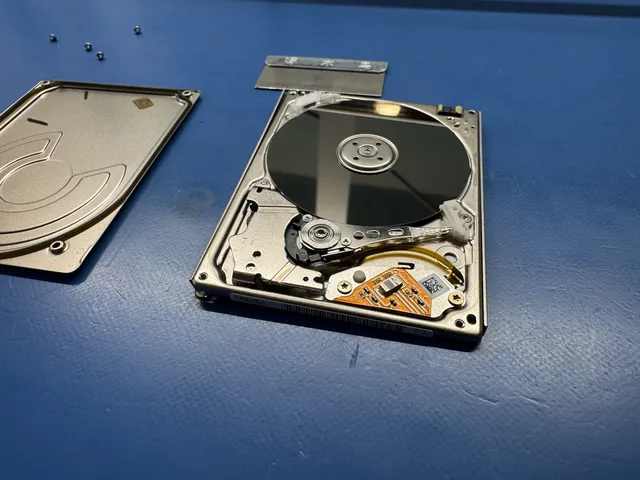
Hard drive recovery requires a professional clean room - a dust-free environment where technicians can safely open the drive and work on its internals. Common procedures include head replacement, platter transplant, and motor repair. These operations demand precision tools and donor drives matched to the exact model and firmware revision of your failed drive.
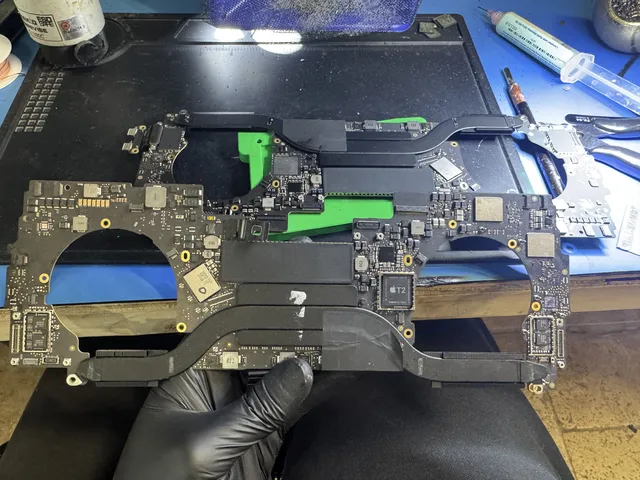
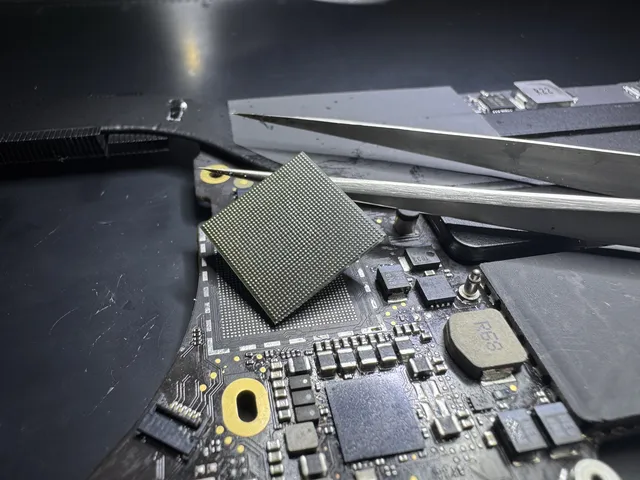
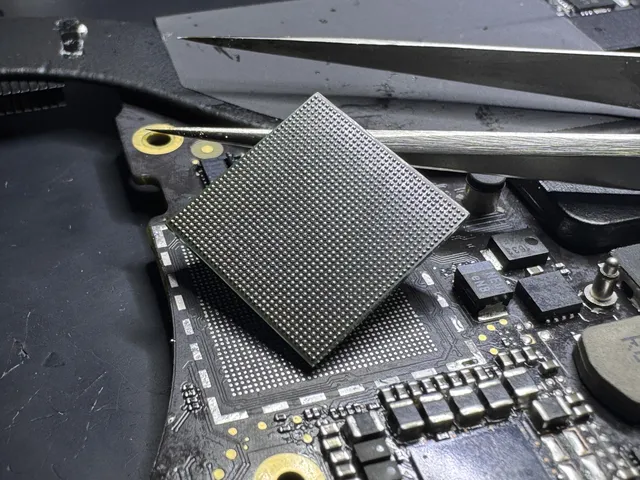
SSD recovery is a different discipline entirely. Because there are no moving parts, failures are electronic in nature. Our data recovery lab uses chip-off equipment to desolder individual NAND packages and read them outside the drive. Reconstructing the data requires proprietary algorithms that understand how each controller model writes data across the flash chips.
For Alameda residents, the practical takeaway is this: do not attempt software recovery on a physically damaged drive, and do not let an unequipped local shop open your hard drive outside a clean room. Both actions can make recovery harder or impossible. Ship your laptop to a lab with real clean room capability and the specialized tools for your specific storage type. Our $100 diagnostic identifies the failure mode and provides a clear recovery path.
Laptop Data Loss in Alameda, CA
Residents of Alameda rely on their laptops for everything from business operations to personal memories. When data loss strikes, the cause determines the recovery approach and timeline.
The most frequent laptop data loss scenarios we see from Alameda fall into four categories: mechanical failure, electronic failure, physical damage, and user error. Each requires a different recovery approach, and our lab handles all of them.

Mechanical failures affect traditional hard drives and account for a significant portion of Alameda laptop recoveries. The read/write heads - which float just nanometers above the spinning platters - are the most failure-prone component. When they fail, the drive clicks, grinds, or goes silent. Recovery requires head transplant surgery in a clean room.
Electronic failures are the domain of SSD recovery. Alameda laptop owners with failed SSDs typically experience sudden disappearance of the drive from the system, data corruption, or extreme slowdowns followed by total failure. Controller chip burnout and firmware corruption are the usual culprits. Our lab desolders the NAND chips and reads them directly.
Physical damage from drops, spills, and surges causes immediate data loss emergencies for Alameda residents. The key rule is to stop using the device immediately. Powering on a damaged drive - especially a hard drive with head damage - can cause permanent platter scoring that reduces recoverable data. Contact our team, generate a free prepaid UPS label on the mail-in form (contiguous US), and send it to our laptop recovery lab as soon as possible. Our $100 diagnostic determines the damage extent and recovery options.
Mail-In Laptop Recovery from Alameda, California
Our mail-in laptop recovery process makes professional data recovery accessible to Alameda residents without leaving home. Here is exactly how it works from start to finish.
Getting your laptop from Alameda to our recovery lab is straightforward. Start by reaching out via our contact form or phone line. We will ask a few questions about your laptop and the symptoms you are experiencing - clicking sounds, boot failures, accidental deletion, liquid damage, or any other issue.

Based on your description, you generate a free prepaid UPS label on the mail-in form (contiguous US) to your Alameda address. Package your laptop securely - we recommend wrapping it in bubble wrap and placing it in a box with firm padding on all sides. Drop it off at any FedEx location or schedule a pickup from your Alameda address.
Transit time from Alameda to our lab depends on your distance, but FedEx Ground typically delivers within 2-4 business days from anywhere in California. Once we receive your laptop, you are notified and the $100 diagnostic begins. We evaluate the storage device, identify the failure mode, assess data recoverability, and send you a firm quote.
If you approve the quote, recovery begins immediately. For standard cases, expect 3-7 business days. Complex physical recoveries may take longer. Once complete, we verify every recovered file, load everything onto a new external drive, and ship it back to Alameda with free return shipping and full tracking. You can also request a cloud upload if you prefer digital delivery. Contact us from Alameda to start the process - our team is ready to help with any laptop recovery scenario.
Choosing a Laptop Data Recovery Provider in Alameda
When your laptop fails in Alameda, you have options: local repair shops, national services, and specialized recovery labs. Understanding the differences helps you make the right choice for your data.
Start by verifying that the provider has a physical lab with clean room capabilities. This is non-negotiable for any hard drive recovery. Ask for photos, video tours, or references. Our lab tour videos are available on our website and YouTube channel - we show the actual facility where your Alameda laptop will be worked on.

Next, understand the pricing model. The best providers charge a reasonable diagnostic fee and provide a firm recovery quote. The worst charge excessive diagnostics, use bait-and-switch pricing, or claim every case is an emergency to justify higher fees. Our $100 diagnostic at MD Repairs covers a complete evaluation and counts toward the recovery cost if you proceed.
Check the provider's reviews and track record. Look for detailed reviews from verified customers, not just star ratings. Pay attention to reviews that mention specific technical details - these tend to be more genuine than vague praise. Our pricing page and customer reviews demonstrate our commitment to transparency.
Finally, evaluate their communication. A good recovery provider answers technical questions clearly, provides realistic timelines, and keeps you informed. Avoid services that are hard to reach, vague about their process, or unwilling to explain their methods. Alameda residents deserve a provider that treats their data - and their time - with respect.
Laptop Data Recovery Cost in Alameda, CA
Laptop recovery pricing is based on what is actually wrong with the drive - not where you live in Alameda. Understanding the cost structure helps you budget and avoid overpaying.
Several factors determine the final cost of recovering data from an Alameda laptop. The primary driver is the failure type - logical failures cost less than physical failures because they do not require clean room intervention or donor parts.

Storage medium matters too. Traditional hard drive recovery from Alameda laptops is well-established with standardized procedures. SSD recovery can be more complex and time-intensive, especially for chip-off cases where NAND chips must be desoldered and read individually. The specific SSD controller model affects the complexity of data reconstruction, which influences pricing.
Drive capacity and data density are additional factors. A 256GB laptop SSD and a 2TB laptop hard drive both require similar diagnostic procedures, but larger drives take longer to image and process. High-density drives with more platters or more NAND chips may need additional donor components.
The condition of the drive when it arrives also affects pricing. An Alameda laptop that was powered off immediately after a failure gives us the best starting point. A drive that was repeatedly powered on, run through consumer recovery software, or opened by an unqualified shop may require additional work to address secondary damage. Our $100 diagnostic accounts for all of these factors and provides Alameda residents with a precise, no-obligation quote. We also offer expedited service for time-sensitive cases at a premium, and our pricing page lists all tier details.
Laptop Data Recovery FAQ
Can you recover data from a liquid-damaged laptop from Alameda?
Yes. Liquid spills on laptops from Alameda are recoverable in most cases. Even if the laptop is dead, the drive or SSD often contains intact data. We clean, assess, and recover data from liquid-damaged storage devices.
Can you recover data from an encrypted laptop drive?
In many cases, yes. If you have the encryption key or password, we can recover data from encrypted laptop drives shipped from Alameda. BitLocker, FileVault, and other encryption types are handled by our team.
Can you recover data from a formatted laptop drive?
Yes. Formatting a laptop drive from Alameda does not immediately erase data. Our forensic-grade scanning tools can locate and recover files from formatted hard drives and, in many cases, formatted SSDs.
Do you recover data from gaming laptops in Alameda?
Yes. Gaming laptops from Alameda often use high-speed NVMe SSDs or hybrid storage. We recover data from ASUS ROG, MSI, Alienware, Razer, Lenovo Legion, and all other gaming laptop brands.
Do you work with businesses in Alameda for laptop recovery?
Yes. We handle laptop data recovery for businesses of all sizes in Alameda. We offer priority service, multi-drive discounts, and can sign NDAs for sensitive corporate data recovery projects.
Can you clone my laptop drive from Alameda?
Yes. Drive cloning is part of our standard recovery process. We create a sector-by-sector image of your laptop drive from Alameda before attempting any file extraction, ensuring the original data is preserved.
Can you recover data from a laptop with a beeping hard drive?
Yes. A beeping laptop hard drive from Alameda usually indicates a motor seizure or stuck heads. Our clean room technicians perform motor replacements and head unsticks to recover data from beeping drives.
How do I track my laptop recovery from Alameda?
We provide tracking information for all shipments. Once your laptop from Alameda arrives at our lab, you receive updates at each stage: intake, diagnostic, quote, recovery, and return shipping.
What if I already tried software recovery on my laptop?
If software recovery failed on your Alameda laptop, professional lab recovery is the next step. In most cases, failed software attempts do not reduce our ability to recover data, but stop using the drive to avoid overwriting data.
How do you determine the laptop recovery price for Alameda customers?
Pricing depends on the failure type and complexity, not your location in Alameda. Our $100 diagnostic identifies the exact issue and we provide a firm, upfront quote. Standard recoveries range from $1,000-$1,500, advanced from $1,500-$3,000+, and critical from $3,500+.
Can you recover data from a laptop that got wet in Alameda?
Yes. Water damage from rain, floods, or spills in Alameda does not always destroy drive data. Our technicians clean and recover data from water-damaged drives using controlled drying and clean room procedures.
Can you recover data from a laptop hard drive with bad sectors?
Yes. Bad sectors are a common issue on aging laptop drives from Alameda. Our tools create a sector-level image while carefully handling bad areas, maximizing the data we can recover from degraded drives.
Do you handle bulk laptop recovery for Alameda organizations?
Yes. Schools, businesses, and government agencies in Alameda trust us for bulk laptop data recovery. We offer volume pricing and dedicated project management for multi-device recovery jobs.
How much does laptop data recovery cost in Alameda?
Laptop data recovery for Alameda residents starts at $1,000 for logical issues and ranges up to $3,500+ for severe physical damage. Every case begins with a $100 diagnostic that provides a detailed quote before any recovery work is performed.
Do you recover data from laptop SSDs in Alameda?
Yes. We perform chip-off and JTAG recovery on failed laptop SSDs from Alameda. Modern SSD failures require specialized equipment that most local shops do not have. Our lab handles all SSD brands and controller types.
No question matches that - it's probably faster to just ask us: (732) 933-7717 or .
Related Recovery Services
Need laptop data recovery? Get an honest quote today.
Call 732-933-7717