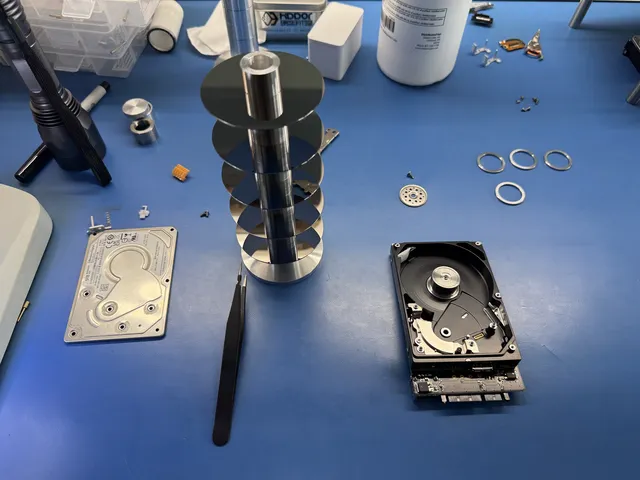
Data Recovery After Fire or Flood
Our founder and lead technician, Joseph Montanti, handles cases personally.
Documents, photos, and other files can be recovered from a fire-damaged computer or flooded drive when enough of the original storage and its supporting hardware survive. The first step is to keep the damaged device off and arrange handling with a recovery lab. Fire and flood recovery depends on the condition inside the device, including contamination, heat damage, and any encryption hardware it needs.
On this page
What to do with the damaged device
Wait until the area is safe. If you need photos for an insurance claim, take them before moving the equipment.
Do not test it with power. Keep wet, burned, or smoke-damaged equipment disconnected, including phone chargers. Leave it unopened and skip the rice, freezer, compressed air and heat drying.
- Keep the original device and its parts together. If a computer or external-drive enclosure is damaged, leave its storage in place unless safe removal has been arranged.
- Contact the lab for packaging instructions suited to the device and contamination. Say whether it was submerged or exposed to firefighting water; that changes handling.
- For a NAS or RAID system, retain every member drive in its original bay or tray. Keep their order intact.
- From an unaffected device, check existing cloud and off-site backups. Open the documents or photos you need so you can identify what still requires recovery.
Seagate's guidance after data loss emphasizes stopping use and avoiding attempts that cause further physical damage.
Why a flooded drive can still contain data
Water exposure can disable a drive without erasing every stored file. A hard drive has both recording surfaces and the electronics and mechanism needed to read them. Moisture or conductive residue can short the board when power reaches it. Corrosion can eat away connections even while the drive is off.
Mud and minerals can dry onto the platters. If the drive spins, the heads can drag grit across the recording surface and scratch it.
There is no reliable number of days that makes a submerged drive safe or beyond help. The kind of liquid, where it entered, and the parts affected matter. Get packaging advice promptly for a submerged hard drive instead of adding water or wrapping every type of device in wet towels. Phones, bare drives, and battery-powered equipment need different handling.
Seagate's description of physical data loss includes fire and water damage and explains that some damaged media can be recovered while severe damage can prevent recovery.
What fire changes inside a computer
Let hot equipment cool naturally without dunking it in water, and leave soot in place without scrubbing or using chemicals. Fire can damage the enclosure, connectors, circuit boards, and the storage itself. Recovery depends on which of those parts still work or can be made readable. A melted external case and destroyed recording media are different failures, so a burned computer deserves an inspection before its files are written off.
Heat exposure also varies within a room and inside equipment. A temperature quoted for a flame is not a measurement of the storage chips or platters. There is no universal household-fire temperature threshold that tells you a drive's files survived. The technician needs to examine the actual media.
Smoke damage and firefighting water can accompany heat damage. A computer from a room that did not burn directly may therefore still need the same powered-off handling. For a laptop or phone, retain the original board as well as its storage; replacing the whole board can leave the files on the discarded one.
In Joe's recovery of an iPhone damaged in a wildfire, the phone would not power on, and he diagnosed a connection problem at the processor. Bench work restored power, and he held the processor connection stable while making an iTunes backup. That backup was the recovery result; restoring ordinary long-term phone use was a separate concern.
What recovery depends on for each device
| Device | Parts the files depend on | What to preserve |
|---|---|---|
| Hard drive | Readable recording surfaces and a working path through the heads and electronics | The complete drive and original circuit board |
| SSD | Readable flash memory, its data layout, and any required encryption information | The original SSD board and components |
| Encrypted phone or tablet | Original storage, security hardware, and unlock access | The original device, rather than only its memory chip |
| SD card or USB flash drive | Readable flash and a way to reconstruct its stored layout | The complete card or drive, including broken pieces |
These differences explain why moving a memory chip is not a universal recovery method. On an iPhone, encryption keys are tied to the device's security hardware. Apple's Secure Enclave documentation explains that hardware tie. Surviving flash memory still needs the right route to decrypt the files.
For water-damaged phones, a water-resistance rating does not replace an internal examination after a disaster. Apple warns that resistance can diminish with wear and that charging a wet phone can cause damage. Its handling guidance covers liquid exposure; a phone recovered from a fire or flood should remain off for recovery handling.
SD cards can present a different opportunity. In Joe's underwater SD card recovery, the card would not read through a USB adapter. He exposed its connections, wired it to a reader, read the raw flash with PC-3000 Flash, and reconstructed the pictures. The card needed its stored data layout rebuilt after the raw read, rather than a simple copy through its usual connector.
Recovery costs and the estimate
| Service | Price range |
|---|---|
| Standard hard drive recovery | $300 to $800 |
| Fire or flood recovery | $500 to $1,500 |
You approve the estimate before recovery work starts and receive credit for the diagnostic if recovery succeeds. The $100 diagnostic is non-refundable once diagnostics start, and donor drives or replacement parts you approve are non-refundable once ordered, even if recovery fails.
Ask your insurer whether your policy covers this work and whether approval is needed before authorizing it. A replacement computer and recovery of its documents are separate expenses. Our recovery pricing page explains the service categories.
Keep a damaged NAS together
A NAS can spread its files across several drives. Recovering one intact-looking disk may leave you with only part of the information needed to reconstruct the volume.
RAID redundancy protects against particular combinations of failures. A fire or flood can affect multiple members at once. Starting a rebuild on damaged originals adds work to those drives before their contents have been preserved. Synology's storage-pool repair documentation distinguishes repairing a pool from repairing physically broken drives and calls for keeping drive order intact.
If your backup is missing files, ask about data recovery services before starting a rebuild.
Get help with data recovery
Bring your device to our Lincroft lab during opening hours, or mail it in.
How to mail your deviceThe $100 diagnostic is non-refundable once diagnostics start, and donor drives or replacement parts you approve are non-refundable once ordered, even if recovery fails.
More lab videos
Published by MDrepairs
MDrepairs is a data recovery and electronics repair lab in Lincroft, New Jersey. Our founder and lead technician Joseph Montanti films real cases for our YouTube channel, showing tools, repair steps and recovery outcomes.
Keep reading
- BitLocker Recovery Key Not Working? Check the Key ID Before Resetting
- exFAT Drive Corrupted? Cross-Platform Rescue Guide
- External Drive Painfully Slow? It May Be Dying